Solved MS Office Enterprise Word 2007 problem.

aritra2116

R.I.P Gary and Randy
Power User
VIP
Local time
8:12 AM
Messages
388
Location
C:\Windows\Earth32.exe
I'm having this problem since yesterday and I'm helpless. Whenever I press enter to go to the next line, it always leaves one line in between even if I don't want it to.
See the screen shot where I write "Hello!" and press enter only once.
Any help?


Uploaded with ImageShack.us
 

My Computer My Computer

Computer type
Laptop
Computer Manufacturer/Model Number
Dell Inspiron N4030
OS
Windows 10 Home 64-Bit
CPU
Intel Core i3 380M @ 2.53GHz Arrandale 32nm Technology
Motherboard
Dell Inc. 0K13WN (CPU 1)
Memory
Total RAM = 4.00 GB and Usable RAM = 3.80 GB
Graphics Card(s)
Generic PnP Monitor (1366x768@60Hz) Intel HD Graphics (Dell)
Sound Card
IDT High Definition Audio CODEC Bluetooth Hands-free Audio
Monitor(s) Displays
1
Screen Resolution
1366 x 768 x 32 bits (4294967296 colors) @ 59 Hz
Hard Drives
ATA WDC WD3200BEVT-7 SCSI Disk Device Size = 320.00 GB
Internet Speed
6-14 Mbps Max and 153 Kbps Min
Antivirus
MBAM Pro, Windows Defender, SuperAntiSpyware, SpyBot S&D
Browser
Microsoft Edge, IE11, Google Chrome, Firefox
Other Info
Your dude.
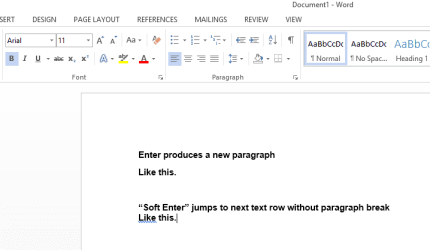
That is default action for Enter key in Word or any other word processors, a new paragraph. To continue the same paragraph from the next text row without a paragraph break you need to use "soft Enter", SHIFT + Enter.

2013-05-28_132804.png

Kari
 

My Computer My Computer

Computer type
Laptop
Computer Manufacturer/Model Number
HP ENVY 17-1150eg
OS
Windows 10 Pro x64 EN-GB
CPU
1.6 GHz Intel Core i7-720QM Processor
Memory
6 GB
Graphics Card(s)
ATI Mobility Radeon HD 5850 Graphics
Sound Card
Beats sound system with integrated subwoofer
Monitor(s) Displays
17" laptop display, 22" LED and 32" Full HD TV through HDMI
Screen Resolution
1600*900 (1), 1920*1080 (2&3)
Hard Drives
Internal: 2 x 500 GB SATA Hard Disk Drive 7200 rpm
External: 2TB for backups, 3TB USB3 network drive for media
Cooling
As Envy runs a bit warm, I have it on a Cooler Master pad

Keyboard
Logitech diNovo Media Desktop Laser (bluetooth)
Mouse
Logitech Performance Mouse MX
Internet Speed
50/10 Mbps VDSL
Antivirus
Windows Defender 4.3.9431.0
Browser
Maxthon 3.5.2., IE11
Thank you very much Kari! You saved me many pages of urgent work! Thanks! :cool:
 

My Computer My Computer

Computer type
Laptop
Computer Manufacturer/Model Number
Dell Inspiron N4030
OS
Windows 10 Home 64-Bit
CPU
Intel Core i3 380M @ 2.53GHz Arrandale 32nm Technology
Motherboard
Dell Inc. 0K13WN (CPU 1)
Memory
Total RAM = 4.00 GB and Usable RAM = 3.80 GB
Graphics Card(s)
Generic PnP Monitor (1366x768@60Hz) Intel HD Graphics (Dell)
Sound Card
IDT High Definition Audio CODEC Bluetooth Hands-free Audio
Monitor(s) Displays
1
Screen Resolution
1366 x 768 x 32 bits (4294967296 colors) @ 59 Hz
Hard Drives
ATA WDC WD3200BEVT-7 SCSI Disk Device Size = 320.00 GB
Internet Speed
6-14 Mbps Max and 153 Kbps Min
Antivirus
MBAM Pro, Windows Defender, SuperAntiSpyware, SpyBot S&D
Browser
Microsoft Edge, IE11, Google Chrome, Firefox
Other Info
Your dude.
Back
Top