
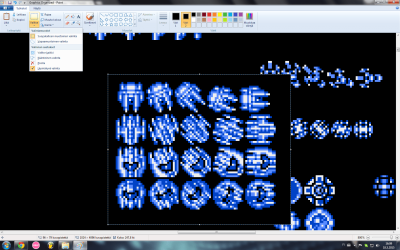
So, I was just going to continue organizing sprites in a PNG file, when I noticed that the transparent selection has stopped functioning. It worked just fine yesterday, but now I can't just make it work. I have selected the "transparent selection" in the selection tool menu, and both colours are selected as RGB 000 black (colour of the background) with the pick colour tool, but it just doesn't work anymore.
Attachments
My Computer
- Computer type
- PC/Desktop
- Computer Manufacturer/Model Number
- ASUS Desktop PC CM6330, CM6330, CM6830 Series
- OS
- Windows 7 Home Premium 64-bit
- CPU
- Intel(R) Core(TM) i5-2320 CPU @ 3.00GHz (4 CPUS), ~3.0GHz
- Memory
- 6144 MB
- Graphics Card(s)
- NVIDIA GeForce GT 620
- Antivirus
- F-Secure
- Browser
- Google Chrome


