ms paint

Herm61

New member
Member
VIP
Local time
8:16 AM
Messages
199
Location
virginia beach
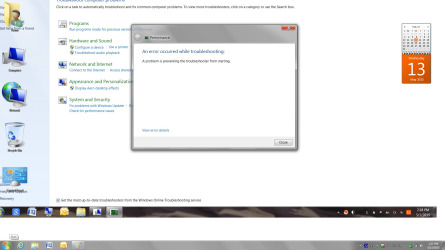
I captured a screenshot in ms paint (I think it is in .png format). but I can't figure out how to drag it down so I cansee the red X to close it.
 

My Computer

Computer Manufacturer/Model Number
HP Pavilion p7xt series)
OS
Windows 7 Home Premium (x64) Service Pack 1
CPU
3.30 gigahertz Intel Core i3-2120
Motherboard
PEGATRON CORPORATION 2AC2 2.00
Memory
128 kilobyte primary memory cache
Graphics Card(s)
enbedded Intel(R) HD Graphics
Sound Card
Realtek High Definition Audio
Monitor(s) Displays
DELL E193FP [Monitor] (19.1"vis
Hard Drives
6052 Megabytes Usable Installed Memory
PSU
?
Case
desktop
Cooling
?
Hey, you can use:

Win+Up arrow: Maximize the active window
Win+Down arrow: Minimize the active window or restore the window if it’s maximized
Win+Left/Right arrows: Dock the active window to each side of the monitor
 

My Computer

Computer type
PC/Desktop
Computer Manufacturer/Model Number
Custom Build
OS
Windows 7 Ultimate x64 SP1
CPU
AMD Phenom 2 1090T
Motherboard
Gigabyte GA-890FXA-UD5
Memory
2x8GB Kingston HyperX Fury Black 1600Mhz Unganged
Graphics Card(s)
MSI GTX 970 Gaming 4G
Sound Card
Realtek On-Board HD 7.1 Audio / Logitech G35
Monitor(s) Displays
3xAcer GD245HQ
Screen Resolution
1920x1080
Hard Drives
Samsung 850 Pro 512GB SSD - OS /
WD Caviar Black SATA 3 - 1 TBx2 - Dynamic RAID 0 /
WD Caviar Green SATA 2 - 640GBx2 - Dynamic RAID 0 /
WD Caviar Green SATA 2 - 640GB - Internal Backup /
Seagate Barracude SATA 3 - 3TB - External Backup/ Sync
PSU
HighPower 1000W
Case
Cooler Master HAF 932
Cooling
Noctua NH-D14
Keyboard
Logitech G19
Mouse
Logitech G500
Internet Speed
100/4 Mbit Cable (100GB quota)
Antivirus
ZoneAlarm Extreme Security / MBAM Pro / MBAE Free / SAS Free
Browser
IE 11 - Firefox - Chrome
Other Info
Logitech F710/ G27/ G940/ Z5500 // TrackIR 5 // Nvidia 3D Surround Vision
Thanks but your suggestion didn't work and I am exasperated. Herm
 

My Computer

Computer Manufacturer/Model Number
HP Pavilion p7xt series)
OS
Windows 7 Home Premium (x64) Service Pack 1
CPU
3.30 gigahertz Intel Core i3-2120
Motherboard
PEGATRON CORPORATION 2AC2 2.00
Memory
128 kilobyte primary memory cache
Graphics Card(s)
enbedded Intel(R) HD Graphics
Sound Card
Realtek High Definition Audio
Monitor(s) Displays
DELL E193FP [Monitor] (19.1"vis
Hard Drives
6052 Megabytes Usable Installed Memory
PSU
?
Case
desktop
Cooling
?
What do you want to do with the red X. If you have the screenshot in Paint, you have to save it. Then you close Paint. If nothing works, try ALT+F4.
 

My Computer

Computer Manufacturer/Model Number
HP, Dell, Gateway, Toshiba - 4 laptops and 2 desktops
OS
Vista, Windows7, Mint Mate, Zorin, Windows 8
CPU
from 1.6GHz Duo to i7
Monitor(s) Displays
2x HP w2207
Hard Drives
5x HDD, 7x SSD, 12x Externals
Keyboard
with trackball - no mices
Mouse
Trackball mice
Internet Speed
DSL 6000
Maybe the Paint window is to large to see it all on the monitor ???
You could try adjusting screen resolution and/or text size.

You could also open the snipping tool and capture the screen (with mspaint open) and save it.
Post that and we can see what your paint window looks like.
 

My Computer

Computer type
PC/Desktop
Computer Manufacturer/Model Number
home built
OS
Multi-Boot W7_Pro_x64 W8.1_Pro_x64 W10_Pro_x64 +Linux_VMs +Chromium_VM
CPU
AMD Athlon II x4 620
Motherboard
Gigabyte GA-MA785G-UD3H
Memory
6GB GSkill DDR2 800
Graphics Card(s)
AMD 4670 GPU + AMD 4200 IGP
Sound Card
on board Realtek ALC889A
Monitor(s) Displays
RCA 40" LCD TV, Insignia 32" LCD TV, HP 15" LCD monitor
Screen Resolution
1680 x 1050
Hard Drives
OCZ Vertex 3 120GB,
Samsung F3 1TB (3),
Several others - WD, Seagate, Hitachi, ...
PSU
Corsair 500 W
Case
Rosewill mid tower
Cooling
CM 90mm rifle
Keyboard
Gyration wireless, Logitech wireless, Dell USB wired
Mouse
Gyration wireless, Logitech wireless, V7 USB wired
Internet Speed
Spectrum - 100Mbps D / 10Mbps U
Antivirus
Avast, MBAM3, EMET, WinPatrol
Browser
Pale Moon, Firefox, IE
Other Info
2 multi-boot PC's
Mainly HTPC/Office/Gen purpose (no gaming).
Trendnet USB KVM.
LG DVD burner/Blue Ray Player.
Tray system for removable SATA backup drives.

Not currently OCd, under-volted.
I use Hybrid sleep, rarely re-boot or shutdown.

Hauppauge HD-PVR, Avermedia PCIe TV Tuner, Hauppauge PCI TV Tuner.
WHS- I want to close the paint screenshot but your solution didn't get me to the red X . Herm
 

My Computer

Computer Manufacturer/Model Number
HP Pavilion p7xt series)
OS
Windows 7 Home Premium (x64) Service Pack 1
CPU
3.30 gigahertz Intel Core i3-2120
Motherboard
PEGATRON CORPORATION 2AC2 2.00
Memory
128 kilobyte primary memory cache
Graphics Card(s)
enbedded Intel(R) HD Graphics
Sound Card
Realtek High Definition Audio
Monitor(s) Displays
DELL E193FP [Monitor] (19.1"vis
Hard Drives
6052 Megabytes Usable Installed Memory
PSU
?
Case
desktop
Cooling
?
And ALT+F4 did not close it either.
 

My Computer

Computer Manufacturer/Model Number
HP, Dell, Gateway, Toshiba - 4 laptops and 2 desktops
OS
Vista, Windows7, Mint Mate, Zorin, Windows 8
CPU
from 1.6GHz Duo to i7
Monitor(s) Displays
2x HP w2207
Hard Drives
5x HDD, 7x SSD, 12x Externals
Keyboard
with trackball - no mices
Mouse
Trackball mice
Internet Speed
DSL 6000
Untitled.png


Thanks for your attempts to help. FYI I always attempt to find the an answer before coming here. Rebooting doesn't help since the same screenshot appears.

ALT+F4 doesn't help any and I can't find any double headed arrow and hive no elevator on the side
 

My Computer

Computer Manufacturer/Model Number
HP Pavilion p7xt series)
OS
Windows 7 Home Premium (x64) Service Pack 1
CPU
3.30 gigahertz Intel Core i3-2120
Motherboard
PEGATRON CORPORATION 2AC2 2.00
Memory
128 kilobyte primary memory cache
Graphics Card(s)
enbedded Intel(R) HD Graphics
Sound Card
Realtek High Definition Audio
Monitor(s) Displays
DELL E193FP [Monitor] (19.1"vis
Hard Drives
6052 Megabytes Usable Installed Memory
PSU
?
Case
desktop
Cooling
?
Did the F11 key get pressed which put it into Full Screen [different from Maximized]? If so pressing F11 again should restore it.
 

My Computer

Computer type
PC/Desktop
Computer Manufacturer/Model Number
Customs, Dell, Gateway, HP, Toshiba, Acer, ASUS
OS
Windows 7 Ultimate 64-bit, Windows 8.1 64-bit, Mac OS X 10.10, Linux Mint 17, Windows 10 Pro TP
Keyboard
Microsoft
Mouse
Microsoft
Rebooting doesn't help since the same screenshot appears.

Are you saying when you reboot the paint window opens automatically, with what you had before the reboot ?

Can you right click on the Paint icon in the taskbar and click Close window ?
 

My Computer

Computer type
PC/Desktop
Computer Manufacturer/Model Number
home built
OS
Multi-Boot W7_Pro_x64 W8.1_Pro_x64 W10_Pro_x64 +Linux_VMs +Chromium_VM
CPU
AMD Athlon II x4 620
Motherboard
Gigabyte GA-MA785G-UD3H
Memory
6GB GSkill DDR2 800
Graphics Card(s)
AMD 4670 GPU + AMD 4200 IGP
Sound Card
on board Realtek ALC889A
Monitor(s) Displays
RCA 40" LCD TV, Insignia 32" LCD TV, HP 15" LCD monitor
Screen Resolution
1680 x 1050
Hard Drives
OCZ Vertex 3 120GB,
Samsung F3 1TB (3),
Several others - WD, Seagate, Hitachi, ...
PSU
Corsair 500 W
Case
Rosewill mid tower
Cooling
CM 90mm rifle
Keyboard
Gyration wireless, Logitech wireless, Dell USB wired
Mouse
Gyration wireless, Logitech wireless, V7 USB wired
Internet Speed
Spectrum - 100Mbps D / 10Mbps U
Antivirus
Avast, MBAM3, EMET, WinPatrol
Browser
Pale Moon, Firefox, IE
Other Info
2 multi-boot PC's
Mainly HTPC/Office/Gen purpose (no gaming).
Trendnet USB KVM.
LG DVD burner/Blue Ray Player.
Tray system for removable SATA backup drives.

Not currently OCd, under-volted.
I use Hybrid sleep, rarely re-boot or shutdown.

Hauppauge HD-PVR, Avermedia PCIe TV Tuner, Hauppauge PCI TV Tuner.
I have a hard time understanding the true nature of the problem but seems the title bar is missing.

Couple of more ideas:

- Not sure if possible or cause this but maybe screen resolution is incorrect?
- ALT+Space will bring the menu you want
- You can also try to move the window if it is off-screen (ALT+Space -> Move -> Use arrow keys of your keyboard)

Edit: Searching some more, try this as well if above won't solve: Might not be applicable for you, you have to check!

- press Windows key + R (run prompt), type utilman and press enter. This will open Ease of Access.
- scroll down and click "Make it easier to focus on tasks"
- Under "Make it easier to manage windows" uncheck Prevent windows from being automatically arranged when moved to the edge of the screen. Then Apply > OK.
 
Last edited:

My Computer

Computer type
PC/Desktop
Computer Manufacturer/Model Number
Custom Build
OS
Windows 7 Ultimate x64 SP1
CPU
AMD Phenom 2 1090T
Motherboard
Gigabyte GA-890FXA-UD5
Memory
2x8GB Kingston HyperX Fury Black 1600Mhz Unganged
Graphics Card(s)
MSI GTX 970 Gaming 4G
Sound Card
Realtek On-Board HD 7.1 Audio / Logitech G35
Monitor(s) Displays
3xAcer GD245HQ
Screen Resolution
1920x1080
Hard Drives
Samsung 850 Pro 512GB SSD - OS /
WD Caviar Black SATA 3 - 1 TBx2 - Dynamic RAID 0 /
WD Caviar Green SATA 2 - 640GBx2 - Dynamic RAID 0 /
WD Caviar Green SATA 2 - 640GB - Internal Backup /
Seagate Barracude SATA 3 - 3TB - External Backup/ Sync
PSU
HighPower 1000W
Case
Cooler Master HAF 932
Cooling
Noctua NH-D14
Keyboard
Logitech G19
Mouse
Logitech G500
Internet Speed
100/4 Mbit Cable (100GB quota)
Antivirus
ZoneAlarm Extreme Security / MBAM Pro / MBAE Free / SAS Free
Browser
IE 11 - Firefox - Chrome
Other Info
Logitech F710/ G27/ G940/ Z5500 // TrackIR 5 // Nvidia 3D Surround Vision
Back
Top