Msconfig Normal Startup or Selective Startup

promono

New member
Local time
6:24 PM
Messages
12
My problem is that my shutdown and booting speed can get slow and my laptop often fails to connect to the wifi network.

I heard that one of the way to speed up the shutdown and booting process is to reduce a number of startup programs. So I did msconfig and de-selected some programs under startup list.

My question is, can I leave my laptop on Selective Startup mode? It seems like there are people who say it's okay to have selective startup mode while others think it's better to leave computer at normal startup setting unless troubleshooting. I read some people having troubles after changing normal startup mode to selective.


Should I leave it on Normal mode? Or would there be no problems even if I use my computer on Selective startup mode? I am a computer illiterate so I'm confused.
 

My Computer

Computer type
Laptop
Computer Manufacturer/Model Number
Sony
OS
Windows 7 Home Premium 64-bit
Antivirus
Mcafee
Oh boy. Another slow boot issue.

Are you guys just having a go at the new guy?

Anyhow:

@promono

I'd be happy to help you with your slow boot issues.

Can you provide a little more detail? Is your computer booting slowly lately?
Is your system slow otherwise?

To answer your question, unless you're troubleshooting I can think of little benefit for a non-advanced user to use the [Selective startup] option. I don't say that to be disrespectful. Just, if it's a little out of your comfort zone, you're unlikely to get much benefit from tweaking that and the consequences for doing it improperly could be catastrophic.
 
Last edited:

My Computer

Computer type
Laptop
Computer Manufacturer/Model Number
HP
OS
Dual Boot Win 8.1 x64; Win 7 SP1 x64
CPU
i7-3610QM @ 2.3 GHz
Motherboard
Hewlett-Packard 181C (U3E1)
Memory
8 GB Dual-Channel DDR3 @ 798MHz
Graphics Card(s)
Intel HD Graphics 4000
Hard Drives
Hitachi HTS547575A9E384 SCSI Disk Device;
WD Elements 1042 USB Device
Antivirus
Microsoft Security Essentials; Comodo Firewall w/ Defense +
PlatypusKnight, you're absolutely correct. Although I have been using Selected Startup within msconfig, I leave close to everything alone in startup and in services. My gig involves actually elongating my boot time. Also, we could advise OP to stay clear of any software package's "fix-PC, fix slow-PC, drivers update," modules. Misuse of such could result in future postings in this very fine forum!
 
Last edited:

My Computer

Computer type
PC/Desktop
Computer Manufacturer/Model Number
Antec desktop; Acer Aspire laptops
OS
Windows 7 Professional 64-bit
CPU
Desktop i5; Acers i5 & i7
Memory
desktop 16GB; 1 Acer 8GB & 1 Acer 16GB
Hard Drives
1TB split into 2 equal partitions [OS and data] usable by RJS
Internet Speed
AT&T DSL
Browser
FF, GChrome, msIE
Other Info
Windows 7 Firewall, Emsisoft AM/AV, MSE [scan-only], SpywareBlaster, Ruiware/BillP combine
Thank you for a quick response.

I only unchecked some of the startup programs. Would that be a big change? I just learned about msconfig, so you are right it's out of my comfort zone for sure. :p

About three weeks ago, I had window update problems. Windows keep updating forever while on shutdown, taking hours. I thought it was due to Window Update error that's causing extremely slow shutdown and boot. But even after I took care of the windows update problem, slow shutdown and boot process persisted.

Also my laptop did not instantly connect to the internet network (I made sure that internet was not the problem). I've been having this issue for over a year. I have to restart 2-3 times until my laptop recognizes the network and connect.

I tried a clean boot to figure out what program is causing the problem. When I disabled McAfee, shutdown and boot process sped up and wifi instantly connected. So I figured that it was McAfee that's slowing down the system.

I did live chat with McAfee, and the technician just changed few settings to reduce some scanning so that system could work faster. For the internet connection, he seemed to have no idea so he just checked some unchecked items.

So, now the shutdown and boot got faster with new setting, but internet takes 5-10 minutes to connect to the network.

Since McAfee is heavy and slows system down, I tried to clean up my laptop a bit. I read from the internet that unchecking some startup programs can speed up booting, but I wasn't sure if I should do it.

*Summarized:
-Slow boot and shutdown + Internet connection issue was due to McAfee (Having this problem for about a month - I've been using McAfee for 4 years so I had no problem with it until last month)
-Decided to keep the McAfee on my laptop, I tried to clean up my hard drive a bit and reduced number of startup programs to speed up shutdown and boot process. And to see if internet connection works better when I use selective startup mode.


Sorry it's too long.
 

My Computer

Computer type
Laptop
Computer Manufacturer/Model Number
Sony
OS
Windows 7 Home Premium 64-bit
Antivirus
Mcafee
[Hawwww] I, DarthMcAfee will rule you well and thoroughly, my good and faithful knight.
And, remember Emperor Windows is less forgiving than I. [Hawwwww]
 

My Computer

Computer type
PC/Desktop
Computer Manufacturer/Model Number
Antec desktop; Acer Aspire laptops
OS
Windows 7 Professional 64-bit
CPU
Desktop i5; Acers i5 & i7
Memory
desktop 16GB; 1 Acer 8GB & 1 Acer 16GB
Hard Drives
1TB split into 2 equal partitions [OS and data] usable by RJS
Internet Speed
AT&T DSL
Browser
FF, GChrome, msIE
Other Info
Windows 7 Firewall, Emsisoft AM/AV, MSE [scan-only], SpywareBlaster, Ruiware/BillP combine
First thing to remember about msconfig/Startup

1. When things are not checked they do not boot at Startup and most shouldn't.

2. Just because they don't boot a Startup doesn't mean you can't use those programs when you desire.

Example:

One has Windows Office not checked in Startup. After they boot and check their email or what ever and then decides to use Windows Office all you have to do is tick on the icon or program and it will open as usual. You can now use Windows Office as usual and close it when your done.

Not checking programs in msconfig Startup does nothing but stop those programs from starting when the computer is booted and just run in the background using up computer resources when you are not using them. Nothing more.

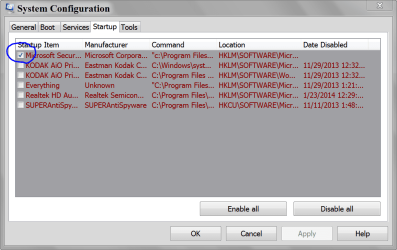
My msconfig/Startup and it works well. Notice I have my security active programs checked because I want them to start on every boot.

MSCONFIG STARTUP.PNG
 

My Computer

Computer type
PC/Desktop
Computer Manufacturer/Model Number
Home made Desktop
OS
Windows 10 Pro. 64/ version 1709 Windows 7 Pro/64
CPU
Intel i7-6800K @ 4.3
Motherboard
ASUS X-99 Deluxe II
Memory
Corsair Platinum 16 gig @2400
Graphics Card(s)
EVGA GTX 1070 OC
Monitor(s) Displays
Asus 27" LED LCD/VE278Q
Screen Resolution
1920-1080 or 1280-720 HDMI
Hard Drives
INTEL SSD 730-240 Gb Sata 3.0/
PSU
EVGA Platium 1200W
Case
Phanteks Luxe Tempered Glass 8 fans/ one radiator
Cooling
XSPC/ Water Cooled CPU
Keyboard
Das 4 Professional
Mouse
Logitech M705/MX Anywhere 2-S
Internet Speed
100 mbits
Antivirus
Microsoft Security Essentials/ Malwarebytes Premium 3.0/ SAS
Browser
I.E. 11 default/Firefox/ ISP Time Warner Cable/Spectrum
Other Info
LG BluRay Burner/
Sound system-KLipsch-THX/
Icy Dock ssd Hot Swap bays.
I just noticed you use McAfee.
In my opinion and the opinion of many others McAfee is a horrible program.

The security programs I have chose to run active are

Antivirus Microsoft Security Essentials/ Malwarebytes Premium
 

My Computer

Computer type
PC/Desktop
Computer Manufacturer/Model Number
Home made Desktop
OS
Windows 10 Pro. 64/ version 1709 Windows 7 Pro/64
CPU
Intel i7-6800K @ 4.3
Motherboard
ASUS X-99 Deluxe II
Memory
Corsair Platinum 16 gig @2400
Graphics Card(s)
EVGA GTX 1070 OC
Monitor(s) Displays
Asus 27" LED LCD/VE278Q
Screen Resolution
1920-1080 or 1280-720 HDMI
Hard Drives
INTEL SSD 730-240 Gb Sata 3.0/
PSU
EVGA Platium 1200W
Case
Phanteks Luxe Tempered Glass 8 fans/ one radiator
Cooling
XSPC/ Water Cooled CPU
Keyboard
Das 4 Professional
Mouse
Logitech M705/MX Anywhere 2-S
Internet Speed
100 mbits
Antivirus
Microsoft Security Essentials/ Malwarebytes Premium 3.0/ SAS
Browser
I.E. 11 default/Firefox/ ISP Time Warner Cable/Spectrum
Other Info
LG BluRay Burner/
Sound system-KLipsch-THX/
Icy Dock ssd Hot Swap bays.
I just noticed you use McAfee.
In my opinion and the opinion of many others McAfee is a horrible program.

The security programs I have chose to run active are

Antivirus Microsoft Security Essentials/ Malwarebytes Premium

I remember that McAfee was there in the beginning, but shouldn't Consumer Protection step in and protect people from the monstrosity that it's become at this point?
 

My Computer

Computer type
Laptop
Computer Manufacturer/Model Number
HP
OS
Dual Boot Win 8.1 x64; Win 7 SP1 x64
CPU
i7-3610QM @ 2.3 GHz
Motherboard
Hewlett-Packard 181C (U3E1)
Memory
8 GB Dual-Channel DDR3 @ 798MHz
Graphics Card(s)
Intel HD Graphics 4000
Hard Drives
Hitachi HTS547575A9E384 SCSI Disk Device;
WD Elements 1042 USB Device
Antivirus
Microsoft Security Essentials; Comodo Firewall w/ Defense +
Honestly @promoono most software related Win 7 issues can be solved by doing this:
Clean reinstall windows
Update
Install Microsoft Security Essentials
Update Drivers
Keep Norton, Mcafee, (anything from Iobit), and Avast off your machine.
Install Firewall if you find you need it.
Install HIPS and run a variety of on demand scanners at regular intervals.
Restrict Downloading to items you actually want/need. Move files you download out of your download folder and catalog and sort them.
BE VERY CAREFUL ABOUT PROGRAMS YOU INSTALL.
Run a System Cleaner once in a while.

All of your problems likely stem from a violation of one or more of the above. I can spot at least two based on your posts. Indiscriminate downloading and program installs, and you have McAfee on your system.

I'd be happy to help you deodorize your machine, but you'll need to start following best practices or these problems will reoccur.

To diagnose, I'll need you post a screenshot of the programs you have installed.
I would also ask you to do this:

Install Startup Delayer from here:
Download Startup Delayer | r2 Studios

Once it's installed, allow it to take control of your startup processes.

I want you to close Startup Delayer, click the Win Start button and run [Configure Startup Delayer].

Click [Tools]. It's in the middle of the menu bar and a bit hard to see.
Click [Restart Startup Delayer as Administrator] and grant it Admin privileges.


Click [Options] in the upper right hand corner (not the same as Tools)
Ensure [Auto Refresh Tasks and Services] is checked.

Click the [Startup Applications] tab.
Ensure [Enable at Startup] and [Prefix Delayed Application Name with Delayed Order] are checked.
Set both Default Idle Values to 50%
Check [Display a Message when all Applications have finished launching]

Click the [Launch Process] tab
Check every single box in this tab.

Under [Show Notifier] I want you to select the [Show always during Startup] radio button.
Click [Save]
If Startup Delayer prompts you to restart Startup Delayer in Administrator mode allow it to restart in Administrator mode.
Double check to ensure all the tabs are formatted as I outlined.
I want you to restart your computer twice.
After the first restart click the [Start] menu and then start typing [Configure Startup Delayer]. Then click [Configure Startup Delayer].

Move all the programs Startup Delayer identifies to delayed start.

Now we get to the fun part.
Startup Delayer will "listen" to your startup process. It will tell you how much time your startup process takes.
You can view a log displaying your startup process and how long each item takes.

The second time you restart your system I want you to run [Configure Startup Delayer], click [Tools], then [View last launch log]


Screenshot that and post.


Also screenshot and post the [Configure Startup Delayer] window that lists all of your startup processes.


Also open CCleaner, Click [Tools] and then [Startup].
Please screenshot the [Windows], [Internet Explorer] and [Scheduled Tasks] tabs and post them here.
 

My Computer

Computer type
Laptop
Computer Manufacturer/Model Number
HP
OS
Dual Boot Win 8.1 x64; Win 7 SP1 x64
CPU
i7-3610QM @ 2.3 GHz
Motherboard
Hewlett-Packard 181C (U3E1)
Memory
8 GB Dual-Channel DDR3 @ 798MHz
Graphics Card(s)
Intel HD Graphics 4000
Hard Drives
Hitachi HTS547575A9E384 SCSI Disk Device;
WD Elements 1042 USB Device
Antivirus
Microsoft Security Essentials; Comodo Firewall w/ Defense +
Hi,
Yes clean boot is for trouble shooting
If you forget to check items when you update them it will add a unknown entries that are not easily removed,
One of the worst things about unchecking items for the startup section,

Please post some screen shots so we know what you have loading,
Click Start and type in the search box,
msconfig
Click on the suggestion on top or hit the Enter key,
Go to the Startup section and take some screen shots for a complete list,
Go to the Services section and on the bottom left Check the box to Hide All Microsoft services,
Repeat the screen shots,
See the links above my signature on how to take and upload screen shots here,

Most of the problems are because users do not use custom installs or just don't read existing install options of which Creating a Startup folder exist on the majority installations of programs,
Cheers.
 

My Computer

Computer type
PC/Desktop
Computer Manufacturer/Model Number
Custom assembled by me :}
OS
Win-7-Pro64bit 7-H-Prem-64bit
CPU
i7-5930K 2nd i9-9940x both water blocked VRM's too
Motherboard
ASUS SABERTOOTH X99 2nd ASUS x299 Apex
Memory
Trident-z 3200C14 2nd Trident-z 3600C16
Graphics Card(s)
EVGA 1080ti ftw3 2nd Titan Xp both water blocked
Sound Card
Built-in Realtek
Monitor(s) Displays
1-AOC G2460PG 24"G-Sync 144Hz/ 2nd 1-ASUS VG248QE 24" 144Hz
Screen Resolution
1920 x 1080 144Hz
Hard Drives
2-Samsung M.2 Evo & Evo Plus
2-Samsung 850 EVO 500GB SSD's/ 3-2.5 W.D. Black 1tb-&3-1tb/3-3.5 WD Black 1tb hdd's
PSU
EVGA SuperNOVA 1000-P2 2nd 1200-P2
Case
2-Corsair Obsidian Series 450D Black ATX Mid Tower
Cooling
Custom water loops
Keyboard
Logitech G710+/ 2nd Logitech G910
Mouse
2-RedDragon M901 Perdition 16400 dpi Gaming mouse = wired
Internet Speed
Comcast Ping 19ms 89.31mbps download speed 6.12mbps upload
Antivirus
Malwarebytes Pro/ Superantispyware Pro
Browser
FireFox & Pale moon
Other Info
2nd ASUS X299 Apex/Intel i9-9940x with Custom water loop/7H-Prem-x64/Corsair 450D case/Ram Trident-z 3600C16 4x8gb / Samsung970Evo plus 500gb SSD/Dual ssd EZ swap evo/PSU EVGA SuperNova 1200w-P2 80+Platinum/GPU Titan Xp /8-ML-140 on push-pull on 2-280GTX rads
Back
Top