Msdt.exe corrupt disk error? Virus/Worm??

brusse01

New member
Local time
9:30 AM
Messages
84
Location
Michigan
Hi all,

I was wondering if this msdt.exe corrupt error is caused by a win32 worm?
A Chkdsk was performed but errors keep happening. Also this msdt.exe error pops up while browsing the internet.

I am trying to help somebody else with this issue.... my own pc is ok.
I suggested that he run malwarebtyes and he said the scan came back clean.

so.... he did a clean install of the RC on the same partiton that used to have the Beta. he is now getting the msdt.exe error and also he is getting winsat.exe corrupt error when trying to run windows index experience.

I am kinda stumped .... I googled it and all things seem to point to a possible infected pc??.... registry errors??

thx for help and ideas :-)
 

My Computer

Computer Manufacturer/Model Number
Custom built
OS
Windows 7
CPU
Athlon 64x2 5600+ dual core
Motherboard
Biostar A770+
Memory
2GB
Graphics Card(s)
ATI Radeon 4350 512 MB
Sound Card
Onboard Realtek HD
Hard Drives
Seagate 500 GB SATA
Keyboard
Logitech Wireless
Mouse
Logitech Wireless
I dunno. Malewarebytes is excellent but perhaps it doesn't have a definition yet for your friend's problem.

As a secondary opinion, you could possibly try scanning with Spybot Search & Destroy, XoftSpySE and/or HijackThis.

If those report clean as well, then I doubt there is an infection, but still possible.

Hopefully he did not try to use any patching software on the 7 install. Did he?

Have you checked the event viewer under windows logs?

Also, here is an excellent online scanner for single files, which uses multiple engines:

Jotti's malware scan

Finally, from an elevated command prompt, do this command:

sfc /scannow
 

My Computer

Computer Manufacturer/Model Number
self built
OS
7600.20510 x86
CPU
P4 550 3.4 GHz HT running at 3.5 GHz
Motherboard
MSI PM8M3-V (MS-7211 v1.x) Micro-ATX mainboard
Memory
OCZ 2 GB(2x1GB) DDR400mHz running @ 414 mHz
Graphics Card(s)
HIS Radeon HD 3850 IceQ 3 Turbo HDMI Dual DL-DVI AGP
Sound Card
MOTU Traveler firewire studio interface 192 kHz 24 bit
Monitor(s) Displays
22" widescreen Acer X223W LCD, 17" Compaq P75 CRT
Screen Resolution
1680x1050 and 1280x1024
Hard Drives
SATA I x2 WD, 400 GB and 120 GB, SATA 2 WD Caviar Black 1 TB
PSU
350W generic
Case
Cybertronpc, it glows blue
Cooling
stock cpu fan, Ice-Q 3 gpu and system, many case fans
Keyboard
Logitch Classical Keyboard 200
Mouse
Logitech Mediaplay cordless
Internet Speed
1792/448 kbits/sec
Other Info
SATA II PCI fake RAID adapter, 1 GB Readyboost, original ATI Remote Wonder (even works with WMC perfectly), Logitech Rumblepad 2 game controller x2
brusse01, Could you please get a hold if the executable in question, and upload them to a free hosting site, such as rapidshare.com. I will take a look, and see if they are infected.
 

My Computer

OS
Windows 7, Windows XP SP3 x86
hi all...

i will have to ask him if he used any patches etc if he did... could be the culprit. will let ya know.
I did suggest to him the sfc/scannow option and he is going to do that ... still waiting for results.

I will try to get a logfile from him and try uploading it. The problem is I dont physically have his pc...

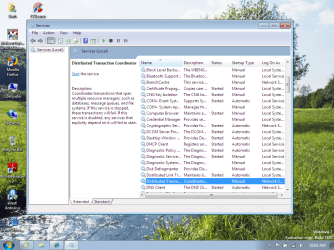
my instinct is telling me that he has a "infection" . I checked my own Task Manager and the processes and I dont have a msdt.exe. I looked in Services and noticed that the Distubuted Transaction Coordinator was set at manual.... maybe I should ask my friend to send me a pic of his Services and compare them?


thanks again for the help..... :-)
 

Attachments

  • Untitled.png
    Untitled.png
    196.4 KB · Views: 808
Last edited:

My Computer

Computer Manufacturer/Model Number
Custom built
OS
Windows 7
CPU
Athlon 64x2 5600+ dual core
Motherboard
Biostar A770+
Memory
2GB
Graphics Card(s)
ATI Radeon 4350 512 MB
Sound Card
Onboard Realtek HD
Hard Drives
Seagate 500 GB SATA
Keyboard
Logitech Wireless
Mouse
Logitech Wireless
See this from Sophos:
W32/Tilebot-BQ Win32 worm (W32/Opanki.worm.gen) - Sophos security analysis

Startup Type:This startup entry is installed as a Windows NT, 2000, 2003, XP, or Vista service.
Service Name:MSDTService Display
Name:Microsoft Distributed Transaction

If this is the path .... c:\windows\msdt.exe ... disable the service, then delete the file. You may have to go into safe mode.
 

My Computer

Computer type
PC/Desktop
Computer Manufacturer/Model Number
Bruce ... somewhere in his 40's
OS
Windows 7 Ultimate 32bit SP1
CPU
Intel(R) Core(TM)2 Quad CPU @ 2.40GHz, 2400 MHz
Motherboard
INTEL/D975XBX2
Memory
4 GB
Graphics Card(s)
ATI Radeon HD 2600 Pro
Monitor(s) Displays
Samsung SyncMaster 914v
Screen Resolution
1280 x 1024
Hard Drives
2/500GB each ... ST3500630AS ATA Device.
One is not connected
PSU
Rocketfish 700 W
Case
G.Skill Gigabyte Chassis
Keyboard
Standard PS/2 Keyboard
Mouse
Microsoft PS/2 Mouse
Internet Speed
DSL
Antivirus
Avira Internet Security
Browser
IE 11
Other Info
ATI HDMI Audio
hi all...

update: he ran sfc/scannow and windows found corrupt files that couldnt be fixed. I am waiting for him to send me the log. He also said that after sfc/scannow he cannot access webpages.... i suggested to reset IE ... also asked if he was able to use a different browser.... still waiting for answer lol

I still suspect a bug .... my next guess would be hardware related. ie his hard drive.
I also suggested for him to do a FULL scan not a quick one with malwarebytes and his AV program. and to let me know if anything shows up. if this is a worm... will AV/malwarebytes be able to catch it??

and thx Jacee.... I will definitely try this and see if all his problems go away.

thx again for help...
 

My Computer

Computer Manufacturer/Model Number
Custom built
OS
Windows 7
CPU
Athlon 64x2 5600+ dual core
Motherboard
Biostar A770+
Memory
2GB
Graphics Card(s)
ATI Radeon 4350 512 MB
Sound Card
Onboard Realtek HD
Hard Drives
Seagate 500 GB SATA
Keyboard
Logitech Wireless
Mouse
Logitech Wireless
Back
Top