Solved msi k9n6pgm2-v2 graphics card won't install

redblade8

New member
Member
VIP
Local time
8:42 PM
Messages
144
Hallo, I've been trying to install my nvidia 430 on my computer without success. If I have it in the computer all I get is s black screen. If its not in there though, everything works fine.

My motherboard is a msi-k9n6pgm2-v2.

Things that I've tried so far:

1. Install nvidia drivers without the graphics card installed so I can see what I'm doing..unfortunately the installer doesn't continue.

2. Without the graphics card in, write down how many keypresses it takes to change the primary graphics to onboard.
Boot up into bios with the graphics now installed into the pcie with a black screen. Follow the keypresses it took to change graphics to onboard, save & reboot. This doesn't seem to work either ..I still get a black screen, the motherboard forgets the settings that I just changed, and reverts to making pcie the default even though only the onboard is working because the drivers for the card aren't installed.

3. I was going to do the same thing with the bios as the nvidia driver installer so my graphics could be in the computer..but I realized that I have no visual feedback as to how to make the installer complete as the installer wont continue without the graphics in..

Edit: I just thought of another solution, I'm going to see if I can create a remote session with my computer, & install the drivers remotely with my cellphone on teamviewer. Ill post back the results.
 
Last edited:

My Computer My Computer

At a glance

Windows 7...Ultimate x64Intel Core i7 2630QM4 GB DDR3NVidea GeForce 540M
Computer Manufacturer/Model Number
ASUS N53SV
OS
Windows 7...Ultimate x64
CPU
Intel Core i7 2630QM
Motherboard
ASUS
Memory
4 GB DDR3
Graphics Card(s)
NVidea GeForce 540M
Hard Drives
750GB SATA
Cooling
Only CPU cooling, none for graphics. Always cool though.
Hey, Are you trying to install this GPU to a tower? When GPU's have the letter M next to them in commonly means that its a laptop version of the card, My apologies if im wrong.
 

My Computer My Computer

At a glance

Windows 7 Home Premium 64BitAMD A6-3420M 1.5GHZ OC - 2.0GHZ4GB DDR3 1600MHZAMD RADEON 6520G+AMD RADEON HD7470M 1GB DDR3
Computer type
Laptop
Computer Manufacturer/Model Number
Packard Bell
OS
Windows 7 Home Premium 64Bit
CPU
AMD A6-3420M 1.5GHZ OC - 2.0GHZ
Memory
4GB DDR3 1600MHZ
Graphics Card(s)
AMD RADEON 6520G+AMD RADEON HD7470M 1GB DDR3
Screen Resolution
1366x768
Hard Drives
500GB SATA
Internet Speed
18Mb Unlimited
Antivirus
AVAST!
Browser
MOZILLA FIREFOX
If it's a Mobile GPU that could be the issue
Different Power states and requirements
 

My Computer My Computer

At a glance

Windows 10 Home Premium 64bit sp1Intel I7-6700K @ 4.6 Ghz 1.344 volts everyday OC32GB G-Skill TridentZ 3200mhz 16-18-18-38 DDR4Sli Gigabyte Windforce GTX 980 G1
Computer type
PC/Desktop
Computer Manufacturer/Model Number
CoreI7-6700K MrFingerIII Special Builds
OS
Windows 10 Home Premium 64bit sp1
CPU
Intel I7-6700K @ 4.6 Ghz 1.344 volts everyday OC
Motherboard
Asrock Fatality K6 Z170 Socket 1151
Memory
32GB G-Skill TridentZ 3200mhz 16-18-18-38 DDR4
Graphics Card(s)
Sli Gigabyte Windforce GTX 980 G1
Sound Card
AC97 Creative Rage Tactic 3D Headphones Bluetooth
Monitor(s) Displays
27" Asus ROG Swift PG278Q G-Sync 48" Vizio Smart HD TV
Screen Resolution
2560x1440p 27"- 48" Currently Gaming at 2560x1440p Res 2K
Hard Drives
250GB Samsung Evo840SSD Seagate baracuda 500 GB WD Mybook 500Gb 1TB Seagate Barracuda
PSU
HX1050w Corsair Silver 80plus certified crosfire/sli
Case
Enthod Pro Full Tower
Cooling
Corsair H110i GT 280 mm High Performance WaterBlock
Keyboard
Logitech wireless keyboard
Mouse
Logitech wireless mouse
Internet Speed
Cox Cable 100+ mb
Antivirus
WebRoot Spysweeper with Antivirus
Browser
IE-10, Chrome, Opera
Other Info
My Other Rig is a AMD FX8320E @4.6Ghz 16GB Ballistic Sport Ram
Mobo Asrock Fatality 990FX 120GB OCZ SSD 1TB Seagate Barracuda Corsair H75 Cooling PSU Corsair CX750
GPU GTX Gigabyte 970G1
You should be able to get into the BIOS setup screens for either the onboard graphics or the Nvidia without any special drivers -- as they are not in use at that time, anyway.

When I recently replaced my onboard AMD video with a video card, I had to first go into the BIOS and disable the onboard graphics, as with that turned on, I too got only a black screen with the monitor cable connected to the video card.
 

My Computer My Computer

At a glance

Win7 Pro 32-bit, Win8 Pro 32-bitAMD Phenom II X6 1090T4GB ddr3 1300AMD HD 4290 onboard
Computer type
PC/Desktop
Computer Manufacturer/Model Number
Custom
OS
Win7 Pro 32-bit, Win8 Pro 32-bit
CPU
AMD Phenom II X6 1090T
Motherboard
Gigabyte
Memory
4GB ddr3 1300
Graphics Card(s)
AMD HD 4290 onboard
Sound Card
Builtin Realtek HD Audio
Monitor(s) Displays
Samsung 24" widescreen, LG 23" widescreen
Screen Resolution
1920x1200/1920x1080
Hard Drives
Kingston 256GB SSD
Keyboard
Logitech Illuminated Keyboard
Mouse
Logitech M705 wireless mouse
Antivirus
Norton Av 2013
Browser
IE v10
It's not a mobile graphics card, it's a desktop nvidia gt 430 that fits into the pcie slot. I dont think I could fit this into my/any laptop physically at all O-o.
Edit: I just noticed I put 430m on my first post instead of just 430. I'm sorry, I suppose I'm too used to adding the m since I've mostly been dealing with laptops, and it's just a habit now.

I tried teamviewer, and I successfully installed the graphics card drivers in windows. A reboot of the computer & I still had a black screen. This time is different though. I now get the post screen with my graphics card installed, where-as I didn't even get the post screen before this all. Before, whether the monitor cable was plugged into the motherboard, or my graphics card I still got a black screen & no post reguardless. Now post seems to be coming up. However, it's a black screen after that, and it doesn't show windows at all.

Ill try disabling the onboard graphics & see if this helps at all, thanks for your replies all =)

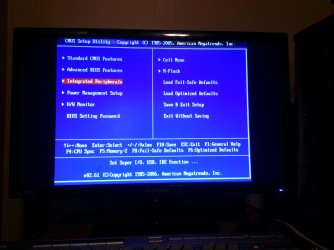
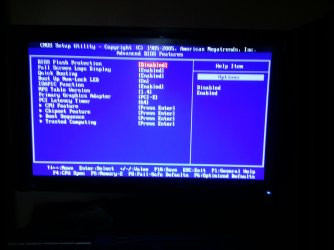
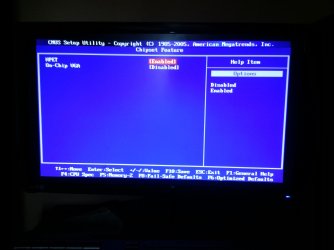
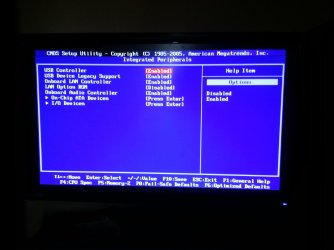
-- It seems that the onboard chip is already disabled..I still get a black screen though. Here's a few images of my bios. What can I change in the bios for this to work? I can upload more pictures of my bios if you'd like.

Edit: After disabling the onboard audio, & quick booting, I now can boot to windows 7 just fine. However, I tryed resetting my bios settings with the 'load opimized settings' option, to replicate this, but it's still booting to windows fine..so I'm not sure why it's suddenly working now.

Windows is stretching my desktop beyond my monitor..so I need to try to fix this now.

Edit: I fixed this in my NVidia control panel settings. If you go to 'adjust desktop size & position' > 'size' > 'enable desktop size and position' > 'resize' you can fix this. In my case I have to set my resolution from what my monitor supports, 1920 x 1080 resolution, to 1842 x 1036 resolution on my s23b300b monitor.

Thanks again for your help! It's much appriciated! =)
~Red.
 

Attachments

  • IMG_20140327_095726.jpg
    IMG_20140327_095726.jpg
    380.4 KB · Views: 1
  • IMG_20140331_124047.jpg
    IMG_20140331_124047.jpg
    350.2 KB · Views: 1
  • IMG_20140331_124110.jpg
    IMG_20140331_124110.jpg
    302.5 KB · Views: 1
  • IMG_20140331_124132.jpg
    IMG_20140331_124132.jpg
    327.4 KB · Views: 1
  • IMG_20140331_124300.jpg
    IMG_20140331_124300.jpg
    350.1 KB · Views: 1
Last edited:

My Computer My Computer

At a glance

Windows 7...Ultimate x64Intel Core i7 2630QM4 GB DDR3NVidea GeForce 540M
Computer Manufacturer/Model Number
ASUS N53SV
OS
Windows 7...Ultimate x64
CPU
Intel Core i7 2630QM
Motherboard
ASUS
Memory
4 GB DDR3
Graphics Card(s)
NVidea GeForce 540M
Hard Drives
750GB SATA
Cooling
Only CPU cooling, none for graphics. Always cool though.
Back
Top