MSI Motherboard

WindowsDXY

New member
Local time
9:10 PM
Messages
9
I've just built up a PC with, among other things, an MSI H67MA-E45 (B3) 1155 motherboard and an Intel Core i3 chip.
I installed Windows 7 Home Premium uneventfully, but when the install was completed:
-No drivers were found for USB (among other things)
-Doesn't seem to recognize the Intel Graphics. Just shows plain vanilla VGA

Since the PC doesn't recognize the USB ports, I can't get to the network via wireless USB device. Nor can I move drivers from another PC via USB flash drive.

Anyone else encountered these problems with the new MSI 1155 boards?

The MSI support doesn't offer email addresses, and the forums seem to be offline.

Thanks in advance for any help.

David
 

My Computer My Computer

OS
Windows 7 Home Premium 64-bit
You should use the MB disk that came with the board; install the motherboard drivers and software from the CD.
 

My Computer My Computer

Computer Manufacturer/Model Number
My Build
OS
win7 Ult 64
CPU
i7 3930K & 3960X
Motherboard
ASUS P9X79 Deluxe
Memory
16GB G-Skill 2133MHz
Graphics Card(s)
Sapphire HD 7970
Sound Card
On-board
Monitor(s) Displays
ASUS 27 inch
Screen Resolution
1920X1080
Hard Drives
Crucial M4 256GB, 1.5TB WD Black for Data/Images
PSU
Corsair AX1200
Case
NZXT 810
Cooling
Custom Loop, Swiftech HDBlock
Keyboard
Mionix
Mouse
Mionix
Internet Speed
Cable
You should use the MB disk that came with the board; install the motherboard drivers and software from the CD.


Kipper's comment is correct.
Once you have the OS installed, put in the mobo disk and load relevant drivers, etc.
This will eliminate a lot of issues.

Jon
 

My Computer My Computer

Computer Manufacturer/Model Number
Home build
OS
Win7 Ultimate x64
CPU
3820
Motherboard
Rampage IV formula
Memory
12 GB kit
Graphics Card(s)
XFX nVidia GeForce GTX 560
Sound Card
On board card
Monitor(s) Displays
LG 27" x 2
Screen Resolution
1920 x 1080
Hard Drives
1 x OCZ Vertex 4 , 256Gb
PSU
875W Thermal Take
Case
Antec P160W
Cooling
Noctua
Keyboard
Logitech Wave Pro
Mouse
Logitech
Internet Speed
1.5 Mb
Other Info
Logitech G25 steering wheel, Logitech Extreme 3D Pro joystick.
Logitech surround sound speaker system.
Just one nag:
It is necessary to install the drivers.
It is not necessary to install much of the the software on a motherboard CD/DVD, unless you have an actual use for it.
A lot of the stuff they have started putting on these disks in recent years is pure bloatware.
 

My Computer My Computer

Computer type
PC/Desktop
Computer Manufacturer/Model Number
Home Built - Jan 2013
OS
Windows 7 64 Bit Home Premium SP1
CPU
i7-3820
Motherboard
Asus P9X79-PRO - Bios 4608
Memory
GSkill F3-14900CL9Q - 16GB
Graphics Card(s)
EVGA GeForce GTX660 - Driver 352.86
Sound Card
On board Realtek ALC898
Monitor(s) Displays
Acer S271HL
Screen Resolution
1920 x 1080
Hard Drives
#1- Samsung 840 Pro Series
#2- Western Digital WD1002FAEX Sata3 Black
#3- Western Digital WD1002FAEX Sata3 Black
PSU
Corsair CMPSU-850TX-V2 - 850 watt (by Seasonic)
Case
Corsair Obsidian 550D
Cooling
Standard 3 120mm case fans, Cooler Master Hyper 212 EVO
Keyboard
MS KC-0405
Mouse
Intellimouse 5-button
Internet Speed
56 Mbits/Sec (on a good day)
Antivirus
Avast & Malwarebytes
Browser
Firefox
Other Info
Asus DVD - DRW-24B1ST 24X
You should use the MB disk that came with the board; install the motherboard drivers and software from the CD.

I installed from the disc first thing, and it loaded a bunch of utilities, but no drivers.
I tried all the utilities installed, and none acted on the USB or graphic drivers.
I did an Update Drivers on all the missing, and pointed to the Disc, but Windows did not find any drivers.

Didn't have this problem with the first W7 system I built with an MSI board.

Curious.
 

My Computer My Computer

OS
Windows 7 Home Premium 64-bit
Just one nag:
It is necessary to install the drivers.
It is not necessary to install much of the the software on a motherboard CD/DVD, unless you have an actual use for it.
A lot of the stuff they have started putting on these disks in recent years is pure bloatware.

Agreed. I didn't find much use in the stuff it installed.
And unfortunately, I didn't find any device drivers either.
 

My Computer My Computer

OS
Windows 7 Home Premium 64-bit

My Computer My Computer

Computer type
PC/Desktop
Computer Manufacturer/Model Number
Me
OS
Win 7 Ultimate x64
CPU
FX-8350 @ 4.6 GHz so far
Motherboard
Asus M5A97 EVO
Memory
ADATA XPG V1 Series Black 8GB DDR3 1600
Graphics Card(s)
Sapphire R9 270x Dual-X
Sound Card
Xonar DGX w/ Corsair Vengence 1300
Monitor(s) Displays
Acer S232HL Abid
Screen Resolution
1920x1080
Hard Drives
120 GB OCZ Vertex 3
500 GB Seagate 7200.12
PSU
Antec Earthwatts 650W Green
Case
Antec Three Hundred
Cooling
Cooler Master 212 EVO
Keyboard
Logitech G510
Mouse
Logitech G500s
Internet Speed
35000/3000
Seeing as USB isn't working at the moment and going to have to use a blank CD/DVD, have you tries the chipset and VGA driver downloaded from MSI,

http://www.msi.com/product/mb/H67MA-E45.html#/?div=Driver&os=Win7 64

Thanks.

I've discovered the folder on the MSI Drivers and Utilities disc that contains the Intel Chipset drivers (D:\Chipset\Intel\SandyBridge). There is an install executable for the Intel drivers there that apparently is not run when you do the automatic install. I'll try this install later today.

If this doesn't solve the problems, I'll try the download you recommend above.
 

My Computer My Computer

OS
Windows 7 Home Premium 64-bit
I've discovered the folder on the MSI Drivers and Utilities disc that contains the Intel Chipset drivers (D:\Chipset\Intel\SandyBridge). There is an install executable for the Intel drivers there that apparently is not run when you do the automatic install. I'll try this install later today.

If this doesn't solve the problems, I'll try the download you recommend above.

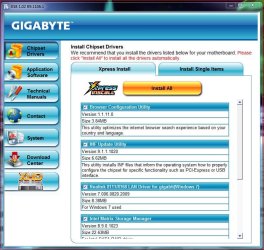
That's weird bcause chipset drivers (inf) should be one of the first drivers installed as they also include the USB drivers.

When you put in the disk there will usually be a list of things that needs to be installed, and the chipset (inf) drivers will usually be listed at/near the top.

Here's an example of my DVD that came with my MB.....

MB Drivers.JPG

At any rate you need to make sure the chipset (inf) drivers are installed.

You also need to make sure the USB 3.0 (not included in the inf package) drivers are installed also since you have a board that supports USB 3.0.

Good luck.
 

My Computer My Computer

Computer type
PC/Desktop
Computer Manufacturer/Model Number
Custom built by me.
OS
Windows 10 Pro
CPU
Intel Core i7-4770K (3.5Ghz)
Motherboard
Gigabyte G1 Sniper 5 (F10 Bios)
Memory
32 gig Corsair Dominator Platinum (4x8Gig)
Graphics Card(s)
Sapphire Tri-X R9 Fury
Sound Card
Soundblaster ZXR
Monitor(s) Displays
NEC PA242W 24" LCD Monitor
Screen Resolution
1920 x 1200
Hard Drives
Primary - Samsung 850 Pro (512gig), Samsung 840 Pro (256gig), 2TB WD Caviar Black.
PSU
EVGA Supernova 1000 G2
Case
Cooler Master HAF X
Cooling
Corsair H100i with Corsair Air Series SP120 Quiet Fans
Keyboard
Logitech Wireless Wave
Mouse
Logitech Performance MX
Internet Speed
High Speed Cable
Antivirus
Norton Security
Browser
IE11
Other Info
Memory Timings - 1866MHz @ 9-9-9-27-1T @ 1.5 volts
Back
Top