Multi-boot/Dual-Boot Windows XP on Windows 7

My Computer My Computer

Computer Manufacturer/Model Number
Gateway KAV60
OS
Windows 7 Home Premium 32-bit
Memory
2 GB
Screen Resolution
1024x600
Hard Drives
250 GB HDD
Internet Speed
Time Warner Cable/Road Runner
Other Info
Intel Atom processor N270
Multi-in-1 card reader
802.11b/g
NO optical drive
NO WWAN
NO Bluetooth

My Computer My Computer

Computer Manufacturer/Model Number
Gateway KAV60
OS
Windows 7 Home Premium 32-bit
Memory
2 GB
Screen Resolution
1024x600
Hard Drives
250 GB HDD
Internet Speed
Time Warner Cable/Road Runner
Other Info
Intel Atom processor N270
Multi-in-1 card reader
802.11b/g
NO optical drive
NO WWAN
NO Bluetooth
Don't bother. :cry:

It didn't work. The blue screen "Windows encountered an error and shutdown to prevent damage blablabla"

Why? Why is it only me with this trouble...?
 

My Computer My Computer

Computer Manufacturer/Model Number
Gateway KAV60
OS
Windows 7 Home Premium 32-bit
Memory
2 GB
Screen Resolution
1024x600
Hard Drives
250 GB HDD
Internet Speed
Time Warner Cable/Road Runner
Other Info
Intel Atom processor N270
Multi-in-1 card reader
802.11b/g
NO optical drive
NO WWAN
NO Bluetooth
Have you googled the exact error message?

Snap a picture or remember enough of the words to type them into Google.

This is frequently a RAM issue. Run the Windows Memory Diagnostic test, switch around RAM sticks, remove all but 2 gb and try again.

Need to also check your HD. On the Support Downloads page for your model HD will be a link to Diagnostics, e.g. WD Lifeguard, Seagate Seatools. See if you can write the ISO to your flash stick and run full test.

Run chkdsk. Right click on HD>Properties>Tools>Check for Errors>check both boxes and scan. Restart.

Did you full format the partition with XP installer?
 
I was going to ask if i format a U3 pen drive, will it work? I bought it on Black Friday. 8GB SanDisk Cruzer U3.
 

My Computer My Computer

Computer Manufacturer/Model Number
Gateway KAV60
OS
Windows 7 Home Premium 32-bit
Memory
2 GB
Screen Resolution
1024x600
Hard Drives
250 GB HDD
Internet Speed
Time Warner Cable/Road Runner
Other Info
Intel Atom processor N270
Multi-in-1 card reader
802.11b/g
NO optical drive
NO WWAN
NO Bluetooth
Have you googled the exact error message?

Snap a picture or remember enough of the words to type them into Google.

This is frequently a RAM issue. Run the Windows Memory Diagnostic test, switch around RAM sticks, remove all but 2 gb and try again.

Need to also check your HD. On the Support Downloads page for your model HD will be a link to Diagnostics, e.g. WD Lifeguard, Seagate Seatools. See if you can write the ISO to your flash stick and run full test.

Run chkdsk. Right click on HD>Properties>Tools>Check for Errors>check both boxes and scan. Restart.

Did you full format the partition with XP installer?

I wasn't able to access the XP installer really. It was loading up all the files in the blue screen "Windows Setup". Then it said Starting Windows, and it went to the blue screen error message.
 

My Computer My Computer

Computer Manufacturer/Model Number
Gateway KAV60
OS
Windows 7 Home Premium 32-bit
Memory
2 GB
Screen Resolution
1024x600
Hard Drives
250 GB HDD
Internet Speed
Time Warner Cable/Road Runner
Other Info
Intel Atom processor N270
Multi-in-1 card reader
802.11b/g
NO optical drive
NO WWAN
NO Bluetooth
Hmm. Boot back into the XP installer and proceed past first screens to see if it discovers an installation to fix, if so click the R for repair that will appear under the discovered installation (not the R for Repair on the first screen).

If it discovers an XP installation, try tapping F8 at bootup to see if you can enter XP Safe Mode. This might be a driver issue that can be fixed in safe mode. You could even insert drivers needed by tapping F6 while installer is loading drivers.
 
Hmm. Boot back into the XP installer and proceed past first screens to see if it discovers an installation to fix, if so click the R for repair that will appear under the discovered installation (not the R for Repair on the first screen).

If it discovers an XP installation, try tapping F8 at bootup to see if you can enter XP Safe Mode. This might be a driver issue that can be fixed in safe mode. You could even insert drivers needed by tapping F6 while installer is loading drivers.

Cover your ears (Or just mute your computer, because the background sound of the video is a bit weird.)

They're uploaded to Mediafire.

CIMG0455.MOV
 

My Computer My Computer

Computer Manufacturer/Model Number
Gateway KAV60
OS
Windows 7 Home Premium 32-bit
Memory
2 GB
Screen Resolution
1024x600
Hard Drives
250 GB HDD
Internet Speed
Time Warner Cable/Road Runner
Other Info
Intel Atom processor N270
Multi-in-1 card reader
802.11b/g
NO optical drive
NO WWAN
NO Bluetooth
Need to put your storage controller driver in at the F6 prompt during file loading of XP installer.

Locate it on your Support Downloads page for your computer model, or google your model for mobo, then google mobo ID + xp storage controller. Put it on your card and browse to it from F6 prompt

If you had your System Specs filled out, I could have already found it for ya.

Doubt whether you have a floppy tho, so you will needed to slipstream the driver(s) into XP installer using Nlite, a very cool program that will recompile the ISO.
http://download.cnet.com/nLite/3000-2094_4-10515136.html
 
Need to put your storage controller driver in at the F6 prompt during file loading of XP installer.

Locate it on your Support Downloads page for your computer model, or google your model for mobo, then google mobo ID + xp storage controller. Put it on your card and browse to it from F6 prompt

If you had your System Specs filled out, I could have already found it for ya.

Doubt whether you have a floppy tho, so you will needed to slipstream the driver(s) into XP installer using Nlite, a very cool program that will recompile the ISO.
nLite - Free software downloads and software reviews - CNET Download.com

I'm guessing you did see the video?

Well anyway, I got confused on what you said. Can you explain it a bit more simplier?

I think I'll need a step-by-step.

And mine is a Gateway KAV60
What other things do you need?
 

My Computer My Computer

Computer Manufacturer/Model Number
Gateway KAV60
OS
Windows 7 Home Premium 32-bit
Memory
2 GB
Screen Resolution
1024x600
Hard Drives
250 GB HDD
Internet Speed
Time Warner Cable/Road Runner
Other Info
Intel Atom processor N270
Multi-in-1 card reader
802.11b/g
NO optical drive
NO WWAN
NO Bluetooth
You need to put the XP storage controller for your model computer into the XP installer so it can work right.

This requires a floppy disk in XP. If you don't have a floppy disk you need to download and install Nlite.

Load the XP files into Nlite, then on the drivers tab, add the XP storage controller, then on the Create ISO tab, make an ISO to write to your flash stick again

nLite - Free software downloads and software reviews - CNET Download.com

Also reboot the computer and enter BIOS setup by tapping F-key given (normally F2)

Look for SATA controller and see if it is set to AHCI, SATA, IDE or RAID.
 
You said you can find it for me if I give you my system specs? Which do you need?

Model: Gateway KAV60
OS: Windows 7 Starter 32-bit
Processor: Intel Atom processor N270
LCD: 10.1 LED LCD 1024x600
Memory: 1 GB Memory
Storage: 250 GB HDD
Optical Drive: NO
Card Reader: Multi-in-1 card reader
WLAN: 802.11b/g
WWAN: NO
Bluetooth: NO
Webcam: Gateway webcam
Battery: 6-cell Li-ion battery

Pretty much, that's what I have on the side of the box that it came in.
 

My Computer My Computer

Computer Manufacturer/Model Number
Gateway KAV60
OS
Windows 7 Home Premium 32-bit
Memory
2 GB
Screen Resolution
1024x600
Hard Drives
250 GB HDD
Internet Speed
Time Warner Cable/Road Runner
Other Info
Intel Atom processor N270
Multi-in-1 card reader
802.11b/g
NO optical drive
NO WWAN
NO Bluetooth

My Computer My Computer

Computer Manufacturer/Model Number
Gateway KAV60
OS
Windows 7 Home Premium 32-bit
Memory
2 GB
Screen Resolution
1024x600
Hard Drives
250 GB HDD
Internet Speed
Time Warner Cable/Road Runner
Other Info
Intel Atom processor N270
Multi-in-1 card reader
802.11b/g
NO optical drive
NO WWAN
NO Bluetooth
You need the XP storage controller, but might as well also download the chipset, graphics and LAN, any others you don't wanna have to add later after install. Put them on your card, and then slipstream them into installer using Nlite
 
I'll PM you the serial number, and then you can tell me what to download, because I would just end up downloading everything. lol

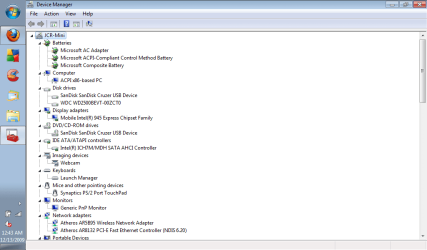
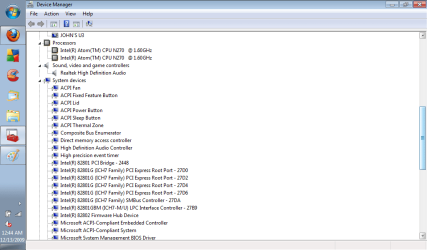
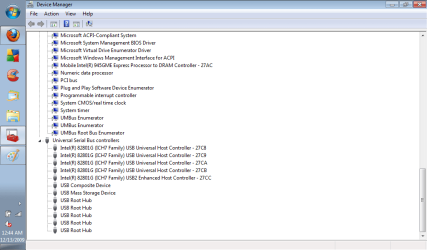
I was wondering you might need my devices.
 

Attachments

  • XP4.png
    XP4.png
    26.8 KB · Views: 2
  • XP5.png
    XP5.png
    24.6 KB · Views: 1
  • XP6.png
    XP6.png
    22.7 KB · Views: 1

My Computer My Computer

Computer Manufacturer/Model Number
Gateway KAV60
OS
Windows 7 Home Premium 32-bit
Memory
2 GB
Screen Resolution
1024x600
Hard Drives
250 GB HDD
Internet Speed
Time Warner Cable/Road Runner
Other Info
Intel Atom processor N270
Multi-in-1 card reader
802.11b/g
NO optical drive
NO WWAN
NO Bluetooth
Download and install Nlite

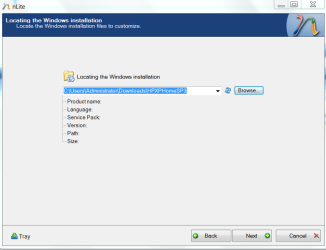
Make a copy of XP files and load the copy into Nlite on the second screen:

nlite1.PNG

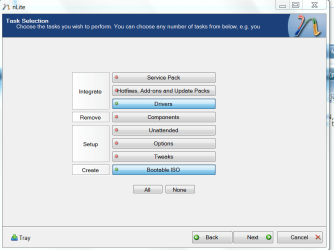
Next select the tasks you want: Drivers and Make ISO

nlite2.PNG

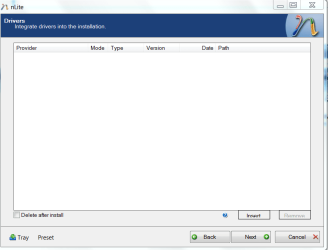
Use the button at bottom right to Insert drivers into ISO. Browse through the driver folder until Nlite picks it up and lists it correctly

nlite3.PNG

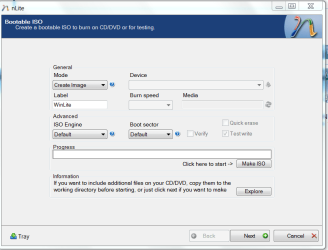
Click the button at the middle right to Make ISO. Tell it where to put the ISO it makes.

nlite 4.PNG

Locate the ISO and write to flash stick as before. or if you need the files, use the ones which you made a copy of as the drivers will be slipstreamed into those files.
 
Back
Top