
Multiple Desktop Folders In Explorer

ten

New member
Local time
8:27 AM
Messages
266
Anyone seen this before or know what causes it? My mom is suffering from it. I did move her default desktop location to her data drive.
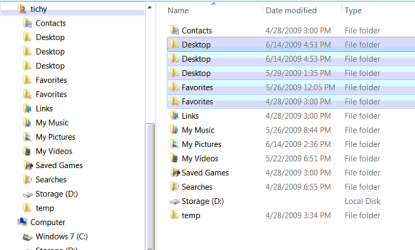
WindowClipping (3).png

Here you can see the properties. The one on the left is the default location one which appears in explorer but shouldn't. The one on the right is the real desktop that I moved to her data drive. 2 copies appear for the one on her data drive.
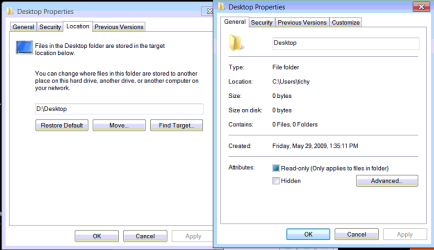
WindowClipping (4).png
 
Last edited:

My Computer

Computer Manufacturer/Model Number
Haha! You peeked. Why so nosey?
OS
XP / Windows 7 Pro RTM
WTH ???

the properties pics, were they of the same folder? The first one under location shows it as D:, the second shows general as C:.

Had you changed it a couple of times where as windows doesn't remove the original locations, but just stops using them? Other than having these multiple folders, is it working ok?

Have you tried to restore it to default and see if that clears out the multiple entries?

AND/OR

Leave whatever one actually contains data, then with the others Take ownership and delete them.

I would try to restore default, restart, verify which actually contains the data, and if the others remain, take ownership and delete. Create a restore point or two along the way. Because you have system folders on d:, make sure that drive is included in system restore.
Really, ...What else can you do???
 

My Computer

Computer Manufacturer/Model Number
POS
OS
OS3.5
CPU
celery
Motherboard
Good Question ...Unknown
Memory
memory never forgets
Graphics Card(s)
OB
Sound Card
OB
Monitor(s) Displays
HUGE
Screen Resolution
168000000x105000000
Hard Drives
full
PSU
OEM 65watt
Case
N/A
Cooling
OB
Keyboard
OB
Mouse
mouse
Internet Speed
1 Trillion MBps
Other Info
Still An Awesome Forum!
could be a bug regarding the 'Common desktop', your desktop and then your mom's maybe? Many forget there's a common one too.
Have you moved your's aswel just out of curiosity?
 

My Computer

Computer Manufacturer/Model Number
Self Built
OS
XP Pro SP3 x86/Vista SP2 x64/Win7 x64 Triple-boot
CPU
AMD64 X2 AM2 5000+
Motherboard
Asus MSN-X Plus
Memory
Corsair TWX 2Gb (2x1Gb) DDR2 800Mhz
Graphics Card(s)
PCI-X 2.0 Inno3D (NVidia) 9500GT 1Gb DDR2
Sound Card
Onboard Realtec ALC662-GR
Monitor(s) Displays
Relisys 17' CRT (model unknown)
Screen Resolution
1024x768
Hard Drives
750Gb Samsung 7200-3Gb/s 32Mb Cache SATA
PSU
500W
Cooling
Standard AMD CPU Fan, One side, front and rear case fan.
Keyboard
Microsoft Multimedia Keyboard
Mouse
Samsung Optical
Internet Speed
10M
the properties pics, were they of the same folder? The first one under location shows it as D:, the second shows general as C:

No they are different folders. I edited the post to clarify.

I did delete the default folder in users to get rid of 1 folder. That screencap is from before I messed with it because I wanted to show it here. It shouldn't be there if it's no longer the real desktop folder.
 
Last edited:

My Computer

Computer Manufacturer/Model Number
Haha! You peeked. Why so nosey?
OS
XP / Windows 7 Pro RTM
could be a bug regarding the 'Common desktop', your desktop and then your mom's maybe? Many forget there's a common one too.
Have you moved your's aswel just out of curiosity?
It's not the common desktop. It was the one in C:\users.

I did move most of the default folders when I installed the original RC and never saw it come up but I haven't done it with 7201. She uses her computer constantly though. I only boot into Windows 7 a few times a week.
 
Last edited:

My Computer

Computer Manufacturer/Model Number
Haha! You peeked. Why so nosey?
OS
XP / Windows 7 Pro RTM
It's a strange one. what happens if you move them back?
I know it defeats the object but don't know what else to suggest I'm afraid. :confused:
 

My Computer

Computer Manufacturer/Model Number
Self Built
OS
XP Pro SP3 x86/Vista SP2 x64/Win7 x64 Triple-boot
CPU
AMD64 X2 AM2 5000+
Motherboard
Asus MSN-X Plus
Memory
Corsair TWX 2Gb (2x1Gb) DDR2 800Mhz
Graphics Card(s)
PCI-X 2.0 Inno3D (NVidia) 9500GT 1Gb DDR2
Sound Card
Onboard Realtec ALC662-GR
Monitor(s) Displays
Relisys 17' CRT (model unknown)
Screen Resolution
1024x768
Hard Drives
750Gb Samsung 7200-3Gb/s 32Mb Cache SATA
PSU
500W
Cooling
Standard AMD CPU Fan, One side, front and rear case fan.
Keyboard
Microsoft Multimedia Keyboard
Mouse
Samsung Optical
Internet Speed
10M
Back
Top