multiple dll files on desktop

bjaneb

New member
Local time
10:17 AM
Messages
9
I have dozens of dll files sitting on my desktop. I would like to move them to a folder so that my desktop is less cluttered. In addition, I'd like to know how to figure out which ones, if any, I can delete.

I'm not sure how they end up on the desktop, I don't choose to install programs there. Thanks for any suggestions!
 

My Computer

Computer type
Laptop
Computer Manufacturer/Model Number
dell xps m1530
OS
windows 7 premium
dlls belong into the system32 folder. It would be interesting to know how they got on the desktop in the first place.

C:\Windows\System32
 

My Computer

Computer Manufacturer/Model Number
HP, Dell, Gateway, Toshiba - 4 laptops and 2 desktops
OS
Vista, Windows7, Mint Mate, Zorin, Windows 8
CPU
from 1.6GHz Duo to i7
Monitor(s) Displays
2x HP w2207
Hard Drives
5x HDD, 7x SSD, 12x Externals
Keyboard
with trackball - no mices
Mouse
Trackball mice
Internet Speed
DSL 6000
I wish I knew how they got there! Can I move them to the system32 folder, or do I need to know what they belong to?
 

My Computer

Computer type
Laptop
Computer Manufacturer/Model Number
dell xps m1530
OS
windows 7 premium
Just move them to the system32 folder. They may be there already and the desktop versions may only be copies. But the system will tell you whether it is a duplicate when you paste them into system32.
 

My Computer

Computer Manufacturer/Model Number
HP, Dell, Gateway, Toshiba - 4 laptops and 2 desktops
OS
Vista, Windows7, Mint Mate, Zorin, Windows 8
CPU
from 1.6GHz Duo to i7
Monitor(s) Displays
2x HP w2207
Hard Drives
5x HDD, 7x SSD, 12x Externals
Keyboard
with trackball - no mices
Mouse
Trackball mice
Internet Speed
DSL 6000
Great, thank you! And just to be clear, it looks like there are a few .exe files associated with a dll file. I should move those to System32 as well, correct?

and .ini, .isi, .inx type files that have an associated dll too?

If I move the wrong file into System32, am I going to create a mess?
 
Last edited:

My Computer

Computer type
Laptop
Computer Manufacturer/Model Number
dell xps m1530
OS
windows 7 premium
Great, thank you! And just to be clear, it looks like there are a few .exe files associated with a dll file. I should move those to System32 as well, correct?

and .ini, .isi, .inx type files that have an associated dll too?

If I move the wrong file into System32, am I going to create a mess?
It could.

Post a screenshot of them Use these tutorials for posting screenshots.
http://www.sevenforums.com/tutorials/9717-screenshot-paint.html
How to Use the Snipping Tool in Vista - Vista Forums
http://www.sevenforums.com/tutorials/9733-screenshots-files-upload-post-seven-forums.html

Do you have the option highlighted in red unchecked in Folders Options?
Folder Options.png

Jerry
 

My Computer

Computer type
Laptop
Computer Manufacturer/Model Number
Sager NP9170
OS
Win 7 Pro x64 / Win 10 Pro
CPU
Intel(R) Core(TM) i7-3630QM CPU @ 2.40GHz
Motherboard
CLEVO P170EM
Memory
12 GB
Graphics Card(s)
(1) Intel(R) HD Graphics 4000 (2) NVIDIA GeForce GTX 675M
Sound Card
(1) Realtek High Definition Audio (2) Intel(R) Display Aud
Monitor(s) Displays
17.3
Screen Resolution
1920x1080
Hard Drives
(1) Samsung 860 EVO 500GB(OS) (1) Samsung 860 EVO 500GB(Data)
Keyboard
Backlite
Antivirus
MSE, Malwarebytes Pro
Browser
Firefox
Other Info
DESKTOP: Custom-built.
OS: Win 10 Pro x64.
CASE: Rosewill R5.
CPU: Intel I5 4670K CPU @ 3.40GHz.
CPU COOLER: Cool Master Hyper 212 EVO.
MOTHERBOARD: Asus Z87-A.
MEMORY: Kingston HyperX 2x4 GB.
GPU: Nvidia Geforce 650 TI.
PSU: Corsair TX750.
DRIVES: (1) Samsung 840 120 GB SSD (2) Western Digital blue 500 GB 7200 RPM.
.exe files and .ini, .isi, .inx type files do not belong in system32. Where did that whole mess come from. It looks like you installed a whole program to the desktop. You better hold until we have seen the picture Bongo asked for.
 

My Computer

Computer Manufacturer/Model Number
HP, Dell, Gateway, Toshiba - 4 laptops and 2 desktops
OS
Vista, Windows7, Mint Mate, Zorin, Windows 8
CPU
from 1.6GHz Duo to i7
Monitor(s) Displays
2x HP w2207
Hard Drives
5x HDD, 7x SSD, 12x Externals
Keyboard
with trackball - no mices
Mouse
Trackball mice
Internet Speed
DSL 6000
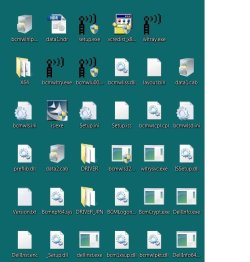
It is a mess! It looks like the files are mostly related to the Dell wireless programs, but moved all the "questionable" icons into one area of the desktop and am sending the screenshot of that part of the screen.DesktopIcons.jpg
I think I've attached the screen shot :-)
 

My Computer

Computer type
Laptop
Computer Manufacturer/Model Number
dell xps m1530
OS
windows 7 premium

My Computer

Computer Manufacturer/Model Number
HP, Dell, Gateway, Toshiba - 4 laptops and 2 desktops
OS
Vista, Windows7, Mint Mate, Zorin, Windows 8
CPU
from 1.6GHz Duo to i7
Monitor(s) Displays
2x HP w2207
Hard Drives
5x HDD, 7x SSD, 12x Externals
Keyboard
with trackball - no mices
Mouse
Trackball mice
Internet Speed
DSL 6000
It looks like what whs said a program unpacked to your desktop, it looks to be a wifi program, if it is and the wifi is working then just put them in a new folder and make sure it's working OK for a few days then delete them.

Jerry
 

My Computer

Computer type
Laptop
Computer Manufacturer/Model Number
Sager NP9170
OS
Win 7 Pro x64 / Win 10 Pro
CPU
Intel(R) Core(TM) i7-3630QM CPU @ 2.40GHz
Motherboard
CLEVO P170EM
Memory
12 GB
Graphics Card(s)
(1) Intel(R) HD Graphics 4000 (2) NVIDIA GeForce GTX 675M
Sound Card
(1) Realtek High Definition Audio (2) Intel(R) Display Aud
Monitor(s) Displays
17.3
Screen Resolution
1920x1080
Hard Drives
(1) Samsung 860 EVO 500GB(OS) (1) Samsung 860 EVO 500GB(Data)
Keyboard
Backlite
Antivirus
MSE, Malwarebytes Pro
Browser
Firefox
Other Info
DESKTOP: Custom-built.
OS: Win 10 Pro x64.
CASE: Rosewill R5.
CPU: Intel I5 4670K CPU @ 3.40GHz.
CPU COOLER: Cool Master Hyper 212 EVO.
MOTHERBOARD: Asus Z87-A.
MEMORY: Kingston HyperX 2x4 GB.
GPU: Nvidia Geforce 650 TI.
PSU: Corsair TX750.
DRIVES: (1) Samsung 840 120 GB SSD (2) Western Digital blue 500 GB 7200 RPM.

My Computer

Computer type
PC/Desktop
Computer Manufacturer/Model Number
1. HP p6733w Desktop 2. HP Envy 700-515xt Desktop
OS
1. Windows 7 Home Premium sp1 - 64bit 2. Windows 7 Pro sp1 - 64bit
CPU
1. AMD Phenom II x2 511 3.4GHz 2. Intel i7-4790 Quad 4.0GHz
Motherboard
1. N-Alvorix-RS880-uATX 2. Kaili2
Memory
1. 5 GB - DDR3 2. 8GB DDR3-1600MHz
Graphics Card(s)
Integrated 1. ATI Radeon 4200 2. Intel HD Graphics 4600
Sound Card
1. Realtek High Definition Audio 2. Realtek (Neutered Beats)
Monitor(s) Displays
1. Acer V193L 2. HP 2311 Series Wide LCD
Screen Resolution
1. 1280 x 1024 2. 1920 x 1080
Hard Drives
1. 750 GB - 7200 RPM SATA 2. 1TB 7200 RPM SATA
PSU
1. 250w 2. 300w
Cooling
Stock
Keyboard
Logitech USB keyboard
Mouse
Logitech USB optical mouse
Internet Speed
1.0 - 2.0 mbps
Antivirus
Eset Smart Security v9.0.349.0
Browser
Pale Moon
If I hover over some of the icons, it says "Dell Wireless WLAN card" or "Broadcom 802.11 Network Adapter Installation Utility" so most of them do seem to be associated with the Dell product. My wireless card is working fine, I think. I can communicate wirelessly with the other devices on my home network. One of the .exe files in an installer, another is an uninstaller, yet another is a setup file.
Is it even possible that the program could run from my desktop?
If I put them in a folder (on my desktop, is that what you meant?) and later delete them, could they be restored from the recycle bin?
I did create a restore point today, so I have something I can go back to in case of problems.
 

My Computer

Computer type
Laptop
Computer Manufacturer/Model Number
dell xps m1530
OS
windows 7 premium
Re "info select", is that also something that could run from the desktop, or should I be able to find that in Program files?
 

My Computer

Computer type
Laptop
Computer Manufacturer/Model Number
dell xps m1530
OS
windows 7 premium
If it was installed to the desktop I doubt it would be in Program Files but you could look under "Programs and Features" in the Control Panel to see if it's installed.

I looked up wltryscv.exe:
"wltrysvc.exe is a process belonging to the Broadcom Corporation Wireless Network Tray Applet, which interacts with your broadband hardware."

Source: http://www.processlibrary.com/en/directory/files/wltrysvc/25512/

bcm1xsup.dll
"bcm1xsup.dll is a WLAN Driver belonging to Dell Wireless Mini Card driver from Dell Corporation"

Source:
http://www.processlibrary.com/en/directory/files/bcm1xsup/234000/

bcmwlcpl.cpl
"bcmwlcpl.cpl is a bcmwlcpl.cpl belonging to Dell Wireless WLAN Card Utility from Dell Inc"

Source:
http://www.processlibrary.com/en/directory/files/bcmwlcpl/404183/

issetup.dll
"Internet Connection Sharing Setup This process is still being reviewed."

Source:
http://www.processlibrary.com/en/directory/files/issetup/314969/

Considering the above is.exe may belong to the issetup

It is possible that all of this was accidentally unzipped to the desktop. This I will have to leave for someone with more expertise.

But, if it were me I'd do as you described:
"If I put them in a folder (on my desktop"

If everything continues to work ok you can put the folder some where for use later if something goes wrong. If things go wrong right away you can paste them back to the desktop.
 
Last edited:

My Computer

Computer type
PC/Desktop
Computer Manufacturer/Model Number
1. HP p6733w Desktop 2. HP Envy 700-515xt Desktop
OS
1. Windows 7 Home Premium sp1 - 64bit 2. Windows 7 Pro sp1 - 64bit
CPU
1. AMD Phenom II x2 511 3.4GHz 2. Intel i7-4790 Quad 4.0GHz
Motherboard
1. N-Alvorix-RS880-uATX 2. Kaili2
Memory
1. 5 GB - DDR3 2. 8GB DDR3-1600MHz
Graphics Card(s)
Integrated 1. ATI Radeon 4200 2. Intel HD Graphics 4600
Sound Card
1. Realtek High Definition Audio 2. Realtek (Neutered Beats)
Monitor(s) Displays
1. Acer V193L 2. HP 2311 Series Wide LCD
Screen Resolution
1. 1280 x 1024 2. 1920 x 1080
Hard Drives
1. 750 GB - 7200 RPM SATA 2. 1TB 7200 RPM SATA
PSU
1. 250w 2. 300w
Cooling
Stock
Keyboard
Logitech USB keyboard
Mouse
Logitech USB optical mouse
Internet Speed
1.0 - 2.0 mbps
Antivirus
Eset Smart Security v9.0.349.0
Browser
Pale Moon
Thanks, I went to the link you provided, lots of good information at that site -- I'll bookmark it.
I did check the control panel and there are a couple of entries related to wireless devices, but of course it's impossible to tell from the name whether it's the applet!
Also didn't see an entry for Info Select.
 

My Computer

Computer type
Laptop
Computer Manufacturer/Model Number
dell xps m1530
OS
windows 7 premium
Thank you, scr. I'm going to go the "sequester in a folder" route and see what happens. I really appreciate your taking the time to look into my questions/problem! And thanks to whs and jerry, as well, for the help. :)
I'll report back in a couple of days, just for closure!
 

My Computer

Computer type
Laptop
Computer Manufacturer/Model Number
dell xps m1530
OS
windows 7 premium
Hope everything works out.
 

My Computer

Computer type
PC/Desktop
Computer Manufacturer/Model Number
1. HP p6733w Desktop 2. HP Envy 700-515xt Desktop
OS
1. Windows 7 Home Premium sp1 - 64bit 2. Windows 7 Pro sp1 - 64bit
CPU
1. AMD Phenom II x2 511 3.4GHz 2. Intel i7-4790 Quad 4.0GHz
Motherboard
1. N-Alvorix-RS880-uATX 2. Kaili2
Memory
1. 5 GB - DDR3 2. 8GB DDR3-1600MHz
Graphics Card(s)
Integrated 1. ATI Radeon 4200 2. Intel HD Graphics 4600
Sound Card
1. Realtek High Definition Audio 2. Realtek (Neutered Beats)
Monitor(s) Displays
1. Acer V193L 2. HP 2311 Series Wide LCD
Screen Resolution
1. 1280 x 1024 2. 1920 x 1080
Hard Drives
1. 750 GB - 7200 RPM SATA 2. 1TB 7200 RPM SATA
PSU
1. 250w 2. 300w
Cooling
Stock
Keyboard
Logitech USB keyboard
Mouse
Logitech USB optical mouse
Internet Speed
1.0 - 2.0 mbps
Antivirus
Eset Smart Security v9.0.349.0
Browser
Pale Moon
Back
Top