Multiple "invalid" operations. System Restore inoperable.

pxfragonard

New member
Power User
VIP
Local time
8:04 AM
Messages
339
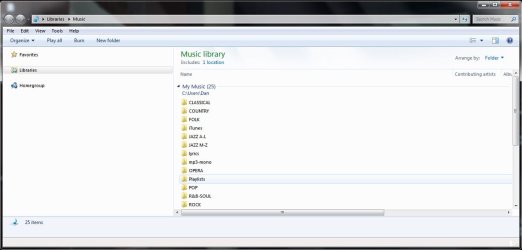
All of a sudden I've been getting a bunch of "invalid" operations. :cry: It seems to have started with Windows explorer being buggy. It would take a long time for the contents of a folder to be listed and if I'd click off and restart I'd just get a bunch of freewheeling clocks under everything, Desktop, Libraries, Homegroup, Computer, Network. Everything... no details available. (See Explorer_Glitch_Sept-17-2014.jpg)

I'd run CHKDSK and it would get sorted out. (See CHKDSKResults.txt for latest)

But then I'd get these "invalid" function notices. (Sorry, no images for this):( For example, I'd just click on "C" in explorer and get nothing but the notice that it was an invalid path... I'd reboot and it happened again after trying to close a program: "Invalid pointer operation." I tried shutting down but it wouldn't shut down because the program I was trying to shut down wasn't shut down because of the "invalid pointer operation." So I had to force a shutdown.

Very strange. I tried a system restore without success. A file wasn't available, it said, probably because of a firewall problem. I disabled the anti-virus but it wouldn't work still. (See SysRestoreFail.jpg)

I'm going to enclose administrative event from event viewer (I don't know if that will help) and a notice about the inoperability of the system restore. I wish I had a picture of the warnings and the codes but I don't. (see AdminEvents.jpg for this... I couldn't upload the .evxt file)

I hope someone can help because my computer knowledge is very limited. For now I'm going to close all programs from Task Manager and try to avoid these problems for the moment. I've backed everything up in preparation for the worst.

Next step restore from an image. This has worked before. I have a repair disc and three restore discs but don't know how to use them or the consequences. I'm hoping there's enough info here for a simple solution....
 

Attachments

  • SysRestoreFail.jpg
    SysRestoreFail.jpg
    26.5 KB · Views: 38
  • CHKDSKResults.txt
    CHKDSKResults.txt
    74 KB · Views: 0
  • Explorer_Glitch_Sept-17-2014.jpg
    Explorer_Glitch_Sept-17-2014.jpg
    44.8 KB · Views: 2
  • AdminEvents.jpg
    AdminEvents.jpg
    391.2 KB · Views: 5

My Computer

Computer Manufacturer/Model Number
HP Pavilion p6745f
OS
Microsoft Windows 7 Home Premium 64-bit 7601 Multiprocessor Free Service Pack 1
CPU
Intel(R) Core(TM) i5-2300 CPU @ 2.80GHz
Motherboard
PEGATRON CORPORATION 2AB6
Memory
6 GB
Graphics Card(s)
Radeon 6750 1gb
Sound Card
(1) IDT High Definition Audio CODEC (2) Intel(R) Display A
Monitor(s) Displays
Acer x193w
Hard Drives
(1) WDC WD15EARS-60MVWB0 (2) Generic- Compact Flash USB Device (3) Generic- MS/MS-Pro USB Device (4) Generic- SD/MMC USB Device (5) Generic- SM/xD-Picture USB Device (6) WD My Book 1110 USB Device
PSU
Internal 500W (100V-240V)
Case
Mid-size ATX
Cooling
unknown
Keyboard
HP usb multimedia keyboard
Mouse
HP usb compliant mouse
Internet Speed
256 kbps
Other Info
Ver: CHI_713.bin vCHI7.13
Thanks very much. I understand some of these things and have tried them, others I'll look up and learn.
 

My Computer

Computer Manufacturer/Model Number
HP Pavilion p6745f
OS
Microsoft Windows 7 Home Premium 64-bit 7601 Multiprocessor Free Service Pack 1
CPU
Intel(R) Core(TM) i5-2300 CPU @ 2.80GHz
Motherboard
PEGATRON CORPORATION 2AB6
Memory
6 GB
Graphics Card(s)
Radeon 6750 1gb
Sound Card
(1) IDT High Definition Audio CODEC (2) Intel(R) Display A
Monitor(s) Displays
Acer x193w
Hard Drives
(1) WDC WD15EARS-60MVWB0 (2) Generic- Compact Flash USB Device (3) Generic- MS/MS-Pro USB Device (4) Generic- SD/MMC USB Device (5) Generic- SM/xD-Picture USB Device (6) WD My Book 1110 USB Device
PSU
Internal 500W (100V-240V)
Case
Mid-size ATX
Cooling
unknown
Keyboard
HP usb multimedia keyboard
Mouse
HP usb compliant mouse
Internet Speed
256 kbps
Other Info
Ver: CHI_713.bin vCHI7.13

My Computer

Computer Manufacturer/Model Number
HP Pavilion p6745f
OS
Microsoft Windows 7 Home Premium 64-bit 7601 Multiprocessor Free Service Pack 1
CPU
Intel(R) Core(TM) i5-2300 CPU @ 2.80GHz
Motherboard
PEGATRON CORPORATION 2AB6
Memory
6 GB
Graphics Card(s)
Radeon 6750 1gb
Sound Card
(1) IDT High Definition Audio CODEC (2) Intel(R) Display A
Monitor(s) Displays
Acer x193w
Hard Drives
(1) WDC WD15EARS-60MVWB0 (2) Generic- Compact Flash USB Device (3) Generic- MS/MS-Pro USB Device (4) Generic- SD/MMC USB Device (5) Generic- SM/xD-Picture USB Device (6) WD My Book 1110 USB Device
PSU
Internal 500W (100V-240V)
Case
Mid-size ATX
Cooling
unknown
Keyboard
HP usb multimedia keyboard
Mouse
HP usb compliant mouse
Internet Speed
256 kbps
Other Info
Ver: CHI_713.bin vCHI7.13
Greg is inquiring if you have scanned with your anti virus program (AV).
He is also recommend that you do.
 

My Computer

Computer type
PC/Desktop
Computer Manufacturer/Model Number
Home made Desktop
OS
Windows 10 Pro. 64/ version 1709 Windows 7 Pro/64
CPU
Intel i7-6800K @ 4.3
Motherboard
ASUS X-99 Deluxe II
Memory
Corsair Platinum 16 gig @2400
Graphics Card(s)
EVGA GTX 1070 OC
Monitor(s) Displays
Asus 27" LED LCD/VE278Q
Screen Resolution
1920-1080 or 1280-720 HDMI
Hard Drives
INTEL SSD 730-240 Gb Sata 3.0/
PSU
EVGA Platium 1200W
Case
Phanteks Luxe Tempered Glass 8 fans/ one radiator
Cooling
XSPC/ Water Cooled CPU
Keyboard
Das 4 Professional
Mouse
Logitech M705/MX Anywhere 2-S
Internet Speed
100 mbits
Antivirus
Microsoft Security Essentials/ Malwarebytes Premium 3.0/ SAS
Browser
I.E. 11 default/Firefox/ ISP Time Warner Cable/Spectrum
Other Info
LG BluRay Burner/
Sound system-KLipsch-THX/
Icy Dock ssd Hot Swap bays.
Test your hard drive with the maker's HD Diagnostic extended CD scan, followed by another full Disk Check.

Run a full scan with Malwarebytes and your AV, then SFC to test System Files, establish a Clean Boot, cull the logs for repeat errors to resolve, utilize System resources from the the Troubleshooting Steps for Windows 7
Sorry, I can't identify what "your AV" is. Could you please explain it?

These give a quick list of steps for you to try which are detailed more thoroughly in the blue linked tutorial. Did you click on it?
 

My Computer

Computer Manufacturer/Model Number
HP Pavilion p6745f
OS
Microsoft Windows 7 Home Premium 64-bit 7601 Multiprocessor Free Service Pack 1
CPU
Intel(R) Core(TM) i5-2300 CPU @ 2.80GHz
Motherboard
PEGATRON CORPORATION 2AB6
Memory
6 GB
Graphics Card(s)
Radeon 6750 1gb
Sound Card
(1) IDT High Definition Audio CODEC (2) Intel(R) Display A
Monitor(s) Displays
Acer x193w
Hard Drives
(1) WDC WD15EARS-60MVWB0 (2) Generic- Compact Flash USB Device (3) Generic- MS/MS-Pro USB Device (4) Generic- SD/MMC USB Device (5) Generic- SM/xD-Picture USB Device (6) WD My Book 1110 USB Device
PSU
Internal 500W (100V-240V)
Case
Mid-size ATX
Cooling
unknown
Keyboard
HP usb multimedia keyboard
Mouse
HP usb compliant mouse
Internet Speed
256 kbps
Other Info
Ver: CHI_713.bin vCHI7.13
Test your hard drive with the maker's HD Diagnostic extended CD scan, followed by another full Disk Check.

Run a full scan with Malwarebytes and your AV, then SFC to test System Files, establish a Clean Boot, cull the logs for repeat errors to resolve, utilize System resources from the the Troubleshooting Steps for Windows 7
Sorry, I can't identify what "your AV" is. Could you please explain it?

These give a quick list of steps for you to try which are detailed more thoroughly in the blue linked tutorial. Did you click on it?
Yes, thank you, it's quite a list! I'm looking forward to learning more about these mysterious machines!
 

My Computer

Computer Manufacturer/Model Number
HP Pavilion p6745f
OS
Microsoft Windows 7 Home Premium 64-bit 7601 Multiprocessor Free Service Pack 1
CPU
Intel(R) Core(TM) i5-2300 CPU @ 2.80GHz
Motherboard
PEGATRON CORPORATION 2AB6
Memory
6 GB
Graphics Card(s)
Radeon 6750 1gb
Sound Card
(1) IDT High Definition Audio CODEC (2) Intel(R) Display A
Monitor(s) Displays
Acer x193w
Hard Drives
(1) WDC WD15EARS-60MVWB0 (2) Generic- Compact Flash USB Device (3) Generic- MS/MS-Pro USB Device (4) Generic- SD/MMC USB Device (5) Generic- SM/xD-Picture USB Device (6) WD My Book 1110 USB Device
PSU
Internal 500W (100V-240V)
Case
Mid-size ATX
Cooling
unknown
Keyboard
HP usb multimedia keyboard
Mouse
HP usb compliant mouse
Internet Speed
256 kbps
Other Info
Ver: CHI_713.bin vCHI7.13
This is a very good way to learn. :geek:

Let us know what you find as you go if you want. Other steps may be indicated by your findings.
 
So far so good and the computer is acting better.... It's going to take a few days to try all this as I'm new to it... but it's fascinating, really... thanks for your help.
 

My Computer

Computer Manufacturer/Model Number
HP Pavilion p6745f
OS
Microsoft Windows 7 Home Premium 64-bit 7601 Multiprocessor Free Service Pack 1
CPU
Intel(R) Core(TM) i5-2300 CPU @ 2.80GHz
Motherboard
PEGATRON CORPORATION 2AB6
Memory
6 GB
Graphics Card(s)
Radeon 6750 1gb
Sound Card
(1) IDT High Definition Audio CODEC (2) Intel(R) Display A
Monitor(s) Displays
Acer x193w
Hard Drives
(1) WDC WD15EARS-60MVWB0 (2) Generic- Compact Flash USB Device (3) Generic- MS/MS-Pro USB Device (4) Generic- SD/MMC USB Device (5) Generic- SM/xD-Picture USB Device (6) WD My Book 1110 USB Device
PSU
Internal 500W (100V-240V)
Case
Mid-size ATX
Cooling
unknown
Keyboard
HP usb multimedia keyboard
Mouse
HP usb compliant mouse
Internet Speed
256 kbps
Other Info
Ver: CHI_713.bin vCHI7.13
Everything's working well, system file check, CHKDSK, memory checks... until I got to the clean boot and I'm stalled here. I did everything recommended for a clean boot on the microsoft page but when I click "apply" after disabling all services after hiding all ms services, the little wheel just goes round and round... I'm gonna go for a long walk and see if it resolves itself. I've read that windows seven uses a lot of resources and needs more memory for this kind of thing so maybe it's slowly working its way through. I may have to restart, and, if it's still running, click "force shutdown" if it doesn't resolve and then after the restart maybe stop one service at a time til they're all done. Does that make sense?
 
Last edited:

My Computer

Computer Manufacturer/Model Number
HP Pavilion p6745f
OS
Microsoft Windows 7 Home Premium 64-bit 7601 Multiprocessor Free Service Pack 1
CPU
Intel(R) Core(TM) i5-2300 CPU @ 2.80GHz
Motherboard
PEGATRON CORPORATION 2AB6
Memory
6 GB
Graphics Card(s)
Radeon 6750 1gb
Sound Card
(1) IDT High Definition Audio CODEC (2) Intel(R) Display A
Monitor(s) Displays
Acer x193w
Hard Drives
(1) WDC WD15EARS-60MVWB0 (2) Generic- Compact Flash USB Device (3) Generic- MS/MS-Pro USB Device (4) Generic- SD/MMC USB Device (5) Generic- SM/xD-Picture USB Device (6) WD My Book 1110 USB Device
PSU
Internal 500W (100V-240V)
Case
Mid-size ATX
Cooling
unknown
Keyboard
HP usb multimedia keyboard
Mouse
HP usb compliant mouse
Internet Speed
256 kbps
Other Info
Ver: CHI_713.bin vCHI7.13
Problem didn't resolve. Had to shut down but it won't log off. Maybe because I ran msconfig as admin, it won't log me off because I'm already logged off.... the last time I had to do a hard shut down and start in safe mode, run a chkdsk with fix and then, in again. Should I try to run msconfig without admin privileges (I'm the only one on the computer anyway) and shut off one service at a time to get a clean boot?
 

My Computer

Computer Manufacturer/Model Number
HP Pavilion p6745f
OS
Microsoft Windows 7 Home Premium 64-bit 7601 Multiprocessor Free Service Pack 1
CPU
Intel(R) Core(TM) i5-2300 CPU @ 2.80GHz
Motherboard
PEGATRON CORPORATION 2AB6
Memory
6 GB
Graphics Card(s)
Radeon 6750 1gb
Sound Card
(1) IDT High Definition Audio CODEC (2) Intel(R) Display A
Monitor(s) Displays
Acer x193w
Hard Drives
(1) WDC WD15EARS-60MVWB0 (2) Generic- Compact Flash USB Device (3) Generic- MS/MS-Pro USB Device (4) Generic- SD/MMC USB Device (5) Generic- SM/xD-Picture USB Device (6) WD My Book 1110 USB Device
PSU
Internal 500W (100V-240V)
Case
Mid-size ATX
Cooling
unknown
Keyboard
HP usb multimedia keyboard
Mouse
HP usb compliant mouse
Internet Speed
256 kbps
Other Info
Ver: CHI_713.bin vCHI7.13
Are you sure you hid All MS Services? If so then it sounds like more serious corruption that is hanging the PC since nothing should be left to disable that is critical at all - except your AV which is why it's excepted.

Try a few reboots.

If this fails, try SFC after full Malwarebytes scan.
 
I managed to achieve it in safe mode. But then I realized I didn't know what you meant by culling the logs. !!
 

My Computer

Computer Manufacturer/Model Number
HP Pavilion p6745f
OS
Microsoft Windows 7 Home Premium 64-bit 7601 Multiprocessor Free Service Pack 1
CPU
Intel(R) Core(TM) i5-2300 CPU @ 2.80GHz
Motherboard
PEGATRON CORPORATION 2AB6
Memory
6 GB
Graphics Card(s)
Radeon 6750 1gb
Sound Card
(1) IDT High Definition Audio CODEC (2) Intel(R) Display A
Monitor(s) Displays
Acer x193w
Hard Drives
(1) WDC WD15EARS-60MVWB0 (2) Generic- Compact Flash USB Device (3) Generic- MS/MS-Pro USB Device (4) Generic- SD/MMC USB Device (5) Generic- SM/xD-Picture USB Device (6) WD My Book 1110 USB Device
PSU
Internal 500W (100V-240V)
Case
Mid-size ATX
Cooling
unknown
Keyboard
HP usb multimedia keyboard
Mouse
HP usb compliant mouse
Internet Speed
256 kbps
Other Info
Ver: CHI_713.bin vCHI7.13
Thanks, Greg! That's very helpful. One of the events that's a constant pain and source of critical error is this one:

Log Name: Microsoft-Windows-Dhcp-Client/Admin
Source: Microsoft-Windows-Dhcp-Client
Date: 11/13/2014 2:19:57 PM
Event ID: 1001
Task Category: Address Configuration State Event
Level: Error
Keywords:
User: LOCAL SERVICE
Computer: Dan-HP
Description:
Your computer was not assigned an address from the network (by the DHCP Server) for the Network Card with network address 0x2226826096FF. The following error occurred: 0x79. Your computer will continue to try and obtain an address on its own from the network address (DHCP) server.
Event Xml:
<Event xmlns="http://schemas.microsoft.com/win/2004/08/events/event">
<System>
<Provider Name="Microsoft-Windows-Dhcp-Client" Guid="{15A7A4F8-0072-4EAB-ABAD-F98A4D666AED}" />
<EventID>1001</EventID>
<Version>0</Version>
<Level>2</Level>
<Task>3</Task>
<Opcode>75</Opcode>
<Keywords>0x4000000000000000</Keywords>
<TimeCreated SystemTime="2014-11-13T19:19:57.272095000Z" />
<EventRecordID>2449</EventRecordID>
<Correlation />
<Execution ProcessID="708" ThreadID="1624" />
<Channel>Microsoft-Windows-Dhcp-Client/Admin</Channel>
<Computer>Dan-HP</Computer>
<Security UserID="S-1-5-19" />
</System>
<EventData>
<Data Name="HWLength">6</Data>
<Data Name="HWAddress">2226826096FF</Data>
<Data Name="StatusCode">121</Data>
</EventData>
</Event>

And I googled it and found that it has to do with the computer looking for a wireless network that I never set up since I'm just wired! No wonder! The problem is that, on the page I googled, they're way over my head.

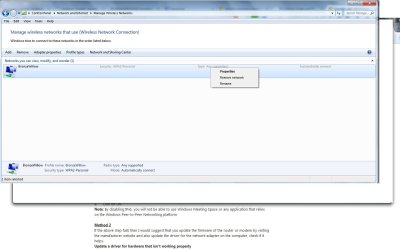
So I did go to the Network Sharing Services, clicked on Manage Wireless Networks and was just about to click "remove network" when I got worried I wouldn't be able to access the internet. It's probably worrying over nothing since it seems it's only for he wireless I don't use. But I thought I'd check and I'll promise not to do it again. I'm sure you have better things to do that walk people through things like this.

Anyway, that's one of the most continuous errors.
 

Attachments

  • wireless.jpg
    wireless.jpg
    83.9 KB · Views: 3
Last edited:

My Computer

Computer Manufacturer/Model Number
HP Pavilion p6745f
OS
Microsoft Windows 7 Home Premium 64-bit 7601 Multiprocessor Free Service Pack 1
CPU
Intel(R) Core(TM) i5-2300 CPU @ 2.80GHz
Motherboard
PEGATRON CORPORATION 2AB6
Memory
6 GB
Graphics Card(s)
Radeon 6750 1gb
Sound Card
(1) IDT High Definition Audio CODEC (2) Intel(R) Display A
Monitor(s) Displays
Acer x193w
Hard Drives
(1) WDC WD15EARS-60MVWB0 (2) Generic- Compact Flash USB Device (3) Generic- MS/MS-Pro USB Device (4) Generic- SD/MMC USB Device (5) Generic- SM/xD-Picture USB Device (6) WD My Book 1110 USB Device
PSU
Internal 500W (100V-240V)
Case
Mid-size ATX
Cooling
unknown
Keyboard
HP usb multimedia keyboard
Mouse
HP usb compliant mouse
Internet Speed
256 kbps
Other Info
Ver: CHI_713.bin vCHI7.13
You should be OK to remove that.

I am using wired and have nothing showing in "manage wireless connections".

Alternatively, you could right click > properties > uncheck the "Connect automatically when this network is in range".
 

My Computers

System One System Two

  • Computer type
    PC/Desktop
    OS
    7 X64
    CPU
    i5 8400
    Motherboard
    gigabyte b365m ds3h
    Memory
    2x8gb 3200mhz
    Hard Drives
    various
    PSU
    pure power 11 400w cm
    Case
    Coolermaster
    Cooling
    cryorig m9i
  • Computer type
    PC/Desktop
    OS
    7x64
    CPU
    g5400
    Motherboard
    ga b365m ds3h
    Memory
    8gb ddr4 2400
    PSU
    xfx pro 450w
I am too lazy to read the entire thread, but if you are having multiple problems still, you might be best trying a Repair Installl. Not sure if Greg already suggested that.
 

My Computers

System One System Two

  • Computer type
    PC/Desktop
    OS
    7 X64
    CPU
    i5 8400
    Motherboard
    gigabyte b365m ds3h
    Memory
    2x8gb 3200mhz
    Hard Drives
    various
    PSU
    pure power 11 400w cm
    Case
    Coolermaster
    Cooling
    cryorig m9i
  • Computer type
    PC/Desktop
    OS
    7x64
    CPU
    g5400
    Motherboard
    ga b365m ds3h
    Memory
    8gb ddr4 2400
    PSU
    xfx pro 450w
Was waiting to see what infection and SFC scans find.

Note that Repair Install (link in tutorial) cannot be run from Safe Mode.
 
Back
Top