Multiple Windows Server 2008 R2

shahidcmc

New member
Local time
12:27 AM
Messages
17
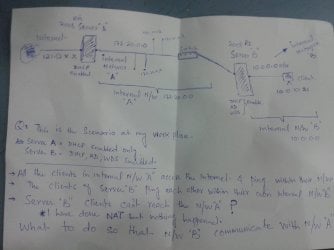
I have attached the image plz help me out ....

want to make communicate all the clients of "Server B" with "Server A".....
 

Attachments

  • server.jpg
    server.jpg
    1.5 MB · Views: 5

My Computer

Computer type
PC/Desktop
OS
SERVER 2008 R2
Make sure Routing is enabled on Server B - https://technet.microsoft.com/en-us/library/cc770798(v=ws.10).aspx

Then if still not working (I believe it should), try adding the static route on Server B (https://technet.microsoft.com/en-us/library/cc757323(v=ws.10).aspx):

Command is:
Code:
[B]route add [/B][I]destination [/I][B]mask [/B][I]subnetmask [/I][I]gateway [/I][B]metric [/B][I]costmetric [/I][B]if [/B][I]interface[/I]

route add -p ServerA-IP-towards-Internal-A-Network mask Internal-A-subnetmask ServerB-IP-towards-Internal-A-Network

Just an example would be, assuming IPs are set like this for your network
route add -p 172.20.0.1 mask 255.255.0.0 172.20.0.254
 

My Computer

Computer type
PC/Desktop
Computer Manufacturer/Model Number
Custom Build
OS
Windows 7 Ultimate x64 SP1
CPU
AMD Phenom 2 1090T
Motherboard
Gigabyte GA-890FXA-UD5
Memory
2x8GB Kingston HyperX Fury Black 1600Mhz Unganged
Graphics Card(s)
MSI GTX 970 Gaming 4G
Sound Card
Realtek On-Board HD 7.1 Audio / Logitech G35
Monitor(s) Displays
3xAcer GD245HQ
Screen Resolution
1920x1080
Hard Drives
Samsung 850 Pro 512GB SSD - OS /
WD Caviar Black SATA 3 - 1 TBx2 - Dynamic RAID 0 /
WD Caviar Green SATA 2 - 640GBx2 - Dynamic RAID 0 /
WD Caviar Green SATA 2 - 640GB - Internal Backup /
Seagate Barracude SATA 3 - 3TB - External Backup/ Sync
PSU
HighPower 1000W
Case
Cooler Master HAF 932
Cooling
Noctua NH-D14
Keyboard
Logitech G19
Mouse
Logitech G500
Internet Speed
100/4 Mbit Cable (100GB quota)
Antivirus
ZoneAlarm Extreme Security / MBAM Pro / MBAE Free / SAS Free
Browser
IE 11 - Firefox - Chrome
Other Info
Logitech F710/ G27/ G940/ Z5500 // TrackIR 5 // Nvidia 3D Surround Vision
Tnx for response... Let me try it but before i move forward dont you think i should touch routing on the server "A" to...!!!?
 

My Computer

Computer type
PC/Desktop
OS
SERVER 2008 R2
The command is for making network B computers to reach Server A, which you asked. If you have more requirements list them here. For example, you didn't say anything about Internet connectivity requirements.
 

My Computer

Computer type
PC/Desktop
Computer Manufacturer/Model Number
Custom Build
OS
Windows 7 Ultimate x64 SP1
CPU
AMD Phenom 2 1090T
Motherboard
Gigabyte GA-890FXA-UD5
Memory
2x8GB Kingston HyperX Fury Black 1600Mhz Unganged
Graphics Card(s)
MSI GTX 970 Gaming 4G
Sound Card
Realtek On-Board HD 7.1 Audio / Logitech G35
Monitor(s) Displays
3xAcer GD245HQ
Screen Resolution
1920x1080
Hard Drives
Samsung 850 Pro 512GB SSD - OS /
WD Caviar Black SATA 3 - 1 TBx2 - Dynamic RAID 0 /
WD Caviar Green SATA 2 - 640GBx2 - Dynamic RAID 0 /
WD Caviar Green SATA 2 - 640GB - Internal Backup /
Seagate Barracude SATA 3 - 3TB - External Backup/ Sync
PSU
HighPower 1000W
Case
Cooler Master HAF 932
Cooling
Noctua NH-D14
Keyboard
Logitech G19
Mouse
Logitech G500
Internet Speed
100/4 Mbit Cable (100GB quota)
Antivirus
ZoneAlarm Extreme Security / MBAM Pro / MBAE Free / SAS Free
Browser
IE 11 - Firefox - Chrome
Other Info
Logitech F710/ G27/ G940/ Z5500 // TrackIR 5 // Nvidia 3D Surround Vision
yes exactly i would like that too,,, if plz...
 

My Computer

Computer type
PC/Desktop
OS
SERVER 2008 R2
Lets go step by step:
Is your network at the moment functional? Is DHCP working on both servers?

First enable Routing on both Servers A and B, and see what you can achieve like that. Please run in cmd after enabling routing:
Code:
route print |clip
It will not output anything visible but copy the results to the clipboard directly. CTRL+V here (or to a notepad) once you run it. Attach both servers.
 

My Computer

Computer type
PC/Desktop
Computer Manufacturer/Model Number
Custom Build
OS
Windows 7 Ultimate x64 SP1
CPU
AMD Phenom 2 1090T
Motherboard
Gigabyte GA-890FXA-UD5
Memory
2x8GB Kingston HyperX Fury Black 1600Mhz Unganged
Graphics Card(s)
MSI GTX 970 Gaming 4G
Sound Card
Realtek On-Board HD 7.1 Audio / Logitech G35
Monitor(s) Displays
3xAcer GD245HQ
Screen Resolution
1920x1080
Hard Drives
Samsung 850 Pro 512GB SSD - OS /
WD Caviar Black SATA 3 - 1 TBx2 - Dynamic RAID 0 /
WD Caviar Green SATA 2 - 640GBx2 - Dynamic RAID 0 /
WD Caviar Green SATA 2 - 640GB - Internal Backup /
Seagate Barracude SATA 3 - 3TB - External Backup/ Sync
PSU
HighPower 1000W
Case
Cooler Master HAF 932
Cooling
Noctua NH-D14
Keyboard
Logitech G19
Mouse
Logitech G500
Internet Speed
100/4 Mbit Cable (100GB quota)
Antivirus
ZoneAlarm Extreme Security / MBAM Pro / MBAE Free / SAS Free
Browser
IE 11 - Firefox - Chrome
Other Info
Logitech F710/ G27/ G940/ Z5500 // TrackIR 5 // Nvidia 3D Surround Vision
really appreciate the way you are responding... i will send it but firstly about the command for static route you have sent me i was unable to understand the syntax as i am configuring a rout through "server 2008 routing Remote access console"..

I am also attaching the screenshot you can check it there and guide me through it i would explain it a little...

Interface Internal ( The one that is connected to the 10.10.10.0 network) having IP 10.10.10.10

Destination 172.20.0.0 ( Network ID to which i want to get access)

Gateway 172.20.13.16 ( The IP of another interface Lan card to which the network 172.20.0.0 is connected)

is this the right way to introduce Static route ... if yes then What about "route add -p" command... ?

" One thing to mention the Server B itself ping its 172.20.13.16 Lan interface and Server A IP 172.20.0.1 as well but its clients failed to communicate with them "
 

Attachments

  • staticroute.png
    staticroute.png
    51.2 KB · Views: 0

My Computer

Computer type
PC/Desktop
OS
SERVER 2008 R2
Its the routing table print of above configured setting
 

Attachments

  • routingt table.png
    routingt table.png
    62.3 KB · Views: 1

My Computer

Computer type
PC/Desktop
OS
SERVER 2008 R2
Command should be doing the same thing as the graphical interface.

In order to have a better descriptive network, perhaps change the ServerB interface names to Network10 and Network172 (it doesn't change how the network works whatever name you give them). I believe you can change from Network Interfaces.

Did you add that 172.20.0.0/255.255.0.0 route with gateway 172.20.13.16 on Interface 10.10.10.10? This doesn't look right. It is sending packets destined for 172.20.0.0 back on to 10.0.0.0 network. Delete that static one please.

By the way, did you actually test ServerA connectivity from networkB (after deleting the above static)? Not by ping but in Explorer address bar \\ServerA-Name or \\ServerA-IP-Address?
 

My Computer

Computer type
PC/Desktop
Computer Manufacturer/Model Number
Custom Build
OS
Windows 7 Ultimate x64 SP1
CPU
AMD Phenom 2 1090T
Motherboard
Gigabyte GA-890FXA-UD5
Memory
2x8GB Kingston HyperX Fury Black 1600Mhz Unganged
Graphics Card(s)
MSI GTX 970 Gaming 4G
Sound Card
Realtek On-Board HD 7.1 Audio / Logitech G35
Monitor(s) Displays
3xAcer GD245HQ
Screen Resolution
1920x1080
Hard Drives
Samsung 850 Pro 512GB SSD - OS /
WD Caviar Black SATA 3 - 1 TBx2 - Dynamic RAID 0 /
WD Caviar Green SATA 2 - 640GBx2 - Dynamic RAID 0 /
WD Caviar Green SATA 2 - 640GB - Internal Backup /
Seagate Barracude SATA 3 - 3TB - External Backup/ Sync
PSU
HighPower 1000W
Case
Cooler Master HAF 932
Cooling
Noctua NH-D14
Keyboard
Logitech G19
Mouse
Logitech G500
Internet Speed
100/4 Mbit Cable (100GB quota)
Antivirus
ZoneAlarm Extreme Security / MBAM Pro / MBAE Free / SAS Free
Browser
IE 11 - Firefox - Chrome
Other Info
Logitech F710/ G27/ G940/ Z5500 // TrackIR 5 // Nvidia 3D Surround Vision
The address you want me to delete is assigned to the 2nd interface card of "Server B" that is connected to the Network 172.20.0.0....
I think the problem lies with IP class i am using ... i should change it to 192.168.0.X class more convenient one and less cumbersome in configuration ...
 

My Computer

Computer type
PC/Desktop
OS
SERVER 2008 R2
if we delete this then what would be the right way to point the internal (10.10.10.10 )network the exit path.!!!


  • route add -p 172.20.0.1 mask 255.255.0.0 172.20.0.254 this was the route you had specified ... i don't know on which interface it should be configured using UI console ... !!!


  1. Another thing in this route is that you are more specific in directing the destination network which gives error when configuring the route through UI...it asks for or works normally when i enter the network 172.20.0.0 instead of 172.20.0.1
 

My Computer

Computer type
PC/Desktop
OS
SERVER 2008 R2
The route 172.20.0.0 / 255.255.0.0 / On-link / 172.20.13.16 -- should route packets from 10.0.0.0 network to 172.20.0.0

"route add -p 172.20.0.1 mask 255.255.0.0 172.20.0.254" was just an example, your IP addresses are different

Again, that IP 172.20.0.1 was an IP I gave as an example to ServerA internal interface. You can instead use the network ID as the destination (not the Server IP), which is 172.20.0.0

I think the problem lies with IP class i am using ... i should change it to 192.168.0.X class more convenient one and less cumbersome in configuration ...

This is not a valid thought. Nothing wrong with using 10.0.0.0 network. You have to understand that IPs/network IDs I use are not necessarily true for your case. Instead try to understand the mentality behind them.

Can you access Internet from ServerB or clients on network B now?
 

My Computer

Computer type
PC/Desktop
Computer Manufacturer/Model Number
Custom Build
OS
Windows 7 Ultimate x64 SP1
CPU
AMD Phenom 2 1090T
Motherboard
Gigabyte GA-890FXA-UD5
Memory
2x8GB Kingston HyperX Fury Black 1600Mhz Unganged
Graphics Card(s)
MSI GTX 970 Gaming 4G
Sound Card
Realtek On-Board HD 7.1 Audio / Logitech G35
Monitor(s) Displays
3xAcer GD245HQ
Screen Resolution
1920x1080
Hard Drives
Samsung 850 Pro 512GB SSD - OS /
WD Caviar Black SATA 3 - 1 TBx2 - Dynamic RAID 0 /
WD Caviar Green SATA 2 - 640GBx2 - Dynamic RAID 0 /
WD Caviar Green SATA 2 - 640GB - Internal Backup /
Seagate Barracude SATA 3 - 3TB - External Backup/ Sync
PSU
HighPower 1000W
Case
Cooler Master HAF 932
Cooling
Noctua NH-D14
Keyboard
Logitech G19
Mouse
Logitech G500
Internet Speed
100/4 Mbit Cable (100GB quota)
Antivirus
ZoneAlarm Extreme Security / MBAM Pro / MBAE Free / SAS Free
Browser
IE 11 - Firefox - Chrome
Other Info
Logitech F710/ G27/ G940/ Z5500 // TrackIR 5 // Nvidia 3D Surround Vision
i understand that what you are referring to ...

i must also mention here that before turning to static routing option ... i worked on NAT to access the internet from Server B clients you know its a simple set of configurations but again i am unable to do that either. Don't know whats the problem with "routing n remote access services"
.
.
. For Your Q?
Still i cant access the 172.20.0.0 network.. i even cant reach the 2nd interface of Server B which has been assigned an automatic IP of 172.20.13.16 by the Server A


My Computer

Computer type
PC/Desktop
OS
SERVER 2008 R2
I must tell you here that i didn't have configure a gateway option on Server B during the configuration of DHCP services and left it blank.... is it appropriate....?
 

My Computer

Computer type
PC/Desktop
OS
SERVER 2008 R2
Ok, couple of things:
Change to static IP on ServerB, servers should always have static.
Configure ServerB DHCP to have 10.10.10.10 as gateway. A gateway is where to send the packets when the interface doesn't know the destination network.

Is this a new office or part of it new?
 

My Computer

Computer type
PC/Desktop
Computer Manufacturer/Model Number
Custom Build
OS
Windows 7 Ultimate x64 SP1
CPU
AMD Phenom 2 1090T
Motherboard
Gigabyte GA-890FXA-UD5
Memory
2x8GB Kingston HyperX Fury Black 1600Mhz Unganged
Graphics Card(s)
MSI GTX 970 Gaming 4G
Sound Card
Realtek On-Board HD 7.1 Audio / Logitech G35
Monitor(s) Displays
3xAcer GD245HQ
Screen Resolution
1920x1080
Hard Drives
Samsung 850 Pro 512GB SSD - OS /
WD Caviar Black SATA 3 - 1 TBx2 - Dynamic RAID 0 /
WD Caviar Green SATA 2 - 640GBx2 - Dynamic RAID 0 /
WD Caviar Green SATA 2 - 640GB - Internal Backup /
Seagate Barracude SATA 3 - 3TB - External Backup/ Sync
PSU
HighPower 1000W
Case
Cooler Master HAF 932
Cooling
Noctua NH-D14
Keyboard
Logitech G19
Mouse
Logitech G500
Internet Speed
100/4 Mbit Cable (100GB quota)
Antivirus
ZoneAlarm Extreme Security / MBAM Pro / MBAE Free / SAS Free
Browser
IE 11 - Firefox - Chrome
Other Info
Logitech F710/ G27/ G940/ Z5500 // TrackIR 5 // Nvidia 3D Surround Vision
No its the same network i was trying to update you about my other attempts n configuration
 

My Computer

Computer type
PC/Desktop
OS
SERVER 2008 R2
Thanks...
.
.
I did the following things yesterday...

For NAT

I succeeded to some extent. now i am able to ping 172.20.0.0 network client from 10.10.10.11 client of Server B ... but cant ping from 172.20.0.20 ( A client inside 172.20.0.0 Network)......

But i cant access the Internet !!!


1. Introduced the gateway of 10.10.10.10 through DHCP for internal Network clients "Lan1"

2. Gave the static IP of 172.20.13.16 to External OR LAN 2 interface without giving the gateway.

3. I linked LAN2 to the public interface (172.20.0.0 network) to connect to the internet
 

My Computer

Computer type
PC/Desktop
OS
SERVER 2008 R2
Aha....

After NAT configuration .......
I succeeded i can ping both the 172.20.0.0 network clients, Server A itself and also can access internet beyond the Server A Network from Server B clients and Network 10.0.0.0

Sever B Client ipconfig statistics:

Ip = 10.10.10.11 (Assigned by DHCP)
Dns= 10.10.10.10
DHCP= 10.10.10.10
Gateway= 10.10.10.10
Everything is working alright with these settings.

At the moment I have set aside the Static routing option .....

My Q is ......

How would i be able now to access the 10.0.0.0 Network from 172.20.0.0 ?
Do i have to go for static routing option or just modify the existing configuration i have stated above?
 

My Computer

Computer type
PC/Desktop
OS
SERVER 2008 R2
You can't ping individual computers behind a NAT unless you forward ports to them. Maybe 1 or 2 servers but for an entire segment this is infeasible. Also not a very good practice to NAT internally. The method below will achieve what you want with routing LAN networks.

Simple Diagram:
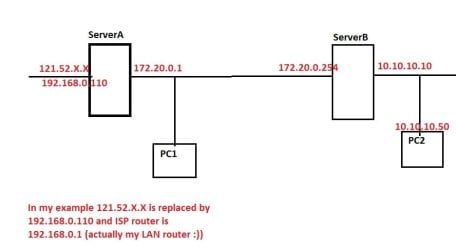
00 - network map.jpg

I started with changing Network Interface names to more meaningful ones:
On ServerA: Internet and Network172
On ServerB: Network172 and Network10

All interfaces are configured with static IPs, it goes as:
ServerA - Internet:
192.168.0.110 / 255.255.255.0 - Gateway: 192.168.0.1 - DNS Servers: nothing set
ServerA - Network172:
172.20.0.1 / 255.255.0.0 - Gateway: nothing set - DNS servers: 172.20.0.254 (since you have AD on ServerB, I guess your DNS is there too)
ServerB - Network172:
172.20.0.254 / 255.255.0.0 - Gateway: 172.20.0.1 - DNS Servers: 172.20.0.254
ServerB - Network10:
10.10.10.10 / 255.0.0.0 - Gateway: nothing set - DNS Servers: 10.10.10.10

Due to the nature of TCP/IP setup on internal interfaces, they were set as "Unidentified Networks", and had to resort to Group Policy to designate them as Private. (Skip if yours are already private). Open Group Policy (run "mmc" and add snap-in for Group Policy Object)
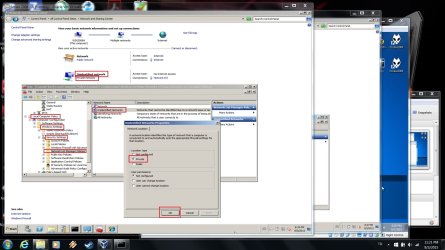
01 - group policy setup.jpg

Install Routing and Remote Access on both servers (if not already), both servers will be configured as "Routers" for LAN routing only.
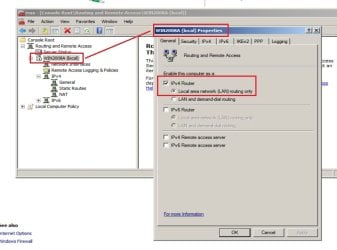
02 - ServerA RRAS properties.jpg

Configure ServerA Internet interface as NAT: Right click General for ServerA and "New Routing Protocol" and select NAT from the list. A NAT entry will show under IPv4, right click and "New Interface", select Internet (this is the name I gave earlier for ServerA outer interface, 192.168.0.110) from the list.

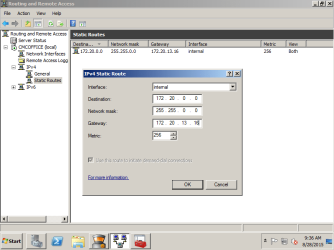
Add Static Route for segment 10.0.0.0: Under ServerA IPv4 list, right click "Static Routes" - "New Static Route" as below:
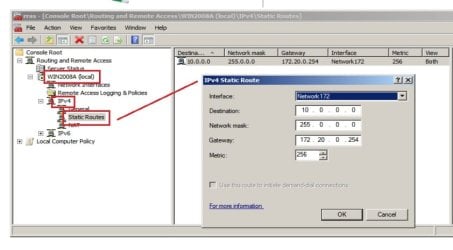
03 - ServerA RRAS static to 10.jpg

Next post - ServerB
 

My Computer

Computer type
PC/Desktop
Computer Manufacturer/Model Number
Custom Build
OS
Windows 7 Ultimate x64 SP1
CPU
AMD Phenom 2 1090T
Motherboard
Gigabyte GA-890FXA-UD5
Memory
2x8GB Kingston HyperX Fury Black 1600Mhz Unganged
Graphics Card(s)
MSI GTX 970 Gaming 4G
Sound Card
Realtek On-Board HD 7.1 Audio / Logitech G35
Monitor(s) Displays
3xAcer GD245HQ
Screen Resolution
1920x1080
Hard Drives
Samsung 850 Pro 512GB SSD - OS /
WD Caviar Black SATA 3 - 1 TBx2 - Dynamic RAID 0 /
WD Caviar Green SATA 2 - 640GBx2 - Dynamic RAID 0 /
WD Caviar Green SATA 2 - 640GB - Internal Backup /
Seagate Barracude SATA 3 - 3TB - External Backup/ Sync
PSU
HighPower 1000W
Case
Cooler Master HAF 932
Cooling
Noctua NH-D14
Keyboard
Logitech G19
Mouse
Logitech G500
Internet Speed
100/4 Mbit Cable (100GB quota)
Antivirus
ZoneAlarm Extreme Security / MBAM Pro / MBAE Free / SAS Free
Browser
IE 11 - Firefox - Chrome
Other Info
Logitech F710/ G27/ G940/ Z5500 // TrackIR 5 // Nvidia 3D Surround Vision
ServerB:

RRAS: Nothing special needed, everything is default.
DNS: Your DNS should already have forwarders enabled for any non-authoritative name resolution. To test things; I had to create a forward lookup zone (called it "internal") that forwards to root servers. It is listening on both 172.20.0.254 and 10.10.10.10.
04 - DNS serverB.jpg

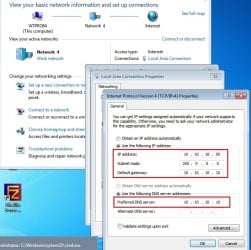
Client PC on Network 10.0.0.0/255.0.0.0 (Yours should be automatic and configured with DHCP):
05 - W7Pro IP config.jpg

Hopefully, I have not left out anything. Windows Firewall is off for both Servers and the client PC! You will have to open proper ports/allow programs etc.

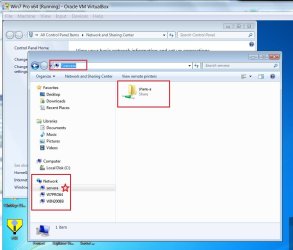
To add: I have shared a folder on both Servers and client PC can access both by entering DNS name, browsing can only see ServerB as ServerA is on a different segment (it does show with DNS name after accessing from address bar). (You can also use Distributed File System -DFS- for shares if so needed).
06 - ServerA shared folder.jpg
 

My Computer

Computer type
PC/Desktop
Computer Manufacturer/Model Number
Custom Build
OS
Windows 7 Ultimate x64 SP1
CPU
AMD Phenom 2 1090T
Motherboard
Gigabyte GA-890FXA-UD5
Memory
2x8GB Kingston HyperX Fury Black 1600Mhz Unganged
Graphics Card(s)
MSI GTX 970 Gaming 4G
Sound Card
Realtek On-Board HD 7.1 Audio / Logitech G35
Monitor(s) Displays
3xAcer GD245HQ
Screen Resolution
1920x1080
Hard Drives
Samsung 850 Pro 512GB SSD - OS /
WD Caviar Black SATA 3 - 1 TBx2 - Dynamic RAID 0 /
WD Caviar Green SATA 2 - 640GBx2 - Dynamic RAID 0 /
WD Caviar Green SATA 2 - 640GB - Internal Backup /
Seagate Barracude SATA 3 - 3TB - External Backup/ Sync
PSU
HighPower 1000W
Case
Cooler Master HAF 932
Cooling
Noctua NH-D14
Keyboard
Logitech G19
Mouse
Logitech G500
Internet Speed
100/4 Mbit Cable (100GB quota)
Antivirus
ZoneAlarm Extreme Security / MBAM Pro / MBAE Free / SAS Free
Browser
IE 11 - Firefox - Chrome
Other Info
Logitech F710/ G27/ G940/ Z5500 // TrackIR 5 // Nvidia 3D Surround Vision
Back
Top