Solved Mutliple Outlook 2003 instance in task tray and task manager

mediaman09

New member
Member
VIP
Local time
7:39 PM
Messages
260
Location
Toronto
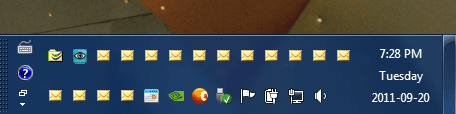
Every now and then I look down at the task tray ...and whoa!!!! about a dozen instances of Outlook. See attached

What is causing this?

And how do I prevent it??
 

Attachments

  • outllok_task_tray.PNG
    outllok_task_tray.PNG
    14.6 KB · Views: 6
  • outlook_task_manager.PNG
    outlook_task_manager.PNG
    12.5 KB · Views: 8

My Computer My Computer

Computer type
PC/Desktop
Computer Manufacturer/Model Number
DELL XPS 8500 // DELL XPS Studio 9100 // DELL Dim 9200
OS
DELL Win 7 Home Premium 64 Bit
CPU
Intel Core i7-930 (8MB L2, 2.8GHz) // ntel Core 2 Quad Q6600
Motherboard
?? // Dell A02 BIOS // ??
Memory
16GB // 18GB DDR3 SDRAM 1333Mhhz 6 DIMMS (3x2, 3x4) //4 GB
Graphics Card(s)
AMD HD7570 // AMD Radeon HD6750 // ATI Radeon HD5670 1 GB GD
Sound Card
?? // THX TruStudio PC //?
Monitor(s) Displays
Dual Dell 2405 WFP-HC24 //SAmsung 27" // Triple 19" LCD
Screen Resolution
1900 x 1200
Hard Drives
Main :WD Caviar Black 1 TB SATA WD1002FAEX
Backup :WD Caviar Black 1 TB SATA WD1002FAEX
PSU
?? // Ultra 900W // ??
It just looks as though you have multiple instances of Outlook open. Probably the way you are accessing your mail each time you open a new email.

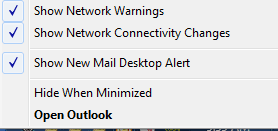
It's likely that Outlook is set to 'hide when minimised' on the task button.
 

My Computer My Computer

Computer type
PC/Desktop
Computer Manufacturer/Model Number
Packard Bell
OS
Windows 7 Home Premium 64bit
CPU
Intel(R) Core(TM) i3-2120 CPU @ 3.30GHz
Motherboard
Packard Bell IPISB-AG
Memory
3.00 GB
Graphics Card(s)
(1) Intel(R) HD Graphics (2) VNC Mirror Driver
Sound Card
Realtek High Definition Audio
Monitor(s) Displays
AIO LCD
Screen Resolution
1920 x 1080
Hard Drives
WDC WD10EADX-22TDHB0 ATA Device
Fixed hard disk media
4 partitions
931.51 GB
Keyboard
Wireless
Mouse
Wireless
Antivirus
Microsoft Security Essentials
Browser
IE; Firefox
Other Info
Also:
Samsung N220 Plus Netbook - Windows 7 Home
HP laptop
iPad 5
Actually, Hide When Minimized was not selected.

But when I did select it, it seemed to have resolved the problem ; now I just see one entry in the task tray, and one process running,

So thanks for pointing me in exactly the right direction !
 

Attachments

  • outlook_hide.png
    outlook_hide.png
    2.4 KB · Views: 351

My Computer My Computer

Computer type
PC/Desktop
Computer Manufacturer/Model Number
DELL XPS 8500 // DELL XPS Studio 9100 // DELL Dim 9200
OS
DELL Win 7 Home Premium 64 Bit
CPU
Intel Core i7-930 (8MB L2, 2.8GHz) // ntel Core 2 Quad Q6600
Motherboard
?? // Dell A02 BIOS // ??
Memory
16GB // 18GB DDR3 SDRAM 1333Mhhz 6 DIMMS (3x2, 3x4) //4 GB
Graphics Card(s)
AMD HD7570 // AMD Radeon HD6750 // ATI Radeon HD5670 1 GB GD
Sound Card
?? // THX TruStudio PC //?
Monitor(s) Displays
Dual Dell 2405 WFP-HC24 //SAmsung 27" // Triple 19" LCD
Screen Resolution
1900 x 1200
Hard Drives
Main :WD Caviar Black 1 TB SATA WD1002FAEX
Backup :WD Caviar Black 1 TB SATA WD1002FAEX
PSU
?? // Ultra 900W // ??
You are most welcome! :D
 

My Computer My Computer

Computer type
PC/Desktop
Computer Manufacturer/Model Number
Packard Bell
OS
Windows 7 Home Premium 64bit
CPU
Intel(R) Core(TM) i3-2120 CPU @ 3.30GHz
Motherboard
Packard Bell IPISB-AG
Memory
3.00 GB
Graphics Card(s)
(1) Intel(R) HD Graphics (2) VNC Mirror Driver
Sound Card
Realtek High Definition Audio
Monitor(s) Displays
AIO LCD
Screen Resolution
1920 x 1080
Hard Drives
WDC WD10EADX-22TDHB0 ATA Device
Fixed hard disk media
4 partitions
931.51 GB
Keyboard
Wireless
Mouse
Wireless
Antivirus
Microsoft Security Essentials
Browser
IE; Firefox
Other Info
Also:
Samsung N220 Plus Netbook - Windows 7 Home
HP laptop
iPad 5
Back
Top