Solved My Computer cannot detect my Seagate external hard drive 3TB

Minotaur

New member
Local time
1:51 AM
Messages
20
Hi guys,

I've had this 3TB hard drive for about 6 months with no problems.

However, for some reason my computer cannot recognise it any more.

It doesn't come up in My Computer, but it comes up in device manager ( see pic 1) and in disk management (see pic 2)

Alarmingly, I can't even assign a letter or do anything but delete the volume (see pic 3)

I can't find the driver cd to install it but I didn't think this would be a problem as I installed it anyway through the computer. I've searched for about 2 days on this forums and others and still can't find a solution. I hope I can find one here :)

oh and i forgot to mention, i tried the hard drive on two different computers and it had the same problem there as well.

pic 1

75264885.png

By piraxtiri at 2012-02-24
pic 2
48509582.png

48509582.png

By piraxtiri at 2012-02-24


By
piraxtiri at 2012-02-24
81049474.png

81049474.png
 
Last edited:

My Computer My Computer

OS
Windows 7 Enterprise 64 bit
Motherboard
i7
Memory
6gb
Graphics Card(s)
NIVIDIA GeForce GT 240
Monitor(s) Displays
Philips 21"
Hard Drives
1TB
Hi,

Your images still dont show - can you repost them using the little paperclip icon?

Regards,
Golden
 

My Computer My Computer

Computer type
PC/Desktop
Computer Manufacturer/Model Number
Golden Mk. I.4
OS
Windows 10 Pro x64 ; Xubuntu x64
CPU
Intel i7 860 @ 2.80 GHz O/C'ed to 4.0GHz
Motherboard
Gigabyte P55A-UD3R Rev.1. Award BIOS F13
Memory
16GB Corsair Vengance DDR3 @ 661 MHz Dual Channel (9-9-9-24)
Graphics Card(s)
EVGA NVidia GTX 560 1024MB
Sound Card
Realtek Integrated
Monitor(s) Displays
Dual Samsung SyncMaster 2494HS
Screen Resolution
1920*1080 and 1920*1080
Hard Drives
1*Samsung 840 EVO 120GB SSD;
1*OCZ Vertex 2 60GB SSD;
2*Samsung F3 SpinPoint 1TB in RAID0;
1*Samsung F1 SpinPoint 1TB;
2*Western Digital 1TB External USB 3.0
1*Western Digital 500GB External USB 3.0
1*Seagate 500GB External USB 2.0
PSU
Thermaltake ToughPower QFan 750W
Case
Thermaltake Element S VK60001W2Z
Cooling
Corsair H60 Water Cooling, 2*230mm and 2*80mm case fans
Keyboard
Logitech G110
Mouse
Logitech MX518
the pics are up now :)
 

My Computer My Computer

OS
Windows 7 Enterprise 64 bit
Motherboard
i7
Memory
6gb
Graphics Card(s)
NIVIDIA GeForce GT 240
Monitor(s) Displays
Philips 21"
Hard Drives
1TB
Hi,

What was on this disk? Did you have MacOS or a variant installed to this disk?

Regards,
Golden
 

My Computer My Computer

Computer type
PC/Desktop
Computer Manufacturer/Model Number
Golden Mk. I.4
OS
Windows 10 Pro x64 ; Xubuntu x64
CPU
Intel i7 860 @ 2.80 GHz O/C'ed to 4.0GHz
Motherboard
Gigabyte P55A-UD3R Rev.1. Award BIOS F13
Memory
16GB Corsair Vengance DDR3 @ 661 MHz Dual Channel (9-9-9-24)
Graphics Card(s)
EVGA NVidia GTX 560 1024MB
Sound Card
Realtek Integrated
Monitor(s) Displays
Dual Samsung SyncMaster 2494HS
Screen Resolution
1920*1080 and 1920*1080
Hard Drives
1*Samsung 840 EVO 120GB SSD;
1*OCZ Vertex 2 60GB SSD;
2*Samsung F3 SpinPoint 1TB in RAID0;
1*Samsung F1 SpinPoint 1TB;
2*Western Digital 1TB External USB 3.0
1*Western Digital 500GB External USB 3.0
1*Seagate 500GB External USB 2.0
PSU
Thermaltake ToughPower QFan 750W
Case
Thermaltake Element S VK60001W2Z
Cooling
Corsair H60 Water Cooling, 2*230mm and 2*80mm case fans
Keyboard
Logitech G110
Mouse
Logitech MX518
nope, just movies and music
 

My Computer My Computer

OS
Windows 7 Enterprise 64 bit
Motherboard
i7
Memory
6gb
Graphics Card(s)
NIVIDIA GeForce GT 240
Monitor(s) Displays
Philips 21"
Hard Drives
1TB
OK. I need a more experienced eye on this...I'll see if I can find someone to have a look at this for you.

I assume you want to avoid format this drive correct?

Regards,
Golden
 

My Computer My Computer

Computer type
PC/Desktop
Computer Manufacturer/Model Number
Golden Mk. I.4
OS
Windows 10 Pro x64 ; Xubuntu x64
CPU
Intel i7 860 @ 2.80 GHz O/C'ed to 4.0GHz
Motherboard
Gigabyte P55A-UD3R Rev.1. Award BIOS F13
Memory
16GB Corsair Vengance DDR3 @ 661 MHz Dual Channel (9-9-9-24)
Graphics Card(s)
EVGA NVidia GTX 560 1024MB
Sound Card
Realtek Integrated
Monitor(s) Displays
Dual Samsung SyncMaster 2494HS
Screen Resolution
1920*1080 and 1920*1080
Hard Drives
1*Samsung 840 EVO 120GB SSD;
1*OCZ Vertex 2 60GB SSD;
2*Samsung F3 SpinPoint 1TB in RAID0;
1*Samsung F1 SpinPoint 1TB;
2*Western Digital 1TB External USB 3.0
1*Western Digital 500GB External USB 3.0
1*Seagate 500GB External USB 2.0
PSU
Thermaltake ToughPower QFan 750W
Case
Thermaltake Element S VK60001W2Z
Cooling
Corsair H60 Water Cooling, 2*230mm and 2*80mm case fans
Keyboard
Logitech G110
Mouse
Logitech MX518
yes please, i'm a bit worried because this thread has 300 views or so and no-one has posted :(
 

My Computer My Computer

OS
Windows 7 Enterprise 64 bit
Motherboard
i7
Memory
6gb
Graphics Card(s)
NIVIDIA GeForce GT 240
Monitor(s) Displays
Philips 21"
Hard Drives
1TB
Don't worry, we have hundreds of posts ever day, and its just a case of getting the right eye on it.
 

My Computer My Computer

Computer type
PC/Desktop
Computer Manufacturer/Model Number
Golden Mk. I.4
OS
Windows 10 Pro x64 ; Xubuntu x64
CPU
Intel i7 860 @ 2.80 GHz O/C'ed to 4.0GHz
Motherboard
Gigabyte P55A-UD3R Rev.1. Award BIOS F13
Memory
16GB Corsair Vengance DDR3 @ 661 MHz Dual Channel (9-9-9-24)
Graphics Card(s)
EVGA NVidia GTX 560 1024MB
Sound Card
Realtek Integrated
Monitor(s) Displays
Dual Samsung SyncMaster 2494HS
Screen Resolution
1920*1080 and 1920*1080
Hard Drives
1*Samsung 840 EVO 120GB SSD;
1*OCZ Vertex 2 60GB SSD;
2*Samsung F3 SpinPoint 1TB in RAID0;
1*Samsung F1 SpinPoint 1TB;
2*Western Digital 1TB External USB 3.0
1*Western Digital 500GB External USB 3.0
1*Seagate 500GB External USB 2.0
PSU
Thermaltake ToughPower QFan 750W
Case
Thermaltake Element S VK60001W2Z
Cooling
Corsair H60 Water Cooling, 2*230mm and 2*80mm case fans
Keyboard
Logitech G110
Mouse
Logitech MX518
yes please, i'm a bit worried because this thread has 300 views or so and no-one has posted :(

All you need to do is assign a driver letter to the drive by using a third party app like parigon disk suite (trial is free)
 

My Computer My Computer

Computer Manufacturer/Model Number
HP Pavillion dv-7 1005 Tx
OS
Win 8 Release candidate 8400
CPU
[email protected]
Memory
4 gigs
Graphics Card(s)
Nvidia 9600M
Sound Card
HD built-in
Monitor(s) Displays
17" Wxga
Screen Resolution
1440x900
Cooling
none
Internet Speed
45Mb down 5Mb up
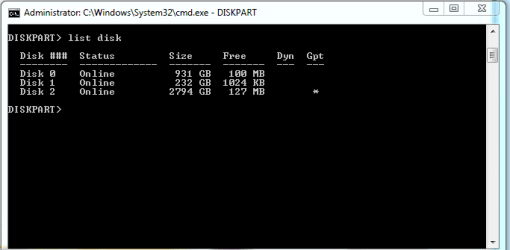
OK, I just had an idea. Lets see if this works.

1. Click Start, then in the search box, type cmd. Right-click CMD.exe, and choose to open as administrator.
2. In the CMD windows, type DISKPART, and hit enter.
3. Now type list disk and hit enter. Take a screen capture of the output and post it back here.

Regards,
Golden
 

My Computer My Computer

Computer type
PC/Desktop
Computer Manufacturer/Model Number
Golden Mk. I.4
OS
Windows 10 Pro x64 ; Xubuntu x64
CPU
Intel i7 860 @ 2.80 GHz O/C'ed to 4.0GHz
Motherboard
Gigabyte P55A-UD3R Rev.1. Award BIOS F13
Memory
16GB Corsair Vengance DDR3 @ 661 MHz Dual Channel (9-9-9-24)
Graphics Card(s)
EVGA NVidia GTX 560 1024MB
Sound Card
Realtek Integrated
Monitor(s) Displays
Dual Samsung SyncMaster 2494HS
Screen Resolution
1920*1080 and 1920*1080
Hard Drives
1*Samsung 840 EVO 120GB SSD;
1*OCZ Vertex 2 60GB SSD;
2*Samsung F3 SpinPoint 1TB in RAID0;
1*Samsung F1 SpinPoint 1TB;
2*Western Digital 1TB External USB 3.0
1*Western Digital 500GB External USB 3.0
1*Seagate 500GB External USB 2.0
PSU
Thermaltake ToughPower QFan 750W
Case
Thermaltake Element S VK60001W2Z
Cooling
Corsair H60 Water Cooling, 2*230mm and 2*80mm case fans
Keyboard
Logitech G110
Mouse
Logitech MX518
here you are
 

Attachments

  • disk.PNG
    disk.PNG
    5.1 KB · Views: 421

My Computer My Computer

OS
Windows 7 Enterprise 64 bit
Motherboard
i7
Memory
6gb
Graphics Card(s)
NIVIDIA GeForce GT 240
Monitor(s) Displays
Philips 21"
Hard Drives
1TB

My Computer My Computer

OS
Windows 7 Enterprise 64 bit
Motherboard
i7
Memory
6gb
Graphics Card(s)
NIVIDIA GeForce GT 240
Monitor(s) Displays
Philips 21"
Hard Drives
1TB
okay update!!!

thanks to zigzag, i installed paragon and somehow i have changed the format of my hard drive from NTFS to Mac OS (my laptop is a mac)

i think i installed a program that would enable you to not just read but write on the hard drive and that modified the format to mac os

so does that mean all my files from the ntfs are gone? i assume so

for some reason it says there is 3TB available but 1gb is used?

if i format it to NTFS, that means i lose all my information hey?

sorry i'm such a noob, just dont know alot about computers
 

My Computer My Computer

OS
Windows 7 Enterprise 64 bit
Motherboard
i7
Memory
6gb
Graphics Card(s)
NIVIDIA GeForce GT 240
Monitor(s) Displays
Philips 21"
Hard Drives
1TB

My Computer My Computer

Computer type
PC/Desktop
Computer Manufacturer/Model Number
Golden Mk. I.4
OS
Windows 10 Pro x64 ; Xubuntu x64
CPU
Intel i7 860 @ 2.80 GHz O/C'ed to 4.0GHz
Motherboard
Gigabyte P55A-UD3R Rev.1. Award BIOS F13
Memory
16GB Corsair Vengance DDR3 @ 661 MHz Dual Channel (9-9-9-24)
Graphics Card(s)
EVGA NVidia GTX 560 1024MB
Sound Card
Realtek Integrated
Monitor(s) Displays
Dual Samsung SyncMaster 2494HS
Screen Resolution
1920*1080 and 1920*1080
Hard Drives
1*Samsung 840 EVO 120GB SSD;
1*OCZ Vertex 2 60GB SSD;
2*Samsung F3 SpinPoint 1TB in RAID0;
1*Samsung F1 SpinPoint 1TB;
2*Western Digital 1TB External USB 3.0
1*Western Digital 500GB External USB 3.0
1*Seagate 500GB External USB 2.0
PSU
Thermaltake ToughPower QFan 750W
Case
Thermaltake Element S VK60001W2Z
Cooling
Corsair H60 Water Cooling, 2*230mm and 2*80mm case fans
Keyboard
Logitech G110
Mouse
Logitech MX518
Hi,

What was on this disk? Did you have MacOS or a variant installed to this disk?

Regards,
Golden

Mmm. I asked you yesterday if had MacOS installed, and you said No. :shock:
 

My Computer My Computer

Computer type
PC/Desktop
Computer Manufacturer/Model Number
Golden Mk. I.4
OS
Windows 10 Pro x64 ; Xubuntu x64
CPU
Intel i7 860 @ 2.80 GHz O/C'ed to 4.0GHz
Motherboard
Gigabyte P55A-UD3R Rev.1. Award BIOS F13
Memory
16GB Corsair Vengance DDR3 @ 661 MHz Dual Channel (9-9-9-24)
Graphics Card(s)
EVGA NVidia GTX 560 1024MB
Sound Card
Realtek Integrated
Monitor(s) Displays
Dual Samsung SyncMaster 2494HS
Screen Resolution
1920*1080 and 1920*1080
Hard Drives
1*Samsung 840 EVO 120GB SSD;
1*OCZ Vertex 2 60GB SSD;
2*Samsung F3 SpinPoint 1TB in RAID0;
1*Samsung F1 SpinPoint 1TB;
2*Western Digital 1TB External USB 3.0
1*Western Digital 500GB External USB 3.0
1*Seagate 500GB External USB 2.0
PSU
Thermaltake ToughPower QFan 750W
Case
Thermaltake Element S VK60001W2Z
Cooling
Corsair H60 Water Cooling, 2*230mm and 2*80mm case fans
Keyboard
Logitech G110
Mouse
Logitech MX518
sorry, i didnt know i did :(
 

My Computer My Computer

OS
Windows 7 Enterprise 64 bit
Motherboard
i7
Memory
6gb
Graphics Card(s)
NIVIDIA GeForce GT 240
Monitor(s) Displays
Philips 21"
Hard Drives
1TB
Well, I think if you have formatted your drive then yes, you effectively wiped all the data off it. Try assign a drive letter to it, and see if you can browse the disk in Windows Explorer.
 

My Computer My Computer

Computer type
PC/Desktop
Computer Manufacturer/Model Number
Golden Mk. I.4
OS
Windows 10 Pro x64 ; Xubuntu x64
CPU
Intel i7 860 @ 2.80 GHz O/C'ed to 4.0GHz
Motherboard
Gigabyte P55A-UD3R Rev.1. Award BIOS F13
Memory
16GB Corsair Vengance DDR3 @ 661 MHz Dual Channel (9-9-9-24)
Graphics Card(s)
EVGA NVidia GTX 560 1024MB
Sound Card
Realtek Integrated
Monitor(s) Displays
Dual Samsung SyncMaster 2494HS
Screen Resolution
1920*1080 and 1920*1080
Hard Drives
1*Samsung 840 EVO 120GB SSD;
1*OCZ Vertex 2 60GB SSD;
2*Samsung F3 SpinPoint 1TB in RAID0;
1*Samsung F1 SpinPoint 1TB;
2*Western Digital 1TB External USB 3.0
1*Western Digital 500GB External USB 3.0
1*Seagate 500GB External USB 2.0
PSU
Thermaltake ToughPower QFan 750W
Case
Thermaltake Element S VK60001W2Z
Cooling
Corsair H60 Water Cooling, 2*230mm and 2*80mm case fans
Keyboard
Logitech G110
Mouse
Logitech MX518
weird, okay so i reformatted to NTFS and assigned a letter but i still have the same problem, doesnt come up in my computer and i cant assign a letter on disk management
 

My Computer My Computer

OS
Windows 7 Enterprise 64 bit
Motherboard
i7
Memory
6gb
Graphics Card(s)
NIVIDIA GeForce GT 240
Monitor(s) Displays
Philips 21"
Hard Drives
1TB
all good now, i just reformatted it again and delete the partition and now it works... the problem was me changing over to mac 0s but i didnt know that i did...sorry for bothering you all and thanks for all your help :)
 

My Computer My Computer

OS
Windows 7 Enterprise 64 bit
Motherboard
i7
Memory
6gb
Graphics Card(s)
NIVIDIA GeForce GT 240
Monitor(s) Displays
Philips 21"
Hard Drives
1TB
Glad to hear its sorted.
 

My Computer My Computer

Computer type
PC/Desktop
Computer Manufacturer/Model Number
Golden Mk. I.4
OS
Windows 10 Pro x64 ; Xubuntu x64
CPU
Intel i7 860 @ 2.80 GHz O/C'ed to 4.0GHz
Motherboard
Gigabyte P55A-UD3R Rev.1. Award BIOS F13
Memory
16GB Corsair Vengance DDR3 @ 661 MHz Dual Channel (9-9-9-24)
Graphics Card(s)
EVGA NVidia GTX 560 1024MB
Sound Card
Realtek Integrated
Monitor(s) Displays
Dual Samsung SyncMaster 2494HS
Screen Resolution
1920*1080 and 1920*1080
Hard Drives
1*Samsung 840 EVO 120GB SSD;
1*OCZ Vertex 2 60GB SSD;
2*Samsung F3 SpinPoint 1TB in RAID0;
1*Samsung F1 SpinPoint 1TB;
2*Western Digital 1TB External USB 3.0
1*Western Digital 500GB External USB 3.0
1*Seagate 500GB External USB 2.0
PSU
Thermaltake ToughPower QFan 750W
Case
Thermaltake Element S VK60001W2Z
Cooling
Corsair H60 Water Cooling, 2*230mm and 2*80mm case fans
Keyboard
Logitech G110
Mouse
Logitech MX518
Back
Top