R raoul2014 New member Local time 2:48 AM Messages 3 Aug 21, 2013 #1 Solved. Last edited: Aug 22, 2013 My Computer My Computer At a glance W7Computer typePC/DesktopOSW7
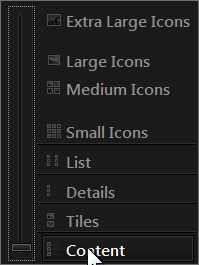
Bongo Jerry ☮ 1956-2019 R.I.P. VIP SF Team Local time 2:48 AM Messages 10,864 Location Iowa Aug 22, 2013 #2 Welcome to the Seven Forums Do you have the view set to Content? Jerry My Computer My Computer At a glance Win 7 Pro x64 / Win 10 ProIntel(R) Core(TM) i7-3630QM CPU @ 2.40GHz12 GB(1) Intel(R) HD Graphics 4000 (2) NVIDIA GeFo...Computer typeLaptopComputer Manufacturer/Model NumberSager NP9170OSWin 7 Pro x64 / Win 10 ProCPUIntel(R) Core(TM) i7-3630QM CPU @ 2.40GHzMotherboardCLEVO P170EMMemory12 GBGraphics Card(s)(1) Intel(R) HD Graphics 4000 (2) NVIDIA GeForce GTX 675MSound Card(1) Realtek High Definition Audio (2) Intel(R) Display AudMonitor(s) Displays17.3Screen Resolution1920x1080Hard Drives(1) Samsung 860 EVO 500GB(OS) (1) Samsung 860 EVO 500GB(Data)KeyboardBackliteAntivirusMSE, Malwarebytes ProBrowserFirefoxOther InfoDESKTOP: Custom-built. OS: Win 10 Pro x64. CASE: Rosewill R5. CPU: Intel I5 4670K CPU @ 3.40GHz. CPU COOLER: Cool Master Hyper 212 EVO. MOTHERBOARD: Asus Z87-A. MEMORY: Kingston HyperX 2x4 GB. GPU: Nvidia Geforce 650 TI. PSU: Corsair TX750. DRIVES: (1) Samsung 840 120 GB SSD (2) Western Digital blue 500 GB 7200 RPM.
R raoul2014 New member Thread Starter Local time 2:48 AM Messages 3 Aug 22, 2013 #3 Yes. It's the size of the bars that seems to have changed. I guess this problem is more archaic than I thought My Computer My Computer At a glance W7Computer typePC/DesktopOSW7
Yes. It's the size of the bars that seems to have changed. I guess this problem is more archaic than I thought
Bongo Jerry ☮ 1956-2019 R.I.P. VIP SF Team Local time 2:48 AM Messages 10,864 Location Iowa Aug 22, 2013 #4 Does it happen on all themes or just that one? If it's just the one post a link to it. Jerry My Computer My Computer At a glance Win 7 Pro x64 / Win 10 ProIntel(R) Core(TM) i7-3630QM CPU @ 2.40GHz12 GB(1) Intel(R) HD Graphics 4000 (2) NVIDIA GeFo...Computer typeLaptopComputer Manufacturer/Model NumberSager NP9170OSWin 7 Pro x64 / Win 10 ProCPUIntel(R) Core(TM) i7-3630QM CPU @ 2.40GHzMotherboardCLEVO P170EMMemory12 GBGraphics Card(s)(1) Intel(R) HD Graphics 4000 (2) NVIDIA GeForce GTX 675MSound Card(1) Realtek High Definition Audio (2) Intel(R) Display AudMonitor(s) Displays17.3Screen Resolution1920x1080Hard Drives(1) Samsung 860 EVO 500GB(OS) (1) Samsung 860 EVO 500GB(Data)KeyboardBackliteAntivirusMSE, Malwarebytes ProBrowserFirefoxOther InfoDESKTOP: Custom-built. OS: Win 10 Pro x64. CASE: Rosewill R5. CPU: Intel I5 4670K CPU @ 3.40GHz. CPU COOLER: Cool Master Hyper 212 EVO. MOTHERBOARD: Asus Z87-A. MEMORY: Kingston HyperX 2x4 GB. GPU: Nvidia Geforce 650 TI. PSU: Corsair TX750. DRIVES: (1) Samsung 840 120 GB SSD (2) Western Digital blue 500 GB 7200 RPM.
R raoul2014 New member Thread Starter Local time 2:48 AM Messages 3 Aug 22, 2013 #5 Thanks for your replies. The bars stay that size regardless of which theme is loaded. I have a feeling that it's related to a registry key EDIT: Messing with the Details view, I managed to get something similar. Go to Right click > Sort by > more and you get access to similar options My Computer My Computer At a glance W7Computer typePC/DesktopOSW7
Thanks for your replies. The bars stay that size regardless of which theme is loaded. I have a feeling that it's related to a registry key EDIT: Messing with the Details view, I managed to get something similar. Go to Right click > Sort by > more and you get access to similar options
Bongo Jerry ☮ 1956-2019 R.I.P. VIP SF Team Local time 2:48 AM Messages 10,864 Location Iowa Aug 23, 2013 #6 You're welcome, good to hear you got it. My Computer My Computer At a glance Win 7 Pro x64 / Win 10 ProIntel(R) Core(TM) i7-3630QM CPU @ 2.40GHz12 GB(1) Intel(R) HD Graphics 4000 (2) NVIDIA GeFo...Computer typeLaptopComputer Manufacturer/Model NumberSager NP9170OSWin 7 Pro x64 / Win 10 ProCPUIntel(R) Core(TM) i7-3630QM CPU @ 2.40GHzMotherboardCLEVO P170EMMemory12 GBGraphics Card(s)(1) Intel(R) HD Graphics 4000 (2) NVIDIA GeForce GTX 675MSound Card(1) Realtek High Definition Audio (2) Intel(R) Display AudMonitor(s) Displays17.3Screen Resolution1920x1080Hard Drives(1) Samsung 860 EVO 500GB(OS) (1) Samsung 860 EVO 500GB(Data)KeyboardBackliteAntivirusMSE, Malwarebytes ProBrowserFirefoxOther InfoDESKTOP: Custom-built. OS: Win 10 Pro x64. CASE: Rosewill R5. CPU: Intel I5 4670K CPU @ 3.40GHz. CPU COOLER: Cool Master Hyper 212 EVO. MOTHERBOARD: Asus Z87-A. MEMORY: Kingston HyperX 2x4 GB. GPU: Nvidia Geforce 650 TI. PSU: Corsair TX750. DRIVES: (1) Samsung 840 120 GB SSD (2) Western Digital blue 500 GB 7200 RPM.