My Computer Freezes randomly while hdd Light turns solid red.

I have this problem after adding 2nd hard disk

I removed the DVD drive from my laptop and then moved the local disk to a caddy in its place. The original hard disk was replaced with an SSD.

I set it all up and it works fine for 99% of the time. I have created hard junctions to keep certain parts of the user data (photos, email files, desktop, my docs etc) on the larger old hard disk, keeping AppData in the usual location.

I am thinking that there is a hardware conflict, but I thought I'd mention the junctions in case someone thinks this could be somehow causing it.

How can I track down this problem? I try looking in the events after it happens but most of the time nothing is listed, sometimes it says things like..

The scan of C:\Users\Ash\AppData\Local\3Dconnexion\3DxWare\3DxServiceState.xml has taken too long to complete and is being canceled. Scan engine version used is 5800.7501 DAT version 8322.0000.

From the virus scanner. Each time it seems that it is random and not always the virus scanner. :confused:
 

My Computer My Computer

Computer type
PC/Desktop
Computer Manufacturer/Model Number
HP zbook 15
OS
win7 pro 64
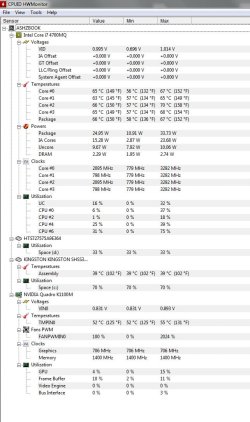
check your voltage and temperatures in the bios and post them
 

My Computer My Computer

Computer type
PC/Desktop
OS
win 7 32 bit
Motherboard
intel
Memory
8 gb
Hard Drives
2 tb
Temps attached. The problem occurs pretty randomly. It seems not to make any difference how hard the computer is working. Often it occurs when lots of web pages are loaded, I am thinking that the web cacheing is having something to do with it. But it can happen even with no web pages up.
 

Attachments

  • temps.jpg
    temps.jpg
    90.3 KB · Views: 0

My Computer My Computer

Computer type
PC/Desktop
Computer Manufacturer/Model Number
HP zbook 15
OS
win7 pro 64
Yes, I believe it is related to web cache because it seems to have the problem shortly after browsing. Any suggestions anybody?
 

My Computer My Computer

Computer type
PC/Desktop
Computer Manufacturer/Model Number
HP zbook 15
OS
win7 pro 64
It happened again.. roughly twice thoughout the working day, sometimes more.

The scan of C:\Windows\SysWOW64\werfault.exe has taken too long to complete and is being canceled. Scan engine version used is 5800.7501 DAT version 8327.0000.

You think it could be the Antivirus causing it?
 

My Computer My Computer

Computer type
PC/Desktop
Computer Manufacturer/Model Number
HP zbook 15
OS
win7 pro 64

My Computers My Computers

System One System Two

  • Computer type
    PC/Desktop
    Computer Manufacturer/Model Number
    custom build
    OS
    Windows 7 HP 64
    CPU
    i5 6600K - 800MHz to 4200MHz
    Motherboard
    GA-Z170-HD3P
    Memory
    4+4G GSkill DDR4 3000
    Graphics Card(s)
    IG - Intel 530
    Monitor(s) Displays
    Samsung 226BW
    Screen Resolution
    1680x1050
    Hard Drives
    (1) -1 SM951 – 128GB M.2 AHCI PCIe SSD drive for Windows 7 and Lubuntu
    (2) -1 WD SATA 3 - 1T for Data
    (3) -1 WD SATA 3 - 1T for backup
    PSU
    Thermaltake 450W TR2 gold
    Keyboard
    Old and good Chicony mechanical keyboard
    Mouse
    Logitech mX performance - 9 buttons (had to disable some)
    Internet Speed
    500Mb/s
    Browser
    Firefox 64
    Other Info
    TinyWall firewall
  • Computer type
    Laptop
    System Manufacturer/Model Number
    Asus Q550LF
    OS
    Windows 7 Pro
    CPU
    i7-4500U 800MHz to 3.0GHz
    Motherboard
    Asus Q550LF
    Memory
    (4+4)G DDR3 1600
    Graphics Card(s)
    IG intel 4400 + NVIDIA GeForce GT 745M
    Sound Card
    Realtek
    Monitor(s) Displays
    LG Display LP156WF4-SPH1
    Screen Resolution
    1920 x 1080
    Hard Drives
    BX500 120G SSD for Windows and programs +
    1T HDD for data
    Internet Speed
    500 Mb/s
    Browser
    Firefox
    Other Info
    TinyWall firewall
Just jumping in here, how old is your drive/ssd ????

Have you checked it`s health ?
 

My Computer My Computer

Computer type
PC/Desktop
Computer Manufacturer/Model Number
Skylake Special #666
OS
Windows 10 Pro x64
CPU
Intel Core i7 6700K
Motherboard
Asus Sabertooth Z170 Mark 1
Memory
GSkill TridentZ RGB 16GB 3600 16-16-16-36
Graphics Card(s)
EVGA GTX 980 Ti SC x2
Sound Card
Realtek High Definition
Monitor(s) Displays
AOC G2460PG
Screen Resolution
1920 x 1080 144Hz
Hard Drives
Samsung 860 Pro 256GB, Seagate Barracuda 4TB x2
PSU
EVGA 1000 P2, EVGA White Custom Braided Cables
Case
Corsair Vengeance C70 Gunmetal Black
Cooling
Corsair H100i v2, Corsair ML120 x2, Thermal Grizzly Kryonaut
Keyboard
Logitech G910 Orion Spectrum
Mouse
Logitech G700s
Internet Speed
Verizon Fios Quantum Gateway 75/75
Antivirus
Windows Defender, Malwarebytes Free 3.8.3
Browser
Chrome
Other Info
Corsair SP120 x4, LG Blu-ray Drive, Durabrand HT-395 100 Watt Dolby Digital Amp, Corsair H2100 Wireless 7.1 Headset
Hi Megahertz, I already had CCleaner, I just ran it, time will tell if it makes a difference..

AddRAM, the problem started I think as soon as I installed the SSD... It's new.
 

My Computer My Computer

Computer type
PC/Desktop
Computer Manufacturer/Model Number
HP zbook 15
OS
win7 pro 64
You're talking about a desktop, not a laptop or alike, aren't you?
Ash, can you explain what you did you do to add the SSD? You did a clean install or cloned the HDD to the SSD?
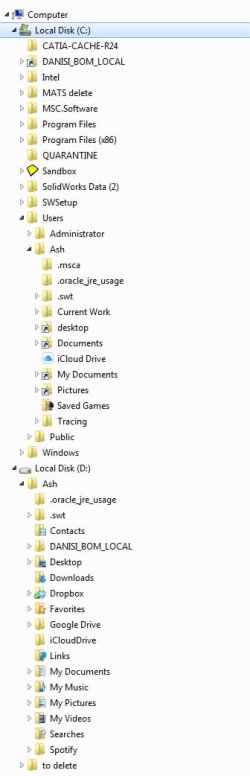
Please take a snapshot with sniping tool of Explorer with the left panel showing the two drives and sub folders.
 

My Computers My Computers

System One System Two

  • Computer type
    PC/Desktop
    Computer Manufacturer/Model Number
    custom build
    OS
    Windows 7 HP 64
    CPU
    i5 6600K - 800MHz to 4200MHz
    Motherboard
    GA-Z170-HD3P
    Memory
    4+4G GSkill DDR4 3000
    Graphics Card(s)
    IG - Intel 530
    Monitor(s) Displays
    Samsung 226BW
    Screen Resolution
    1680x1050
    Hard Drives
    (1) -1 SM951 – 128GB M.2 AHCI PCIe SSD drive for Windows 7 and Lubuntu
    (2) -1 WD SATA 3 - 1T for Data
    (3) -1 WD SATA 3 - 1T for backup
    PSU
    Thermaltake 450W TR2 gold
    Keyboard
    Old and good Chicony mechanical keyboard
    Mouse
    Logitech mX performance - 9 buttons (had to disable some)
    Internet Speed
    500Mb/s
    Browser
    Firefox 64
    Other Info
    TinyWall firewall
  • Computer type
    Laptop
    System Manufacturer/Model Number
    Asus Q550LF
    OS
    Windows 7 Pro
    CPU
    i7-4500U 800MHz to 3.0GHz
    Motherboard
    Asus Q550LF
    Memory
    (4+4)G DDR3 1600
    Graphics Card(s)
    IG intel 4400 + NVIDIA GeForce GT 745M
    Sound Card
    Realtek
    Monitor(s) Displays
    LG Display LP156WF4-SPH1
    Screen Resolution
    1920 x 1080
    Hard Drives
    BX500 120G SSD for Windows and programs +
    1T HDD for data
    Internet Speed
    500 Mb/s
    Browser
    Firefox
    Other Info
    TinyWall firewall
Hi, it's a laptop. The new ssd was smaller than my data on the old hard disk so first I backed up and deleted all my photos, music, work files (which lived in sub-folders on the desktop) and then cloned the disc using disc cloning software.
Then I removed the blueray player and put the old HD back in place of it in a caddy.
The old HD is just used for certain user data like my docs, my photos, desktop etc. I made junctions for all those. I did make some junctions also for install file locations etc too as they take up bags of space. It all works fine except this intermittent locking up for about 1-2 mins each time. I'll do a snapshot of what is on d: (old HD) soon.
 

My Computer My Computer

Computer type
PC/Desktop
Computer Manufacturer/Model Number
HP zbook 15
OS
win7 pro 64
Please, the hole system
393064d1477265934-installing-ssd-dell-xps-8700-a-my_tree.jpg
 

My Computers My Computers

System One System Two

  • Computer type
    PC/Desktop
    Computer Manufacturer/Model Number
    custom build
    OS
    Windows 7 HP 64
    CPU
    i5 6600K - 800MHz to 4200MHz
    Motherboard
    GA-Z170-HD3P
    Memory
    4+4G GSkill DDR4 3000
    Graphics Card(s)
    IG - Intel 530
    Monitor(s) Displays
    Samsung 226BW
    Screen Resolution
    1680x1050
    Hard Drives
    (1) -1 SM951 – 128GB M.2 AHCI PCIe SSD drive for Windows 7 and Lubuntu
    (2) -1 WD SATA 3 - 1T for Data
    (3) -1 WD SATA 3 - 1T for backup
    PSU
    Thermaltake 450W TR2 gold
    Keyboard
    Old and good Chicony mechanical keyboard
    Mouse
    Logitech mX performance - 9 buttons (had to disable some)
    Internet Speed
    500Mb/s
    Browser
    Firefox 64
    Other Info
    TinyWall firewall
  • Computer type
    Laptop
    System Manufacturer/Model Number
    Asus Q550LF
    OS
    Windows 7 Pro
    CPU
    i7-4500U 800MHz to 3.0GHz
    Motherboard
    Asus Q550LF
    Memory
    (4+4)G DDR3 1600
    Graphics Card(s)
    IG intel 4400 + NVIDIA GeForce GT 745M
    Sound Card
    Realtek
    Monitor(s) Displays
    LG Display LP156WF4-SPH1
    Screen Resolution
    1920 x 1080
    Hard Drives
    BX500 120G SSD for Windows and programs +
    1T HDD for data
    Internet Speed
    500 Mb/s
    Browser
    Firefox
    Other Info
    TinyWall firewall
Cloning can create problems, it works or it don`t.

I would start fresh. Especially with a new SSD :)

Please tell us you created a Disk Image before you wiped the hard drive.
 

My Computer My Computer

Computer type
PC/Desktop
Computer Manufacturer/Model Number
Skylake Special #666
OS
Windows 10 Pro x64
CPU
Intel Core i7 6700K
Motherboard
Asus Sabertooth Z170 Mark 1
Memory
GSkill TridentZ RGB 16GB 3600 16-16-16-36
Graphics Card(s)
EVGA GTX 980 Ti SC x2
Sound Card
Realtek High Definition
Monitor(s) Displays
AOC G2460PG
Screen Resolution
1920 x 1080 144Hz
Hard Drives
Samsung 860 Pro 256GB, Seagate Barracuda 4TB x2
PSU
EVGA 1000 P2, EVGA White Custom Braided Cables
Case
Corsair Vengeance C70 Gunmetal Black
Cooling
Corsair H100i v2, Corsair ML120 x2, Thermal Grizzly Kryonaut
Keyboard
Logitech G910 Orion Spectrum
Mouse
Logitech G700s
Internet Speed
Verizon Fios Quantum Gateway 75/75
Antivirus
Windows Defender, Malwarebytes Free 3.8.3
Browser
Chrome
Other Info
Corsair SP120 x4, LG Blu-ray Drive, Durabrand HT-395 100 Watt Dolby Digital Amp, Corsair H2100 Wireless 7.1 Headset
I did a backup, but that was about 4 months ago, would be quicker reinstalling everything!

How can I find out what it is trying to do when the HD light is on solid? event viewer sometimes doesn't even give any errors.
 

My Computer My Computer

Computer type
PC/Desktop
Computer Manufacturer/Model Number
HP zbook 15
OS
win7 pro 64
..Tree attached.
 

Attachments

  • tree.jpg
    tree.jpg
    32.3 KB · Views: 0

My Computer My Computer

Computer type
PC/Desktop
Computer Manufacturer/Model Number
HP zbook 15
OS
win7 pro 64
- Run sfc /scannow on a command prompt as administrator
- Schedule a check disk on both disks.

How big is your SSD?
 

My Computers My Computers

System One System Two

  • Computer type
    PC/Desktop
    Computer Manufacturer/Model Number
    custom build
    OS
    Windows 7 HP 64
    CPU
    i5 6600K - 800MHz to 4200MHz
    Motherboard
    GA-Z170-HD3P
    Memory
    4+4G GSkill DDR4 3000
    Graphics Card(s)
    IG - Intel 530
    Monitor(s) Displays
    Samsung 226BW
    Screen Resolution
    1680x1050
    Hard Drives
    (1) -1 SM951 – 128GB M.2 AHCI PCIe SSD drive for Windows 7 and Lubuntu
    (2) -1 WD SATA 3 - 1T for Data
    (3) -1 WD SATA 3 - 1T for backup
    PSU
    Thermaltake 450W TR2 gold
    Keyboard
    Old and good Chicony mechanical keyboard
    Mouse
    Logitech mX performance - 9 buttons (had to disable some)
    Internet Speed
    500Mb/s
    Browser
    Firefox 64
    Other Info
    TinyWall firewall
  • Computer type
    Laptop
    System Manufacturer/Model Number
    Asus Q550LF
    OS
    Windows 7 Pro
    CPU
    i7-4500U 800MHz to 3.0GHz
    Motherboard
    Asus Q550LF
    Memory
    (4+4)G DDR3 1600
    Graphics Card(s)
    IG intel 4400 + NVIDIA GeForce GT 745M
    Sound Card
    Realtek
    Monitor(s) Displays
    LG Display LP156WF4-SPH1
    Screen Resolution
    1920 x 1080
    Hard Drives
    BX500 120G SSD for Windows and programs +
    1T HDD for data
    Internet Speed
    500 Mb/s
    Browser
    Firefox
    Other Info
    TinyWall firewall
I've tried those already :(, it's 256gb with currently 84 free.
 

My Computer My Computer

Computer type
PC/Desktop
Computer Manufacturer/Model Number
HP zbook 15
OS
win7 pro 64
You're wasting to much time. AddRam suggested a clean install. So do I.

As you already have a backup, this is what I would do.
- Remove the HDD - Important.
- Boot from your Win 7 installation disk (if your BIOS is UEFI boot it as UEFI) - Install - advanced - delete all partitions - create new. It will create the necessary partitions.
- When it comes to give your user name, enter Audit (follow Kari tutorial - attached).
- After entering audit mode, shutdown and put on the HDD.
- Reboot and follow Kari tutorial. Attached is the Sysprep.cmd.txt and the Relocate.xml. You will have to edit Relocate.xml to match the Win 7 installation disk. Place Sysprep.cmd.txt and Relocate.xml at D:\ and rename it to Sysprep.cmd. Be careful, DO NOT execute it.
Follow Kari till you get your laptop running normally.
- Read SSD.txt and Profile.txt
- Move your data to D:\Users\Ash
 

Attachments

Last edited:

My Computers My Computers

System One System Two

  • Computer type
    PC/Desktop
    Computer Manufacturer/Model Number
    custom build
    OS
    Windows 7 HP 64
    CPU
    i5 6600K - 800MHz to 4200MHz
    Motherboard
    GA-Z170-HD3P
    Memory
    4+4G GSkill DDR4 3000
    Graphics Card(s)
    IG - Intel 530
    Monitor(s) Displays
    Samsung 226BW
    Screen Resolution
    1680x1050
    Hard Drives
    (1) -1 SM951 – 128GB M.2 AHCI PCIe SSD drive for Windows 7 and Lubuntu
    (2) -1 WD SATA 3 - 1T for Data
    (3) -1 WD SATA 3 - 1T for backup
    PSU
    Thermaltake 450W TR2 gold
    Keyboard
    Old and good Chicony mechanical keyboard
    Mouse
    Logitech mX performance - 9 buttons (had to disable some)
    Internet Speed
    500Mb/s
    Browser
    Firefox 64
    Other Info
    TinyWall firewall
  • Computer type
    Laptop
    System Manufacturer/Model Number
    Asus Q550LF
    OS
    Windows 7 Pro
    CPU
    i7-4500U 800MHz to 3.0GHz
    Motherboard
    Asus Q550LF
    Memory
    (4+4)G DDR3 1600
    Graphics Card(s)
    IG intel 4400 + NVIDIA GeForce GT 745M
    Sound Card
    Realtek
    Monitor(s) Displays
    LG Display LP156WF4-SPH1
    Screen Resolution
    1920 x 1080
    Hard Drives
    BX500 120G SSD for Windows and programs +
    1T HDD for data
    Internet Speed
    500 Mb/s
    Browser
    Firefox
    Other Info
    TinyWall firewall
Seems to be fixed... I have been running for a couple of weeks to be sure. I checked all the junctions and found some erroneous entries which I changed, and some strange entries which I deleted. I also did a sack of maintenance on the registry in general and reinstalled various drivers so in the end I am only half sure that the problem was the junctions. Anyway, now it is fixed it seems fingers crossed. The amount of time to reinstall all my apps and get things how I like them would have been several weekends of my time.
 

My Computer My Computer

Computer type
PC/Desktop
Computer Manufacturer/Model Number
HP zbook 15
OS
win7 pro 64
Back
Top