
My computer is not using all installed memory...

juanantoniod

Antonio
Power User
Local time
10:11 PM
Messages
300
Location
Los Angeles, CA
Hello everyone,

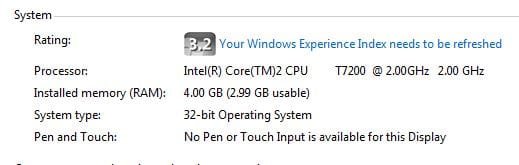
I just installed my new 4GB memory cards (2x2GB) in my notebook computer, and it is not showing all of it as useable. It says:

Installed Memory (RAM): 4.00 GB (2.99 GB usable)

Attached is a screen capture of my system properties which shows this. Why is it not able to use all of the 4.00 GB that I have installed?

Thanks for any help! Happy Holidays!
 

Attachments
  • Memory Capture.jpg
    Memory Capture.jpg
    18.9 KB · Views: 58

My Computer

Computer Manufacturer/Model Number
HP Pavilion Media Center PC m7350n
OS
Microsoft Windows 7 Home Premium 32-bit 7601 Multiprocessor Free Service Pack 1
CPU
Intel(R) Pentium(R) D CPU 2.80GHz
Motherboard
ASUSTek Computer INC. EMERY
Memory
2.00 GB
Graphics Card(s)
NVIDIA GeForce 6200SE TurboCache(TM)
Sound Card
Realtek High Definition Audio
Monitor(s) Displays
HP L1710 LCD Display
Screen Resolution
1280 x 1024 x 32 bits (4294967296 colors) @ 60 Hz
Hard Drives
(1) SAMSUNG SP2504C (2) EPSON Stylus Storage USB Device (3) Generic USB CF Reader USB Device (4) Generic USB MS Reader USB Device (5) Generic USB SD Reader USB Device (6) Generic USB SM Reader USB Device (7) Seagate FA GoFlex Desk USB Dev
Internet Speed
20+mbps
Hello everyone,

I just installed my new 4GB memory cards (2x2GB) in my notebook computer, and it is not showing all of it as useable. It says:

Installed Memory (RAM): 4.00 GB (2.99 GB usable)

Attached is a screen capture of my system properties which shows this. Why is it not able to use all of the 4.00 GB that I have installed?

Thanks for any help! Happy Holidays!


You are running 32 bit OS. It can usually only use about 3.25 gigs the rest of the missing is probably your video card.
 

My Computer

Computer Manufacturer/Model Number
HP Pavillion dv-7 1005 Tx
OS
Win 8 Release candidate 8400
CPU
[email protected]
Memory
4 gigs
Graphics Card(s)
Nvidia 9600M
Sound Card
HD built-in
Monitor(s) Displays
17" Wxga
Screen Resolution
1440x900
Cooling
none
Internet Speed
45Mb down 5Mb up
That's normal with a 32 bit OS.
 

My Computer

Computer type
PC/Desktop
Computer Manufacturer/Model Number
Custom Build
OS
Windows 7 Home Premium 64 bit
CPU
Intel Core i7-4790
Motherboard
GA-Z87X-D3H
Memory
G.SKILL 8GB (2 x 4GB) DDR3 F3-10666CL9D-8GBNT
Graphics Card(s)
AMD Radeon R7 250
Sound Card
Realtek ALC892
Monitor(s) Displays
Samsung UN32EH5000, Dell 1703FPT
Screen Resolution
1920 x 1080, 1280 x 1024
Hard Drives
WD5003AZEX
WD10EZEX
Samsung HD103SJ
Samsung 128 GB 840 PRO
PSU
SeaSonic M12II SS-500GM
Case
Fractal Design Define R4
Cooling
Zalman CNPS9900ALED
Keyboard
Logitech K800
Mouse
Logitech M705
Internet Speed
16 Mbps
Antivirus
Avast
Browser
Firefox
Other Info
Bose Companion 2 Multimedia Speakers
A 32bit OS can't address a full 4gb of memory .... typically it will only be able to use @3.5gb of memory... In your case the remainder of the missing ram is probably being used by your graphics chip... You need to install the 64bit version of Windows to utilize the full 4gb of RAM... ;)


EDIT: Ken beat me again! :o
 

My Computer

Computer type
PC/Desktop
Computer Manufacturer/Model Number
LENOVO K450 @3.0GHZ
OS
64-bit Windows 8.1 Pro
CPU
Core(TM) i5 CPU 4330 Haswell @ 3.20GHz
Motherboard
LENOVO
Memory
12.00 GB
Graphics Card(s)
Intel(R) HD Graphics
Sound Card
Intel HD integtrated
Monitor(s) Displays
HP 25' ISP Monitor
Screen Resolution
1900/1020
Hard Drives
(1) ST1000DM003-1CH162 (2) Generic STORAGE DEVICE USB Device (3) Generic STORAGE DEVICE USB Device
Internet Speed
100mb down/10mb up
You need to install the 64bit version of Windows to utilize the full 4gb of RAM... ;)

And have a motherboard/chipset capable of addressing larger address spaces. ;)
And if the BIOS doesn't have a method of remapping...
 

My Computer

Computer type
PC/Desktop
Computer Manufacturer/Model Number
Alienware Aurora ALX R4
OS
Windows 10 Pro (x64)
CPU
Intel Core i7-3930K (3.2GHz - 4.5GHz)
Motherboard
Alienware Aurora-R4 x79
Memory
4x Samsung 4GB PC3-12800 DDR3 (16GB 1600MHz)
Graphics Card(s)
Nvidia Geforce GTX 690
Sound Card
SteelSeries Siberia Elite
Monitor(s) Displays
Dell UltraSharp U3011
Screen Resolution
2560x1600
Hard Drives
Samsung 850 Pro 256 GB, Seagate 1TB Desktop Hybrid HDD, 2x Western Digital 4TB Green HDD
PSU
875W Some Dell PSU <.<
Case
Alienware Aurora ALX
Cooling
Custom Liquid Cooling (EK CPU & GPU blocks) dual EK 480RAD
Keyboard
Logitech G710+ Mechanical
Mouse
Logitech G700s
Internet Speed
Verizon Fios (50 mbps average)
Other Info
Server: Intel NUC D54250WYK: i5-4250U, 16GB, 256 GB mSATA, Windows Server 2012 R2
Thank you everyone! I guess that was $100 down the toilet. I do notice a little performance increase, but I really think I am going over to the other side (Mac).

Sometimes my machine will shut down 'abnormally' because the battery loses power, and so I must boot into safe mode, shut down, then boot normally. Howeve, when I boot into safe mode, I can see all the DOS paths flying by and some have System with a lower case "s" and some with upper case "S". Wouldn't you think by now that *someone* would have thought to proofread thee and make them consistent???

And what is up with this auotmatic updating??? I have it set to download updates, then prompt me to install. Instead, it never prompts me, and then when I am in a hurry and shutting down my machine to reboot or something, it will install all the updates, usually about 10, taking about 20 minutes. I never gave it permission to do that!

And speaking of shutting down, even when there are *no* updates to install, it takes FOREVER. What happened to the days of just turning off the machine??? I swear a nuclear bomb could be falling and I would sill be waiting for windows to finish shutting down!

One last rant. If my iPhone can handle 32 GB of memory, why can my Notebook/Laptop computer not handle only 4 GB, and because it is not running Windows 64 bit??? Shouldn't Microsoft have told me this when I purchased Windows 7???

At this point, I"m so sick of Microsoft. The only thing I want to have to do with them is their Kinect that hooks up to the 360 XBOX. That looks cool, but it is probably a big abomination like all Microsoft products.

Thoughts?
 
Last edited:

My Computer

Computer Manufacturer/Model Number
HP Pavilion Media Center PC m7350n
OS
Microsoft Windows 7 Home Premium 32-bit 7601 Multiprocessor Free Service Pack 1
CPU
Intel(R) Pentium(R) D CPU 2.80GHz
Motherboard
ASUSTek Computer INC. EMERY
Memory
2.00 GB
Graphics Card(s)
NVIDIA GeForce 6200SE TurboCache(TM)
Sound Card
Realtek High Definition Audio
Monitor(s) Displays
HP L1710 LCD Display
Screen Resolution
1280 x 1024 x 32 bits (4294967296 colors) @ 60 Hz
Hard Drives
(1) SAMSUNG SP2504C (2) EPSON Stylus Storage USB Device (3) Generic USB CF Reader USB Device (4) Generic USB MS Reader USB Device (5) Generic USB SD Reader USB Device (6) Generic USB SM Reader USB Device (7) Seagate FA GoFlex Desk USB Dev
Internet Speed
20+mbps
One last rant. If my iPhone can handle 32 GB of memory, why can my Notebook/Laptop computer not handle only 4 GB, and because it is not running Windows 64 bit??? Shouldn't Microsoft have told me this when I purchased Windows 7???

Ummm your iPhone's 32 GBs is not RAM. That 32 GBs is like a Hard Drive for a computer. The 4 GB RAM limit is a 32 bit limitation, not a Windows limitation. This has been known for years. Your lack of research in the matter is of your own fault.

By the way. you already have access to the 64bit version of Windows. You do not need to buy another copy. A license for the 32bit version is also for the 64bit version.
 
Last edited:

My Computer

Computer type
PC/Desktop
Computer Manufacturer/Model Number
Alienware Aurora ALX R4
OS
Windows 10 Pro (x64)
CPU
Intel Core i7-3930K (3.2GHz - 4.5GHz)
Motherboard
Alienware Aurora-R4 x79
Memory
4x Samsung 4GB PC3-12800 DDR3 (16GB 1600MHz)
Graphics Card(s)
Nvidia Geforce GTX 690
Sound Card
SteelSeries Siberia Elite
Monitor(s) Displays
Dell UltraSharp U3011
Screen Resolution
2560x1600
Hard Drives
Samsung 850 Pro 256 GB, Seagate 1TB Desktop Hybrid HDD, 2x Western Digital 4TB Green HDD
PSU
875W Some Dell PSU <.<
Case
Alienware Aurora ALX
Cooling
Custom Liquid Cooling (EK CPU & GPU blocks) dual EK 480RAD
Keyboard
Logitech G710+ Mechanical
Mouse
Logitech G700s
Internet Speed
Verizon Fios (50 mbps average)
Other Info
Server: Intel NUC D54250WYK: i5-4250U, 16GB, 256 GB mSATA, Windows Server 2012 R2
Thank you everyone! I guess that was $100 down the toilet. I do notice a little performance increase, but I really think I am going over to the other side (Mac).
You should use whatever you want to use, but any 32bit OS is going to have this issue - switching to a 32bit Mac or Linux isn't going to allow the OS to use memory the BIOS has reserved either, unfortunately.

Sometimes my machine will shut down 'abnormally' because the battery loses power, and so I must boot into safe mode, shut down, then boot normally
Another BIOS issue you should look into before continuing use with Windows 7 (or switching to a Mac OS or a Linux variant - it means the BIOS is misreporting the battery state to the OS when it makes the more invasive checks that Win7 does, as will most newer Linux variants or a Mac OS X install).

However, when I boot into safe mode, I can see all the DOS paths flying by and some have System with a lower case "s" and some with upper case "S". Wouldn't you think by now that *someone* would have thought to proofread thee and make them consistent???
They're that way for a reason, and while the OCD in you might be satisfied if they were all the same, it's not feasible or recommended that this be done ;).


And what is up with this auotmatic updating??? I have it set to download updates, then prompt me to install. Instead, it never prompts me, and then when I am in a hurry and shutting down my machine to reboot or something, it will install all the updates, usually about 10, taking about 20 minutes. I never gave it permission to do that!
Be careful when shutting down - the default is to "shut down and install updates" - you have to make an additional click into the shutdown menu to skip that (if you use the power button or just click shut down in the menu, this is the default).

And speaking of shutting down, even when there are *no* updates to install, it takes FOREVER. What happened to the days of just turning off the machine??? I swear a nuclear bomb could be falling and I would sill be waiting for windows to finish shutting down!
Sounds like a service or application is "checkpointing" winlogon's shutdown process (aka, winlogon or services.exe asks the app or service if it's ready to shut down, and it keeps responding "in a bit..." over and over). This is configurable in the registry, but there are also tools (xperf) to troubleshoot this and catch the offender.

One last rant. If my iPhone can handle 32 GB of memory, why can my Notebook/Laptop computer not handle only 4 GB, and because it is not running Windows 64 bit??? Shouldn't Microsoft have told me this when I purchased Windows 7???
As a previous poster said, this isn't RAM, it's a disk - also, Windows 7 (x64) could handle 32GB with aplomb - if you bought a retail copy of Windows 7, you already have both the 32 and 64bit discs, and you should at this point be installing the 64bit Windows 7 from the 64bit DVD. Using a 32bit OS with huge BIOS reservations isn't a good idea nowadays.

At this point, I"m so sick of Microsoft. The only thing I want to have to do with them is their Kinect that hooks up to the 360 XBOX. That looks cool, but it is probably a big abomination like all Microsoft products.
That is your perogative, but nothing you've mentioned here (other than the shutdown preference to install before powering off) is a Microsoft problem. More research by you in this case would have saved you a lot of time and frustration, so I think your pain is mostly self-inflicted. If you'd like to troubleshoot the shutdown slowness, that can be done on another thread, but I'd suggest installing the 64bit Win7 install from the 64bit disc before going any further with your troubleshooting. Pretty much every other setting can be tweaked or troubleshot away.
 

My Computer

Computer type
PC/Desktop
Computer Manufacturer/Model Number
Custom
OS
Windows 10 Pro x64
CPU
Intel Core i7 4790K @ 4.5GHz
Motherboard
Asus Maximus Hero VII
Memory
32GB DDR3
Graphics Card(s)
Nvidia GeForce GTX970
Sound Card
Realtek HD Audio
Screen Resolution
1920x1200
Hard Drives
1x Samsung 250GB SSD
4x WD RE 2TB (RAIDZ)
PSU
Corsair AX760i
Case
Fractal Design Define R4
Cooling
Noctua NH-D15
Thanks, but...

One last rant. If my iPhone can handle 32 GB of memory, why can my Notebook/Laptop computer not handle only 4 GB, and because it is not running Windows 64 bit??? Shouldn't Microsoft have told me this when I purchased Windows 7???

Ummm your iPhone's 32 GBs is not RAM. That 32 GBs is like a Hard Drive for a computer. The 4 GB RAM limit is a 32 bit limitation, not a Windows limitation. This has been known for years. Your lack of research in the matter is of your own fault.

By the way. you already have access to the 64bit version of Windows. You do not need to buy another copy. A license for the 32bit version is also for the 64bit version.

Well, thanks for the information on using the 64bit of Windows. I guess my question would be, if 32 bit is so bad, and there is a viable option, why is this option not the de facto standard? And, FWIW, I did do *my* research before hand. I called Toshiba, and asked them what was the maximum RAM my computer could address? They told me 4GB...
 

My Computer

Computer Manufacturer/Model Number
HP Pavilion Media Center PC m7350n
OS
Microsoft Windows 7 Home Premium 32-bit 7601 Multiprocessor Free Service Pack 1
CPU
Intel(R) Pentium(R) D CPU 2.80GHz
Motherboard
ASUSTek Computer INC. EMERY
Memory
2.00 GB
Graphics Card(s)
NVIDIA GeForce 6200SE TurboCache(TM)
Sound Card
Realtek High Definition Audio
Monitor(s) Displays
HP L1710 LCD Display
Screen Resolution
1280 x 1024 x 32 bits (4294967296 colors) @ 60 Hz
Hard Drives
(1) SAMSUNG SP2504C (2) EPSON Stylus Storage USB Device (3) Generic USB CF Reader USB Device (4) Generic USB MS Reader USB Device (5) Generic USB SD Reader USB Device (6) Generic USB SM Reader USB Device (7) Seagate FA GoFlex Desk USB Dev
Internet Speed
20+mbps
>>>Cluberti,

Thanks for all the detail in your answers! I appreciate that very much. I am not re quoting directly because I do not have the personal ability to do that. I would still like to know why all the "S's" in the System folder are not consistently all upper or all lower case. That makes no sense to me. Other than that, your points are very clear and well taken. Is it true that Mac users don't have to deal with all of these issues, or is it just a case of the grass being greener on the other side? (I am referring to things like configuring the shut down to not install updates, and figuring out which application is holding up the shut down process. Mac purports to not have these issues, and, from my iPhone usage, it would seem that they are correct.)

Take good care,
 

My Computer

Computer Manufacturer/Model Number
HP Pavilion Media Center PC m7350n
OS
Microsoft Windows 7 Home Premium 32-bit 7601 Multiprocessor Free Service Pack 1
CPU
Intel(R) Pentium(R) D CPU 2.80GHz
Motherboard
ASUSTek Computer INC. EMERY
Memory
2.00 GB
Graphics Card(s)
NVIDIA GeForce 6200SE TurboCache(TM)
Sound Card
Realtek High Definition Audio
Monitor(s) Displays
HP L1710 LCD Display
Screen Resolution
1280 x 1024 x 32 bits (4294967296 colors) @ 60 Hz
Hard Drives
(1) SAMSUNG SP2504C (2) EPSON Stylus Storage USB Device (3) Generic USB CF Reader USB Device (4) Generic USB MS Reader USB Device (5) Generic USB SD Reader USB Device (6) Generic USB SM Reader USB Device (7) Seagate FA GoFlex Desk USB Dev
Internet Speed
20+mbps
Oh and the iPhone's 32GB is RAM, not 'hard disk'. I mean, how would they fit a disk into that little phone?
 

My Computer

Computer Manufacturer/Model Number
HP Pavilion Media Center PC m7350n
OS
Microsoft Windows 7 Home Premium 32-bit 7601 Multiprocessor Free Service Pack 1
CPU
Intel(R) Pentium(R) D CPU 2.80GHz
Motherboard
ASUSTek Computer INC. EMERY
Memory
2.00 GB
Graphics Card(s)
NVIDIA GeForce 6200SE TurboCache(TM)
Sound Card
Realtek High Definition Audio
Monitor(s) Displays
HP L1710 LCD Display
Screen Resolution
1280 x 1024 x 32 bits (4294967296 colors) @ 60 Hz
Hard Drives
(1) SAMSUNG SP2504C (2) EPSON Stylus Storage USB Device (3) Generic USB CF Reader USB Device (4) Generic USB MS Reader USB Device (5) Generic USB SD Reader USB Device (6) Generic USB SM Reader USB Device (7) Seagate FA GoFlex Desk USB Dev
Internet Speed
20+mbps
Oh and the iPhone's 32GB is RAM, not 'hard disk'. I mean, how would they fit a disk into that little phone?

... You are being serious are you not?
 

My Computer

Computer type
PC/Desktop
Computer Manufacturer/Model Number
Alienware Aurora ALX R4
OS
Windows 10 Pro (x64)
CPU
Intel Core i7-3930K (3.2GHz - 4.5GHz)
Motherboard
Alienware Aurora-R4 x79
Memory
4x Samsung 4GB PC3-12800 DDR3 (16GB 1600MHz)
Graphics Card(s)
Nvidia Geforce GTX 690
Sound Card
SteelSeries Siberia Elite
Monitor(s) Displays
Dell UltraSharp U3011
Screen Resolution
2560x1600
Hard Drives
Samsung 850 Pro 256 GB, Seagate 1TB Desktop Hybrid HDD, 2x Western Digital 4TB Green HDD
PSU
875W Some Dell PSU <.<
Case
Alienware Aurora ALX
Cooling
Custom Liquid Cooling (EK CPU & GPU blocks) dual EK 480RAD
Keyboard
Logitech G710+ Mechanical
Mouse
Logitech G700s
Internet Speed
Verizon Fios (50 mbps average)
Other Info
Server: Intel NUC D54250WYK: i5-4250U, 16GB, 256 GB mSATA, Windows Server 2012 R2
No worries mate. The reason 32bit Windows is still around is mostly down to drivers and old applications - there are even today still folks that have apps and drivers that just don't work in a 64bit environment. It is worth noting, however, that OEMs like Lenovo and Dell have been shipping Windows 7 x64 as the default for quite some time now (and Toshiba has been on my sh*t list as far as hardware and software goes for a long time, so I have no idea what they've done since the Vista days). As to Mac, the reason they tend to have fewer problems like this is down to the app and developer ecosystem - it's a much more closed garden, so to speak, and they have far more control (meaning 100%, basically) over the drivers and hardware that works with their OS. Also, once they made the switch from PPC to x86/Intel, they pretty much got rid of backwards compatibility with older PPC apps (these had to run in an emulation layer, or be rewritten for x86 Mac OS X ultimately). The grass is greener, for sure, but you lose a lot of control over your PC environs. The choice is, of course, ultimately yours - again, you should use what works best for you. If you have apps that you can take with you and either repurchase, completely replace, or re-download for Mac OS X, then you should seriously consider it. Otherwise, sticking with Windows means doing your research and making wise decisions (just as you would with any other aspect of your life). On one hand, your research in talking to Toshiba was good, but asking them how much RAM your system could address (4GB, which is technically correct) versus how much the OS could actually *use* once the hardware and BIOS reserves memory is something else that Toshiba was bound to give you a technically correct, but completely unusable answer on (again, don't get me started on Toshiba). If you need help doing real research, let us know here ;).
 

My Computer

Computer type
PC/Desktop
Computer Manufacturer/Model Number
Custom
OS
Windows 10 Pro x64
CPU
Intel Core i7 4790K @ 4.5GHz
Motherboard
Asus Maximus Hero VII
Memory
32GB DDR3
Graphics Card(s)
Nvidia GeForce GTX970
Sound Card
Realtek HD Audio
Screen Resolution
1920x1200
Hard Drives
1x Samsung 250GB SSD
4x WD RE 2TB (RAIDZ)
PSU
Corsair AX760i
Case
Fractal Design Define R4
Cooling
Noctua NH-D15

My Computer

Computer type
Laptop
Computer Manufacturer/Model Number
Sony Vaio VPCEB47GM Laptop
OS
Win 7 Pro 64-bit
CPU
Intel i5 2.4 Ghz
Memory
8GB DDR3
Graphics Card(s)
Intel HD 3000
Sound Card
IDT High Definition
Monitor(s) Displays
15.6 WGXA Anti-Glare LED
Screen Resolution
1280x800
Hard Drives
640Gb 7200rpm
Antivirus
MSE
Browser
Opera (primary) with IE9 backup
Hi Juan! look, i have a MacBook Pro 15" late 2010! and it's not the best thing that's ever happened to me.. sometimes people get all *happy* because they've got a Mac, and Mac to be honest, ok, it's easy, it's cool, it's good hardware, but i've had a lot of software issues with OSX Snow Leopard, random locks, random reboots, people say Mac is "Virus Free" and that's not entirely true..

I spend way more time in my System Specs PC than in my MacBook Pro (Core i5 2.4GB, 4GB DDR3 Ram) :huh: and i'm not a M$ fanboy, neither an Apple fanboy.. few weeks ago, i took my MacBook to an Expo i had to do in the University, and in the middle of the expo, the Presentation i had on iWork hung up, causing me a really big problem, but that is not what we came to argue.

Thing is, 64-bit OS for your toshiba and that's it... easy as that.. you will see approx. 3.5GB as the other 0.5GB is reserved to your Video Card that's integrated..

End of the story.. :) Be happy..

EDIT: iPhone 4G has 512MB Ram and 32GB Flash Drive (Storage), iPhone 3GS has 256MB Ram! iPhone 3G has 128MB Ram!
 

My Computer

Computer type
PC/Desktop
OS
Windows
Looks like someone needs to take windows all versions 101

Not trying to be funny man but you need to really read about what you are useing and if some salesperson told you this informantion then we can't really blame you for being misinformed

Like i was saying you should go purchase windows for dummies even though i never used it ,It's a direct and plain english type of deal with out all the jargen smargen that you won't understand then you will have a idea of what my fellow members are explaining to you :cool:
 

My Computer

Computer type
PC/Desktop
Computer Manufacturer/Model Number
CoreI7-6700K MrFingerIII Special Builds
OS
Windows 10 Home Premium 64bit sp1
CPU
Intel I7-6700K @ 4.6 Ghz 1.344 volts everyday OC
Motherboard
Asrock Fatality K6 Z170 Socket 1151
Memory
32GB G-Skill TridentZ 3200mhz 16-18-18-38 DDR4
Graphics Card(s)
Sli Gigabyte Windforce GTX 980 G1
Sound Card
AC97 Creative Rage Tactic 3D Headphones Bluetooth
Monitor(s) Displays
27" Asus ROG Swift PG278Q G-Sync 48" Vizio Smart HD TV
Screen Resolution
2560x1440p 27"- 48" Currently Gaming at 2560x1440p Res 2K
Hard Drives
250GB Samsung Evo840SSD Seagate baracuda 500 GB WD Mybook 500Gb 1TB Seagate Barracuda
PSU
HX1050w Corsair Silver 80plus certified crosfire/sli
Case
Enthod Pro Full Tower
Cooling
Corsair H110i GT 280 mm High Performance WaterBlock
Keyboard
Logitech wireless keyboard
Mouse
Logitech wireless mouse
Internet Speed
Cox Cable 100+ mb
Antivirus
WebRoot Spysweeper with Antivirus
Browser
IE-10, Chrome, Opera
Other Info
My Other Rig is a AMD FX8320E @4.6Ghz 16GB Ballistic Sport Ram
Mobo Asrock Fatality 990FX 120GB OCZ SSD 1TB Seagate Barracuda Corsair H75 Cooling PSU Corsair CX750
GPU GTX Gigabyte 970G1
Half serious...

Oh and the iPhone's 32GB is RAM, not 'hard disk'. I mean, how would they fit a disk into that little phone?

... You are being serious are you not?

I was being half serious or mostly serious, kind of tongue in cheek. Because it is true: How would one fit a hard disk in that small of a space (the iPhone)? AND, the memory in iPhone is RAM (Random Access Memory) or working memory, not a hard drive. Perhaps a hybrid term might be more accurrate: solid state memory?
 

My Computer

Computer Manufacturer/Model Number
HP Pavilion Media Center PC m7350n
OS
Microsoft Windows 7 Home Premium 32-bit 7601 Multiprocessor Free Service Pack 1
CPU
Intel(R) Pentium(R) D CPU 2.80GHz
Motherboard
ASUSTek Computer INC. EMERY
Memory
2.00 GB
Graphics Card(s)
NVIDIA GeForce 6200SE TurboCache(TM)
Sound Card
Realtek High Definition Audio
Monitor(s) Displays
HP L1710 LCD Display
Screen Resolution
1280 x 1024 x 32 bits (4294967296 colors) @ 60 Hz
Hard Drives
(1) SAMSUNG SP2504C (2) EPSON Stylus Storage USB Device (3) Generic USB CF Reader USB Device (4) Generic USB MS Reader USB Device (5) Generic USB SD Reader USB Device (6) Generic USB SM Reader USB Device (7) Seagate FA GoFlex Desk USB Dev
Internet Speed
20+mbps
It seems like it is just different problems...

No worries mate. The reason 32bit Windows is still around is mostly down to drivers and old applications - there are even today still folks that have apps and drivers that just don't work in a 64bit environment. It is worth noting, however, that OEMs like Lenovo and Dell have been shipping Windows 7 x64 as the default for quite some time now (and Toshiba has been on my sh*t list as far as hardware and software goes for a long time, so I have no idea what they've done since the Vista days). As to Mac, the reason they tend to have fewer problems like this is down to the app and developer ecosystem - it's a much more closed garden, so to speak, and they have far more control (meaning 100%, basically) over the drivers and hardware that works with their OS. Also, once they made the switch from PPC to x86/Intel, they pretty much got rid of backwards compatibility with older PPC apps (these had to run in an emulation layer, or be rewritten for x86 Mac OS X ultimately). The grass is greener, for sure, but you lose a lot of control over your PC environs. The choice is, of course, ultimately yours - again, you should use what works best for you. If you have apps that you can take with you and either repurchase, completely replace, or re-download for Mac OS X, then you should seriously consider it. Otherwise, sticking with Windows means doing your research and making wise decisions (just as you would with any other aspect of your life). On one hand, your research in talking to Toshiba was good, but asking them how much RAM your system could address (4GB, which is technically correct) versus how much the OS could actually *use* once the hardware and BIOS reserves memory is something else that Toshiba was bound to give you a technically correct, but completely unusable answer on (again, don't get me started on Toshiba). If you need help doing real research, let us know here ;).

Cluberti,

Thanks for the very explanative response. It used to be that people stuck with Microsoft Windows OS instead of Mac because of software incompatibility or unavailability issues on the Mac. But now that everything is going toward a more cloud based 'os', the line between Macs and Microsoft Windows PCs is getting thinner and thinner. Everything Adobe will run on Mac, Office is available for Mac, although I wonder why anyone would want to put something from Microsoft on such a beautiful machine. iTunes, the other major player in the software applications, is of course Mac-able. So, yeah, I cannot see why anyone would want to use a Microsoft Windows based PC.

I am curious, however, why Toshiba is on your s**t list. I have had nothing but good with my last 2 Satellites and 1 Portege, the original Tablet PC -- boy did that bomb! He he he.

I just love the idea of a PC that works the way iPhone works. When I first got the iPhone, every time I went to do something it was just like they thought of it first. Nothing needed to be reconfigured, downloaded or fixed to get it to work. Now that I have had the phone for a while, I can notice a few downfalls: 1-is that when you turn the phone horizontal on the home screens, the icons do not turn with it, 2-is the built in correction dictionary for typing sux; I wish they would have used the same keyboarding system that the PS3 uses, and last, 3-well i guess there really is nothing else to fix, except that i wish the entire phone was controllable by voice, but that is a whole other topic.

Thanks again for the follow through on this thread!

P.S. Until I can get a Mac, should I go back and reinstall Windows and Office in the 64 Bit versions, and start using that for increased performance? Or am I going to have compatibility issues with 64 bit Windows, because my mom's desktop PC has Microsoft Windows 64 bit, and when I was visiting her a few months ago, one of the Adobe apps, like flash or something, was not working on the 64 bit environment because it had not been built yet. Is this a common occurrence where 64 bit apps come second to 32 bit?

Happy Holidays!
 

My Computer

Computer Manufacturer/Model Number
HP Pavilion Media Center PC m7350n
OS
Microsoft Windows 7 Home Premium 32-bit 7601 Multiprocessor Free Service Pack 1
CPU
Intel(R) Pentium(R) D CPU 2.80GHz
Motherboard
ASUSTek Computer INC. EMERY
Memory
2.00 GB
Graphics Card(s)
NVIDIA GeForce 6200SE TurboCache(TM)
Sound Card
Realtek High Definition Audio
Monitor(s) Displays
HP L1710 LCD Display
Screen Resolution
1280 x 1024 x 32 bits (4294967296 colors) @ 60 Hz
Hard Drives
(1) SAMSUNG SP2504C (2) EPSON Stylus Storage USB Device (3) Generic USB CF Reader USB Device (4) Generic USB MS Reader USB Device (5) Generic USB SD Reader USB Device (6) Generic USB SM Reader USB Device (7) Seagate FA GoFlex Desk USB Dev
Internet Speed
20+mbps
Thanks, Marsmimar!

To speed up shutdown times, try this:

http://www.sevenforums.com/tutorials/717-shut-down-speed-up.html

For information about why you might be getting updates installed even though you want to be notified beforehand, see this:

http://www.sevenforums.com/windows-updates-activation/121062-stop-automatic-updates.html#post1042245

I appreciate you looking these up for me, but shouldn't the computer figure out the fastest way and just shut down when you tell it? (One of the whole reasons I despised Mac from the get-go was because you just couldn't open the drive door and take out your floppy, like you could on the DOS PCs of that day, and that you had to tell the Mac to shut down, you couldn't just turn it off like a PC. Now, with MS Windows, we basically have the same issues, so there is no reason to despise Mac any more than MS Windows)

Also, what gave Microsoft the 'right' to just install its updates even when you tell it not to? Is this not evil? Perhaps I'm too forward in my thinking, but after working with computers for 32 years, I would have thought that these 'kinks' would have already been worked out.
 

My Computer

Computer Manufacturer/Model Number
HP Pavilion Media Center PC m7350n
OS
Microsoft Windows 7 Home Premium 32-bit 7601 Multiprocessor Free Service Pack 1
CPU
Intel(R) Pentium(R) D CPU 2.80GHz
Motherboard
ASUSTek Computer INC. EMERY
Memory
2.00 GB
Graphics Card(s)
NVIDIA GeForce 6200SE TurboCache(TM)
Sound Card
Realtek High Definition Audio
Monitor(s) Displays
HP L1710 LCD Display
Screen Resolution
1280 x 1024 x 32 bits (4294967296 colors) @ 60 Hz
Hard Drives
(1) SAMSUNG SP2504C (2) EPSON Stylus Storage USB Device (3) Generic USB CF Reader USB Device (4) Generic USB MS Reader USB Device (5) Generic USB SD Reader USB Device (6) Generic USB SM Reader USB Device (7) Seagate FA GoFlex Desk USB Dev
Internet Speed
20+mbps
I understand...

Looks like someone needs to take windows all versions 101

Not trying to be funny man but you need to really read about what you are useing and if some salesperson told you this informantion then we can't really blame you for being misinformed

Like i was saying you should go purchase windows for dummies even though i never used it ,It's a direct and plain english type of deal with out all the jargen smargen that you won't understand then you will have a idea of what my fellow members are explaining to you :cool:

I have no problems understanding how Windows works (or fails to). Nor do I not know what fellow members are talking about. I fully get it. I just think that, by now (I have been working with computers for 32 years.), these things should function a bit better. It is kind of like a car. Now they make cars that need *no* maintenance for the first 100,000 miles. Shouldn't computers have advanced at leas that much?
 

My Computer

Computer Manufacturer/Model Number
HP Pavilion Media Center PC m7350n
OS
Microsoft Windows 7 Home Premium 32-bit 7601 Multiprocessor Free Service Pack 1
CPU
Intel(R) Pentium(R) D CPU 2.80GHz
Motherboard
ASUSTek Computer INC. EMERY
Memory
2.00 GB
Graphics Card(s)
NVIDIA GeForce 6200SE TurboCache(TM)
Sound Card
Realtek High Definition Audio
Monitor(s) Displays
HP L1710 LCD Display
Screen Resolution
1280 x 1024 x 32 bits (4294967296 colors) @ 60 Hz
Hard Drives
(1) SAMSUNG SP2504C (2) EPSON Stylus Storage USB Device (3) Generic USB CF Reader USB Device (4) Generic USB MS Reader USB Device (5) Generic USB SD Reader USB Device (6) Generic USB SM Reader USB Device (7) Seagate FA GoFlex Desk USB Dev
Internet Speed
20+mbps
Back
Top