Solved Windows is not using my NVIDIA GEFORCE

hoangnnm

New member
Local time
1:59 AM
Messages
16
Hi all, I have Geforce GT 525M running on Dell Inspiron N5110 .
s1.JPG

I didn't know that my windows is not using the VGA until i installed a game and it told me that my Video card does not meet the minium requirement .
I don't know how to make windows use my VGA instead of the onboard card.
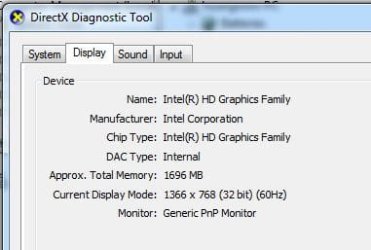
s2.JPG

I tried to "detect" and set the VGA to my main display but if i do so, i gonna see nothing on the screen except the background even i choosed "Show desktop only in 2" already .
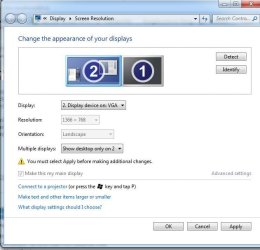
s3.JPG

Please help me, thanks very much !
 

My Computer

OS
Windows 7 Ultimate x64
You should be able to disable the onboard VGA in BIOS. Othewise, have you tried disabling the Intel Graphics Adapter in the Device Manager?
 

My Computer

Computer Manufacturer/Model Number
Custom
OS
Windows 10 Professional x64
CPU
Intel Core i5-4690K Devil's Canyon Quad-Core 3.5GHz
Motherboard
Gigabyte GA-Z97MX Gaming 5 (Rev. 1.0)
Memory
G.Skill AEGIS 16GB PC3-12800
Graphics Card(s)
Sapphire Dual-X Radeon R9 280
Sound Card
Integrated Motherboard Sound
Monitor(s) Displays
42" Insignia LCD TV
Screen Resolution
1920x1080
Hard Drives
System: Kingston SSDNow M.2 SATA
Internal 1: Western Digital 7200RPM 2TB SATA III
External 1: Western Digital 7200RPM 3TB USB 3.0
PSU
Rosewill Bronze RBR1000-M 1000W w/Modular Cabling
Case
Antec 900 Series
Keyboard
Logitech K350
Mouse
Logitech M510
Internet Speed
100 MBPs
You should be able to disable the onboard VGA in BIOS. Othewise, have you tried disabling the Intel Graphics Adapter in the Device Manager?
Hi askavatar, thanks for the reply.

I tried to disable the onboard VGA in bios but i could not find where is that ! ( my bios menu is quiet simple ) .

If I disable the Intel adapter in the Device Manager my screen will shut down immediately ( means it's still running just not displaying anymore ) and i have to shut my laptop down by keep pressing the power button.
 

My Computer

OS
Windows 7 Ultimate x64
go into Bios check Pci-e settings or graphic card slot

there should be something telling you onboard graphics and should be able to switch to installed graphics im sure there is a setting for onboard video have to find it

Can you make a screen shot of the bios and show us the settings ?
 

My Computer

Computer type
PC/Desktop
Computer Manufacturer/Model Number
CoreI7-6700K MrFingerIII Special Builds
OS
Windows 10 Home Premium 64bit sp1
CPU
Intel I7-6700K @ 4.6 Ghz 1.344 volts everyday OC
Motherboard
Asrock Fatality K6 Z170 Socket 1151
Memory
32GB G-Skill TridentZ 3200mhz 16-18-18-38 DDR4
Graphics Card(s)
Sli Gigabyte Windforce GTX 980 G1
Sound Card
AC97 Creative Rage Tactic 3D Headphones Bluetooth
Monitor(s) Displays
27" Asus ROG Swift PG278Q G-Sync 48" Vizio Smart HD TV
Screen Resolution
2560x1440p 27"- 48" Currently Gaming at 2560x1440p Res 2K
Hard Drives
250GB Samsung Evo840SSD Seagate baracuda 500 GB WD Mybook 500Gb 1TB Seagate Barracuda
PSU
HX1050w Corsair Silver 80plus certified crosfire/sli
Case
Enthod Pro Full Tower
Cooling
Corsair H110i GT 280 mm High Performance WaterBlock
Keyboard
Logitech wireless keyboard
Mouse
Logitech wireless mouse
Internet Speed
Cox Cable 100+ mb
Antivirus
WebRoot Spysweeper with Antivirus
Browser
IE-10, Chrome, Opera
Other Info
My Other Rig is a AMD FX8320E @4.6Ghz 16GB Ballistic Sport Ram
Mobo Asrock Fatality 990FX 120GB OCZ SSD 1TB Seagate Barracuda Corsair H75 Cooling PSU Corsair CX750
GPU GTX Gigabyte 970G1

My Computer

Computer type
PC/Desktop
Computer Manufacturer/Model Number
Dwarf Dwf/11/2012 r09/2013
OS
Windows 8.1 Pro RTM x64
CPU
Intel Core-i5-3570K 4-core @ 3.4GHz (Ivy Bridge) (OC 4.4GHz)
Motherboard
ASRock Z77 Extreme4-M
Memory
4 x 4GB DDR3-1600 Corsair Vengeance CMZ8GX3M2A1600C9B (16GB)
Graphics Card(s)
MSI GeForce GTX770 Gaming OC 2GB
Sound Card
Realtek High Definition on board solution (ALC 898)
Monitor(s) Displays
ViewSonic VA1912w Widescreen (VGA)
Screen Resolution
1440x900
Hard Drives
OCZ Agility 3 SSD 120GB SATA III x2 (RAID 0)
Samsung HD501LJ 500GB SATA II x2
Hitachi HDS721010CLA332 1TB SATA II
Iomega 1.5TB Ext USB 2.0
WD 2.0TB Ext USB 3.0
PSU
XFX Pro Series 850W Semi-Modular
Case
Gigabyte IF233
Cooling
1 x 120mm Front Inlet 1 x 120mm Rear Exhaust
Keyboard
Microsoft Comfort Curve Keyboard 3000 (USB)
Mouse
Microsoft Comfort Mouse 3000 for Business (USB)
Internet Speed
NetGear DG834Gv3 ADSL Modem/Router (Ethernet) ~4.0 Mb/s (O2)
Antivirus
Avast! 8.0.1497
Browser
IE 11
Other Info
Optical Drive: HL-DT-ST BD-RE BH10LS30 SATA Bluray
Lexmark S305 Printer/Scanner/Copier (USB)
WEI Score: 8.1/8.1/8.5/8.5/8.25
Asus Eee PC 1011PX Netbook (Windows 7 x86 Starter)

My Computer

Computer type
PC/Desktop
Computer Manufacturer/Model Number
Self Built
OS
Win 10 Pro x64
CPU
Intel I5-2500K @3.3GHz
Motherboard
Asrock P67 Extreme4
Memory
16GB G.Skill Ripjaws X (4x4GB)
Graphics Card(s)
EVGA GeForce 750 Ti SC 2GB
Sound Card
ASUS Xonar DG 5.1 Channels 24-bit 96KHz PCI Interface Sound
Monitor(s) Displays
auria eq2367
Screen Resolution
1920 x 1080
Hard Drives
250GB Samsung 850 EVO SSD
1TB WD Blue
1TB Hitachi
PSU
SeaSonic X 650W 80 Plus Gold
Case
Corsair Obsidian 750D
Cooling
Corsair H60, Three 140mm case fans
Keyboard
Logitech Wireless Keyboard K520
Mouse
Logitech Wireless Mouse M310
Internet Speed
Wave Broadband ~ 100 dn 5 up
Antivirus
Windows Defender, Malwarebytes Premium
Browser
Edge, IE11, Chrome
Other Info
Laptop specs: HP g7-1365dx /
CPU: AMD A6-3420M APU with Radeon(tm) HD Graphics /
RAM: Crucial 8Gb (2x4Gb) /
SSD: Crucial M4-CT128M4SSD2 ATA Device/ FW 000F /
GFX: AMD Radeon HD 6520G /
OS: Windows 10 Pro x64
Yeah, those Dells tend to have a limited BIOS, I forgot about that. The next choice would have been Solar's advice, but i doubt the Dell BIOS even has graphic priority options, either. Looks like Dwarf is on the right track.
 

My Computer

Computer Manufacturer/Model Number
Custom
OS
Windows 10 Professional x64
CPU
Intel Core i5-4690K Devil's Canyon Quad-Core 3.5GHz
Motherboard
Gigabyte GA-Z97MX Gaming 5 (Rev. 1.0)
Memory
G.Skill AEGIS 16GB PC3-12800
Graphics Card(s)
Sapphire Dual-X Radeon R9 280
Sound Card
Integrated Motherboard Sound
Monitor(s) Displays
42" Insignia LCD TV
Screen Resolution
1920x1080
Hard Drives
System: Kingston SSDNow M.2 SATA
Internal 1: Western Digital 7200RPM 2TB SATA III
External 1: Western Digital 7200RPM 3TB USB 3.0
PSU
Rosewill Bronze RBR1000-M 1000W w/Modular Cabling
Case
Antec 900 Series
Keyboard
Logitech K350
Mouse
Logitech M510
Internet Speed
100 MBPs
Hi guys, thanks very much for your fast replies !
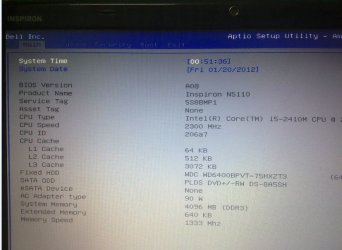
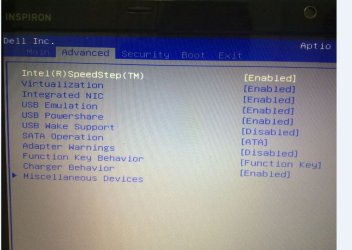
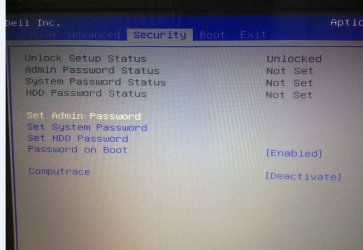
Here are some screen shot of the bios :
b1.JPG
b2.JPG
b3.JPG
 

My Computer

OS
Windows 7 Ultimate x64
Did you go into the intergration and virtulazation area's the integration im thinking would be the graphics disabling might bring the card up

Miscellanious devices didnt show anything?

Take a look
 

My Computer

Computer type
PC/Desktop
Computer Manufacturer/Model Number
CoreI7-6700K MrFingerIII Special Builds
OS
Windows 10 Home Premium 64bit sp1
CPU
Intel I7-6700K @ 4.6 Ghz 1.344 volts everyday OC
Motherboard
Asrock Fatality K6 Z170 Socket 1151
Memory
32GB G-Skill TridentZ 3200mhz 16-18-18-38 DDR4
Graphics Card(s)
Sli Gigabyte Windforce GTX 980 G1
Sound Card
AC97 Creative Rage Tactic 3D Headphones Bluetooth
Monitor(s) Displays
27" Asus ROG Swift PG278Q G-Sync 48" Vizio Smart HD TV
Screen Resolution
2560x1440p 27"- 48" Currently Gaming at 2560x1440p Res 2K
Hard Drives
250GB Samsung Evo840SSD Seagate baracuda 500 GB WD Mybook 500Gb 1TB Seagate Barracuda
PSU
HX1050w Corsair Silver 80plus certified crosfire/sli
Case
Enthod Pro Full Tower
Cooling
Corsair H110i GT 280 mm High Performance WaterBlock
Keyboard
Logitech wireless keyboard
Mouse
Logitech wireless mouse
Internet Speed
Cox Cable 100+ mb
Antivirus
WebRoot Spysweeper with Antivirus
Browser
IE-10, Chrome, Opera
Other Info
My Other Rig is a AMD FX8320E @4.6Ghz 16GB Ballistic Sport Ram
Mobo Asrock Fatality 990FX 120GB OCZ SSD 1TB Seagate Barracuda Corsair H75 Cooling PSU Corsair CX750
GPU GTX Gigabyte 970G1

My Computer

Computer type
PC/Desktop
Computer Manufacturer/Model Number
Dwarf Dwf/11/2012 r09/2013
OS
Windows 8.1 Pro RTM x64
CPU
Intel Core-i5-3570K 4-core @ 3.4GHz (Ivy Bridge) (OC 4.4GHz)
Motherboard
ASRock Z77 Extreme4-M
Memory
4 x 4GB DDR3-1600 Corsair Vengeance CMZ8GX3M2A1600C9B (16GB)
Graphics Card(s)
MSI GeForce GTX770 Gaming OC 2GB
Sound Card
Realtek High Definition on board solution (ALC 898)
Monitor(s) Displays
ViewSonic VA1912w Widescreen (VGA)
Screen Resolution
1440x900
Hard Drives
OCZ Agility 3 SSD 120GB SATA III x2 (RAID 0)
Samsung HD501LJ 500GB SATA II x2
Hitachi HDS721010CLA332 1TB SATA II
Iomega 1.5TB Ext USB 2.0
WD 2.0TB Ext USB 3.0
PSU
XFX Pro Series 850W Semi-Modular
Case
Gigabyte IF233
Cooling
1 x 120mm Front Inlet 1 x 120mm Rear Exhaust
Keyboard
Microsoft Comfort Curve Keyboard 3000 (USB)
Mouse
Microsoft Comfort Mouse 3000 for Business (USB)
Internet Speed
NetGear DG834Gv3 ADSL Modem/Router (Ethernet) ~4.0 Mb/s (O2)
Antivirus
Avast! 8.0.1497
Browser
IE 11
Other Info
Optical Drive: HL-DT-ST BD-RE BH10LS30 SATA Bluray
Lexmark S305 Printer/Scanner/Copier (USB)
WEI Score: 8.1/8.1/8.5/8.5/8.25
Asus Eee PC 1011PX Netbook (Windows 7 x86 Starter)

My Computer

Computer type
PC/Desktop
Computer Manufacturer/Model Number
Self Built
OS
Win 10 Pro x64
CPU
Intel I5-2500K @3.3GHz
Motherboard
Asrock P67 Extreme4
Memory
16GB G.Skill Ripjaws X (4x4GB)
Graphics Card(s)
EVGA GeForce 750 Ti SC 2GB
Sound Card
ASUS Xonar DG 5.1 Channels 24-bit 96KHz PCI Interface Sound
Monitor(s) Displays
auria eq2367
Screen Resolution
1920 x 1080
Hard Drives
250GB Samsung 850 EVO SSD
1TB WD Blue
1TB Hitachi
PSU
SeaSonic X 650W 80 Plus Gold
Case
Corsair Obsidian 750D
Cooling
Corsair H60, Three 140mm case fans
Keyboard
Logitech Wireless Keyboard K520
Mouse
Logitech Wireless Mouse M310
Internet Speed
Wave Broadband ~ 100 dn 5 up
Antivirus
Windows Defender, Malwarebytes Premium
Browser
Edge, IE11, Chrome
Other Info
Laptop specs: HP g7-1365dx /
CPU: AMD A6-3420M APU with Radeon(tm) HD Graphics /
RAM: Crucial 8Gb (2x4Gb) /
SSD: Crucial M4-CT128M4SSD2 ATA Device/ FW 000F /
GFX: AMD Radeon HD 6520G /
OS: Windows 10 Pro x64
I just realized that this is a Laptop, and probably wouldn't have the option to disable the main video device, anyway. Anyway, surfing through the Dell forums, this apparantly worked for someone: Dell Community

Since there was no useful information in that link, here's the NVIDIA download link. As I understand it, you should be able to get to Beta drivers from here:
http://www.nvidia.com/Download/index.aspx?lang=en-us

Here are the latest BETA driver
http://www.nvidia.com/object/notebook-win7-winvista-64bit-290.53-beta-driver.html
 
Last edited:

My Computer

Computer Manufacturer/Model Number
Custom
OS
Windows 10 Professional x64
CPU
Intel Core i5-4690K Devil's Canyon Quad-Core 3.5GHz
Motherboard
Gigabyte GA-Z97MX Gaming 5 (Rev. 1.0)
Memory
G.Skill AEGIS 16GB PC3-12800
Graphics Card(s)
Sapphire Dual-X Radeon R9 280
Sound Card
Integrated Motherboard Sound
Monitor(s) Displays
42" Insignia LCD TV
Screen Resolution
1920x1080
Hard Drives
System: Kingston SSDNow M.2 SATA
Internal 1: Western Digital 7200RPM 2TB SATA III
External 1: Western Digital 7200RPM 3TB USB 3.0
PSU
Rosewill Bronze RBR1000-M 1000W w/Modular Cabling
Case
Antec 900 Series
Keyboard
Logitech K350
Mouse
Logitech M510
Internet Speed
100 MBPs
I just realized that this is a Laptop, and probably wouldn't have the option to disable the main video device, anyway. Anyway, surfing through the Dell forums, this apparantly worked for someone: Dell Community
you might have done it ;)
 

My Computer

Computer type
PC/Desktop
Computer Manufacturer/Model Number
CoreI7-6700K MrFingerIII Special Builds
OS
Windows 10 Home Premium 64bit sp1
CPU
Intel I7-6700K @ 4.6 Ghz 1.344 volts everyday OC
Motherboard
Asrock Fatality K6 Z170 Socket 1151
Memory
32GB G-Skill TridentZ 3200mhz 16-18-18-38 DDR4
Graphics Card(s)
Sli Gigabyte Windforce GTX 980 G1
Sound Card
AC97 Creative Rage Tactic 3D Headphones Bluetooth
Monitor(s) Displays
27" Asus ROG Swift PG278Q G-Sync 48" Vizio Smart HD TV
Screen Resolution
2560x1440p 27"- 48" Currently Gaming at 2560x1440p Res 2K
Hard Drives
250GB Samsung Evo840SSD Seagate baracuda 500 GB WD Mybook 500Gb 1TB Seagate Barracuda
PSU
HX1050w Corsair Silver 80plus certified crosfire/sli
Case
Enthod Pro Full Tower
Cooling
Corsair H110i GT 280 mm High Performance WaterBlock
Keyboard
Logitech wireless keyboard
Mouse
Logitech wireless mouse
Internet Speed
Cox Cable 100+ mb
Antivirus
WebRoot Spysweeper with Antivirus
Browser
IE-10, Chrome, Opera
Other Info
My Other Rig is a AMD FX8320E @4.6Ghz 16GB Ballistic Sport Ram
Mobo Asrock Fatality 990FX 120GB OCZ SSD 1TB Seagate Barracuda Corsair H75 Cooling PSU Corsair CX750
GPU GTX Gigabyte 970G1
Thanks a lot guys, i'm downloading the last version of my NVIDIA and hope that it works !
 

My Computer

OS
Windows 7 Ultimate x64
Hi guys, it seems there's no way to make windows use the VGA at default display .
But installing new newest verison of NVIDIA control panel solved my problem , i can play the game now.
Thanks alot for your help, I am very appreciated !
 

My Computer

OS
Windows 7 Ultimate x64
You're welcome. :)
 

My Computer

Computer type
PC/Desktop
Computer Manufacturer/Model Number
Dwarf Dwf/11/2012 r09/2013
OS
Windows 8.1 Pro RTM x64
CPU
Intel Core-i5-3570K 4-core @ 3.4GHz (Ivy Bridge) (OC 4.4GHz)
Motherboard
ASRock Z77 Extreme4-M
Memory
4 x 4GB DDR3-1600 Corsair Vengeance CMZ8GX3M2A1600C9B (16GB)
Graphics Card(s)
MSI GeForce GTX770 Gaming OC 2GB
Sound Card
Realtek High Definition on board solution (ALC 898)
Monitor(s) Displays
ViewSonic VA1912w Widescreen (VGA)
Screen Resolution
1440x900
Hard Drives
OCZ Agility 3 SSD 120GB SATA III x2 (RAID 0)
Samsung HD501LJ 500GB SATA II x2
Hitachi HDS721010CLA332 1TB SATA II
Iomega 1.5TB Ext USB 2.0
WD 2.0TB Ext USB 3.0
PSU
XFX Pro Series 850W Semi-Modular
Case
Gigabyte IF233
Cooling
1 x 120mm Front Inlet 1 x 120mm Rear Exhaust
Keyboard
Microsoft Comfort Curve Keyboard 3000 (USB)
Mouse
Microsoft Comfort Mouse 3000 for Business (USB)
Internet Speed
NetGear DG834Gv3 ADSL Modem/Router (Ethernet) ~4.0 Mb/s (O2)
Antivirus
Avast! 8.0.1497
Browser
IE 11
Other Info
Optical Drive: HL-DT-ST BD-RE BH10LS30 SATA Bluray
Lexmark S305 Printer/Scanner/Copier (USB)
WEI Score: 8.1/8.1/8.5/8.5/8.25
Asus Eee PC 1011PX Netbook (Windows 7 x86 Starter)
Solved Windows is not using my NVIDIA GEFORCE

Hey ... never Give up.
Upgrade your ram to 8GB :)

(translate )
????8G???? - ???? | ???????
 

My Computer

Computer Manufacturer/Model Number
Dell Inspiron N5110
OS
Windows 7 Pro x64
CPU
Core i5
Graphics Card(s)
nVidia GeForce GT 525M
If all else fails

First do everything that was originally mentioned with changing preferred graphics processor in Nvidia Control panel and in windows control panel, changing power plan to High Performance and if that still hasn't changed it then do this...Go to C:\Windows\Performance\WinSAT and delete the winsat.txt
Then go to C:\Windows\Performance\WinSAT\DataStore and delete all the files in there.
Now restart W.E.I.
Note: The scores should be the proper score now.
 

My Computer

Computer type
Laptop
Computer Manufacturer/Model Number
MSI GT70 2PC Dominator
OS
Windows 7 Home Premium 64bit
CPU
i7 4810MQ
Memory
16gb
Graphics Card(s)
GTX 970m
Hard Drives
1tb internal HDD, 250gb SSD (OS) 2tb External HDD
Try this just do the opposite. Choose the Nvidia High performance in Nvidia control Panel and disable the on board graphics in device Manager AFTER YOU MAKE SURE IT WORKS.

First set the integrated graphics as preferred .....

  1. Open Nvidia control panel.
  2. Click on "Manage 3D settings".
  3. Click on the button below "Preferred Graphics Processor"
  4. Change it to "Integrated graphics"from the drop down menu.
    wol_error.gif
    This image has been resized. Click this bar to view the full image. The original image is sized 772x284.
    wol_error.gif
    This image has been resized. Click this bar to view the full image. The original image is sized 772x284.
    IntegratedGraphicsin3DSettings_zps6be37eaa.jpg
  5. Apply it.
Now restart the computer.


Now, disable nvidia graphics card in the device manager.

  1. Click on the start button.
  2. Type Device Manager in the search bar.
  3. Click on the resulting link. The Device Manager window will open.
  4. The third one should be "Display Adapter". Expand it by clicking on the "►" in front of it. Your nvidia card name will be shown.
  5. Right click on it. Choose "Disable" in the context menu.
  6. A dialog will appear with some scary words. Dont be afraid. Click on "Yes" .
  7. Restart the computer.
Hopefully the nvidia display is out of use now, and so there will not be any further chance of graphics switching.


Let us know how the computer is running after doing it.
 

My Computers

System One System Two

  • Computer type
    PC/Desktop
    Computer Manufacturer/Model Number
    ALWAYS UNDER CONSTRUCTION
    OS
    Windows 11 Pro
    CPU
    Ryzen 9 5900X
    Motherboard
    Asus X570 Crosshair Viii Hero
    Memory
    32GB G Skill DDR4-3600
    Graphics Card(s)
    EVGA RTX 3080 FTW 3 Ultra
    Sound Card
    On Board/Sennheiser PC37X Headset
    Monitor(s) Displays
    3 X Asus 27"
    Screen Resolution
    2560x1440
    Hard Drives
    2 X 1 TB NVME drives
    PSU
    EVGA 850
    Case
    Phanteks Eclipse P400A
    Cooling
    EVGA 280 AIO
    Keyboard
    Logitech G510s/ Logitech G13
    Mouse
    Logitech G502
    Internet Speed
    24/1
    Antivirus
    ESET/MBAM Pro/SAS Pro
    Browser
    Chrome/ Firefox/ Edge
  • Computer type
    Laptop
    System Manufacturer/Model Number
    Dell 16 Plus
    OS
    Windows 11 Pro
    CPU
    Intel Ultra 9 288V
    Memory
    32 GB LPDDR5X 8533
    Monitor(s) Displays
    16" Mini-LED HDR600 Touch 90 Hz
    Screen Resolution
    2560X1600
    Hard Drives
    1 TB NVME
Back
Top