My computer is not using all installed memory...

So, the grass is not all that green...

Hi Juan! look, i have a MacBook Pro 15" late 2010! and it's not the best thing that's ever happened to me.. sometimes people get all *happy* because they've got a Mac, and Mac to be honest, ok, it's easy, it's cool, it's good hardware, but i've had a lot of software issues with OSX Snow Leopard, random locks, random reboots, people say Mac is "Virus Free" and that's not entirely true..

I spend way more time in my System Specs PC than in my MacBook Pro (Core i5 2.4GB, 4GB DDR3 Ram) :huh: and i'm not a M$ fanboy, neither an Apple fanboy.. few weeks ago, i took my MacBook to an Expo i had to do in the University, and in the middle of the expo, the Presentation i had on iWork hung up, causing me a really big problem, but that is not what we came to argue.

Thing is, 64-bit OS for your toshiba and that's it... easy as that.. you will see approx. 3.5GB as the other 0.5GB is reserved to your Video Card that's integrated..

End of the story.. :) Be happy..

EDIT: iPhone 4G has 512MB Ram and 32GB Flash Drive (Storage), iPhone 3GS has 256MB Ram! iPhone 3G has 128MB Ram!

Punkster,

First, I hope that no one thinks that I am being argumentative with them personally. I am just trying to understand and figure this out. So, if you don't mind, I have a question. My Toshiba has an Intel Video 'card'. Normally, with video cards you see them specc'd with a certain amount of memory. Since mine is integrated is this why it needs to use .5GB of the system RAM? And, if I only had 2GB before, was it using .5GB of that as well?

Does iPhone really have a division between memory types? I mean, at this point are not all of these terms archaic and irrelevant anyhow? For example, RAM -- Random Access Memory -- the 'flash' drive is addressed, it would seem, just as 'randomly' as the RAM, so is there really a difference?

Last, your point is well taken about the Mac. If I am tired of having to always figure out how to make my computer work optimally, then I should probably be on a Mac, but, forewarned, I *may* still have problems. Basically, I just want a computer that works as well or better than iPhone does. I mean, I turn my iPhone on and there is no wait time to use it. I turn it off and there is no wait time to shut off. The apps download and run as expected, unless the programmer of that app has mad some mistakes that cause it to crash, which is then the app's fault, not the OS's.
 

My Computer

Computer Manufacturer/Model Number
HP Pavilion Media Center PC m7350n
OS
Microsoft Windows 7 Home Premium 32-bit 7601 Multiprocessor Free Service Pack 1
CPU
Intel(R) Pentium(R) D CPU 2.80GHz
Motherboard
ASUSTek Computer INC. EMERY
Memory
2.00 GB
Graphics Card(s)
NVIDIA GeForce 6200SE TurboCache(TM)
Sound Card
Realtek High Definition Audio
Monitor(s) Displays
HP L1710 LCD Display
Screen Resolution
1280 x 1024 x 32 bits (4294967296 colors) @ 60 Hz
Hard Drives
(1) SAMSUNG SP2504C (2) EPSON Stylus Storage USB Device (3) Generic USB CF Reader USB Device (4) Generic USB MS Reader USB Device (5) Generic USB SD Reader USB Device (6) Generic USB SM Reader USB Device (7) Seagate FA GoFlex Desk USB Dev
Internet Speed
20+mbps
The reason your iPhone is so fast on and off is down to a streamlined os for the processor, and that 32gb of "ram" used as a disk. It is basically an ssd, so yes - there is a difference between memory chips used as storage and memory chips used as random access memory for the os. As to your other question, yes, video cards with shared memory use that memory regardless of the total amount of RAM in the system (in this case, 2gb vs 4). One last point, if you want a desktop or laptop to boot fast like a phone, use a modern x64 os like win7, and use an ssd for a hard drive.
 

My Computer

Computer type
PC/Desktop
Computer Manufacturer/Model Number
Custom
OS
Windows 10 Pro x64
CPU
Intel Core i7 4790K @ 4.5GHz
Motherboard
Asus Maximus Hero VII
Memory
32GB DDR3
Graphics Card(s)
Nvidia GeForce GTX970
Sound Card
Realtek HD Audio
Screen Resolution
1920x1200
Hard Drives
1x Samsung 250GB SSD
4x WD RE 2TB (RAIDZ)
PSU
Corsair AX760i
Case
Fractal Design Define R4
Cooling
Noctua NH-D15
At my wits end...

Okay, I have lived with this one problem for quite some time now. It is that the keyboard delays or loses keystrokes, especially, well almost completely in Webforms. I have tried everything possible to fix this, and it still happens.

Plus, I just went to delete some files and Windows with only Google Talk and IE running was bogging down in the Windows Exporer file selection. Then, when it finally started to delete the files, it gave me a long wait for that.

AND, then I went to Empty Recycle Bin, and it lagged at that.

So, I am ready to start anew. I know that Office comes in 32 bit and 64 bit flavors, but as for other programs, I have not seem them offer *both*. Does this mean that the program just works in 32 and 64 bit OS's? Am I going to have any programs that don't work in Win 7 64 bit?

Thanks, guys!

~Antonio
 

My Computer

Computer Manufacturer/Model Number
HP Pavilion Media Center PC m7350n
OS
Microsoft Windows 7 Home Premium 32-bit 7601 Multiprocessor Free Service Pack 1
CPU
Intel(R) Pentium(R) D CPU 2.80GHz
Motherboard
ASUSTek Computer INC. EMERY
Memory
2.00 GB
Graphics Card(s)
NVIDIA GeForce 6200SE TurboCache(TM)
Sound Card
Realtek High Definition Audio
Monitor(s) Displays
HP L1710 LCD Display
Screen Resolution
1280 x 1024 x 32 bits (4294967296 colors) @ 60 Hz
Hard Drives
(1) SAMSUNG SP2504C (2) EPSON Stylus Storage USB Device (3) Generic USB CF Reader USB Device (4) Generic USB MS Reader USB Device (5) Generic USB SD Reader USB Device (6) Generic USB SM Reader USB Device (7) Seagate FA GoFlex Desk USB Dev
Internet Speed
20+mbps
Okay, I have lived with this one problem for quite some time now. It is that the keyboard delays or loses keystrokes, especially, well almost completely in Webforms. I have tried everything possible to fix this, and it still happens.

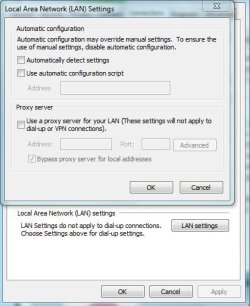
- open Internet Explorer
- go to Tools -> Internet Options
- go to "Connections" tab
- click on "LAN settings" button
- uncheck "Automatically detect settings"
- ok, ok, close properties, restatr internet explorer and see if it lags again.

I bet your computer is not performing as you wish because the factory software preload (norton crap, toshiba useless utilities, etc), A clean install with your OS @ 64bit should bring performance back.
 

My Computer

Computer type
PC/Desktop
OS
Microsoft Windows 10 Professional / Windows 7 Professional
CPU
Intel i5-3570
Motherboard
Lenovo Mahobay
Memory
16GB DDR3
Graphics Card(s)
AMD Radeon HD 7850 2GB
Sound Card
(1) Realtek HD Audio (2) AMD HD Audio
Monitor(s) Displays
LG LS192WS
Screen Resolution
1440 x 900 @ 32bit color
Hard Drives
(1) SUV300S37A/120G (2) ST3500413AS SATA Disk Device AHCI mode enabled.
PSU
Corsair HX620
Case
Thermaltake V4 Black Edition
Cooling
Cooler Master Hyper 212 + Artic Silver 5 on CPU/GPU
Keyboard
Dell SK-8115
Mouse
Razer Copperhead with MAPED mat (awesome!)
Internet Speed
100 Mbps up/down
Browser
Chrome
Actually, losing keystrokes in IE is something I've seen before as well. It was a combination of McAfee and .NET in my case, and removing McAfee made the problem go away.
 

My Computer

Computer type
PC/Desktop
Computer Manufacturer/Model Number
Custom
OS
Windows 10 Pro x64
CPU
Intel Core i7 4790K @ 4.5GHz
Motherboard
Asus Maximus Hero VII
Memory
32GB DDR3
Graphics Card(s)
Nvidia GeForce GTX970
Sound Card
Realtek HD Audio
Screen Resolution
1920x1200
Hard Drives
1x Samsung 250GB SSD
4x WD RE 2TB (RAIDZ)
PSU
Corsair AX760i
Case
Fractal Design Define R4
Cooling
Noctua NH-D15
Thank you, OldMX

Okay, I have lived with this one problem for quite some time now. It is that the keyboard delays or loses keystrokes, especially, well almost completely in Webforms. I have tried everything possible to fix this, and it still happens.

- open Internet Explorer
- go to Tools -> Internet Options
- go to "Connections" tab
- click on "LAN settings" button
- uncheck "Automatically detect settings"
- ok, ok, close properties, restatr internet explorer and see if it lags again.

I bet your computer is not performing as you wish because the factory software preload (norton crap, toshiba useless utilities, etc), A clean install with your OS @ 64bit should bring performance back.

I am so looking forward to a clean install that runs more efficiently! :)

Is there any thing that I should be aware of, going into the 64bit world? I'm trying to do my research, as I have been so advised by other members of this forum.

I did try what you said above, but in my IE, Automatically detect settings was already UN checked. So, just for your information, I have attached a capture of the LAN settings dialogue box. If you have any more ideas, let me know. But, as I type this, I am not noticing a lag. Now, I am wondering if it was caused all along by Weatherbug, because that is the only last thing I could think of to get rid of.

I previously thought it was McAfee too, so I have already completely uninstalled McAfee and am using Microsoft Security Essentials, per the recommendations on this forum.

Is there a program that will show the temperature in my system tray? That is the only reason I had Weatherbug installed, so I need a different program, one that does not take up much in the way of system resources.

Thanks for all your help! I appreciate any other input you can give me! :geek:

I think I forgot this image:

Your comments on this setup are greatly appreciated!
 

Attachments

  • LAN Settings Capture.JPG
    LAN Settings Capture.JPG
    39.6 KB · Views: 1
Last edited:

My Computer

Computer Manufacturer/Model Number
HP Pavilion Media Center PC m7350n
OS
Microsoft Windows 7 Home Premium 32-bit 7601 Multiprocessor Free Service Pack 1
CPU
Intel(R) Pentium(R) D CPU 2.80GHz
Motherboard
ASUSTek Computer INC. EMERY
Memory
2.00 GB
Graphics Card(s)
NVIDIA GeForce 6200SE TurboCache(TM)
Sound Card
Realtek High Definition Audio
Monitor(s) Displays
HP L1710 LCD Display
Screen Resolution
1280 x 1024 x 32 bits (4294967296 colors) @ 60 Hz
Hard Drives
(1) SAMSUNG SP2504C (2) EPSON Stylus Storage USB Device (3) Generic USB CF Reader USB Device (4) Generic USB MS Reader USB Device (5) Generic USB SD Reader USB Device (6) Generic USB SM Reader USB Device (7) Seagate FA GoFlex Desk USB Dev
Internet Speed
20+mbps
Thanks, Cluberti!

Actually, losing keystrokes in IE is something I've seen before as well. It was a combination of McAfee and .NET in my case, and removing McAfee made the problem go away.

This is a good suggestion, and I thought it was my culprit as well, in the beginning, but have since resolved to only installing Microsoft Security Essentials, and have started with NO .NETs, and that did not help.

However, as I type this, I do not feel the lag. It is so nice for my keystrokes to keep up with my typing. (I was having to open Notepad, type in there and then copy and paste EVERYTHING!)

So, I got to thinking, what is the only prgram that is common to both of my computers that I always install at the beginning, after the printer and antivrus, and it was Weatherbug. So, maybe that was the problem all along.

Do you have any suggestions for a system tray pgogram, which shows the local temperature? If I am not going to use Weatherbug, I would like a replacement that does not use up much of system resources.

Also, FWIW, I just ordered a new 2 TB USB HD, and I am going to just dump everything that is old into a folder named 2010 on the new HD, reformat the HDD on my Toshiba, and then install the Windows 64 OS, then re-partition it for a separate data partition, and then I should be good to go.

If anyone has any advice for me on doing this, I am open to hearing whatever you have to say.

Thanks! :geek:
 

My Computer

Computer Manufacturer/Model Number
HP Pavilion Media Center PC m7350n
OS
Microsoft Windows 7 Home Premium 32-bit 7601 Multiprocessor Free Service Pack 1
CPU
Intel(R) Pentium(R) D CPU 2.80GHz
Motherboard
ASUSTek Computer INC. EMERY
Memory
2.00 GB
Graphics Card(s)
NVIDIA GeForce 6200SE TurboCache(TM)
Sound Card
Realtek High Definition Audio
Monitor(s) Displays
HP L1710 LCD Display
Screen Resolution
1280 x 1024 x 32 bits (4294967296 colors) @ 60 Hz
Hard Drives
(1) SAMSUNG SP2504C (2) EPSON Stylus Storage USB Device (3) Generic USB CF Reader USB Device (4) Generic USB MS Reader USB Device (5) Generic USB SD Reader USB Device (6) Generic USB SM Reader USB Device (7) Seagate FA GoFlex Desk USB Dev
Internet Speed
20+mbps
I guess my question would be, if 32 bit is so bad,
This always gets me. The fact that someone did not pay attention during math class is being blamed on Microsoft. The largest binary number that you can make with 32 bits is 4GB-1. Try it, it's fun.

And if you bought a PC with devices that need address space, it has to come off those 32 bits too. All a matter of mathematics - no hidden agenda and no culprit.
 

My Computer

Computer Manufacturer/Model Number
HP, Dell, Gateway, Toshiba - 4 laptops and 2 desktops
OS
Vista, Windows7, Mint Mate, Zorin, Windows 8
CPU
from 1.6GHz Duo to i7
Monitor(s) Displays
2x HP w2207
Hard Drives
5x HDD, 7x SSD, 12x Externals
Keyboard
with trackball - no mices
Mouse
Trackball mice
Internet Speed
DSL 6000
Do you have any suggestions for a system tray pgogram, which shows the local temperature? If I am not going to use Weatherbug, I would like a replacement that does not use up much of system resources.
Not a system tray app, but the MSN weather sidebar app is pretty much the only thing I need nowadays. There are some other ones from the Weather Channel, WeatherBug, and a few other 3rd parties, but I've always gone back to the stock sidebar weather applet from MSN. I would at least suggest using that rather than a taskbar applet, as the notification area is a thing of the past (and Microsoft is trying to get developers and users to stop using it as a data storage location and get it back to a *notification* area with Win7).
 

My Computer

Computer type
PC/Desktop
Computer Manufacturer/Model Number
Custom
OS
Windows 10 Pro x64
CPU
Intel Core i7 4790K @ 4.5GHz
Motherboard
Asus Maximus Hero VII
Memory
32GB DDR3
Graphics Card(s)
Nvidia GeForce GTX970
Sound Card
Realtek HD Audio
Screen Resolution
1920x1200
Hard Drives
1x Samsung 250GB SSD
4x WD RE 2TB (RAIDZ)
PSU
Corsair AX760i
Case
Fractal Design Define R4
Cooling
Noctua NH-D15
Thanks, Cluberti, and everyone else!

Well, guys, I went out and got a 2 TB External HDD, so that I could just dump my documents and files onto it, before reformatting and installing the 64 bit Win 7.

I apologize for this wishy-washiness, but it just feels like I am about to cut my arm off or something. Maybe because I spend so much time with my computer, but really, I probably just need a little reinforcement that it will all be worth it in the end...

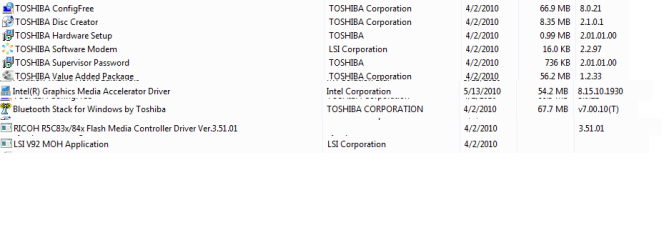
Also, Cluberti, you have been open about your criticism of Toshiba. Before, when I did a system reinstall, I just inlcluded anything that they had on their Website that was for Windows 7, unless I specifically knew that it was not on my system.

So, could you (or anyone else with an opinion) please comment on the following programs that are currently installed, and tell me if I need to install them on my new, fresh, Windows 7?

Thanks guys!!! :)
 

Attachments

  • Toshiba Drivers Installed.png
    Toshiba Drivers Installed.png
    10.5 KB · Views: 11

My Computer

Computer Manufacturer/Model Number
HP Pavilion Media Center PC m7350n
OS
Microsoft Windows 7 Home Premium 32-bit 7601 Multiprocessor Free Service Pack 1
CPU
Intel(R) Pentium(R) D CPU 2.80GHz
Motherboard
ASUSTek Computer INC. EMERY
Memory
2.00 GB
Graphics Card(s)
NVIDIA GeForce 6200SE TurboCache(TM)
Sound Card
Realtek High Definition Audio
Monitor(s) Displays
HP L1710 LCD Display
Screen Resolution
1280 x 1024 x 32 bits (4294967296 colors) @ 60 Hz
Hard Drives
(1) SAMSUNG SP2504C (2) EPSON Stylus Storage USB Device (3) Generic USB CF Reader USB Device (4) Generic USB MS Reader USB Device (5) Generic USB SD Reader USB Device (6) Generic USB SM Reader USB Device (7) Seagate FA GoFlex Desk USB Dev
Internet Speed
20+mbps
P.S. In what order can I re-do my system? Right now, I have it partitioned, with the Documents, Music, etc., on the 'Data' Partition and the System in the Active Partition. Should I start from root and go all the way back to an unpartitioned, newly formatted hard drive (the internal), or should I keep my partitions and just format the system partition with the Windows 7 system install disc prior to installing Win 7 64bit?
 

My Computer

Computer Manufacturer/Model Number
HP Pavilion Media Center PC m7350n
OS
Microsoft Windows 7 Home Premium 32-bit 7601 Multiprocessor Free Service Pack 1
CPU
Intel(R) Pentium(R) D CPU 2.80GHz
Motherboard
ASUSTek Computer INC. EMERY
Memory
2.00 GB
Graphics Card(s)
NVIDIA GeForce 6200SE TurboCache(TM)
Sound Card
Realtek High Definition Audio
Monitor(s) Displays
HP L1710 LCD Display
Screen Resolution
1280 x 1024 x 32 bits (4294967296 colors) @ 60 Hz
Hard Drives
(1) SAMSUNG SP2504C (2) EPSON Stylus Storage USB Device (3) Generic USB CF Reader USB Device (4) Generic USB MS Reader USB Device (5) Generic USB SD Reader USB Device (6) Generic USB SM Reader USB Device (7) Seagate FA GoFlex Desk USB Dev
Internet Speed
20+mbps
First I would suggest to backup any data and create recovery disks (if you are using a preinstalled windows), then, you need to wipe your HDD, most of the time, using diskpart and deleting partitions from there and then creating new ones is the way to go... I leave this excelent tutorials by Bare Foot Kid:
http://www.sevenforums.com/tutorials/91339-ssd-hdd-optimize-windows-reinstallation.html
http://www.sevenforums.com/tutorials/119713-diskpart-pc-startup.html?ltr=D

If you alredy have a separated partition for your data... just format the system partition (in where Seven will be installed) and then pont the setup to that partition... verify before that is seen as a primary active partition.

I've read your problem with the OS and 4 GB RAM, but trust me, you will get rid of all your problems once you install 7 x64, its faster (somewhat) and pretty stable... ah! dont forget to gt the 64 bit versions of your drivers before anything else, so you can install and then restore your drivers to enjoy your new fresh installed OS ;)

Hope this helps

See ya!!! :D
 

My Computer

Computer type
PC/Desktop
Computer Manufacturer/Model Number
Assembled Desktop PC
OS
Microsoft Windows 7 Home Premium SP1 64-bit Build 7600
CPU
AMD Athlon 64 X2 5200+ Dual Core CPU @ 2.7 Ghz (Brisbane)
Motherboard
PCChips A13G+ v3.0
Memory
2x2 GB DDR2 PC-5300 (667 Mhz) Kingston ValueRAM
Graphics Card(s)
XFX ATI Radeon HD 4350 GPU (512 MB + 512 MB HM)
Sound Card
Realtek High Definition Audio Driver ALC660 @ MCP61S
Monitor(s) Displays
HP S2031 20" LED HD Widescreen Display Monitor
Screen Resolution
1600 x 900 px
Hard Drives
Maxtor Diamond Max 10 (160 GB, 7200 RPM, SATA-II Hard Disk)
Western Digital Scorpion Blue (250 GB, 5400 RPM, SATA-II External Hard Disk - Personal Data)
Toshiba MQ01ABD050 (500 GB, 5400 RPM, SATA-II External Hard Disk - Software & ISOs)
PSU
Pixxo Transformer 850W 80+ Certification PSU
Case
Compaq 5BW353 Case
Cooling
Many solutions, see other info...
Keyboard
Green Leaf (Mitzu) Standard Keyboard
Mouse
Microsoft USB Lasser Pointing Device
Internet Speed
10 MB
Antivirus
Avast Antivirus Free
Browser
Firefox, Chrome, Internet Explorer
Other Info
Windows Experience Index Result: 3.8 of 7.9.

Cooling solutions:
- AVC @ 2000/5000 RPM Copper Heatpipes (For Athlon 64 X2 6000+ CPU used in an Athlon 64 X2 5200+)
- Rear Fan 80 mm @ 2700 RPM for heat extraction
- Manhatan Chipset Cooler @ 4700/7200 RPM (For nVidia Chipset in MoBo)
- Foxconn @ 2500 RPM (Old Pentium III heatsink fan) in XFX ATI Radeon HD 4350
What if...?

To speed up shutdown times, try this:

http://www.sevenforums.com/tutorials/717-shut-down-speed-up.html

For information about why you might be getting updates installed even though you want to be notified beforehand, see this:

http://www.sevenforums.com/windows-updates-activation/121062-stop-automatic-updates.html#post1042245

Thanks, Marsmimar!

I read both of those articles, and they were very informative. What I would prefer is if Windows, when restarting or shutting down, to say, "I have updates ready to install. May I install them now? Yes, or Remind Me Later". Adobe is polite enough to do this, why can't Microsoft be polite too? :sarc:

Take care,
 

My Computer

Computer Manufacturer/Model Number
HP Pavilion Media Center PC m7350n
OS
Microsoft Windows 7 Home Premium 32-bit 7601 Multiprocessor Free Service Pack 1
CPU
Intel(R) Pentium(R) D CPU 2.80GHz
Motherboard
ASUSTek Computer INC. EMERY
Memory
2.00 GB
Graphics Card(s)
NVIDIA GeForce 6200SE TurboCache(TM)
Sound Card
Realtek High Definition Audio
Monitor(s) Displays
HP L1710 LCD Display
Screen Resolution
1280 x 1024 x 32 bits (4294967296 colors) @ 60 Hz
Hard Drives
(1) SAMSUNG SP2504C (2) EPSON Stylus Storage USB Device (3) Generic USB CF Reader USB Device (4) Generic USB MS Reader USB Device (5) Generic USB SD Reader USB Device (6) Generic USB SM Reader USB Device (7) Seagate FA GoFlex Desk USB Dev
Internet Speed
20+mbps
Do you have any suggestions for a system tray pgogram, which shows the local temperature? If I am not going to use Weatherbug, I would like a replacement that does not use up much of system resources.
Not a system tray app, but the MSN weather sidebar app is pretty much the only thing I need nowadays. There are some other ones from the Weather Channel, WeatherBug, and a few other 3rd parties, but I've always gone back to the stock sidebar weather applet from MSN. I would at least suggest using that rather than a taskbar applet, as the notification area is a thing of the past (and Microsoft is trying to get developers and users to stop using it as a data storage location and get it back to a *notification* area with Win7).

LOL that's funny! :D

Microsoft says this on one hand, but on the other, puts a OneNote icon in the system tray for opening up Side Notes.

I just want the temperatur to be always visible, but it sounds like there is one with this option somewhere...
 

My Computer

Computer Manufacturer/Model Number
HP Pavilion Media Center PC m7350n
OS
Microsoft Windows 7 Home Premium 32-bit 7601 Multiprocessor Free Service Pack 1
CPU
Intel(R) Pentium(R) D CPU 2.80GHz
Motherboard
ASUSTek Computer INC. EMERY
Memory
2.00 GB
Graphics Card(s)
NVIDIA GeForce 6200SE TurboCache(TM)
Sound Card
Realtek High Definition Audio
Monitor(s) Displays
HP L1710 LCD Display
Screen Resolution
1280 x 1024 x 32 bits (4294967296 colors) @ 60 Hz
Hard Drives
(1) SAMSUNG SP2504C (2) EPSON Stylus Storage USB Device (3) Generic USB CF Reader USB Device (4) Generic USB MS Reader USB Device (5) Generic USB SD Reader USB Device (6) Generic USB SM Reader USB Device (7) Seagate FA GoFlex Desk USB Dev
Internet Speed
20+mbps
Very helpful, but...

First I would suggest to backup any data and create recovery disks (if you are using a preinstalled windows), then, you need to wipe your HDD, most of the time, using diskpart and deleting partitions from there and then creating new ones is the way to go... I leave this excelent tutorials by Bare Foot Kid:
http://www.sevenforums.com/tutorials/91339-ssd-hdd-optimize-windows-reinstallation.html
http://www.sevenforums.com/tutorials/119713-diskpart-pc-startup.html?ltr=D

If you alredy have a separated partition for your data... just format the system partition (in where Seven will be installed) and then pont the setup to that partition... verify before that is seen as a primary active partition.

I've read your problem with the OS and 4 GB RAM, but trust me, you will get rid of all your problems once you install 7 x64, its faster (somewhat) and pretty stable... ah! dont forget to gt the 64 bit versions of your drivers before anything else, so you can install and then restore your drivers to enjoy your new fresh installed OS ;)

Hope this helps

See ya!!! :D

FerchogtX,

:) Thanks for taking the time to quell my fears. Unfortunately, they were well founded. After I read your post, I downloaded all of the Toshiba x64 drivers, then I said to myself, 'What am I missing?' And the answer was iTunes and MobileMe, the cloud sync app for my iPhone. It does not work with x64. However, I also learned that x32 is not that bad, and that it does use 3.8GB of the 4GB, and that x64 is mostly for 4GB and ABOVE, and since I have just 4GB, I am at the cusp of needing x64. So, I'll be okay, but I do appreciate your comments!

FWIW, I am going to clean up my OS -- uninstall unnecessary programs and such, and then do regular system images while I try to figure out how to replace Mozy with some local storage and application...

Take good care,
 

My Computer

Computer Manufacturer/Model Number
HP Pavilion Media Center PC m7350n
OS
Microsoft Windows 7 Home Premium 32-bit 7601 Multiprocessor Free Service Pack 1
CPU
Intel(R) Pentium(R) D CPU 2.80GHz
Motherboard
ASUSTek Computer INC. EMERY
Memory
2.00 GB
Graphics Card(s)
NVIDIA GeForce 6200SE TurboCache(TM)
Sound Card
Realtek High Definition Audio
Monitor(s) Displays
HP L1710 LCD Display
Screen Resolution
1280 x 1024 x 32 bits (4294967296 colors) @ 60 Hz
Hard Drives
(1) SAMSUNG SP2504C (2) EPSON Stylus Storage USB Device (3) Generic USB CF Reader USB Device (4) Generic USB MS Reader USB Device (5) Generic USB SD Reader USB Device (6) Generic USB SM Reader USB Device (7) Seagate FA GoFlex Desk USB Dev
Internet Speed
20+mbps
Are thos apps you mention 32 bit? if so, they WILL work on x64... you see, x64 has support for either x32 or x64 natively, is not like XP x64, I have x64 in my machines and all my apps go just fine, don't be afraid, if the apps you use (that is the most probability) are x32, they will run on 7 x64.

BTW... x32 sometimes can detect 3.8 GB, but is not a rule, for example, in my desktop I have dual boot with XP SP3 and 7 x64 HP, and the best XP can detect is 3.5 B, taking in mind that my VGA is a PCI-Ex card and not onboard (which frees up RAM)... It's sad I know, and has a very lil' explanation, although x32 systems CAN handle 4 GB, that's the limit, in which, the BIOS need to redirect memory from there to allocate IRQ's for your devices, this includes the serial ports, parallel (if you got any), USB's, HDD, RAM itself and mainly, your VGA card, in which, if you got an onboard one, the amount of memory used to allocate is twice (for example, if onboard and 256 MB VRAM: BIOS need 256 MB to allocate + 256 MB for VRAM = 512 MB... yeah, unfair, but that's how it works)

If I were you, first check if your MoBo can handle Memory Hole Remapping (I guess it does, but is not bad to check), if it does so, you are ready to install a 64 bit OS... you see, Memory Hole Remapping changes the IRQ offsets in the MoBo to the very end of the RAM limit (4 GB) so a 64 bit OS can handle the whole memory, even works for 32 bit OS (but the limitation I stated above)... This is supposed to be solved on most BIOSes (Automatically enabled and not confugurable) and in the new EFI systems.

I was on your situation when I installed my 64 bit OS, but trust me, you will be happy at the end.

See ya!! :D
 

My Computer

Computer type
PC/Desktop
Computer Manufacturer/Model Number
Assembled Desktop PC
OS
Microsoft Windows 7 Home Premium SP1 64-bit Build 7600
CPU
AMD Athlon 64 X2 5200+ Dual Core CPU @ 2.7 Ghz (Brisbane)
Motherboard
PCChips A13G+ v3.0
Memory
2x2 GB DDR2 PC-5300 (667 Mhz) Kingston ValueRAM
Graphics Card(s)
XFX ATI Radeon HD 4350 GPU (512 MB + 512 MB HM)
Sound Card
Realtek High Definition Audio Driver ALC660 @ MCP61S
Monitor(s) Displays
HP S2031 20" LED HD Widescreen Display Monitor
Screen Resolution
1600 x 900 px
Hard Drives
Maxtor Diamond Max 10 (160 GB, 7200 RPM, SATA-II Hard Disk)
Western Digital Scorpion Blue (250 GB, 5400 RPM, SATA-II External Hard Disk - Personal Data)
Toshiba MQ01ABD050 (500 GB, 5400 RPM, SATA-II External Hard Disk - Software & ISOs)
PSU
Pixxo Transformer 850W 80+ Certification PSU
Case
Compaq 5BW353 Case
Cooling
Many solutions, see other info...
Keyboard
Green Leaf (Mitzu) Standard Keyboard
Mouse
Microsoft USB Lasser Pointing Device
Internet Speed
10 MB
Antivirus
Avast Antivirus Free
Browser
Firefox, Chrome, Internet Explorer
Other Info
Windows Experience Index Result: 3.8 of 7.9.

Cooling solutions:
- AVC @ 2000/5000 RPM Copper Heatpipes (For Athlon 64 X2 6000+ CPU used in an Athlon 64 X2 5200+)
- Rear Fan 80 mm @ 2700 RPM for heat extraction
- Manhatan Chipset Cooler @ 4700/7200 RPM (For nVidia Chipset in MoBo)
- Foxconn @ 2500 RPM (Old Pentium III heatsink fan) in XFX ATI Radeon HD 4350
I'm gonna wait...

FerchogtX,

Thanks for the kind words, and all the follow through on my issue. While I am not dismissing what you have to say, I did speak with Apple's MobileMe Technical Support last night. (MobileMe is the cloud sync that keeps my Outlook in tune with my iPhone; it also has drop box type of file sharing, and Web hosting.

On the MobileMe Website, they say very specifically that it does not work with Outlook 2010 x64. On the Web, I was mostly finding that people were not successful in getting it to work. So, I chatted with a MobileMe Tech Support Rep last night, and definitively, they do not support Windows x64 for the MobileMe Control Panel (the 'sync tool') nor does that even work with Office2010 x64.

So, it's like I am double damned with x64 Win 7. I will just live with my x32 Win 7, eventually get an iMac, and a DROBO for backup and file storage, then things will work better. ALTHOUGH...since UN installing Weatherbug, I have not had the problems with IE losing my keystrokes in Webforms as much. Maybe *that* was the problem that needed solving. Who knew? :p

Now, all I need is a weather application that will just show the temperature in the system tray display. Ohhh, Accuweather is the one I was trying to remember to check out!

So, thanks again, very much! Eventually, I just migh do the x64 thing, and I will remember your encouraging words when I do.

Take good care,

~Antonio :geek:
 

My Computer

Computer Manufacturer/Model Number
HP Pavilion Media Center PC m7350n
OS
Microsoft Windows 7 Home Premium 32-bit 7601 Multiprocessor Free Service Pack 1
CPU
Intel(R) Pentium(R) D CPU 2.80GHz
Motherboard
ASUSTek Computer INC. EMERY
Memory
2.00 GB
Graphics Card(s)
NVIDIA GeForce 6200SE TurboCache(TM)
Sound Card
Realtek High Definition Audio
Monitor(s) Displays
HP L1710 LCD Display
Screen Resolution
1280 x 1024 x 32 bits (4294967296 colors) @ 60 Hz
Hard Drives
(1) SAMSUNG SP2504C (2) EPSON Stylus Storage USB Device (3) Generic USB CF Reader USB Device (4) Generic USB MS Reader USB Device (5) Generic USB SD Reader USB Device (6) Generic USB SM Reader USB Device (7) Seagate FA GoFlex Desk USB Dev
Internet Speed
20+mbps
LOL that's funny! :D

Microsoft says this on one hand, but on the other, puts a OneNote icon in the system tray for opening up Side Notes.
Yes, but Office 2010 will run on OSes other than Win7 - ones with no sidebar, for example (ahem - XP SP3). Until XP dies, unfortunately, the notification area is the only universal option (which is how we got into this mess in the first place! ;)).
 

My Computer

Computer type
PC/Desktop
Computer Manufacturer/Model Number
Custom
OS
Windows 10 Pro x64
CPU
Intel Core i7 4790K @ 4.5GHz
Motherboard
Asus Maximus Hero VII
Memory
32GB DDR3
Graphics Card(s)
Nvidia GeForce GTX970
Sound Card
Realtek HD Audio
Screen Resolution
1920x1200
Hard Drives
1x Samsung 250GB SSD
4x WD RE 2TB (RAIDZ)
PSU
Corsair AX760i
Case
Fractal Design Define R4
Cooling
Noctua NH-D15
Back
Top