
My computer Overheating

DrNick

New member
Local time
9:14 AM
Messages
73
Hi everyone I'm back,
I posted here before but the problem is back
I've tried to get this problem fixed for a while but nothing much has worked. I had a Dell Studio 1440/14z Vista and I got an upgrade to Windows 7. After that upgrade whenever I start to play a game my computer overheates like crazy. And the game becomes unplayable by low fps. This also happens when I've watched like Youtube for a while or so.
Here are my specs.
Windows 7 Home Premium
Processor: Intel(R) Core(TM) Duo CPU T6500 @ 210.GHz 2.10 GHz
Installed memory(RAM): 3.00 GB (2.75 GB usable)
System type: 64 - bit Operationg System
Graphics Card: NVIDIA GeForce 9400M G
Audio: IDT High Definition Audio CODEC
It also said:
NVIDIA High Definition Audio
I even have a cooling pad. Which does not seem to do much. The cooling pad is Targus Model AWE01US2
Thank you very much I hope you can help me figure the problem out, I'm fairly sure the problem IS overheating. Thanks!
 

My Computer

Computer Manufacturer/Model Number
Dell Studio 1440/14z
OS
Microsoft Windows 7 Home Premium
Memory
3.00 GB
Graphics Card(s)
nVidia Geforce 9400
Sound Card
IDT Audio
Screen Resolution
1366 x 768
Mouse
Microsoft Wireless Notebook Optical Mouse 3000
Hi everyone I'm back,
I posted here before but the problem is back
I've tried to get this problem fixed for a while but nothing much has worked. I had a Dell Studio 1440/14z Vista and I got an upgrade to Windows 7. After that upgrade whenever I start to play a game my computer overheates like crazy. And the game becomes unplayable by low fps. This also happens when I've watched like Youtube for a while or so.
Here are my specs.
Windows 7 Home Premium
Processor: Intel(R) Core(TM) Duo CPU T6500 @ 210.GHz 2.10 GHz
Installed memory(RAM): 3.00 GB (2.75 GB usable)
System type: 64 - bit Operationg System
Graphics Card: NVIDIA GeForce 9400M G
Audio: IDT High Definition Audio CODEC
It also said:
NVIDIA High Definition Audio
I even have a cooling pad. Which does not seem to do much. The cooling pad is Targus Model AWE01US2
Thank you very much I hope you can help me figure the problem out, I'm fairly sure the problem IS overheating. Thanks!


Is the fan running? Have you blown out the ducts with canned air? if, AND ONLY IF, you are handy with tools, the fan and ducts can and should be cleaned. Make sure you can do this before you start

ken
 

My Computer

Computer Manufacturer/Model Number
HP Pavillion dv-7 1005 Tx
OS
Win 8 Release candidate 8400
CPU
[email protected]
Memory
4 gigs
Graphics Card(s)
Nvidia 9600M
Sound Card
HD built-in
Monitor(s) Displays
17" Wxga
Screen Resolution
1440x900
Cooling
none
Internet Speed
45Mb down 5Mb up
Is your fan working at all??? Is your laptop full of dust??? Did you check your bios for your settings?? Have you installed programs to check your actual core temps?? More details are needed... GL :)
 

My Computer

Computer Manufacturer/Model Number
Toshiba Satellite
OS
Windows 7 Home Premium 64-bit
CPU
Pentium(R) Dual-Core T4300 @ 2.10GHz
Motherboard
Toshiba Model KSWAA - Chipset Intel GL40 Rev 07
Memory
3 GB DDR2 PC2-6400 (400 MHz) Samsung M4 70T2864Q23-CF7
Graphics Card(s)
Mobile Intel GMA4500M 32bit OS (64bit OS) dynamically
Sound Card
Realtek ALC272-GR Software Sound
Monitor(s) Displays
16.0" HD TFT with TrueBrite Matrix colour LCD display
Screen Resolution
1366 x 768
Hard Drives
FUJITSU MJA2320BH G2-(S2) 320GB (5400RPM) Serial-ATA
Keyboard
Canadian Bilingual Keyboard 105 keys with 13 Function keys
Mouse
Touchpad Point device & Lexma USB Mouse
Internet Speed
Walking is Faster
Other Info
Wireless LAN Realtek RTL89191SE 802.11n PCI-E NIC + a
LAN Realek PCIe FE Family Controller and
TOSHIBA Software Modem
Ok so the fan is deffinatly running, I have not blown out the ducts, and I'm not even sure if it's full of dust. I've heard about BIOS and I don't know much about them. All I know is that my BIO version is A01

My core tempuratures when I am not playing any games is attatched, the picture is called coretemps1 =p.
The second picture is right after I leave a game because of the drop in gameplay, it's called coretempsgames.
Thank you
 

Attachments

  • coretemps1.jpg
    coretemps1.jpg
    57.1 KB · Views: 151
  • coretempsgames.jpg
    coretempsgames.jpg
    58.4 KB · Views: 144

My Computer

Computer Manufacturer/Model Number
Dell Studio 1440/14z
OS
Microsoft Windows 7 Home Premium
Memory
3.00 GB
Graphics Card(s)
nVidia Geforce 9400
Sound Card
IDT Audio
Screen Resolution
1366 x 768
Mouse
Microsoft Wireless Notebook Optical Mouse 3000
What surface are you placing the laptop on??
 

My Computer

Computer Manufacturer/Model Number
Mesh
OS
win7 ultimate 32 , 64 ,XP
CPU
3.40
Memory
4 GB
Graphics Card(s)
GeForce GTX 480
Sound Card
Realtek
Monitor(s) Displays
LG 28" LCD
Screen Resolution
1600X1024
Hard Drives
2X500GB HDD sata
Western Digital Usb 2TB
PSU
650w
Keyboard
Wireless Logitech
Mouse
Wireless Logitech
Internet Speed
50 MB
It's on a cooling pad on a wood desk
 

My Computer

Computer Manufacturer/Model Number
Dell Studio 1440/14z
OS
Microsoft Windows 7 Home Premium
Memory
3.00 GB
Graphics Card(s)
nVidia Geforce 9400
Sound Card
IDT Audio
Screen Resolution
1366 x 768
Mouse
Microsoft Wireless Notebook Optical Mouse 3000
I would try to use it without the cooling pad and see what happened...
But as far as I know ..if a machine is overheating it will shut down straight away...
 

My Computer

Computer Manufacturer/Model Number
Mesh
OS
win7 ultimate 32 , 64 ,XP
CPU
3.40
Memory
4 GB
Graphics Card(s)
GeForce GTX 480
Sound Card
Realtek
Monitor(s) Displays
LG 28" LCD
Screen Resolution
1600X1024
Hard Drives
2X500GB HDD sata
Western Digital Usb 2TB
PSU
650w
Keyboard
Wireless Logitech
Mouse
Wireless Logitech
Internet Speed
50 MB
Ok, I did and I got basically the same type of problem:
 

Attachments

  • coretempsgames2.jpg
    coretempsgames2.jpg
    52.4 KB · Views: 61
Last edited:

My Computer

Computer Manufacturer/Model Number
Dell Studio 1440/14z
OS
Microsoft Windows 7 Home Premium
Memory
3.00 GB
Graphics Card(s)
nVidia Geforce 9400
Sound Card
IDT Audio
Screen Resolution
1366 x 768
Mouse
Microsoft Wireless Notebook Optical Mouse 3000
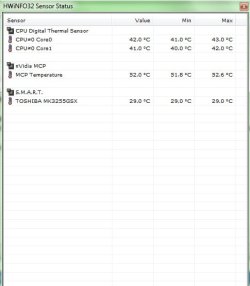
I would now say that the problem is the graphic card .
 

My Computer

Computer Manufacturer/Model Number
Mesh
OS
win7 ultimate 32 , 64 ,XP
CPU
3.40
Memory
4 GB
Graphics Card(s)
GeForce GTX 480
Sound Card
Realtek
Monitor(s) Displays
LG 28" LCD
Screen Resolution
1600X1024
Hard Drives
2X500GB HDD sata
Western Digital Usb 2TB
PSU
650w
Keyboard
Wireless Logitech
Mouse
Wireless Logitech
Internet Speed
50 MB
Are you sure that's it? I don't need to update my BIOS or anything? And a Nvidia Gforcwe 9400 is not enough? The games I play are Crysis (medium settings) Half Life 2, Team Fortress 2 and Unreal Tournament 3. The graphics card did fine before I installed Windows 7, maybe I need to get an old graphics driver?
 

My Computer

Computer Manufacturer/Model Number
Dell Studio 1440/14z
OS
Microsoft Windows 7 Home Premium
Memory
3.00 GB
Graphics Card(s)
nVidia Geforce 9400
Sound Card
IDT Audio
Screen Resolution
1366 x 768
Mouse
Microsoft Wireless Notebook Optical Mouse 3000
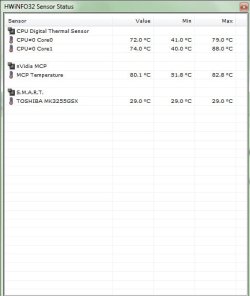
I am sure as in both temp reading in your snapshot the graphic is max .. probably an old driver will work better.
 

My Computer

Computer Manufacturer/Model Number
Mesh
OS
win7 ultimate 32 , 64 ,XP
CPU
3.40
Memory
4 GB
Graphics Card(s)
GeForce GTX 480
Sound Card
Realtek
Monitor(s) Displays
LG 28" LCD
Screen Resolution
1600X1024
Hard Drives
2X500GB HDD sata
Western Digital Usb 2TB
PSU
650w
Keyboard
Wireless Logitech
Mouse
Wireless Logitech
Internet Speed
50 MB
I tried to download an XP one (I kinda see now how thqat wouldn't work =p) but I do not know how to get an older driver for Windows 7. Can you help me out? I know a driver website but I just want like an old one that will work with Win7. Thanks
 

My Computer

Computer Manufacturer/Model Number
Dell Studio 1440/14z
OS
Microsoft Windows 7 Home Premium
Memory
3.00 GB
Graphics Card(s)
nVidia Geforce 9400
Sound Card
IDT Audio
Screen Resolution
1366 x 768
Mouse
Microsoft Wireless Notebook Optical Mouse 3000
Any vista driver will do....
 

My Computer

Computer Manufacturer/Model Number
Mesh
OS
win7 ultimate 32 , 64 ,XP
CPU
3.40
Memory
4 GB
Graphics Card(s)
GeForce GTX 480
Sound Card
Realtek
Monitor(s) Displays
LG 28" LCD
Screen Resolution
1600X1024
Hard Drives
2X500GB HDD sata
Western Digital Usb 2TB
PSU
650w
Keyboard
Wireless Logitech
Mouse
Wireless Logitech
Internet Speed
50 MB
Ok, I tried a vista download for my laptop here but it also said it was for windows 7 or something
 

My Computer

Computer Manufacturer/Model Number
Dell Studio 1440/14z
OS
Microsoft Windows 7 Home Premium
Memory
3.00 GB
Graphics Card(s)
nVidia Geforce 9400
Sound Card
IDT Audio
Screen Resolution
1366 x 768
Mouse
Microsoft Wireless Notebook Optical Mouse 3000
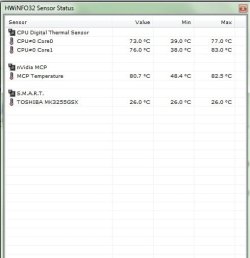
thats a high number of temp for a graphic card
 

My Computer

OS
window's 7
CPU
core 2 quad
Motherboard
gigabyte
Memory
2gb corsair
Graphics Card(s)
ati hd4850
Monitor(s) Displays
lg
Screen Resolution
1600 X 900
Case
power logic
Other Info
none of the spec above is accurate
Does that mean I need a better one?
 

My Computer

Computer Manufacturer/Model Number
Dell Studio 1440/14z
OS
Microsoft Windows 7 Home Premium
Memory
3.00 GB
Graphics Card(s)
nVidia Geforce 9400
Sound Card
IDT Audio
Screen Resolution
1366 x 768
Mouse
Microsoft Wireless Notebook Optical Mouse 3000
Also, whenever I try to download a Vista Driver for my laptop it just says I do not run on Vista and It can't install
 

My Computer

Computer Manufacturer/Model Number
Dell Studio 1440/14z
OS
Microsoft Windows 7 Home Premium
Memory
3.00 GB
Graphics Card(s)
nVidia Geforce 9400
Sound Card
IDT Audio
Screen Resolution
1366 x 768
Mouse
Microsoft Wireless Notebook Optical Mouse 3000
Same problem

I know this forum is a couple of months old, but I too am having the same problem. I have the exact same model Dell, with the exact same specs, and even the upgrade to Win 7. Im not sure what happens after you install Win 7, but this laptop overheats like crazy rendering the graphics card useless. Anytime you play a game or even watch a movie for too long the fps is almost 0. I have tried everything from old vista drivers to opening up the laptop and applying Artic Silver cooling agent to the cpu cooler and gpu cooler. I even updated the bios and installed any Dell drivers that would actually work (some of dells "urgent" drivers caused Windows to become corrupt and would have to do a system restore). This really sucks and was wondering if you found something that worked or just got rid of it or sold it or something. It's really a shame because when it was working it was a really nice laptop, and the warranty expired right when this problem starts to happen.
 

My Computer

OS
Windows 7 Home Premium 64bit
CPU
Core 2 Due E8400
Motherboard
Asus P5Q3
Memory
4 gb ddr 3
Graphics Card(s)
Gtx 260
Monitor(s) Displays
Lg 22" lcd
Hard Drives
750 gb 7200 rpm + 250 gb 7200 rpm
PSU
700 watt something or other
Case
Antec 300
Hi all, I know this is pretty old, I am having the exact same problem with the same computer. Did anyone find a solid solution to this? Other than going back to Vista which I really do not want to do...
 

My Computer

OS
Windows 7 Pro 32-bit
Your best bet would be to contact Dell with regards to the drivers and see if it is still supported by Dell.
 

My Computer

Computer Manufacturer/Model Number
Alienware Area 51 Desktop and Dell Inspirion 17R (N7010)
OS
Windows 7 Ultimate x64 and Home Premium x64
CPU
Intel i7 960 (3.2 GHz Quad Core)
Motherboard
Alienware Intel based X58
Memory
12 Gigs (Triple Channel)
Graphics Card(s)
Alienware OEM nVidia GTX 560 Ti (1.25 Gig)
Sound Card
Creative Labs X-Fi Titanium
Monitor(s) Displays
Samsung PX2370 LED 23" Monitor
Screen Resolution
1920x1080
Hard Drives
2 320 Gig SATA in Raid 1 Configuration (System/App)
1 1 Tera SATA (Games)
1 1 Tera SATA (Data/Music/Videos)
PSU
750 Watt Power Supply
Case
Alienware Area 51 Desktop
Cooling
Liquid Cooled
Keyboard
Logitech G510
Mouse
Microsoft Trackball Explorer
Internet Speed
Cable
Back
Top