
My computer screen is enlarged- Please help!

domdico

New member
Local time
8:45 AM
Messages
1
Location
Ohio
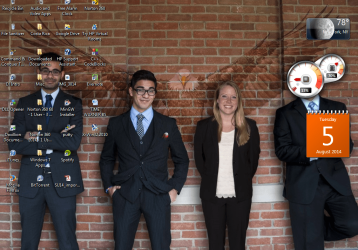
My computer screen suddenly glitched, with gray squares and lines suddenly appearing on my screen, with everything else distorted. I immediately shut off my computer, and when I turned it back on, everything on my screen was HUGE. I have edited my display settings by right clicking the desktop, clicking "screen resolution", and selecting 1024x768. I have tried to attach a screenshot.
 

Attachments
  • Capture.PNG
    Capture.PNG
    394.2 KB · Views: 5

My Computer My Computer

Computer type
PC/Desktop
OS
Ohio
Hi there.

I assume it's a PC with monitor? Try to set 'auto' settings on your monitor. It should flicker again and set the size back to normal.
 

My Computer My Computer

Computer type
Laptop
Computer Manufacturer/Model Number
Lenovo E450
OS
Windows 10 Pro
Are you using a VGA connector? or an HDMI? is it connected to the motherboard or graphics card? What i noticed on my computer if the connector is connected to the motherboard i also got a distorted image and a low resolution. Did you checked in the device manager if the graphics card is detected properly? :sarc:
 

My Computer My Computer

OS
windows 7 32 bit build 7600
Motherboard
emx mcp61m2 icafe
Graphics Card(s)
NVIDIA GEforce 8400GS super
Monitor(s) Displays
Samsung LD190
Back
Top