My external hard disk did not show up in My Computer

sha37

New member
Local time
12:11 PM
Messages
4
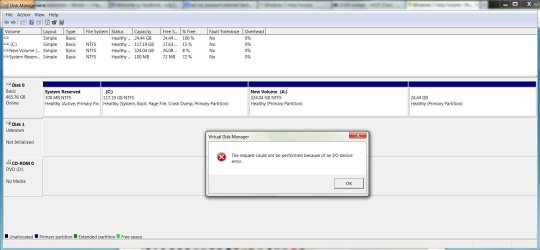
I'm using WD Passport 1TB with 3.0 usb. When i connect it to my computer, it does not showed up at My Computer. I'd tried to assign a letter but an error poped out like this -> (see attachments)
Other things u guys might need to know, i've tried to uninstall the driver and install it back again, but it wont work. When i connect it to my computer, my external make a weird sound but not to fast, but have 2seconds interval. Then after some times making sounds like that, it became silent. The lights still working but after 2seconds interval, it goes off and lights again.
Any suggestions guys? Thank you so much for making some time to read my problem. Peace! =D
 

Attachments
  • Hard Disk Error.JPG
    Hard Disk Error.JPG
    114.8 KB · Views: 4

My Computer My Computer

At a glance

windows 7 Home Premium 64bitIntel I5 first generation4GBATI Mobility Radeon 5730
Computer type
Laptop
Computer Manufacturer/Model Number
Dell Studio Xps
OS
windows 7 Home Premium 64bit
CPU
Intel I5 first generation
Memory
4GB
Graphics Card(s)
ATI Mobility Radeon 5730

My Computer My Computer

At a glance

Windows 11 x64i5 2500K @ 3.3 GHz16 GB DDR 3 @ 1600MhzMSI 1050TI 4GB OC version
Computer type
PC/Desktop
Computer Manufacturer/Model Number
Custom Bulid/Self made
OS
Windows 11 x64
CPU
i5 2500K @ 3.3 GHz
Motherboard
ASUS P8 Z77 V pro
Memory
16 GB DDR 3 @ 1600Mhz
Graphics Card(s)
MSI 1050TI 4GB OC version
Sound Card
On Board (Realtek HD audio)
Monitor(s) Displays
Samsung 22" LCD
Screen Resolution
1920*1080
Hard Drives
Seagate 1 TB, WD 1TB, Seagate 2 TB ( I use a lot of space)
PSU
coolermaster 750 W
Case
Coolermaster HAF912
Cooling
Coolermaster hyper 212 EVO
Keyboard
Samsung
Mouse
Dell Wireless
Internet Speed
Wireless 50 Mbps
Antivirus
AVG 2016 Internet Security
Browser
Google Chrome
Thanks archer. i need to assign which disk i want to check is it? But then my external hard disk does not appear at My Computer. Or do you have other ways to perform this task? thanks again
 

My Computer My Computer

At a glance

windows 7 Home Premium 64bitIntel I5 first generation4GBATI Mobility Radeon 5730
Computer type
Laptop
Computer Manufacturer/Model Number
Dell Studio Xps
OS
windows 7 Home Premium 64bit
CPU
Intel I5 first generation
Memory
4GB
Graphics Card(s)
ATI Mobility Radeon 5730
another thing...

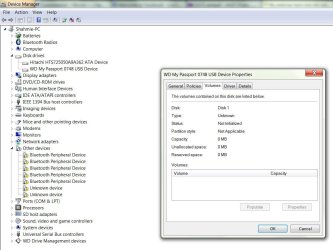
One more thing, when i check at device manager->disk drives->WD....(which is my external hard disk), then i right click and click properties->volumes->click populate, it turn out like this (see attachments). Is it normal?
 

Attachments

  • WD error.JPG
    WD error.JPG
    99.4 KB · Views: 0

My Computer My Computer

At a glance

windows 7 Home Premium 64bitIntel I5 first generation4GBATI Mobility Radeon 5730
Computer type
Laptop
Computer Manufacturer/Model Number
Dell Studio Xps
OS
windows 7 Home Premium 64bit
CPU
Intel I5 first generation
Memory
4GB
Graphics Card(s)
ATI Mobility Radeon 5730
In that case, I will suggest you to change the cable for HDD.
 

My Computer My Computer

At a glance

Windows 11 x64i5 2500K @ 3.3 GHz16 GB DDR 3 @ 1600MhzMSI 1050TI 4GB OC version
Computer type
PC/Desktop
Computer Manufacturer/Model Number
Custom Bulid/Self made
OS
Windows 11 x64
CPU
i5 2500K @ 3.3 GHz
Motherboard
ASUS P8 Z77 V pro
Memory
16 GB DDR 3 @ 1600Mhz
Graphics Card(s)
MSI 1050TI 4GB OC version
Sound Card
On Board (Realtek HD audio)
Monitor(s) Displays
Samsung 22" LCD
Screen Resolution
1920*1080
Hard Drives
Seagate 1 TB, WD 1TB, Seagate 2 TB ( I use a lot of space)
PSU
coolermaster 750 W
Case
Coolermaster HAF912
Cooling
Coolermaster hyper 212 EVO
Keyboard
Samsung
Mouse
Dell Wireless
Internet Speed
Wireless 50 Mbps
Antivirus
AVG 2016 Internet Security
Browser
Google Chrome
In that case, I will suggest you to change the cable for HDD.

Do you mean the USB cable? I've tried twice with different cable, which is still 3.0 USB, but still the same.
Any other suggestions?
 

My Computer My Computer

At a glance

windows 7 Home Premium 64bitIntel I5 first generation4GBATI Mobility Radeon 5730
Computer type
Laptop
Computer Manufacturer/Model Number
Dell Studio Xps
OS
windows 7 Home Premium 64bit
CPU
Intel I5 first generation
Memory
4GB
Graphics Card(s)
ATI Mobility Radeon 5730
Is your HDD getting recognized in BIOS?

If it is,

Right click "My Computer"
Click "Manage"
Select "Disk Management"
Right click "Disk Management" and select "Rescan Disks"
Find your drive in the list in the bottom pane
Right click it and select "Initialize"
Add a partition
 

My Computer My Computer

At a glance

Windows 11 x64i5 2500K @ 3.3 GHz16 GB DDR 3 @ 1600MhzMSI 1050TI 4GB OC version
Computer type
PC/Desktop
Computer Manufacturer/Model Number
Custom Bulid/Self made
OS
Windows 11 x64
CPU
i5 2500K @ 3.3 GHz
Motherboard
ASUS P8 Z77 V pro
Memory
16 GB DDR 3 @ 1600Mhz
Graphics Card(s)
MSI 1050TI 4GB OC version
Sound Card
On Board (Realtek HD audio)
Monitor(s) Displays
Samsung 22" LCD
Screen Resolution
1920*1080
Hard Drives
Seagate 1 TB, WD 1TB, Seagate 2 TB ( I use a lot of space)
PSU
coolermaster 750 W
Case
Coolermaster HAF912
Cooling
Coolermaster hyper 212 EVO
Keyboard
Samsung
Mouse
Dell Wireless
Internet Speed
Wireless 50 Mbps
Antivirus
AVG 2016 Internet Security
Browser
Google Chrome
Back
Top