My External Hard Drive Isn't Recognized

cxw22

New member
Local time
10:04 AM
Messages
33
Yesterday, I backed up everything on my computer because I was going to restore it and format the drive. So I transfered everything over to my Seagate 500gb hard drive.

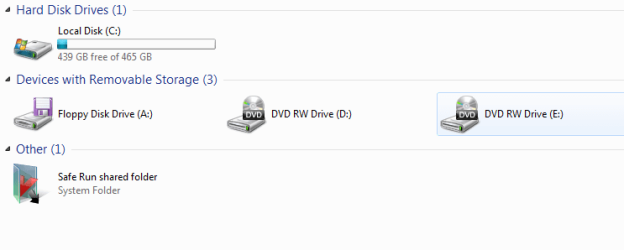
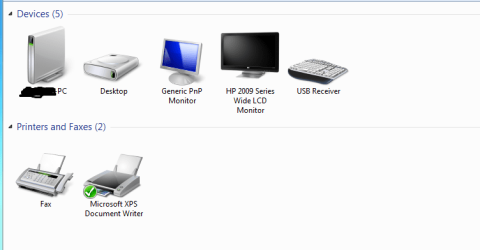
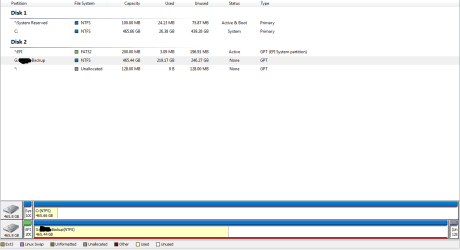
Once I finished formatting and reinstalling windows, I installed all my neccessary chipset drivers, ect.. and connected my external hard drive but it wasn't recognized. It shows up as connected and the green light is on, but nothing in "my computer". I tried to set my external drive to a letter in disk management but it doesn't give me the option. Please someone help, I have tons of movies, music and school work on my drive and need it to be transfered over.

Here are some pics to understand the situation.

http://img440.imageshack.us/img440/9079/capb.png
http://img835.imageshack.us/img835/9454/captureaj.png
http://img255.imageshack.us/img255/880/capture2n.png
 

My Computer

OS
Windows 7 Ultimate 64x

My Computer

Computer Manufacturer/Model Number
HP, Dell, Gateway, Toshiba - 4 laptops and 2 desktops
OS
Vista, Windows7, Mint Mate, Zorin, Windows 8
CPU
from 1.6GHz Duo to i7
Monitor(s) Displays
2x HP w2207
Hard Drives
5x HDD, 7x SSD, 12x Externals
Keyboard
with trackball - no mices
Mouse
Trackball mice
Internet Speed
DSL 6000
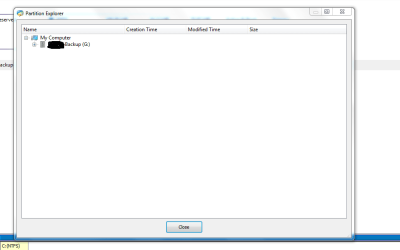
I downloaded it and it found the external drive and it could be opened in the explorer inside the application but it didn't fix the problem. I set the drive to a letter and applied it, but it didn't show up in my com]puter.
 

Attachments

  • a.PNG
    a.PNG
    9.7 KB · Views: 37
  • d.PNG
    d.PNG
    20.3 KB · Views: 39
  • s.PNG
    s.PNG
    13.7 KB · Views: 65
  • Capture.PNG
    Capture.PNG
    12 KB · Views: 30

My Computer

OS
Windows 7 Ultimate 64x
I had this, Format it then reassign a drive letter if formatting fails.

Do note it has 2 partitions, you could merge them if there not important.
 

My Computer

Computer type
PC/Desktop
Computer Manufacturer/Model Number
GIGABYTE Rig (Custom)
OS
Windows 7 Professional (x64/SP1) /Linux Mint 16
CPU
Intel i5-3570k 3.40 GHz @ 4.6 GHz
Motherboard
GIGABYTE Z77X-D3H
Memory
8GB (2133MHz) DDR3
Graphics Card(s)
Asus GTX560 Ti (Nvidia)
Monitor(s) Displays
HP 23", Acer 19" and a Dell 17"
Screen Resolution
1080p, 1440x900 and 1280x1024
Hard Drives
Sandisk Extreme 120GB (SSD), WD 2TB green and 4 other HDDs
PSU
Antec 620w High Current Gamer
Case
Corsair Obsidian 600D
Cooling
CPU - Antec KÜHLER H₂O 920
Keyboard
Steelseries 6Gv2
Mouse
Roccat LUA
Internet Speed
4 - 6mb/s
Antivirus
ESET NOD32
Browser
Chrome/Firefox
Other Info
Intel Gigabit CT (PCIE NIC) and Thinkpad T61p,
I had this, Format it then reassign a drive letter if formatting fails.

Do note it has 2 partitions, you could merge them if there not important.

I don't want to format because I have all my music,movies, and school work on the drive.
 

My Computer

OS
Windows 7 Ultimate 64x
Have you tried it on a separate pc?
 

My Computer

Computer type
PC/Desktop
Computer Manufacturer/Model Number
GIGABYTE Rig (Custom)
OS
Windows 7 Professional (x64/SP1) /Linux Mint 16
CPU
Intel i5-3570k 3.40 GHz @ 4.6 GHz
Motherboard
GIGABYTE Z77X-D3H
Memory
8GB (2133MHz) DDR3
Graphics Card(s)
Asus GTX560 Ti (Nvidia)
Monitor(s) Displays
HP 23", Acer 19" and a Dell 17"
Screen Resolution
1080p, 1440x900 and 1280x1024
Hard Drives
Sandisk Extreme 120GB (SSD), WD 2TB green and 4 other HDDs
PSU
Antec 620w High Current Gamer
Case
Corsair Obsidian 600D
Cooling
CPU - Antec KÜHLER H₂O 920
Keyboard
Steelseries 6Gv2
Mouse
Roccat LUA
Internet Speed
4 - 6mb/s
Antivirus
ESET NOD32
Browser
Chrome/Firefox
Other Info
Intel Gigabit CT (PCIE NIC) and Thinkpad T61p,
I've tried it on two and those computers didn't recognize it either. I then tried a 8gb thumb drive and it was recognized on all 3 computers.

What should I do?
 

My Computer

OS
Windows 7 Ultimate 64x
Try recover your data using software then format it.

What format is it using FAT, FAT32 or NTFS?
 
Last edited:

My Computer

Computer type
PC/Desktop
Computer Manufacturer/Model Number
GIGABYTE Rig (Custom)
OS
Windows 7 Professional (x64/SP1) /Linux Mint 16
CPU
Intel i5-3570k 3.40 GHz @ 4.6 GHz
Motherboard
GIGABYTE Z77X-D3H
Memory
8GB (2133MHz) DDR3
Graphics Card(s)
Asus GTX560 Ti (Nvidia)
Monitor(s) Displays
HP 23", Acer 19" and a Dell 17"
Screen Resolution
1080p, 1440x900 and 1280x1024
Hard Drives
Sandisk Extreme 120GB (SSD), WD 2TB green and 4 other HDDs
PSU
Antec 620w High Current Gamer
Case
Corsair Obsidian 600D
Cooling
CPU - Antec KÜHLER H₂O 920
Keyboard
Steelseries 6Gv2
Mouse
Roccat LUA
Internet Speed
4 - 6mb/s
Antivirus
ESET NOD32
Browser
Chrome/Firefox
Other Info
Intel Gigabit CT (PCIE NIC) and Thinkpad T61p,
What software?
 

My Computer

OS
Windows 7 Ultimate 64x
Wait, aparntly Tweak UI may fix the problem, have a look at this software, just reasign the drive letter using this or disk manager

Totalidea Software :: Downloads :: Tweak Windows 7 - Tweak Windows Vista - Tweak-7 - Tweak7 - TweakVI - Tweak-Vista - TweakVista - TweakXP - Tweak-XP - Tweak XP - TweakUI - Outlook Backup - Outlook Notes - FireTune

"Hi there
I dont know if this will work for you but looking on the web I came accross someone who had a similar problem they fixed it as follows.
They installed Tweak UI and then

She I was able to get the drive recognized using "Tweak UI", clicking on My Computer, Drives,and check marking Drive F. It did the trick.
Hope this helps
Kindest Regards Tony B." (Kioskea.net)
 

My Computer

Computer type
PC/Desktop
Computer Manufacturer/Model Number
GIGABYTE Rig (Custom)
OS
Windows 7 Professional (x64/SP1) /Linux Mint 16
CPU
Intel i5-3570k 3.40 GHz @ 4.6 GHz
Motherboard
GIGABYTE Z77X-D3H
Memory
8GB (2133MHz) DDR3
Graphics Card(s)
Asus GTX560 Ti (Nvidia)
Monitor(s) Displays
HP 23", Acer 19" and a Dell 17"
Screen Resolution
1080p, 1440x900 and 1280x1024
Hard Drives
Sandisk Extreme 120GB (SSD), WD 2TB green and 4 other HDDs
PSU
Antec 620w High Current Gamer
Case
Corsair Obsidian 600D
Cooling
CPU - Antec KÜHLER H₂O 920
Keyboard
Steelseries 6Gv2
Mouse
Roccat LUA
Internet Speed
4 - 6mb/s
Antivirus
ESET NOD32
Browser
Chrome/Firefox
Other Info
Intel Gigabit CT (PCIE NIC) and Thinkpad T61p,
To do this by disk Management go to start, right click computer, then click manage, then click Disk Management on the panel, right click the external drive, then click "change drive letter and paths" then if its blank click ad if it has a drive letter click remove and then add then resign it a letter on the drop down menu, OK and close all that then check.

Try that before the tweak stuff if fails then do it.

Sorry for the random order of things am new to here.
 
Last edited:

My Computer

Computer type
PC/Desktop
Computer Manufacturer/Model Number
GIGABYTE Rig (Custom)
OS
Windows 7 Professional (x64/SP1) /Linux Mint 16
CPU
Intel i5-3570k 3.40 GHz @ 4.6 GHz
Motherboard
GIGABYTE Z77X-D3H
Memory
8GB (2133MHz) DDR3
Graphics Card(s)
Asus GTX560 Ti (Nvidia)
Monitor(s) Displays
HP 23", Acer 19" and a Dell 17"
Screen Resolution
1080p, 1440x900 and 1280x1024
Hard Drives
Sandisk Extreme 120GB (SSD), WD 2TB green and 4 other HDDs
PSU
Antec 620w High Current Gamer
Case
Corsair Obsidian 600D
Cooling
CPU - Antec KÜHLER H₂O 920
Keyboard
Steelseries 6Gv2
Mouse
Roccat LUA
Internet Speed
4 - 6mb/s
Antivirus
ESET NOD32
Browser
Chrome/Firefox
Other Info
Intel Gigabit CT (PCIE NIC) and Thinkpad T61p,
I can't change the letter of the drive through disk manager but ill try the software out.
 

My Computer

OS
Windows 7 Ultimate 64x
Why cant you?

If you can't do it via Disk Manager, you have an issue with your computer
 
Last edited:

My Computer

Computer type
PC/Desktop
Computer Manufacturer/Model Number
GIGABYTE Rig (Custom)
OS
Windows 7 Professional (x64/SP1) /Linux Mint 16
CPU
Intel i5-3570k 3.40 GHz @ 4.6 GHz
Motherboard
GIGABYTE Z77X-D3H
Memory
8GB (2133MHz) DDR3
Graphics Card(s)
Asus GTX560 Ti (Nvidia)
Monitor(s) Displays
HP 23", Acer 19" and a Dell 17"
Screen Resolution
1080p, 1440x900 and 1280x1024
Hard Drives
Sandisk Extreme 120GB (SSD), WD 2TB green and 4 other HDDs
PSU
Antec 620w High Current Gamer
Case
Corsair Obsidian 600D
Cooling
CPU - Antec KÜHLER H₂O 920
Keyboard
Steelseries 6Gv2
Mouse
Roccat LUA
Internet Speed
4 - 6mb/s
Antivirus
ESET NOD32
Browser
Chrome/Firefox
Other Info
Intel Gigabit CT (PCIE NIC) and Thinkpad T61p,
If you have another disk to where you could copy the data, I would use a Linux distro (e.g. a live Ubuntu) to copy it. Then you can initialize and reformat the stubborn disk.
 

My Computer

Computer Manufacturer/Model Number
HP, Dell, Gateway, Toshiba - 4 laptops and 2 desktops
OS
Vista, Windows7, Mint Mate, Zorin, Windows 8
CPU
from 1.6GHz Duo to i7
Monitor(s) Displays
2x HP w2207
Hard Drives
5x HDD, 7x SSD, 12x Externals
Keyboard
with trackball - no mices
Mouse
Trackball mice
Internet Speed
DSL 6000
If you have another disk to where you could copy the data, I would use a Linux distro (e.g. a live Ubuntu) to copy it. Then you can initialize and reformat the stubborn disk.

can you explain this a little bit more. I'm not really familiar with linux.

ATM.... i'm running getbackdata for NTFS and it seems to be working. Its reading sectors and approxs 5hrs til its done. So hopefully I will get everything back.
 

My Computer

OS
Windows 7 Ultimate 64x
I had a similar problem with my external hdd. This is what fixed mine. In search type in Computer management. When that opens go to Disk Management. When that opens it should show a graphic, similar to Partition Wizard. In my case it showed "Disk 1", but no assigned Drive Letter, and this was the problem. I right clicked that graphic and the option of "Change drive letter path........." appears. I selected a drive letter and closed it. All worked fine after that. I probably did a restart just to make sure the changes were picked up. I sure hope this works for you.
 

My Computer

Computer type
PC/Desktop
Computer Manufacturer/Model Number
HP d4996t
OS
Windows 8 Pro
CPU
Intel Core 2 quad Q6600 2.4Ghz
Motherboard
Asustek
Memory
4 Ghz
Graphics Card(s)
Nvidia GeForce 8400GS
Sound Card
Soundblaster X-Fi Extreme Audio
Monitor(s) Displays
Hyundai 22" widescreen
Hard Drives
400 GB 279 G free
I had a similar problem with my external hdd. This is what fixed mine. In search type in Computer management. When that opens go to Disk Management. When that opens it should show a graphic, similar to Partition Wizard. In my case it showed "Disk 1", but no assigned Drive Letter, and this was the problem. I right clicked that graphic and the option of "Change drive letter path........." appears. I selected a drive letter and closed it. All worked fine after that. I probably did a restart just to make sure the changes were picked up. I sure hope this works for you.

When I attempt this, I right click on my external hard drive and everything is greyed-out except "Help" and "Delete Volume"
 

My Computer

OS
Windows 7 Ultimate 64x

My Computer

Computer Manufacturer/Model Number
HP, Dell, Gateway, Toshiba - 4 laptops and 2 desktops
OS
Vista, Windows7, Mint Mate, Zorin, Windows 8
CPU
from 1.6GHz Duo to i7
Monitor(s) Displays
2x HP w2207
Hard Drives
5x HDD, 7x SSD, 12x Externals
Keyboard
with trackball - no mices
Mouse
Trackball mice
Internet Speed
DSL 6000
*Found Solution*: GetDataBack for NTFS

This saved me tons of stress and money. It found my drive and was able to find all my files and transfer them over successfully (Over 220gbs, but took like 10hrs). I highly recommend this. This program is also able to find files on corrupted hard drives, and able to find deleted files. Its a great program.
 

My Computer

OS
Windows 7 Ultimate 64x
For the GetDataBack for NTFS, did you have to buy it or did you use their trial version?
 

My Computer

Computer Manufacturer/Model Number
HP, Dell, Gateway, Toshiba - 4 laptops and 2 desktops
OS
Vista, Windows7, Mint Mate, Zorin, Windows 8
CPU
from 1.6GHz Duo to i7
Monitor(s) Displays
2x HP w2207
Hard Drives
5x HDD, 7x SSD, 12x Externals
Keyboard
with trackball - no mices
Mouse
Trackball mice
Internet Speed
DSL 6000
Back
Top