My google Chrome window gets cut off during use

bigboi972

New member
Member
VIP
Local time
3:37 AM
Messages
319
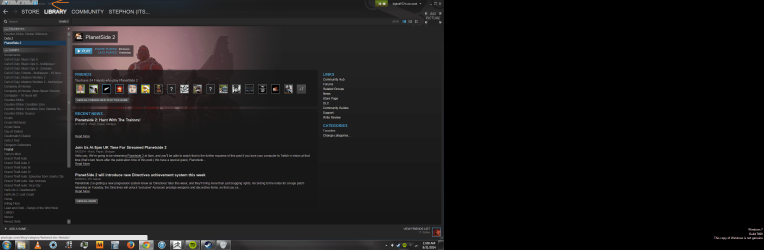
Hello I am using google chrome as my main browser. When I try to maximize chrome after minimizing it only half of the window will show up. Or only part of a tab will show up in the upper left corner of my screen. Although the window does not appear to be fully displayed I can still click on things as if it was maximized I have included photos. SO you can see what I mean. Also when this happens even if the window is smaller the top part of the google chrome window is cut off. I have uninstalled and reinstalled the application I have also reset my gpu settings to default [/ATTACH][/ATTACH]
 

Attachments
  • Untitled.png
    Untitled.png
    225.9 KB · Views: 4
  • Untitled2.png
    Untitled2.png
    140.5 KB · Views: 3

My Computer My Computer

Computer type
PC/Desktop
OS
Microsoft Windows 7 Professional 64-bit
CPU
Intel Xeon E3 @ 3.30GHzIntel(R) Xeon(R) CPU E3-1230 v3 @ 3.3
Motherboard
MSI Z97 GAMING 5 (MS-7917)
Memory
16.00GB Single-Channel DDR3 @ 666MHz (9-9-9-24)
Graphics Card(s)
ATI Radeon HD 7950
Sound Card
(1) AMD High Definition Audio Device (2) USB Audio Device
Hard Drives
(1) Samsung SSD 840 EVO 120GB ATA Device
(2) TOSHIBA MK7559GSM ATA Device
Other Info
TRENDnet Wireless AC1200 Dual Band USB 3.0 Adapter, TEW-805UB
Make sure google chrome is up to date, ----about chrome

It may be an extension. incognito by default disabled all extensions. Have you tried a incognito window and see if that has the same problem?
 
Last edited:

My Computer My Computer

Computer type
PC/Desktop
Computer Manufacturer/Model Number
Custom Built
OS
Windows 10 Pro
CPU
AMD Ryzen 5 2400G Processor with Radeon RX Vega 11 Graphics
Motherboard
ASRock X470 Master SLI/AC AM4 AMD Promontory X470 SATA 6Gb/s
Memory
G.SKILL Ripjaws V Series 16GB (2 x 8GB) 288-Pin DDR4 SDRAM D
Graphics Card(s)
2047MB NVIDIA GeForce GTX 1060 6GB (EVGA)
Sound Card
Motherboard Built in
Monitor(s) Displays
Acer R240HY bidx 23.8-Inch IPS HDMI DVI VGA (1920 x 1080) Wi
Screen Resolution
1920 x 1080
Hard Drives
1TB Sandisk SSD PLUS (Main drive)
500 GB Seagate 7200 RPM (Games)
500 GB Western Digital 7200 RPM (Virtual Machines)
PSU
CORSAIR TX Series TX650M 650W 80+ Gold Modular Power Supply
Case
CORSAIR CARBIDE SPEC-02 Mid-Tower Gaming Case, Red LED Fan
Cooling
220mm, two 120mm, and four 60mm fans
Keyboard
Wired Dell keyboard
Mouse
Wireless Logitech mouse
Internet Speed
250mb down, 30mb up
Antivirus
Panda Cloud Antivirus
Browser
Chrome-ish x64
Other Info
Your awesome for reading this.
Make sure google chrome is up to date, ----about chrome

It may be an extension. Ignoto by default disabled all extensions. Have you tried a ignoto window and see if that has the same problem?

no i have not ill try it for a few days and check back with you
 

My Computer My Computer

Computer type
PC/Desktop
OS
Microsoft Windows 7 Professional 64-bit
CPU
Intel Xeon E3 @ 3.30GHzIntel(R) Xeon(R) CPU E3-1230 v3 @ 3.3
Motherboard
MSI Z97 GAMING 5 (MS-7917)
Memory
16.00GB Single-Channel DDR3 @ 666MHz (9-9-9-24)
Graphics Card(s)
ATI Radeon HD 7950
Sound Card
(1) AMD High Definition Audio Device (2) USB Audio Device
Hard Drives
(1) Samsung SSD 840 EVO 120GB ATA Device
(2) TOSHIBA MK7559GSM ATA Device
Other Info
TRENDnet Wireless AC1200 Dual Band USB 3.0 Adapter, TEW-805UB
Make sure google chrome is up to date, ----about chrome

It may be an extension. incognito by default disabled all extensions. Have you tried a incognito window and see if that has the same problem?

I attempted using incognito it gives me the same problem
 

My Computer My Computer

Computer type
PC/Desktop
OS
Microsoft Windows 7 Professional 64-bit
CPU
Intel Xeon E3 @ 3.30GHzIntel(R) Xeon(R) CPU E3-1230 v3 @ 3.3
Motherboard
MSI Z97 GAMING 5 (MS-7917)
Memory
16.00GB Single-Channel DDR3 @ 666MHz (9-9-9-24)
Graphics Card(s)
ATI Radeon HD 7950
Sound Card
(1) AMD High Definition Audio Device (2) USB Audio Device
Hard Drives
(1) Samsung SSD 840 EVO 120GB ATA Device
(2) TOSHIBA MK7559GSM ATA Device
Other Info
TRENDnet Wireless AC1200 Dual Band USB 3.0 Adapter, TEW-805UB

My Computer My Computer

Computer type
PC/Desktop
Computer Manufacturer/Model Number
Custom Built
OS
Windows 10 Pro
CPU
AMD Ryzen 5 2400G Processor with Radeon RX Vega 11 Graphics
Motherboard
ASRock X470 Master SLI/AC AM4 AMD Promontory X470 SATA 6Gb/s
Memory
G.SKILL Ripjaws V Series 16GB (2 x 8GB) 288-Pin DDR4 SDRAM D
Graphics Card(s)
2047MB NVIDIA GeForce GTX 1060 6GB (EVGA)
Sound Card
Motherboard Built in
Monitor(s) Displays
Acer R240HY bidx 23.8-Inch IPS HDMI DVI VGA (1920 x 1080) Wi
Screen Resolution
1920 x 1080
Hard Drives
1TB Sandisk SSD PLUS (Main drive)
500 GB Seagate 7200 RPM (Games)
500 GB Western Digital 7200 RPM (Virtual Machines)
PSU
CORSAIR TX Series TX650M 650W 80+ Gold Modular Power Supply
Case
CORSAIR CARBIDE SPEC-02 Mid-Tower Gaming Case, Red LED Fan
Cooling
220mm, two 120mm, and four 60mm fans
Keyboard
Wired Dell keyboard
Mouse
Wireless Logitech mouse
Internet Speed
250mb down, 30mb up
Antivirus
Panda Cloud Antivirus
Browser
Chrome-ish x64
Other Info
Your awesome for reading this.
Hello, I'm having the same exact problem. Reinstalled Chrome without any extensions, ruled out all possible reasons I could think of really.
 

My Computer My Computer

Computer type
PC/Desktop
OS
Windows 7 Ultimate x64
Hi what is open in the background ?
Use Clean boot,
http://www.sevenforums.com/tutorials/179159-troubleshoot-application-conflicts-performing-clean-startup.html
Click Start and type in the search box,
msconfig
Click on the suggestion on top or hit the Enter key,
Go to the Startup section and take some screen shots for a complete list,
Go to the Services section and on the bottom left Check the box to Hide All Microsoft services,
Repeat the screen shots,
See the links above my signature on how to take and upload screen shots here,

Also how are you activating maximized ?
Is there any difference using the F11 key to go full screen instead ?
Cheers.
 

My Computer My Computer

Computer type
PC/Desktop
Computer Manufacturer/Model Number
Custom assembled by me :}
OS
Win-7-Pro64bit 7-H-Prem-64bit
CPU
i7-5930K 2nd i9-9940x both water blocked VRM's too
Motherboard
ASUS SABERTOOTH X99 2nd ASUS x299 Apex
Memory
Trident-z 3200C14 2nd Trident-z 3600C16
Graphics Card(s)
EVGA 1080ti ftw3 2nd Titan Xp both water blocked
Sound Card
Built-in Realtek
Monitor(s) Displays
1-AOC G2460PG 24"G-Sync 144Hz/ 2nd 1-ASUS VG248QE 24" 144Hz
Screen Resolution
1920 x 1080 144Hz
Hard Drives
2-Samsung M.2 Evo & Evo Plus
2-Samsung 850 EVO 500GB SSD's/ 3-2.5 W.D. Black 1tb-&3-1tb/3-3.5 WD Black 1tb hdd's
PSU
EVGA SuperNOVA 1000-P2 2nd 1200-P2
Case
2-Corsair Obsidian Series 450D Black ATX Mid Tower
Cooling
Custom water loops
Keyboard
Logitech G710+/ 2nd Logitech G910
Mouse
2-RedDragon M901 Perdition 16400 dpi Gaming mouse = wired
Internet Speed
Comcast Ping 19ms 89.31mbps download speed 6.12mbps upload
Antivirus
Malwarebytes Pro/ Superantispyware Pro
Browser
FireFox & Pale moon
Other Info
2nd ASUS X299 Apex/Intel i9-9940x with Custom water loop/7H-Prem-x64/Corsair 450D case/Ram Trident-z 3600C16 4x8gb / Samsung970Evo plus 500gb SSD/Dual ssd EZ swap evo/PSU EVGA SuperNova 1200w-P2 80+Platinum/GPU Titan Xp /8-ML-140 on push-pull on 2-280GTX rads
I am having the same issue, and I just recently reinstalled windows. The only thing I've changed though is I increased the size in the display options. I have a messed up model of samsung televisions that even though they're supposed to be 1080p, there's an issue with HDMI that it only goes to 1080i, so everything looks terrible and hard to see. I will try to return it to 100% and see if I still have the issue, though I did find that if I use F11 to full screen and exit, it returns to normal for a while.

Here's some screenshots of the actual issue. It seems it happens when you fully minimize the window, and try to get it back up, the first screenshot is how it looks at first when you try to maximize, the second image is what happens when you try to make it take half a screen, it almost looks perfect, but there's a cut off at the bottom that if there's a scroll bar, you can't get to it. then the third shows what happens if you move the window and then try to maximize it again, a huge portion comes back but it's still pretty cut off.

https://onedrive.live.com/redir?resid=CFEC43EC9681A2B3!15746&authkey=!AARpfC356uUtAMg&ithint=folder,
 

My Computer My Computer

Computer type
PC/Desktop
Computer Manufacturer/Model Number
custom built
OS
Windows 7 Ultimate x64
CPU
AMD FX-9590
Motherboard
Gigabyte GA-990FXA-UD3
Memory
8 GB G.skill Sniper DDR3 2133
Graphics Card(s)
Radeon HD 6970
Hard Drives
2TB seagate 7200 rpm
Antivirus
my brain
Browser
Chrome
Hi and welcome to SevenForums,
Does Internet explorer act the same way ?

Is "My Brain" really an antivirus :confused:
 

My Computer My Computer

Computer type
PC/Desktop
Computer Manufacturer/Model Number
Custom assembled by me :}
OS
Win-7-Pro64bit 7-H-Prem-64bit
CPU
i7-5930K 2nd i9-9940x both water blocked VRM's too
Motherboard
ASUS SABERTOOTH X99 2nd ASUS x299 Apex
Memory
Trident-z 3200C14 2nd Trident-z 3600C16
Graphics Card(s)
EVGA 1080ti ftw3 2nd Titan Xp both water blocked
Sound Card
Built-in Realtek
Monitor(s) Displays
1-AOC G2460PG 24"G-Sync 144Hz/ 2nd 1-ASUS VG248QE 24" 144Hz
Screen Resolution
1920 x 1080 144Hz
Hard Drives
2-Samsung M.2 Evo & Evo Plus
2-Samsung 850 EVO 500GB SSD's/ 3-2.5 W.D. Black 1tb-&3-1tb/3-3.5 WD Black 1tb hdd's
PSU
EVGA SuperNOVA 1000-P2 2nd 1200-P2
Case
2-Corsair Obsidian Series 450D Black ATX Mid Tower
Cooling
Custom water loops
Keyboard
Logitech G710+/ 2nd Logitech G910
Mouse
2-RedDragon M901 Perdition 16400 dpi Gaming mouse = wired
Internet Speed
Comcast Ping 19ms 89.31mbps download speed 6.12mbps upload
Antivirus
Malwarebytes Pro/ Superantispyware Pro
Browser
FireFox & Pale moon
Other Info
2nd ASUS X299 Apex/Intel i9-9940x with Custom water loop/7H-Prem-x64/Corsair 450D case/Ram Trident-z 3600C16 4x8gb / Samsung970Evo plus 500gb SSD/Dual ssd EZ swap evo/PSU EVGA SuperNova 1200w-P2 80+Platinum/GPU Titan Xp /8-ML-140 on push-pull on 2-280GTX rads
depends how you are using the word antivirus I suppose. I'm pretty used to windows 8 since I have a Surface Pro, and windows 8 integrated Security Essentials into Windows Defender; however, I use my desktop for gaming and also any intensive software I need for school like AutoCAD, so I kept windows 7, but considering I've never had a virus since early high school, I put antivirus on the back of my to-do list.

anyway back on topic, both 150% and 125% gave the issue, but once set to 100% I couldn't recreate it, for now at least. It usually messed up as soon as you minimize and maximize again so I think it's not going to happen at all. For now I just set my resolution down to increase size, maybe it's time to buy new monitors... As for IE, I didn't try, but later I can try to increase the DPI again and check it though. I personally think it's a bug that chrome has with increased scale.
 

My Computer My Computer

Computer type
PC/Desktop
Computer Manufacturer/Model Number
custom built
OS
Windows 7 Ultimate x64
CPU
AMD FX-9590
Motherboard
Gigabyte GA-990FXA-UD3
Memory
8 GB G.skill Sniper DDR3 2133
Graphics Card(s)
Radeon HD 6970
Hard Drives
2TB seagate 7200 rpm
Antivirus
my brain
Browser
Chrome
Yikes back of to do list :confused:
if you like Windows defender so much please download Microsoft security essentials as said it's the same thing,
Now days no matter what you use for a antivirus program you really do need a specialized malware utility,
http://www.malwarebytes.org/products/malwarebytes_free
I would also recommend this cookies monster both are free along with MSE ;)
http://www.superantispyware.com/?tag=SUPERANTISPYWARE

This could be a case of hardware acceleration in Chrome,
http://www.sevenforums.com/tutorials/271264-chrome-gpu-hardware-acceleration-turn-off.html
 

My Computer My Computer

Computer type
PC/Desktop
Computer Manufacturer/Model Number
Custom assembled by me :}
OS
Win-7-Pro64bit 7-H-Prem-64bit
CPU
i7-5930K 2nd i9-9940x both water blocked VRM's too
Motherboard
ASUS SABERTOOTH X99 2nd ASUS x299 Apex
Memory
Trident-z 3200C14 2nd Trident-z 3600C16
Graphics Card(s)
EVGA 1080ti ftw3 2nd Titan Xp both water blocked
Sound Card
Built-in Realtek
Monitor(s) Displays
1-AOC G2460PG 24"G-Sync 144Hz/ 2nd 1-ASUS VG248QE 24" 144Hz
Screen Resolution
1920 x 1080 144Hz
Hard Drives
2-Samsung M.2 Evo & Evo Plus
2-Samsung 850 EVO 500GB SSD's/ 3-2.5 W.D. Black 1tb-&3-1tb/3-3.5 WD Black 1tb hdd's
PSU
EVGA SuperNOVA 1000-P2 2nd 1200-P2
Case
2-Corsair Obsidian Series 450D Black ATX Mid Tower
Cooling
Custom water loops
Keyboard
Logitech G710+/ 2nd Logitech G910
Mouse
2-RedDragon M901 Perdition 16400 dpi Gaming mouse = wired
Internet Speed
Comcast Ping 19ms 89.31mbps download speed 6.12mbps upload
Antivirus
Malwarebytes Pro/ Superantispyware Pro
Browser
FireFox & Pale moon
Other Info
2nd ASUS X299 Apex/Intel i9-9940x with Custom water loop/7H-Prem-x64/Corsair 450D case/Ram Trident-z 3600C16 4x8gb / Samsung970Evo plus 500gb SSD/Dual ssd EZ swap evo/PSU EVGA SuperNova 1200w-P2 80+Platinum/GPU Titan Xp /8-ML-140 on push-pull on 2-280GTX rads
Hmm I don't even have the GPU hardware acceleration option in my experiments list. The closest thing I found when I did a CTRL+F for 'gpu' was GPU rasterization which isn't even available for my platform apparently.

It's not that I enjoyed windows defender, it just was there. I used malware bytes a ton at my IT job, and it worked well usually, but the free version is more of a malware deletion tool than a prevention one. I watched for two years how users would constantly get viruses, so I'm pretty confident in my ability to avoid them. The only ones that I'm probably decently vulnerable to are those nasty backdoors that you hear exploited from popular software, but then again those are usually discreet enough to get past even the most expensive antivirus programs.
 

My Computer My Computer

Computer type
PC/Desktop
Computer Manufacturer/Model Number
custom built
OS
Windows 7 Ultimate x64
CPU
AMD FX-9590
Motherboard
Gigabyte GA-990FXA-UD3
Memory
8 GB G.skill Sniper DDR3 2133
Graphics Card(s)
Radeon HD 6970
Hard Drives
2TB seagate 7200 rpm
Antivirus
my brain
Browser
Chrome
Okay games/ gaming is the easiest way to pick up a bunch of crap,
It could just be Chrome's new 64 bit version not quite compatible it is still beta to the public,
test with Internet explorer and possibly another browser of your choosing/ Firefox.....
 

My Computer My Computer

Computer type
PC/Desktop
Computer Manufacturer/Model Number
Custom assembled by me :}
OS
Win-7-Pro64bit 7-H-Prem-64bit
CPU
i7-5930K 2nd i9-9940x both water blocked VRM's too
Motherboard
ASUS SABERTOOTH X99 2nd ASUS x299 Apex
Memory
Trident-z 3200C14 2nd Trident-z 3600C16
Graphics Card(s)
EVGA 1080ti ftw3 2nd Titan Xp both water blocked
Sound Card
Built-in Realtek
Monitor(s) Displays
1-AOC G2460PG 24"G-Sync 144Hz/ 2nd 1-ASUS VG248QE 24" 144Hz
Screen Resolution
1920 x 1080 144Hz
Hard Drives
2-Samsung M.2 Evo & Evo Plus
2-Samsung 850 EVO 500GB SSD's/ 3-2.5 W.D. Black 1tb-&3-1tb/3-3.5 WD Black 1tb hdd's
PSU
EVGA SuperNOVA 1000-P2 2nd 1200-P2
Case
2-Corsair Obsidian Series 450D Black ATX Mid Tower
Cooling
Custom water loops
Keyboard
Logitech G710+/ 2nd Logitech G910
Mouse
2-RedDragon M901 Perdition 16400 dpi Gaming mouse = wired
Internet Speed
Comcast Ping 19ms 89.31mbps download speed 6.12mbps upload
Antivirus
Malwarebytes Pro/ Superantispyware Pro
Browser
FireFox & Pale moon
Other Info
2nd ASUS X299 Apex/Intel i9-9940x with Custom water loop/7H-Prem-x64/Corsair 450D case/Ram Trident-z 3600C16 4x8gb / Samsung970Evo plus 500gb SSD/Dual ssd EZ swap evo/PSU EVGA SuperNova 1200w-P2 80+Platinum/GPU Titan Xp /8-ML-140 on push-pull on 2-280GTX rads
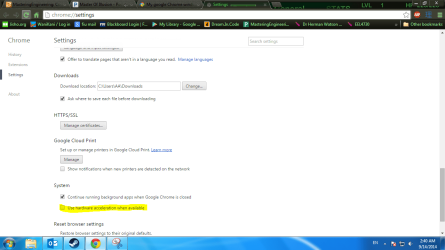
interestingly, I found the hardware acceleration option while actually looking at a totally different issue with chrome. Oddly a couple of videos on youtube would play sound but the video was just a black screen. I wanted to see if maybe it was HTML5, but I didn't know how to turn it off. I naturally went into the regular Chrome settings to look for it and instead of finding HTML5, I found the settings for hardware acceleration. I turned it off and funny enough it actually fixed my youtube issue. I guess it stopped being an experimental option and put it as a normal option in some update. That would make the page you linked me out of date, so I'd suggest having someone update it. As for the chrome cut off issue, I will try to go to 1080p and increase my DPI I guess.

Here's a screenshot of the option because why not. It's under "show advance settings" and at the very bottom.
 

Attachments

  • hardware accel.PNG
    hardware accel.PNG
    48.5 KB · Views: 1

My Computer My Computer

Computer type
PC/Desktop
Computer Manufacturer/Model Number
custom built
OS
Windows 7 Ultimate x64
CPU
AMD FX-9590
Motherboard
Gigabyte GA-990FXA-UD3
Memory
8 GB G.skill Sniper DDR3 2133
Graphics Card(s)
Radeon HD 6970
Hard Drives
2TB seagate 7200 rpm
Antivirus
my brain
Browser
Chrome
I believe the setting has always been under advanced settings :/
I messaged the tutorial creator to test it with the new version thanks for the heads up :)

The new version of Chrome has only been out a couple weeks now and has been self updating for users so there's no telling when you got the new version but do you think that's when the issue started ?
Not the youtube issue the original issue ;)
 

My Computer My Computer

Computer type
PC/Desktop
Computer Manufacturer/Model Number
Custom assembled by me :}
OS
Win-7-Pro64bit 7-H-Prem-64bit
CPU
i7-5930K 2nd i9-9940x both water blocked VRM's too
Motherboard
ASUS SABERTOOTH X99 2nd ASUS x299 Apex
Memory
Trident-z 3200C14 2nd Trident-z 3600C16
Graphics Card(s)
EVGA 1080ti ftw3 2nd Titan Xp both water blocked
Sound Card
Built-in Realtek
Monitor(s) Displays
1-AOC G2460PG 24"G-Sync 144Hz/ 2nd 1-ASUS VG248QE 24" 144Hz
Screen Resolution
1920 x 1080 144Hz
Hard Drives
2-Samsung M.2 Evo & Evo Plus
2-Samsung 850 EVO 500GB SSD's/ 3-2.5 W.D. Black 1tb-&3-1tb/3-3.5 WD Black 1tb hdd's
PSU
EVGA SuperNOVA 1000-P2 2nd 1200-P2
Case
2-Corsair Obsidian Series 450D Black ATX Mid Tower
Cooling
Custom water loops
Keyboard
Logitech G710+/ 2nd Logitech G910
Mouse
2-RedDragon M901 Perdition 16400 dpi Gaming mouse = wired
Internet Speed
Comcast Ping 19ms 89.31mbps download speed 6.12mbps upload
Antivirus
Malwarebytes Pro/ Superantispyware Pro
Browser
FireFox & Pale moon
Other Info
2nd ASUS X299 Apex/Intel i9-9940x with Custom water loop/7H-Prem-x64/Corsair 450D case/Ram Trident-z 3600C16 4x8gb / Samsung970Evo plus 500gb SSD/Dual ssd EZ swap evo/PSU EVGA SuperNova 1200w-P2 80+Platinum/GPU Titan Xp /8-ML-140 on push-pull on 2-280GTX rads
welp, I tried with both 125% and 150% DPI, and I'm unable to recreate the issue. I'm going to say it's an issue with Hardware Acceleration in their new update then. I have been having issues with chrome lately, I hope things get better. I love Google, and I love chrome, so I don't really want to have to switch to Firefox or something. I'll report back if the issue ends up reoccurs
 

My Computer My Computer

Computer type
PC/Desktop
Computer Manufacturer/Model Number
custom built
OS
Windows 7 Ultimate x64
CPU
AMD FX-9590
Motherboard
Gigabyte GA-990FXA-UD3
Memory
8 GB G.skill Sniper DDR3 2133
Graphics Card(s)
Radeon HD 6970
Hard Drives
2TB seagate 7200 rpm
Antivirus
my brain
Browser
Chrome
Back
Top