my hard drive is not showing up

shawna

New member
Local time
9:23 PM
Messages
10
This is my sons laptop. It had vista and 7 installed on it. I am positive it had a virus before it tore up. It wont load windows but I got a disk and when I load it, it doesnt show my harddrive. It shows a drive letter x: This seems like windows is installed on it. I am not sure if it is tho. I downloaded easeus to recovery the drive and it has found the drive. So if the drive was shot, it wouldn't be able to find it would it? When I go into bios it says no ide device. It use to show it. I was going to do a clean install fo windows and went to partition the drive and I messed it up. If anyone could help that would be great!!
 

My Computer My Computer

At a glance

WINDOWS 7 WINDOWS VISTA 32 BIT
Computer Manufacturer/Model Number
HPDV6426US
OS
WINDOWS 7 WINDOWS VISTA 32 BIT
First Drive X is the windows installation DVD, it is not the hard drive. I think the first thing to do would be to go to the hard drive manufacturers site and download their hard drive diagnostic test. That would at least give you a pretty good idea if it is a hard drive problem or not. Assuming it passes. I would follow this tutorial on How to Ready an SSD / HDD to Reinstall an Operating System. Is the hard drive making any unusual noises and can you hear it running? Sometimes when you turn the computer on you can hear it spin up.
 

My Computers My Computers

  • At a glance

    Windows 11 ProRyzen 9 5900X32GB G Skill DDR4-3600EVGA RTX 3080 FTW 3 Ultra
    Computer type
    PC/Desktop
    Computer Manufacturer/Model Number
    ALWAYS UNDER CONSTRUCTION
    OS
    Windows 11 Pro
    CPU
    Ryzen 9 5900X
    Motherboard
    Asus X570 Crosshair Viii Hero
    Memory
    32GB G Skill DDR4-3600
    Graphics Card(s)
    EVGA RTX 3080 FTW 3 Ultra
    Sound Card
    On Board/Sennheiser PC37X Headset
    Monitor(s) Displays
    3 X Asus 27"
    Screen Resolution
    2560x1440
    Hard Drives
    2 X 1 TB NVME drives
    PSU
    EVGA 850
    Case
    Phanteks Eclipse P400A
    Cooling
    EVGA 280 AIO
    Keyboard
    Logitech G510s/ Logitech G13
    Mouse
    Logitech G502
    Internet Speed
    24/1
    Antivirus
    ESET/MBAM Pro/SAS Pro
    Browser
    Chrome/ Firefox/ Edge
  • At a glance

    Windows 11 ProIntel Ultra 9 288V32 GB LPDDR5X 8533
    Computer type
    Laptop
    System Manufacturer/Model Number
    Dell 16 Plus
    OS
    Windows 11 Pro
    CPU
    Intel Ultra 9 288V
    Memory
    32 GB LPDDR5X 8533
    Monitor(s) Displays
    16" Mini-LED HDR600 Touch 90 Hz
    Screen Resolution
    2560X1600
    Hard Drives
    1 TB NVME
Yes I can hear it start and it sounds like it should. I have looked on Toshibas website for a download for the hdd but I cant find anything. Do you have any idea of where I could look? I dont think it is the hdd I think I may have deleted something I shouldn't have. I also looked at the link you posted.When I go into diskpart it does list 2 disks but one of them is my usb drive.
 

My Computer My Computer

At a glance

WINDOWS 7 WINDOWS VISTA 32 BIT
Computer Manufacturer/Model Number
HPDV6426US
OS
WINDOWS 7 WINDOWS VISTA 32 BIT
Now I am having a problem with the windows 7 that I was trying to install. When I try to boot the computer with that version it says something about the boot manager is missing. I am lucky I have a different cd to boot from. But let me ask you is it really possible that it is a virus causing these problems with my computer? I know the computer had a virus before these problems. I didn't get the chance to try to remove them before the system crashed.
 

My Computer My Computer

At a glance

WINDOWS 7 WINDOWS VISTA 32 BIT
Computer Manufacturer/Model Number
HPDV6426US
OS
WINDOWS 7 WINDOWS VISTA 32 BIT

My Computer My Computer

At a glance

Windows 7 Ultimate SP1 64-BitIntel Core i7 870 @ 2.93GHz8Gb Dual-Channel DDR3 @ 664MHznVidia GeForce GTX 460 1024MB dedicated RAM
Computer Manufacturer/Model Number
HP Pavilion Elite 495UK
OS
Windows 7 Ultimate SP1 64-Bit
CPU
Intel Core i7 870 @ 2.93GHz
Motherboard
MSI 2A9C (CPU1)
Memory
8Gb Dual-Channel DDR3 @ 664MHz
Graphics Card(s)
nVidia GeForce GTX 460 1024MB dedicated RAM
Sound Card
Realtek HD Audio
Monitor(s) Displays
HP2310i
Screen Resolution
1920 x 1080
Hard Drives
1x1954GB Hitachi HDS22020ALA 330 (RAID), 1x1954GB Hitachi External for backup and storage
PSU
460W
Case
HP Elite
Cooling
Air cooled
Keyboard
Logitech K750 solar-powered keyboard
Mouse
Logitech Wireless M180 mouse
Internet Speed
2Mb
Other Info
Pure Avanti Flow Internet Radio with iPod Dock, 64Gb iPod, HP USB Speakers, Sony MDR-V500 Headphones, Sony Vaio F-Series Laptop
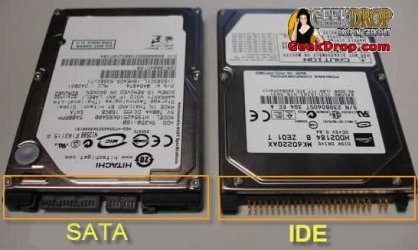
What type hard laptop is it. Model number? Does it have an IDE hard drive or sata? This may help identify it.

sata-ide-laptop-hard-drive-1.jpg
 

My Computers My Computers

  • At a glance

    Windows 11 ProRyzen 9 5900X32GB G Skill DDR4-3600EVGA RTX 3080 FTW 3 Ultra
    Computer type
    PC/Desktop
    Computer Manufacturer/Model Number
    ALWAYS UNDER CONSTRUCTION
    OS
    Windows 11 Pro
    CPU
    Ryzen 9 5900X
    Motherboard
    Asus X570 Crosshair Viii Hero
    Memory
    32GB G Skill DDR4-3600
    Graphics Card(s)
    EVGA RTX 3080 FTW 3 Ultra
    Sound Card
    On Board/Sennheiser PC37X Headset
    Monitor(s) Displays
    3 X Asus 27"
    Screen Resolution
    2560x1440
    Hard Drives
    2 X 1 TB NVME drives
    PSU
    EVGA 850
    Case
    Phanteks Eclipse P400A
    Cooling
    EVGA 280 AIO
    Keyboard
    Logitech G510s/ Logitech G13
    Mouse
    Logitech G502
    Internet Speed
    24/1
    Antivirus
    ESET/MBAM Pro/SAS Pro
    Browser
    Chrome/ Firefox/ Edge
  • At a glance

    Windows 11 ProIntel Ultra 9 288V32 GB LPDDR5X 8533
    Computer type
    Laptop
    System Manufacturer/Model Number
    Dell 16 Plus
    OS
    Windows 11 Pro
    CPU
    Intel Ultra 9 288V
    Memory
    32 GB LPDDR5X 8533
    Monitor(s) Displays
    16" Mini-LED HDR600 Touch 90 Hz
    Screen Resolution
    2560X1600
    Hard Drives
    1 TB NVME
essenbe, The hdd is a toshiba mk1637gsx. I am pretty sure it is ide. But at the moment I am still running easeus data recovery wizard. It has been running for two days and I really hate to interrupt it after it is so close to be finished.
 

My Computer My Computer

At a glance

WINDOWS 7 WINDOWS VISTA 32 BIT
Computer Manufacturer/Model Number
HPDV6426US
OS
WINDOWS 7 WINDOWS VISTA 32 BIT
Seavixen32, That is what I was trying to do. I went into diskpart and while I was trying to clean it I ended up deleting everything. Now the hdd doesn't have a letter and no partitions no nothing. I don't know but I am almost sure that is where I messed up. The hdd and a few partitions where there before I messed with diskpart. Now I am not sure where to begin to fix it. Do you have any recommendations.
 

My Computer My Computer

At a glance

WINDOWS 7 WINDOWS VISTA 32 BIT
Computer Manufacturer/Model Number
HPDV6426US
OS
WINDOWS 7 WINDOWS VISTA 32 BIT
Seavixen32, That is what I was trying to do. I went into diskpart and while I was trying to clean it I ended up deleting everything. Now the hdd doesn't have a letter and no partitions no nothing. I don't know but I am almost sure that is where I messed up. The hdd and a few partitions where there before I messed with diskpart. Now I am not sure where to begin to fix it. Do you have any recommendations.

Providing the hard drive is still OK it would seem a clean install would be your best bet.

If the hard drive has died on you then you have no choice but to replace it, and then install Windows.

If you have a system repair disc you should be able to get into the Windows Recovery Environment and partition your drive using diskpart from the command prompt.

If you don't have a Windows DVD you can go to the Digital River site and download a Windows ISO, burn it to a blank DVD and install Windows using your COA product key to activate.
 

My Computer My Computer

At a glance

Windows 7 Ultimate SP1 64-BitIntel Core i7 870 @ 2.93GHz8Gb Dual-Channel DDR3 @ 664MHznVidia GeForce GTX 460 1024MB dedicated RAM
Computer Manufacturer/Model Number
HP Pavilion Elite 495UK
OS
Windows 7 Ultimate SP1 64-Bit
CPU
Intel Core i7 870 @ 2.93GHz
Motherboard
MSI 2A9C (CPU1)
Memory
8Gb Dual-Channel DDR3 @ 664MHz
Graphics Card(s)
nVidia GeForce GTX 460 1024MB dedicated RAM
Sound Card
Realtek HD Audio
Monitor(s) Displays
HP2310i
Screen Resolution
1920 x 1080
Hard Drives
1x1954GB Hitachi HDS22020ALA 330 (RAID), 1x1954GB Hitachi External for backup and storage
PSU
460W
Case
HP Elite
Cooling
Air cooled
Keyboard
Logitech K750 solar-powered keyboard
Mouse
Logitech Wireless M180 mouse
Internet Speed
2Mb
Other Info
Pure Avanti Flow Internet Radio with iPod Dock, 64Gb iPod, HP USB Speakers, Sony MDR-V500 Headphones, Sony Vaio F-Series Laptop
seavixen32, the link to the ios image download you listed, will it happen to have any of the drivers included in the download? When I am trying to install windows it will start then it doesn't show my hdd. Then it asks me to locate and install the driver. Which I cant find. Is there a specific driver for a hdd?Or could the reason its not showing up because I haven't created a partition? Thank you so much for helping me.
 

My Computer My Computer

At a glance

WINDOWS 7 WINDOWS VISTA 32 BIT
Computer Manufacturer/Model Number
HPDV6426US
OS
WINDOWS 7 WINDOWS VISTA 32 BIT
I believe Seavixen directed you to the Digital River ISO image of Windows 7. The link is to My Digital life but the download id from Digital River. The ISO will contain all of the generic drivers that normally come with any windows DVD. Specific drivers for your system can be downloaded from your Motherboard manufacturers web site. Go to their web site, look up your specific motherboard and click on downloads. You can download drivers, the manual or bios updates and utilities.
 

My Computers My Computers

  • At a glance

    Windows 11 ProRyzen 9 5900X32GB G Skill DDR4-3600EVGA RTX 3080 FTW 3 Ultra
    Computer type
    PC/Desktop
    Computer Manufacturer/Model Number
    ALWAYS UNDER CONSTRUCTION
    OS
    Windows 11 Pro
    CPU
    Ryzen 9 5900X
    Motherboard
    Asus X570 Crosshair Viii Hero
    Memory
    32GB G Skill DDR4-3600
    Graphics Card(s)
    EVGA RTX 3080 FTW 3 Ultra
    Sound Card
    On Board/Sennheiser PC37X Headset
    Monitor(s) Displays
    3 X Asus 27"
    Screen Resolution
    2560x1440
    Hard Drives
    2 X 1 TB NVME drives
    PSU
    EVGA 850
    Case
    Phanteks Eclipse P400A
    Cooling
    EVGA 280 AIO
    Keyboard
    Logitech G510s/ Logitech G13
    Mouse
    Logitech G502
    Internet Speed
    24/1
    Antivirus
    ESET/MBAM Pro/SAS Pro
    Browser
    Chrome/ Firefox/ Edge
  • At a glance

    Windows 11 ProIntel Ultra 9 288V32 GB LPDDR5X 8533
    Computer type
    Laptop
    System Manufacturer/Model Number
    Dell 16 Plus
    OS
    Windows 11 Pro
    CPU
    Intel Ultra 9 288V
    Memory
    32 GB LPDDR5X 8533
    Monitor(s) Displays
    16" Mini-LED HDR600 Touch 90 Hz
    Screen Resolution
    2560X1600
    Hard Drives
    1 TB NVME
Shawna, Essenbe's advice is good and yes, it was the Digital River ISO I was suggesting.

Once you've downloaded this image and burned it to a blank DVD, you can boot into it and install Windows, during which time you can partition your hard drive.

If you're being asked for drivers then please take note of Essenbe's advice as to where you can get them.
 

My Computer My Computer

At a glance

Windows 7 Ultimate SP1 64-BitIntel Core i7 870 @ 2.93GHz8Gb Dual-Channel DDR3 @ 664MHznVidia GeForce GTX 460 1024MB dedicated RAM
Computer Manufacturer/Model Number
HP Pavilion Elite 495UK
OS
Windows 7 Ultimate SP1 64-Bit
CPU
Intel Core i7 870 @ 2.93GHz
Motherboard
MSI 2A9C (CPU1)
Memory
8Gb Dual-Channel DDR3 @ 664MHz
Graphics Card(s)
nVidia GeForce GTX 460 1024MB dedicated RAM
Sound Card
Realtek HD Audio
Monitor(s) Displays
HP2310i
Screen Resolution
1920 x 1080
Hard Drives
1x1954GB Hitachi HDS22020ALA 330 (RAID), 1x1954GB Hitachi External for backup and storage
PSU
460W
Case
HP Elite
Cooling
Air cooled
Keyboard
Logitech K750 solar-powered keyboard
Mouse
Logitech Wireless M180 mouse
Internet Speed
2Mb
Other Info
Pure Avanti Flow Internet Radio with iPod Dock, 64Gb iPod, HP USB Speakers, Sony MDR-V500 Headphones, Sony Vaio F-Series Laptop
That easues program didn't do anything. I started running diskpart and did the clean all command. That succeeded. Then I went to create partition and got an error. Diskpart has encountered an error: The request could not be performed because of an i\o device error. See the system log for more information. I cant see my system log there isn't anything on the computer. The hdd is there and it says its online and it is 149gb in size and 149gb free. What can I do???
 

My Computer My Computer

At a glance

WINDOWS 7 WINDOWS VISTA 32 BIT
Computer Manufacturer/Model Number
HPDV6426US
OS
WINDOWS 7 WINDOWS VISTA 32 BIT
problems installing windows 7

When I am installing windows and get the part where Ichoose the drive to install windows on there is only one drive and it says that windows cannot be put on it. But it say that its empty. It 149gb unallocated. Then when I click on show more it says something about the hardware is not compatible. I think it is a driver problem. But I am not sure. The hard drive is mk1637gsx made by toshiba. I have tried to create a partition it wont let me. One other problem I am having everytime I boot with my usb or disk I have to delete the copy of windows and put it back onto my usb drive and then boot. I dont know if these two problems are related but it seems as tho they would be. I would be forever grateful if somebody could help me please.Another thing is when I run startup repair it returns the problem no os installed then something about trying to recover the partition. Then I restart it and get a boot error. Thats when I have to erase my usb.
 
Last edited:

My Computer My Computer

At a glance

WINDOWS 7 WINDOWS VISTA 32 BIT
Computer Manufacturer/Model Number
HPDV6426US
OS
WINDOWS 7 WINDOWS VISTA 32 BIT

My Computer My Computer

At a glance

Windows 7 x64Intel i7 2600kG.skill Ripjaw 16gigs @ 1866Nvidia gtx580 (evga)
Computer Manufacturer/Model Number
Insane hobo technologies. ;-)
OS
Windows 7 x64
CPU
Intel i7 2600k
Motherboard
Asrock z68 extreme 4 gen 3
Memory
G.skill Ripjaw 16gigs @ 1866
Graphics Card(s)
Nvidia gtx580 (evga)
Sound Card
Integrated HD audio + hdmi
Monitor(s) Displays
24" ASUS widescreen + 42" insignia
Screen Resolution
1080p (1920x1080)
Hard Drives
128 Samsung 830
256 Samsung 840
3 x 1tb storage drive (various)
1 western digital 1tb (eSATA)
1 Seagate 1tb (eSATA)
PSU
1 kilowatt SLI/Crossfire rated Silverstone modular
Case
NZXT Phantom + additional 220 fan
Cooling
Zalmann
Keyboard
Microsoft wireless 3000 (v2)
Mouse
MS - wireless 5000 (bluetrack)
Internet Speed
depends on if you ask me or my provider.
Other Info
The above information is provided as is, and the author assumes no responsibility for issues it may cause with your sanity or fanboyism.
AnothrWhen I am installing windows and get the part where Ichoose the drive to install windows on there is only one drive and it says that windows cannot be put on it. But it say that its empty. It 149gb unallocated. Then when I click on show more it says something about the hardware is not compatible. I think it is a driver problem. But I am not sure. The hard drive is mk1637gsx made by toshiba. I have tried to create a partition it wont let me. One other problem I am having everytime I boot with my usb or disk I have to delete the copy of windows and put it back onto my usb drive and then boot. I dont know if these two problems are related but it seems as tho they would be. I would be forever grateful if somebody could help me please.Another thing is when I run startup repair it returns the problem no os installed then something about trying to recover the partition. Then I restart it and get a boot error. Thats when I have to erase my usb.

Hi Shawna,

Is your Toshiba Hard drive recognised in the BIOS? A question now: How did you come to know that it is a Toshiba mk1637gsx?

To start with a clean slate please do the following.

1. Clean erase your Toshiba Hard drive. Download and run the Erase Utility Software Utilities

2. Check your hard drive with the Toshiba Diagnostic utility - DOS Diagnostic Tool version 7.0. Download from the above referenced site.

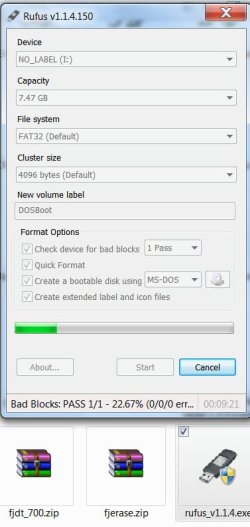
[Both the above should be run from a bootable DOS disk. Download and run Rufus v1.1.4 (without FreeDOS support) Rufus - Create bootable USB drives to create your bootable USB pendrive. Put the .exe files of the above 2, (fjerase.exe and FJDT.EXE) and run them from the DOS prompt. ( Please do read the Readme files when you unzip 1 and 2)]

If everything goes OK, then try to clean install Windows 7.

Good luck.:)

EDIT: Screenshot added: Rufus creating a bootable DOS pendrive. "Check device for bad blocks" checked to make sure that the pendrive is OK.

CheckToshiba.jpg
 
Last edited by a moderator:

My Computer My Computer

At a glance

Windows 7 Home Premium 32 bit
OS
Windows 7 Home Premium 32 bit
Ok I download the fjdtwin.exe and tried to run it. I keep getting errors.The computer cant start because oledlg.dll is missing from your computer. Try reinstalling the program to fix this problem. Also when I try to run fjerase I get this error. Windows cant find C:\fjerase\fjerase.exe Make sure you typed the name correctly, and then try again. C: is my usb drive. To answer a question you asked about how I know that my hdd is mk1637gsx It is wrote on the hdd itself. I just wanted to say thank you for your help..
 

My Computer My Computer

At a glance

WINDOWS 7 WINDOWS VISTA 32 BIT
Computer Manufacturer/Model Number
HPDV6426US
OS
WINDOWS 7 WINDOWS VISTA 32 BIT
You should download DOS Diagnostic Tool version 7.0 and run it from DOS. (and not Windows Diagnostic Tool Ver. 1.12)

Similarly you should also run fjerase.exe from DOS.

( I do not know how you are running these from Windows.:confused:)
 

My Computer My Computer

At a glance

Windows 7 Home Premium 32 bit
OS
Windows 7 Home Premium 32 bit
I did download both of these. I dont know where I am making the misktake at. Could you please walk me though exactly what and how I am suppose to do this. Is it possible that there is a virus or something causing this? My com;puter is acting crazy. I know that before it crashed there was a virus but I didnt get the chance to try and remove it. I got a different blue screen error now. A problem has been detected and windows has been shut down to prevent damage to your compter. wimFsf.sys PAGE_FAULT_IN_NONPAGED_AREA Technical information: STOP 0x00000050 (ox83BB88F9, 0x00000000, 0x848B7339,0x00000000) wimFsf.sys - address 848B7339 base at 848B4000 Datestamp 4a5bc0a6 This is the first time I have every had this appear.
 

My Computer My Computer

At a glance

WINDOWS 7 WINDOWS VISTA 32 BIT
Computer Manufacturer/Model Number
HPDV6426US
OS
WINDOWS 7 WINDOWS VISTA 32 BIT
Shawna -

What needs to be done now is run the Toshiba diagnostics CD extended scan to check the condition of your HD.

From this link: Software Utilities Choose the second DOS download, after download rightclick the file to extract from .zip file, burn ISO to CD using ImgBurn at 4x speed, boot disk to run Extended scan. Once test is passed, use the tool to wipe the HD.

If the drive is good, boot the WIn7 installer, choose Custom Install, at the drive selection screen click Drive Options to create New partition and Format, click Next to install: Clean Install Windows 7

If this fails again, try formatting a Primary NTFS partition using free Partition Wizard bootable CD, mark it Active, then try install to the partition.

Please report back what happens, including any verbatim errors.
 
Back
Top