
My laptop wakes immediately after I put it to Sleep mode

nekov4ego

New member
Power User
Local time
7:32 AM
Messages
102
Location
Bulgaria, Europe
It's been like this since I installed Windows 7.

No device is wake armed except for the keyboard but I sure don't press anything (I'd have noticed and wouldn't be here).
When I put it to Sleep it sleeps for a second and then wakes up. If I try again, it may sleep without problems but suddenly after a while it wakes up again.

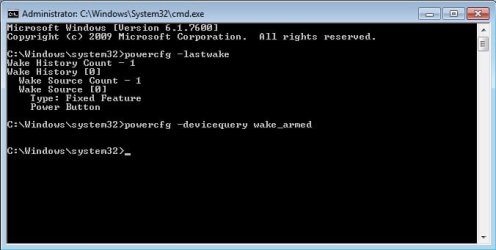
I used -lastwake and -devicequery wake_armed, "unarmed" everything and now it's like this ...
cmd.jpg

I don't know what's this fixed feature but I don't press ANYTHING. Any suggestions are welcome.

PS: The laptop is Asus x51lr.
 

My Computer My Computer

At a glance

Microsoft Windows 7 Ultimate x64 (Build 7601 ...AMD Phenom II X2 555 @ X4 B55 (3.2Ghz, 2MB L2...4GB (2x2GB) Corsair DDR3, 1333MhzASUS ENGTX560, DirectCU, 1GD5
OS
Microsoft Windows 7 Ultimate x64 (Build 7601 SP1)
CPU
AMD Phenom II X2 555 @ X4 B55 (3.2Ghz, 2MB L2/6MB L3 Cache)
Motherboard
ASUS M4A785TD-V Evo
Memory
4GB (2x2GB) Corsair DDR3, 1333Mhz
Graphics Card(s)
ASUS ENGTX560, DirectCU, 1GD5
Sound Card
8-Channel HD Audio
Monitor(s) Displays
Philips 226CL2SB
Screen Resolution
1920x1080p
Hard Drives
500GB Seagate, SATA2, 7200rpm, 16MB/s
PSU
Corsair TX650 v2
Internet Speed
90mbps Fiber Optics
This might be a 3rd party that is set to update itself in automatic mode, so it triggers when it wants.

Can be also Windows Media Center, but hopefully there's a fix for that: HERE

That might Temporarily or check again your Power Plan Settings in the Control Panel.
 
Last edited:

My Computer My Computer

At a glance

Windows 7 Professional SP1 - x64 [Non-UEFI Boot]Ivy Bridge Core i5 3570K (Delidded)G.Skill "Ares" DDR3 PC3-12800 - 1600MHz (16Gb)Asus Dual-RX480-O4G
Computer type
PC/Desktop
Computer Manufacturer/Model Number
Custom Build
OS
Windows 7 Professional SP1 - x64 [Non-UEFI Boot]
CPU
Ivy Bridge Core i5 3570K (Delidded)
Motherboard
Asus P8Z77-V LE PLUS
Memory
G.Skill "Ares" DDR3 PC3-12800 - 1600MHz (16Gb)
Graphics Card(s)
Asus Dual-RX480-O4G
Sound Card
Creative Sound Blaster Z w/5.1 sound system
Monitor(s) Displays
Asus IPS 23"
Screen Resolution
16/9
Hard Drives
Internal:
500Go Sata 6Gb/s (x2)
500Go Sata 3Gb/s (x2)
SSD 60Go Sata 6Gb/s
PSU
In Win C 900W Series 80+ Platinum
Case
Thermaltake Chaser A71
Cooling
Custom Water Cooling Loop
Keyboard
Cooler Master QuickFire XTi
Mouse
Razer Imperator 2012 (4G)
Antivirus
MSE
Browser
IE 11.0.xxx Rtm
Other Info
"Raid0" with Intel Smart Response Technology (HDD/SSD)
No triggers in Media Center. What should I check in Power Options exactly? Strange, but I put it to sleep and when I picked it up after 30-40mins, it woke up even before I had the chance to open it.
 

My Computer My Computer

At a glance

Microsoft Windows 7 Ultimate x64 (Build 7601 ...AMD Phenom II X2 555 @ X4 B55 (3.2Ghz, 2MB L2...4GB (2x2GB) Corsair DDR3, 1333MhzASUS ENGTX560, DirectCU, 1GD5
OS
Microsoft Windows 7 Ultimate x64 (Build 7601 SP1)
CPU
AMD Phenom II X2 555 @ X4 B55 (3.2Ghz, 2MB L2/6MB L3 Cache)
Motherboard
ASUS M4A785TD-V Evo
Memory
4GB (2x2GB) Corsair DDR3, 1333Mhz
Graphics Card(s)
ASUS ENGTX560, DirectCU, 1GD5
Sound Card
8-Channel HD Audio
Monitor(s) Displays
Philips 226CL2SB
Screen Resolution
1920x1080p
Hard Drives
500GB Seagate, SATA2, 7200rpm, 16MB/s
PSU
Corsair TX650 v2
Internet Speed
90mbps Fiber Optics
No triggers in Media Center. What should I check in Power Options exactly? Strange, but I put it to sleep and when I picked it up after 30-40mins, it woke up even before I had the chance to open it.

Have alook at this section:

Tutorials - Windows 7 Forums[2]=Power%20Management

Go in "Power Management" section. Those tutorials might help you.
 

My Computer My Computer

At a glance

Windows 7 Professional SP1 - x64 [Non-UEFI Boot]Ivy Bridge Core i5 3570K (Delidded)G.Skill "Ares" DDR3 PC3-12800 - 1600MHz (16Gb)Asus Dual-RX480-O4G
Computer type
PC/Desktop
Computer Manufacturer/Model Number
Custom Build
OS
Windows 7 Professional SP1 - x64 [Non-UEFI Boot]
CPU
Ivy Bridge Core i5 3570K (Delidded)
Motherboard
Asus P8Z77-V LE PLUS
Memory
G.Skill "Ares" DDR3 PC3-12800 - 1600MHz (16Gb)
Graphics Card(s)
Asus Dual-RX480-O4G
Sound Card
Creative Sound Blaster Z w/5.1 sound system
Monitor(s) Displays
Asus IPS 23"
Screen Resolution
16/9
Hard Drives
Internal:
500Go Sata 6Gb/s (x2)
500Go Sata 3Gb/s (x2)
SSD 60Go Sata 6Gb/s
PSU
In Win C 900W Series 80+ Platinum
Case
Thermaltake Chaser A71
Cooling
Custom Water Cooling Loop
Keyboard
Cooler Master QuickFire XTi
Mouse
Razer Imperator 2012 (4G)
Antivirus
MSE
Browser
IE 11.0.xxx Rtm
Other Info
"Raid0" with Intel Smart Response Technology (HDD/SSD)
Check the Performance Log on Advanced Tools page accessed by clicking your WEI score link at Computer>Properties for what might be hanging at suspend.

Update your display driver, try all versions of driver including Vista to see if Sleep will work correctly.

If these fail, tool the Pro's use to trace these issues: Trace Windows 7 boot/shutdown/hibernate/standby/resume issues - MSFN
 
Last edited:

My Computer My Computer

At a glance

Windows 7 Professional SP1 - x64 [Non-UEFI Boot]Ivy Bridge Core i5 3570K (Delidded)G.Skill "Ares" DDR3 PC3-12800 - 1600MHz (16Gb)Asus Dual-RX480-O4G
Computer type
PC/Desktop
Computer Manufacturer/Model Number
Custom Build
OS
Windows 7 Professional SP1 - x64 [Non-UEFI Boot]
CPU
Ivy Bridge Core i5 3570K (Delidded)
Motherboard
Asus P8Z77-V LE PLUS
Memory
G.Skill "Ares" DDR3 PC3-12800 - 1600MHz (16Gb)
Graphics Card(s)
Asus Dual-RX480-O4G
Sound Card
Creative Sound Blaster Z w/5.1 sound system
Monitor(s) Displays
Asus IPS 23"
Screen Resolution
16/9
Hard Drives
Internal:
500Go Sata 6Gb/s (x2)
500Go Sata 3Gb/s (x2)
SSD 60Go Sata 6Gb/s
PSU
In Win C 900W Series 80+ Platinum
Case
Thermaltake Chaser A71
Cooling
Custom Water Cooling Loop
Keyboard
Cooler Master QuickFire XTi
Mouse
Razer Imperator 2012 (4G)
Antivirus
MSE
Browser
IE 11.0.xxx Rtm
Other Info
"Raid0" with Intel Smart Response Technology (HDD/SSD)
Thanks a lot guys. I will have to try after a week (it's my father's laptop, and he travels). But I will read everything tomorrow. I hope it will work.

As for the display driver -- there is only one (I know) for that GPU (and I am using the one for Vista) -- ATI Radeon X1100.
 

My Computer My Computer

At a glance

Microsoft Windows 7 Ultimate x64 (Build 7601 ...AMD Phenom II X2 555 @ X4 B55 (3.2Ghz, 2MB L2...4GB (2x2GB) Corsair DDR3, 1333MhzASUS ENGTX560, DirectCU, 1GD5
OS
Microsoft Windows 7 Ultimate x64 (Build 7601 SP1)
CPU
AMD Phenom II X2 555 @ X4 B55 (3.2Ghz, 2MB L2/6MB L3 Cache)
Motherboard
ASUS M4A785TD-V Evo
Memory
4GB (2x2GB) Corsair DDR3, 1333Mhz
Graphics Card(s)
ASUS ENGTX560, DirectCU, 1GD5
Sound Card
8-Channel HD Audio
Monitor(s) Displays
Philips 226CL2SB
Screen Resolution
1920x1080p
Hard Drives
500GB Seagate, SATA2, 7200rpm, 16MB/s
PSU
Corsair TX650 v2
Internet Speed
90mbps Fiber Optics
My laptop keeps waking up and it is still because of that Fixed Feature Power Button, which I found is listed in Device Manager, in System Devices as ACPI Fixed Feature Power Button. It is the button I use to turn on my notebook, but I don't press it at all and it wakes up the machine; how is that possible? If it were because of the button, the laptop would be not only waking up but also turning on when it's completely off.

How can I fix this? Has anyone experienced something similar o_O? All my drivers are for Vista because there aren't any for Windows 7.
 

My Computer My Computer

At a glance

Microsoft Windows 7 Ultimate x64 (Build 7601 ...AMD Phenom II X2 555 @ X4 B55 (3.2Ghz, 2MB L2...4GB (2x2GB) Corsair DDR3, 1333MhzASUS ENGTX560, DirectCU, 1GD5
OS
Microsoft Windows 7 Ultimate x64 (Build 7601 SP1)
CPU
AMD Phenom II X2 555 @ X4 B55 (3.2Ghz, 2MB L2/6MB L3 Cache)
Motherboard
ASUS M4A785TD-V Evo
Memory
4GB (2x2GB) Corsair DDR3, 1333Mhz
Graphics Card(s)
ASUS ENGTX560, DirectCU, 1GD5
Sound Card
8-Channel HD Audio
Monitor(s) Displays
Philips 226CL2SB
Screen Resolution
1920x1080p
Hard Drives
500GB Seagate, SATA2, 7200rpm, 16MB/s
PSU
Corsair TX650 v2
Internet Speed
90mbps Fiber Optics
Back
Top