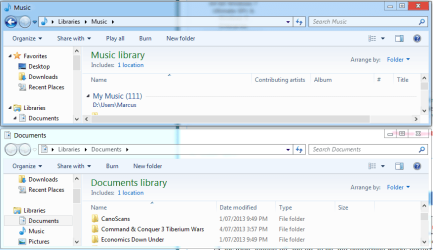
When I reinstalled Windows recently I decided to move my user data folders to my D drive since C drive is a new SSD - I did this by using the location tab in the properties dialog.
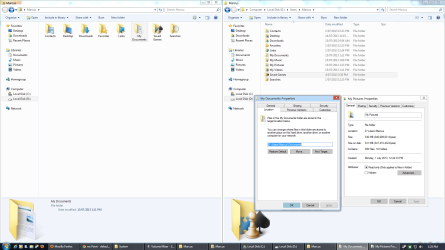
Now, when I click the start menu and click on my username to open my home folder, it displays all my data folders, EXCEPT My Music, My Videos and My Pictures. (of course, if I navigate to C:\users\...... only Appdata is there since everything was moved to D:\users\......) So I go to where the folders are stored, on D drive, and they are all there, but when I go to properties for these three folders, the "location" tab is not there.
Furthermore, I remember the default save location for MS Paint is the pictures folder, however now its default location is My Documents. Same thing applies to Windows Live Movie Maker (default should be Videos but it's defaulting to Documents). I think this is related to the problem I described above.
Also, when I click on the Pictures library (or the videos, or music library) it says there is no folder included, so I had to manually include the right folder from the D drive.
The attached screenshot sums it all up. Of course, when I saved it, I just saved it in the default directory for Paint, which happened to be... MY DOCUMENTS.
Now, when I click the start menu and click on my username to open my home folder, it displays all my data folders, EXCEPT My Music, My Videos and My Pictures. (of course, if I navigate to C:\users\...... only Appdata is there since everything was moved to D:\users\......) So I go to where the folders are stored, on D drive, and they are all there, but when I go to properties for these three folders, the "location" tab is not there.
Furthermore, I remember the default save location for MS Paint is the pictures folder, however now its default location is My Documents. Same thing applies to Windows Live Movie Maker (default should be Videos but it's defaulting to Documents). I think this is related to the problem I described above.
Also, when I click on the Pictures library (or the videos, or music library) it says there is no folder included, so I had to manually include the right folder from the D drive.
The attached screenshot sums it all up. Of course, when I saved it, I just saved it in the default directory for Paint, which happened to be... MY DOCUMENTS.
Attachments
My Computer
At a glance
Windows 7 Professional x64Intel Core i5 4690KCorsair Vengeance 16GB DDR3-1600Sapphire Radeon R9 290 Tri-X OC
- Computer type
- PC/Desktop
- OS
- Windows 7 Professional x64
- CPU
- Intel Core i5 4690K
- Motherboard
- Gigabyte Z97X Gaming-3
- Memory
- Corsair Vengeance 16GB DDR3-1600
- Graphics Card(s)
- Sapphire Radeon R9 290 Tri-X OC
- Sound Card
- ONBOARD SOUND :D
- Monitor(s) Displays
- Samsung S24A450BW
- Screen Resolution
- 1920x1200 (16:10 forever)
- Hard Drives
- 250GB Samsung 840 EVO + 2TB Seagate Barracudea
- PSU
- Fractal Design Newton R3 1000W
- Case
- Corsair Graphite 230T
- Cooling
- Cooler Master Hyper 212X
- Keyboard
- Logitech G710+, CM Storm TK
- Mouse
- Steelseries Rival
- Internet Speed
- Australian
- Antivirus
- Avast, because I'm cheap
- Browser
- All the browsers!


 )
)