my ram

pryskna

New member
Local time
6:40 AM
Messages
30
Hi all,
have a question
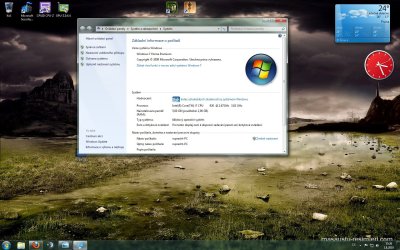
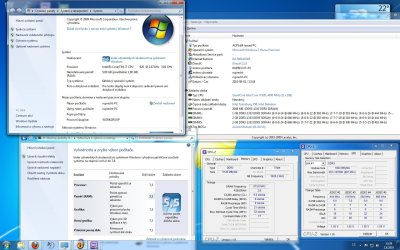
Installed ram shows only 5GB and 2GB for use,why ??????
I run the power of my pc (or how is it calling)
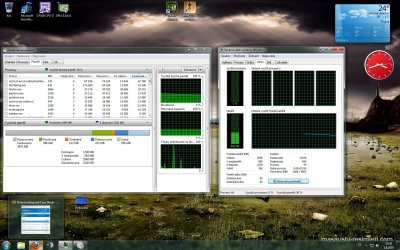
And the ram has a low performance ,(on screen) got only 5,5 points. everything else is almost 7,5
Can i do something with it?
Its not because of OC ?
 

Attachments
  • rams.jpg
    rams.jpg
    234.9 KB · Views: 48

My Computer

OS
Windows 7 home premium 64bit
CPU
i7 920 @ 4GHz @ 1.296v D0
Motherboard
gigabyte X58A-UD3R rev2.
Memory
zeppelin 3x2GB DDR3 1600MHz
Graphics Card(s)
ASUS GTX470
Sound Card
Realtek
Monitor(s) Displays
LG 22"
Screen Resolution
1680x1050
Hard Drives
Kingston 64GB SSD/
WD 320GB
PSU
Seasonic 750W
Case
Antec Three hundred
Cooling
Noctuas
Enable Memory Remap in your BIOS if this option is listed.
Go to Start>Run>msconfig>Boot>advanced options> Uncheck Maximum memory
 

My Computer

Computer type
PC/Desktop
Computer Manufacturer/Model Number
Custom Build
OS
Windows 10 Pro x64, Arch Linux
CPU
Intel Core 2 Quad Q8200 OC'd 3.08GHz
Motherboard
Asus Rampage formula LGA775
Memory
8GB DDR2 900Mhz
Graphics Card(s)
MSI GT730 2GB GDDR5 (Kepler)
Sound Card
Supreme FX2
Monitor(s) Displays
Samsung LS22F350 LED
Screen Resolution
1080P
Hard Drives
Kingston SSDNow UV400 120GB, 500GB Hitachi, 2TB Samsung, 500GB Seagate FreeAgent, 640GB Samsung, 160GB Toshiba (Arch)
PSU
AeroCool 500W Bronze
Cooling
Cooler Master V6 + 3X fans
Keyboard
Prolink keyboard
Mouse
Logitech M705
Internet Speed
1MiB/s
Browser
Chrome Beta
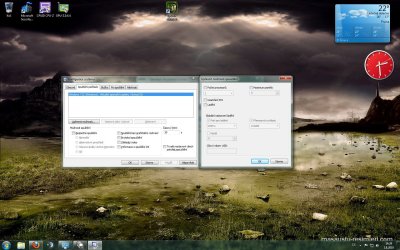
its this one on left side?... should i wrote something to there, i can put maximum 51xx
 

Attachments

  • ram.jpg
    ram.jpg
    287.5 KB · Views: 31

My Computer

OS
Windows 7 home premium 64bit
CPU
i7 920 @ 4GHz @ 1.296v D0
Motherboard
gigabyte X58A-UD3R rev2.
Memory
zeppelin 3x2GB DDR3 1600MHz
Graphics Card(s)
ASUS GTX470
Sound Card
Realtek
Monitor(s) Displays
LG 22"
Screen Resolution
1680x1050
Hard Drives
Kingston 64GB SSD/
WD 320GB
PSU
Seasonic 750W
Case
Antec Three hundred
Cooling
Noctuas
Put 5120 in the max RAM and reboot
Have you tried the Memory Remap option in your BIOS?
 

My Computer

Computer type
PC/Desktop
Computer Manufacturer/Model Number
Custom Build
OS
Windows 10 Pro x64, Arch Linux
CPU
Intel Core 2 Quad Q8200 OC'd 3.08GHz
Motherboard
Asus Rampage formula LGA775
Memory
8GB DDR2 900Mhz
Graphics Card(s)
MSI GT730 2GB GDDR5 (Kepler)
Sound Card
Supreme FX2
Monitor(s) Displays
Samsung LS22F350 LED
Screen Resolution
1080P
Hard Drives
Kingston SSDNow UV400 120GB, 500GB Hitachi, 2TB Samsung, 500GB Seagate FreeAgent, 640GB Samsung, 160GB Toshiba (Arch)
PSU
AeroCool 500W Bronze
Cooling
Cooler Master V6 + 3X fans
Keyboard
Prolink keyboard
Mouse
Logitech M705
Internet Speed
1MiB/s
Browser
Chrome Beta
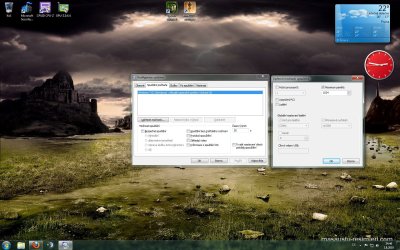
cant find Memory remap in bios :(,and when i reboot it shows max mem 1024mb? :(
 

Attachments

  • remap.jpg
    remap.jpg
    299.8 KB · Views: 7

My Computer

OS
Windows 7 home premium 64bit
CPU
i7 920 @ 4GHz @ 1.296v D0
Motherboard
gigabyte X58A-UD3R rev2.
Memory
zeppelin 3x2GB DDR3 1600MHz
Graphics Card(s)
ASUS GTX470
Sound Card
Realtek
Monitor(s) Displays
LG 22"
Screen Resolution
1680x1050
Hard Drives
Kingston 64GB SSD/
WD 320GB
PSU
Seasonic 750W
Case
Antec Three hundred
Cooling
Noctuas
cant find Memory remap in bios :(,and when i reboot it shows max mem 1024mb? :(
Then uncheck Maximum memory

Your ram sticks may be malfunctioning,

To check if your ram is bad:

Download MemTest86

Burn it to CD/DVD using an ISO burner such as IMGBurn

Boot from the disc. (You may have to change your boot order via your BIOS)
 

My Computer

Computer type
PC/Desktop
Computer Manufacturer/Model Number
Custom Build
OS
Windows 10 Pro x64, Arch Linux
CPU
Intel Core 2 Quad Q8200 OC'd 3.08GHz
Motherboard
Asus Rampage formula LGA775
Memory
8GB DDR2 900Mhz
Graphics Card(s)
MSI GT730 2GB GDDR5 (Kepler)
Sound Card
Supreme FX2
Monitor(s) Displays
Samsung LS22F350 LED
Screen Resolution
1080P
Hard Drives
Kingston SSDNow UV400 120GB, 500GB Hitachi, 2TB Samsung, 500GB Seagate FreeAgent, 640GB Samsung, 160GB Toshiba (Arch)
PSU
AeroCool 500W Bronze
Cooling
Cooler Master V6 + 3X fans
Keyboard
Prolink keyboard
Mouse
Logitech M705
Internet Speed
1MiB/s
Browser
Chrome Beta
Pass complete, no errors.
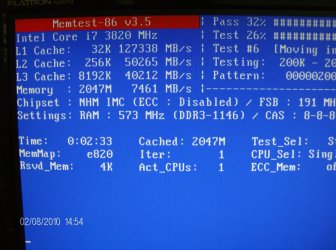
Here is a photo, i can see, there is only 2048 Memory, its that what show me in PC that i have 5Gb, but can use only 2GB ?Its look, that its still testing only 2048Mb ram?
 

Attachments

  • HPIM3448.JPG
    HPIM3448.JPG
    377.4 KB · Views: 10
  • ss.jpg
    ss.jpg
    304.3 KB · Views: 15

My Computer

OS
Windows 7 home premium 64bit
CPU
i7 920 @ 4GHz @ 1.296v D0
Motherboard
gigabyte X58A-UD3R rev2.
Memory
zeppelin 3x2GB DDR3 1600MHz
Graphics Card(s)
ASUS GTX470
Sound Card
Realtek
Monitor(s) Displays
LG 22"
Screen Resolution
1680x1050
Hard Drives
Kingston 64GB SSD/
WD 320GB
PSU
Seasonic 750W
Case
Antec Three hundred
Cooling
Noctuas
Pass complete, no errors.
Here is a photo, i can see, there is only 2048 Memory, its that what show me in PC that i have 5Gb, but can use only 2GB ?Its look, that its still testing only 2048Mb ram?

Is your BIOS detecting all the 5GB?
 

My Computer

Computer type
PC/Desktop
Computer Manufacturer/Model Number
Custom Build
OS
Windows 10 Pro x64, Arch Linux
CPU
Intel Core 2 Quad Q8200 OC'd 3.08GHz
Motherboard
Asus Rampage formula LGA775
Memory
8GB DDR2 900Mhz
Graphics Card(s)
MSI GT730 2GB GDDR5 (Kepler)
Sound Card
Supreme FX2
Monitor(s) Displays
Samsung LS22F350 LED
Screen Resolution
1080P
Hard Drives
Kingston SSDNow UV400 120GB, 500GB Hitachi, 2TB Samsung, 500GB Seagate FreeAgent, 640GB Samsung, 160GB Toshiba (Arch)
PSU
AeroCool 500W Bronze
Cooling
Cooler Master V6 + 3X fans
Keyboard
Prolink keyboard
Mouse
Logitech M705
Internet Speed
1MiB/s
Browser
Chrome Beta
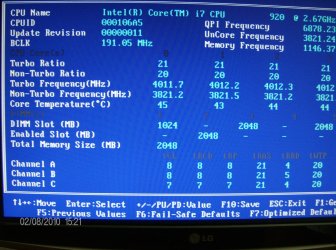
rly weird, in bios: Dimm slot shows 3, thats ok (dont know, why the first slot show only 1024MB)
Enabled slot shows only 1 :( (thats mby what show in PC only 2048MB ram)
Total memory size shows again only 2048mb :(
And why its 3074 MB rezerved by hardware?
Thx so much for your help.

One think, cannot be the fail in mb memory slots?... just wondering :)
 

Attachments

  • sssd.jpg
    sssd.jpg
    317.6 KB · Views: 15
  • HPIM3450.JPG
    HPIM3450.JPG
    392.3 KB · Views: 13

My Computer

OS
Windows 7 home premium 64bit
CPU
i7 920 @ 4GHz @ 1.296v D0
Motherboard
gigabyte X58A-UD3R rev2.
Memory
zeppelin 3x2GB DDR3 1600MHz
Graphics Card(s)
ASUS GTX470
Sound Card
Realtek
Monitor(s) Displays
LG 22"
Screen Resolution
1680x1050
Hard Drives
Kingston 64GB SSD/
WD 320GB
PSU
Seasonic 750W
Case
Antec Three hundred
Cooling
Noctuas
rly weird, in bios: Dimm slot shows 3, thats ok (dont know, why the first slot show only 1024MB)
Enabled slot shows only 1 :( (thats mby what show in PC only 2048MB ram)
Total memory size shows again only 2048mb :(
And why its 3074 MB rezerved by hardware?
Thx so much for your help.

One think, cannot be the fail in mb memory slots?... just wondering :)

Your graphics card GTX470 uses the hardware reserved 3074MB
The RAM slots could also be faulty
 

My Computer

Computer type
PC/Desktop
Computer Manufacturer/Model Number
Custom Build
OS
Windows 10 Pro x64, Arch Linux
CPU
Intel Core 2 Quad Q8200 OC'd 3.08GHz
Motherboard
Asus Rampage formula LGA775
Memory
8GB DDR2 900Mhz
Graphics Card(s)
MSI GT730 2GB GDDR5 (Kepler)
Sound Card
Supreme FX2
Monitor(s) Displays
Samsung LS22F350 LED
Screen Resolution
1080P
Hard Drives
Kingston SSDNow UV400 120GB, 500GB Hitachi, 2TB Samsung, 500GB Seagate FreeAgent, 640GB Samsung, 160GB Toshiba (Arch)
PSU
AeroCool 500W Bronze
Cooling
Cooler Master V6 + 3X fans
Keyboard
Prolink keyboard
Mouse
Logitech M705
Internet Speed
1MiB/s
Browser
Chrome Beta
hmm, so what you think i should do?
I tr yreset bios to default and chcnge the stick to the white slots and the pc start, but black screen and nothing happend :( i put them back to the blue slots and it works, but still the same.I was looking to gigabyte web and these zeppelin ram are not supported :(
Ihave another ram here from my old rig, 4x1 gb DDR2 kingston, should i try them in these board?..
 

My Computer

OS
Windows 7 home premium 64bit
CPU
i7 920 @ 4GHz @ 1.296v D0
Motherboard
gigabyte X58A-UD3R rev2.
Memory
zeppelin 3x2GB DDR3 1600MHz
Graphics Card(s)
ASUS GTX470
Sound Card
Realtek
Monitor(s) Displays
LG 22"
Screen Resolution
1680x1050
Hard Drives
Kingston 64GB SSD/
WD 320GB
PSU
Seasonic 750W
Case
Antec Three hundred
Cooling
Noctuas
Pryskna, make sure that your RAM is in the right slots on the motherboard. Check your RAM and motherboard manuals to make sure that dual-channel, etc is set up right.

~Lordbob
 

My Computer

Computer Manufacturer/Model Number
Hera
OS
Windows 7 Ultimate x64, Mint 9
CPU
Intel i5-2500k
Motherboard
ASUS P8P67 Pro
Memory
2x 4Gb Corsair VENGEANCE DDR3-1600
Graphics Card(s)
NVidia GeForce N260GTX Twin Frozr
Sound Card
Realtek HD OnBoard Audio
Monitor(s) Displays
ASUS 24" Monitor
Screen Resolution
1920x1080
Hard Drives
G.SKILL Phoenix Series 60GB SATA II MLC Internal Solid State Drive (SSD)
SAMSUNG Spinpoint F3R 1TB 7200 RPM 32MB Cache SATA II
PSU
Cooler Master Real Power Pro 750W
Case
Cooler Master Haf 932
Cooling
Fans
Keyboard
Razer Tarantula
Mouse
Razer Lachesis
Internet Speed
not fast enough
In addition to what Lordbob has said, make sure your RAM is running full speed. Looking at the info you supplied, it looks like your RAM is underclocked... 573


It should be running at 1333 (666 x 2), you currently have it running at 1146 (573 x 2). You also might want to double check that the voltage is correct as well.

Let us know.
 

My Computer

Computer type
PC/Desktop
Computer Manufacturer/Model Number
Custom built by me.
OS
Windows 10 Pro
CPU
Intel Core i7-4770K (3.5Ghz)
Motherboard
Gigabyte G1 Sniper 5 (F10 Bios)
Memory
32 gig Corsair Dominator Platinum (4x8Gig)
Graphics Card(s)
Sapphire Tri-X R9 Fury
Sound Card
Soundblaster ZXR
Monitor(s) Displays
NEC PA242W 24" LCD Monitor
Screen Resolution
1920 x 1200
Hard Drives
Primary - Samsung 850 Pro (512gig), Samsung 840 Pro (256gig), 2TB WD Caviar Black.
PSU
EVGA Supernova 1000 G2
Case
Cooler Master HAF X
Cooling
Corsair H100i with Corsair Air Series SP120 Quiet Fans
Keyboard
Logitech Wireless Wave
Mouse
Logitech Performance MX
Internet Speed
High Speed Cable
Antivirus
Norton Security
Browser
IE11
Other Info
Memory Timings - 1866MHz @ 9-9-9-27-1T @ 1.5 volts
Back
Top