My screen saver doesn't work!

VeronicaMary

New member
Local time
2:54 PM
Messages
9
Hi, can anyone advise me? Since I downloaded Windows 7 Professional my screen saver doesn't work! I have put in 'Photos' and it works when I preview in Control Panel, so I 'apply' and 'ok' but then nothing happens! What can I do? :cry:
 

My Computer

Computer Manufacturer/Model Number
DELL
OS
Windows 7 Professional 32 bit
Hello VeronicaMary, Welcome to SevenForums.

How about the time how the screensaver takes effect?
maybe you set it too high or maybe a display driver problem...

another reasons why screensavers wont execute are;

running activity in your pc or sudden movement of your pointing device...

hope our gurus will help you further. :D
 

My Computer

Computer Manufacturer/Model Number
HP G62-340US Notebook
OS
Win7 Pro SP1 x64
CPU
AMD K10 Athlon(tm) II P340 Dual-Core Processor ~2.2GHz
Motherboard
Hewlett-Packard 1444 69.37/AMD 785GX/BIOS F29
Memory
DDR3 4.0GB (3.74 Usable)
Graphics Card(s)
AMD M880G with ATI Mobility Radeon HD 4250 256MB Video
Sound Card
ATI RS785/RS880 - High Definition Audio Controller
Monitor(s) Displays
SAMSUNG 156AT09-H04
Screen Resolution
1366x768 - 344 x 194 mm, Pixel Clock 69.30 MHz
Hard Drives
WDC WD3200BEVT-60A23T0 320GB
Other Info
Bought on July 03, 2011
A few suggestions: First, why don't you try your screensaver on another computer to see if the problem is with your computer or with the screensaver app itself?

Note: If the problem definitely involves your computer, after each adjustment you try, shut down your system and reboot.

First, you might try uninstalling the screensaver and reinstalling it, to make sure there was no corruption during the installation/download.

If that doesn't help, re-set the time for the screensaver to appear at one minute, so that your progress is faster/easier to monitor. Then, why don't you try changing some of the settings (one at a time) under Screensaver Settings and/or PowerPlan settings. After each change, shut down and re-boot. Sometimes, just changing a setting or two will correct a corruption. You can always change the settings back to where you want them, once you've identified and corrected the problem.

 

My Computer

Computer Manufacturer/Model Number
HP Pavillion dv5t (generation 1)
OS
Vista 64 bit and 32 bit (SP2)
CPU
Intel(R) Core(TM)2 Duo Processor T9400 (2.53 GHz
Memory
4GB DDR2 System Memory (2 Dimm)
Graphics Card(s)
512 MB NVIDIA GeForce 9600M GT
Monitor(s) Displays
15.4" diagonal WSXGA+ High-Definition HP BrightView Widescre
Screen Resolution
1680 x 1050
Hard Drives
320GB 5400RPM SATA Hard Drive with HP ProtectSmart Hard Drive Protection
Keyboard
Built-in HP
Mouse
Built in - Synaptics TouchPad V6.5 on PS/2 Port
Internet Speed
Max
Other Info
~ Intel Next-Gen Wireless-N Mini-card w/Bluetooth ~ Blu-Ray ROM DVD+/-R/RW ~ Integ. HDTV Hybrid Tuner ~ 12 Cell Battery ~ MS Office (Home Premium) 2007 ~
I have a 3 year old Dell computer which was Vista up till 2 weeks ago and my screensaver worked perfectly with photos. I have changed all the settings (as you suggested) many times to no avail! It works in preview but not on the screen :( I wouldn't know how to uninstall or reinstall the screensaver, it's just part of Windows isn't it?
 

My Computer

Computer Manufacturer/Model Number
DELL
OS
Windows 7 Professional 32 bit

My Computer

Computer Manufacturer/Model Number
HP Pavilion Elite 495UK
OS
Windows 7 Ultimate SP1 64-Bit
CPU
Intel Core i7 870 @ 2.93GHz
Motherboard
MSI 2A9C (CPU1)
Memory
8Gb Dual-Channel DDR3 @ 664MHz
Graphics Card(s)
nVidia GeForce GTX 460 1024MB dedicated RAM
Sound Card
Realtek HD Audio
Monitor(s) Displays
HP2310i
Screen Resolution
1920 x 1080
Hard Drives
1x1954GB Hitachi HDS22020ALA 330 (RAID), 1x1954GB Hitachi External for backup and storage
PSU
460W
Case
HP Elite
Cooling
Air cooled
Keyboard
Logitech K750 solar-powered keyboard
Mouse
Logitech Wireless M180 mouse
Internet Speed
2Mb
Other Info
Pure Avanti Flow Internet Radio with iPod Dock, 64Gb iPod, HP USB Speakers, Sony MDR-V500 Headphones, Sony Vaio F-Series Laptop
By the way, I have also tried the other default screensavers and they don't work either!
 

My Computer

Computer Manufacturer/Model Number
DELL
OS
Windows 7 Professional 32 bit
By the way, I have also tried the other default screensavers and they don't work either!

That's why you need to run the Windows Upgrade Advisor to see if your computer is OK to run Windows 7 or if it flags up any incompatibilities.

I'm also assuming your pictures are in your My Pictures folder. Do you then have them in sub-folders? If so, you need to copy any pictures you want to use in the root of the My Pictures folder otherwise Windows 7 won't see them.

You could try this fix using the Windows Live Photo Gallery: http://social.technet.microsoft.com...f/thread/06faa44f-d787-4ce8-a10c-5ebceb193b1e

http://windows.microsoft.com/en-US/windows-vista/Windows-Photo-Gallery-frequently-asked-questions
 

My Computer

Computer Manufacturer/Model Number
HP Pavilion Elite 495UK
OS
Windows 7 Ultimate SP1 64-Bit
CPU
Intel Core i7 870 @ 2.93GHz
Motherboard
MSI 2A9C (CPU1)
Memory
8Gb Dual-Channel DDR3 @ 664MHz
Graphics Card(s)
nVidia GeForce GTX 460 1024MB dedicated RAM
Sound Card
Realtek HD Audio
Monitor(s) Displays
HP2310i
Screen Resolution
1920 x 1080
Hard Drives
1x1954GB Hitachi HDS22020ALA 330 (RAID), 1x1954GB Hitachi External for backup and storage
PSU
460W
Case
HP Elite
Cooling
Air cooled
Keyboard
Logitech K750 solar-powered keyboard
Mouse
Logitech Wireless M180 mouse
Internet Speed
2Mb
Other Info
Pure Avanti Flow Internet Radio with iPod Dock, 64Gb iPod, HP USB Speakers, Sony MDR-V500 Headphones, Sony Vaio F-Series Laptop
I clean installed from a disc (Christmas present) and everything else seems to be working fine. Dell did tell me that my pc was compatible with Windows 7
 

My Computer

Computer Manufacturer/Model Number
DELL
OS
Windows 7 Professional 32 bit
what is the windows upgrade advisor?
 

My Computer

Computer Manufacturer/Model Number
DELL
OS
Windows 7 Professional 32 bit

My Computer

Computer Manufacturer/Model Number
HP Pavilion Elite 495UK
OS
Windows 7 Ultimate SP1 64-Bit
CPU
Intel Core i7 870 @ 2.93GHz
Motherboard
MSI 2A9C (CPU1)
Memory
8Gb Dual-Channel DDR3 @ 664MHz
Graphics Card(s)
nVidia GeForce GTX 460 1024MB dedicated RAM
Sound Card
Realtek HD Audio
Monitor(s) Displays
HP2310i
Screen Resolution
1920 x 1080
Hard Drives
1x1954GB Hitachi HDS22020ALA 330 (RAID), 1x1954GB Hitachi External for backup and storage
PSU
460W
Case
HP Elite
Cooling
Air cooled
Keyboard
Logitech K750 solar-powered keyboard
Mouse
Logitech Wireless M180 mouse
Internet Speed
2Mb
Other Info
Pure Avanti Flow Internet Radio with iPod Dock, 64Gb iPod, HP USB Speakers, Sony MDR-V500 Headphones, Sony Vaio F-Series Laptop
Thank you, have done that and it says all is compatible, I almost wish it hadn't!
 

My Computer

Computer Manufacturer/Model Number
DELL
OS
Windows 7 Professional 32 bit
Right, did you check to make sure the images you want to use are in your My Pictures folder and not any sub-folders?
 

My Computer

Computer Manufacturer/Model Number
HP Pavilion Elite 495UK
OS
Windows 7 Ultimate SP1 64-Bit
CPU
Intel Core i7 870 @ 2.93GHz
Motherboard
MSI 2A9C (CPU1)
Memory
8Gb Dual-Channel DDR3 @ 664MHz
Graphics Card(s)
nVidia GeForce GTX 460 1024MB dedicated RAM
Sound Card
Realtek HD Audio
Monitor(s) Displays
HP2310i
Screen Resolution
1920 x 1080
Hard Drives
1x1954GB Hitachi HDS22020ALA 330 (RAID), 1x1954GB Hitachi External for backup and storage
PSU
460W
Case
HP Elite
Cooling
Air cooled
Keyboard
Logitech K750 solar-powered keyboard
Mouse
Logitech Wireless M180 mouse
Internet Speed
2Mb
Other Info
Pure Avanti Flow Internet Radio with iPod Dock, 64Gb iPod, HP USB Speakers, Sony MDR-V500 Headphones, Sony Vaio F-Series Laptop
Yes, I have and as I said, it runs perfectly in the preview but nothing happens 1, 5 or 10 minutes on. I have also powered it down to 20 minutes and it doesn't do that either??
 

My Computer

Computer Manufacturer/Model Number
DELL
OS
Windows 7 Professional 32 bit
This one's a puzzle.

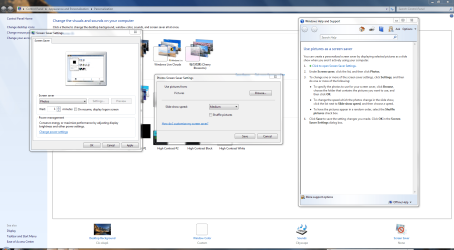
Please check this screenshot and compare it with how you are setting yours up.

SCS.PNG

In particular, did you click the Settings button and go from there?

You may want to download and try the Windows Live Photo Gallery instead.

Photo Gallery - Windows Live - Download for Free
 

My Computer

Computer Manufacturer/Model Number
HP Pavilion Elite 495UK
OS
Windows 7 Ultimate SP1 64-Bit
CPU
Intel Core i7 870 @ 2.93GHz
Motherboard
MSI 2A9C (CPU1)
Memory
8Gb Dual-Channel DDR3 @ 664MHz
Graphics Card(s)
nVidia GeForce GTX 460 1024MB dedicated RAM
Sound Card
Realtek HD Audio
Monitor(s) Displays
HP2310i
Screen Resolution
1920 x 1080
Hard Drives
1x1954GB Hitachi HDS22020ALA 330 (RAID), 1x1954GB Hitachi External for backup and storage
PSU
460W
Case
HP Elite
Cooling
Air cooled
Keyboard
Logitech K750 solar-powered keyboard
Mouse
Logitech Wireless M180 mouse
Internet Speed
2Mb
Other Info
Pure Avanti Flow Internet Radio with iPod Dock, 64Gb iPod, HP USB Speakers, Sony MDR-V500 Headphones, Sony Vaio F-Series Laptop
Done it all.....nothing works :huh:
 

My Computer

Computer Manufacturer/Model Number
DELL
OS
Windows 7 Professional 32 bit
Including the Windows Live Photo Gallery?

Also, did you make sure that the checkbox for each picture you want to use was selected?

You might want to have a look at this link too: http://windows.microsoft.com/en-US/windows7/Use-pictures-as-a-screen-saver

This forum thread suggests that using Windows Live Photo Gallery may be the answer to your problem: http://answers.microsoft.com/en-us/...have-the/4089a38c-3e5f-4415-978e-064fe4edf651

Have you made doubly sure that the Windows screensaver option is switched on in your control panel?

http://www.sevenforums.com/tutorials/2111-screen-saver-turn-off.html
 

My Computer

Computer Manufacturer/Model Number
HP Pavilion Elite 495UK
OS
Windows 7 Ultimate SP1 64-Bit
CPU
Intel Core i7 870 @ 2.93GHz
Motherboard
MSI 2A9C (CPU1)
Memory
8Gb Dual-Channel DDR3 @ 664MHz
Graphics Card(s)
nVidia GeForce GTX 460 1024MB dedicated RAM
Sound Card
Realtek HD Audio
Monitor(s) Displays
HP2310i
Screen Resolution
1920 x 1080
Hard Drives
1x1954GB Hitachi HDS22020ALA 330 (RAID), 1x1954GB Hitachi External for backup and storage
PSU
460W
Case
HP Elite
Cooling
Air cooled
Keyboard
Logitech K750 solar-powered keyboard
Mouse
Logitech Wireless M180 mouse
Internet Speed
2Mb
Other Info
Pure Avanti Flow Internet Radio with iPod Dock, 64Gb iPod, HP USB Speakers, Sony MDR-V500 Headphones, Sony Vaio F-Series Laptop
Yes all the above, it's very strange, it all used to work perfectly with Vista and yet Windows 7 says all is compatible!
 

My Computer

Computer Manufacturer/Model Number
DELL
OS
Windows 7 Professional 32 bit
Back
Top