
tonathaman
New member
- Local time
- 3:44 PM
- Messages
- 1
Hello.
I just got windows 7 and i wanted to have a Transperent taskbar like most of you guys will have.
But mine always stay the same.
I can't change the color of my taskbar?
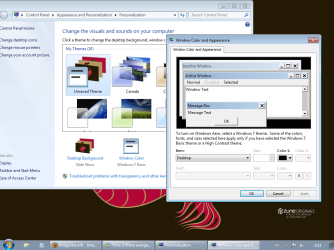
When i go to Personalize >> Windows Color i get a windows Classic window that says this: CLICK HERE TO SEE IMAGE
i searched around on google and on youtube.
And with the most people when they open Windows Color they get this: CLICK TO SEE IMAGE
I got Windows 7 Ultimate.
Does somebody knows how i can solve this problem that i can get normal Taskbars '' transparent'' Taskbar with a color?
I just got windows 7 and i wanted to have a Transperent taskbar like most of you guys will have.
But mine always stay the same.
I can't change the color of my taskbar?
When i go to Personalize >> Windows Color i get a windows Classic window that says this: CLICK HERE TO SEE IMAGE
i searched around on google and on youtube.
And with the most people when they open Windows Color they get this: CLICK TO SEE IMAGE
I got Windows 7 Ultimate.
Does somebody knows how i can solve this problem that i can get normal Taskbars '' transparent'' Taskbar with a color?
Attachments
My Computer
- OS
- tweny


