my WD My Book wont load on my computer

Serendipity313

New member
Local time
11:11 AM
Messages
12
Hope anyone can help me.

I got a My Book 1140 (2TB), when I connect it to my computer (also tried on 2 other laptops),

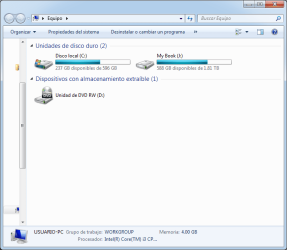
1. Appears listed on the hard drive, but does not load. The bar that determines the space of the used or free disk does not appear. And if I click on it, tells me the perimeter is incorrect so cannot access to the WD My Book

2. Also on the COMPUTER MANAGEMENT, doesn't appear under volume but it does under disk management is the one call Disco 1, but cannot open it.

I also use the WD Data LifeGuard Diagnostics, told me have some bad sector, so I fix them, unplug and plug the USB and same error, wont load, sometimes wont even appear or the computer tells me need to format, I click on format (don't want to erased) and tells me the WD My Book is not connect it

Any Ideas? :cry::cry::cry::cry:


20170114_045300.jpg


20170114_054923.jpg
Save
 

My Computer My Computer

At a glance

64 bit - Windows 7
Computer type
Laptop
OS
64 bit - Windows 7
Welcome to the forum.
Bad sector and / or bad block is a bad signal.
Is it new? Do you have data on it?
 

My Computers My Computers

  • At a glance

    Windows 7 HP 64i5 6600K - 800MHz to 4200MHz4+4G GSkill DDR4 3000IG - Intel 530
    Computer type
    PC/Desktop
    Computer Manufacturer/Model Number
    custom build
    OS
    Windows 7 HP 64
    CPU
    i5 6600K - 800MHz to 4200MHz
    Motherboard
    GA-Z170-HD3P
    Memory
    4+4G GSkill DDR4 3000
    Graphics Card(s)
    IG - Intel 530
    Monitor(s) Displays
    Samsung 226BW
    Screen Resolution
    1680x1050
    Hard Drives
    (1) -1 SM951 – 128GB M.2 AHCI PCIe SSD drive for Windows 7 and Lubuntu
    (2) -1 WD SATA 3 - 1T for Data
    (3) -1 WD SATA 3 - 1T for backup
    PSU
    Thermaltake 450W TR2 gold
    Keyboard
    Old and good Chicony mechanical keyboard
    Mouse
    Logitech mX performance - 9 buttons (had to disable some)
    Internet Speed
    500Mb/s
    Browser
    Firefox 64
    Other Info
    TinyWall firewall
  • At a glance

    Windows 7 Proi7-4500U 800MHz to 3.0GHz(4+4)G DDR3 1600IG intel 4400 + NVIDIA GeForce GT 745M
    Computer type
    Laptop
    System Manufacturer/Model Number
    Asus Q550LF
    OS
    Windows 7 Pro
    CPU
    i7-4500U 800MHz to 3.0GHz
    Motherboard
    Asus Q550LF
    Memory
    (4+4)G DDR3 1600
    Graphics Card(s)
    IG intel 4400 + NVIDIA GeForce GT 745M
    Sound Card
    Realtek
    Monitor(s) Displays
    LG Display LP156WF4-SPH1
    Screen Resolution
    1920 x 1080
    Hard Drives
    BX500 120G SSD for Windows and programs +
    1T HDD for data
    Internet Speed
    500 Mb/s
    Browser
    Firefox
    Other Info
    TinyWall firewall
Hi Megahertz07, thanks for the welcome :)

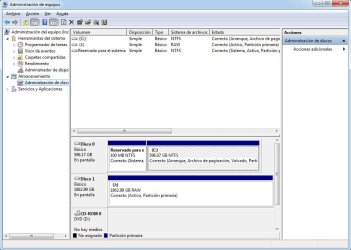
It does have data about 1 TB (is a 2TB HD), is not new (2013). After waiting the WD My Book appear on the Volume section. but the File system saids is a RAW.

I read that I should run CHKDSK command so, I did (still running)

20170114_144235.jpg
 

My Computer My Computer

At a glance

64 bit - Windows 7
Computer type
Laptop
OS
64 bit - Windows 7

My Computers My Computers

  • At a glance

    Windows 7 HP 64i5 6600K - 800MHz to 4200MHz4+4G GSkill DDR4 3000IG - Intel 530
    Computer type
    PC/Desktop
    Computer Manufacturer/Model Number
    custom build
    OS
    Windows 7 HP 64
    CPU
    i5 6600K - 800MHz to 4200MHz
    Motherboard
    GA-Z170-HD3P
    Memory
    4+4G GSkill DDR4 3000
    Graphics Card(s)
    IG - Intel 530
    Monitor(s) Displays
    Samsung 226BW
    Screen Resolution
    1680x1050
    Hard Drives
    (1) -1 SM951 – 128GB M.2 AHCI PCIe SSD drive for Windows 7 and Lubuntu
    (2) -1 WD SATA 3 - 1T for Data
    (3) -1 WD SATA 3 - 1T for backup
    PSU
    Thermaltake 450W TR2 gold
    Keyboard
    Old and good Chicony mechanical keyboard
    Mouse
    Logitech mX performance - 9 buttons (had to disable some)
    Internet Speed
    500Mb/s
    Browser
    Firefox 64
    Other Info
    TinyWall firewall
  • At a glance

    Windows 7 Proi7-4500U 800MHz to 3.0GHz(4+4)G DDR3 1600IG intel 4400 + NVIDIA GeForce GT 745M
    Computer type
    Laptop
    System Manufacturer/Model Number
    Asus Q550LF
    OS
    Windows 7 Pro
    CPU
    i7-4500U 800MHz to 3.0GHz
    Motherboard
    Asus Q550LF
    Memory
    (4+4)G DDR3 1600
    Graphics Card(s)
    IG intel 4400 + NVIDIA GeForce GT 745M
    Sound Card
    Realtek
    Monitor(s) Displays
    LG Display LP156WF4-SPH1
    Screen Resolution
    1920 x 1080
    Hard Drives
    BX500 120G SSD for Windows and programs +
    1T HDD for data
    Internet Speed
    500 Mb/s
    Browser
    Firefox
    Other Info
    TinyWall firewall
Oh thanks, not sure how to write to him, don't see a contact message icon to write him :(
 

My Computer My Computer

At a glance

64 bit - Windows 7
Computer type
Laptop
OS
64 bit - Windows 7
it is now more than 12 hours since you started CheckDisk. Has it completed?

What is the status after checkDisk completed? ( Do not abort checkdisk for any reason. Let it complete)

After checkdisk completes post a screenshot of Windows Disk Management.

Follow the guidelines here to post an untruncataed screenshot with all the information clearly visible. Disk Management - Post a Screen Capture Image
Snipping Tool How to Use the Snipping Tool in Vista
Upload to Seven Forums: Screenshots and Files - Upload and Post in Seven Forums

Upload only to SevenForum servers.
 

My Computer My Computer

At a glance

Windows 7 Home Premium 32 bit
OS
Windows 7 Home Premium 32 bit
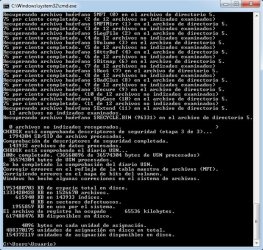
Thanks for your help Mr. Jumanji, the CheckDisk finish hours ago, since I didnt close the window could do the screenshot it is in spanish, but the translation can be something like this:

0 undetected files recovered.
USN Journal check completed
Correct errors in the reflection of the master file table <MFT>
Fixing errors in the volume bitmap.
Windows has made some corrections to the file system.

19534880703 KB of total disk space
1333420428 KB in 1526670 files
615940 KB in 143933 indexes
0 KB in bad sectors
19558559 KB in use per system
The log file has occupied 65536 kilobytes
617488476 kb available on disk

4096 bytes in each allocation unit
488370175 allocation units on total disk
154372119 allocation units available on disk

After it finish a friend told me to try EaseUS Data Recovery, since it will not erase the information, but supposedly try to recover information, it is 74%, however it does not show anything on the screen, I do not know if it will do when it reaches 100% (I took a screenshot of it too).

Thanks again.
 

Attachments

My Computer My Computer

At a glance

64 bit - Windows 7
Computer type
Laptop
OS
64 bit - Windows 7
Jumanji gave you instructions to post a snapshot. Please follow them.
 

My Computers My Computers

  • At a glance

    Windows 7 HP 64i5 6600K - 800MHz to 4200MHz4+4G GSkill DDR4 3000IG - Intel 530
    Computer type
    PC/Desktop
    Computer Manufacturer/Model Number
    custom build
    OS
    Windows 7 HP 64
    CPU
    i5 6600K - 800MHz to 4200MHz
    Motherboard
    GA-Z170-HD3P
    Memory
    4+4G GSkill DDR4 3000
    Graphics Card(s)
    IG - Intel 530
    Monitor(s) Displays
    Samsung 226BW
    Screen Resolution
    1680x1050
    Hard Drives
    (1) -1 SM951 – 128GB M.2 AHCI PCIe SSD drive for Windows 7 and Lubuntu
    (2) -1 WD SATA 3 - 1T for Data
    (3) -1 WD SATA 3 - 1T for backup
    PSU
    Thermaltake 450W TR2 gold
    Keyboard
    Old and good Chicony mechanical keyboard
    Mouse
    Logitech mX performance - 9 buttons (had to disable some)
    Internet Speed
    500Mb/s
    Browser
    Firefox 64
    Other Info
    TinyWall firewall
  • At a glance

    Windows 7 Proi7-4500U 800MHz to 3.0GHz(4+4)G DDR3 1600IG intel 4400 + NVIDIA GeForce GT 745M
    Computer type
    Laptop
    System Manufacturer/Model Number
    Asus Q550LF
    OS
    Windows 7 Pro
    CPU
    i7-4500U 800MHz to 3.0GHz
    Motherboard
    Asus Q550LF
    Memory
    (4+4)G DDR3 1600
    Graphics Card(s)
    IG intel 4400 + NVIDIA GeForce GT 745M
    Sound Card
    Realtek
    Monitor(s) Displays
    LG Display LP156WF4-SPH1
    Screen Resolution
    1920 x 1080
    Hard Drives
    BX500 120G SSD for Windows and programs +
    1T HDD for data
    Internet Speed
    500 Mb/s
    Browser
    Firefox
    Other Info
    TinyWall firewall
Screenshot with Snipping Tool > Save as jpg > upload to Seven Forums.

Please read again on how to upload and insert it in the post. Screenshots and Files - Upload and Post in Seven Forums

Anyway after EaseUS finishes, shut down your computer and then reboot.

I do not know what checkdisk Command you ran.

Run check disk again from command prompt.

Open Command prompt. Start > All programs > Accessories > Command Prompt

Type
CHKDSK K: /f /v /r /x Press enter. Note: Replace K: with the actual drive letter of the external drive. Also note that before every option/switch there is a space.

Allow check disk to complete.

When checkdisk runs please do not do anything else on the PC. No multitasking. Hands off.

Do not abort checkdisk midway for any reason. Dangerous - for the data

Allow it to complete even if it runs for a day.

When checkdisk completes, shut down your PC, plugout your My Book, reboot , allow time for Windows to settle, and then plug in your My Book.

Let me know the status.
 
Last edited:

My Computer My Computer

At a glance

Windows 7 Home Premium 32 bit
OS
Windows 7 Home Premium 32 bit
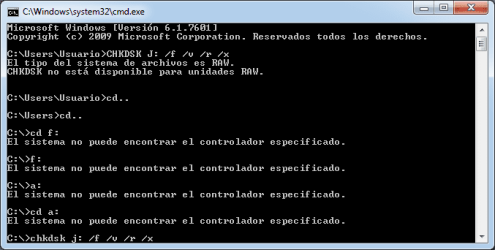
Hi, sorry about the screenshots, let me fix it. I use this command CHKDSK /f J:
and gave me this:
ArchivoViejo.jpg

This is the way that the WD My Book Appear on my computer
DiscoRAW.jpg
 

My Computer My Computer

At a glance

64 bit - Windows 7
Computer type
Laptop
OS
64 bit - Windows 7
Hi Mr Jumanji

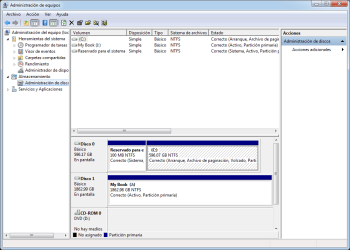
The EaseUS finish but nothing happens, I shutdown and reboot, now the WD My Book is NTFS not RAW any more
DiscoNFTS.png

It also appears on the computer

DiscoSaleDisponible.png

I can click on it, but it doesn't open give me this error: The request can not be made due to an I / O device error
ErrorDeFolder.png

I also try what you told me (J is my WD My Book) Command Prompt CHKDSK J: /f /v /r /x
It gave me this error: Not available for RAW drives, a friend try to help me looking for other commands but didn't work either.
ErrorComandoAcutal.png

Im running again the EaseUS to see if it works now that is a NTFS drive, its on his 20%.
 

My Computer My Computer

At a glance

64 bit - Windows 7
Computer type
Laptop
OS
64 bit - Windows 7
Your drive is no longer RAW. You are able to see the folders and files on it but unable to open because of I/O error. Bad sectors.

When it is no longer RAW how will checkdisk say it is RAW? You are definitely doing something wrong and mixing up events that happened before or running more than one program that are accessing the drive making it unavailable for one or the other.

Do only one thing at a time.

If you want to run checkdisk, reboot and run only checkdisk. After checking the drive letter in My Computer close it. Don't keep Windows Disk Management open.No need to run it at all. After checkdisk finishes reboot your PC.

Whatever files and folders you are able to open and see , copy those ASAP to another external drive.Then run WD lifeguard diagnostic for Windows and do an extended Test with repair option to repair the bad sectors if possible. But be aware that data in bad sectors is already lost.
 
Last edited:

My Computer My Computer

At a glance

Windows 7 Home Premium 32 bit
OS
Windows 7 Home Premium 32 bit
Mr Jumanji

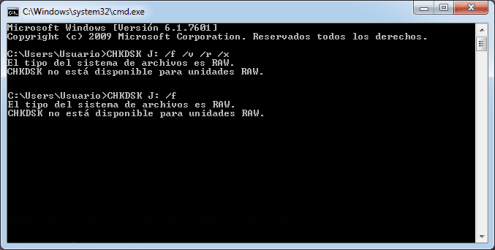
Its not working, I use the command you ask me CHKDSK J: /f /v /r /x

Also try CHKDSK J: /f

Even the firts command I use at first CHKDSK /f J: that gave me the first screenshoot.


Didn't work either I close all the programs, windows, nothing was running, reboot, shudown and reboot, really don't know whats wrong.

ErrorComandoAcutal2.png
 

My Computer My Computer

At a glance

64 bit - Windows 7
Computer type
Laptop
OS
64 bit - Windows 7
Mr Jumanji.

Hi, update, the command CHKDSK J: /f /v /r /x is running
I am really dont know much about this kind of commands (fixing computeres) since what I study is not about that, so looking for the I / O device error found a youtube video that ask to run the commands as and administrator, looking at my screenshots mine is C: \Users and in the youtube video is C: \Windows so now is working.

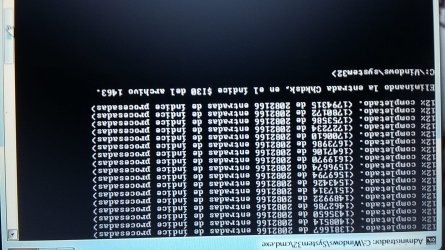
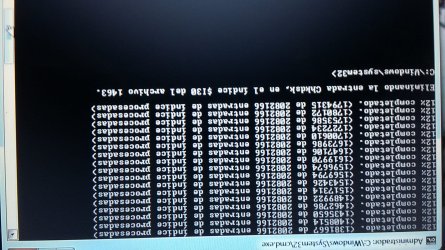
Now I didn't want it to open anything or run any program so I took a photo what is doing now, its seems like stuck. asking for some other command.

The error in english is:
Removing the Chkdsk entry in the $ 130 index from1463 file

ErrorWin.jpg

I do not know why the photo is backwards, but when I click it if it is correct
 

Attachments

  • ErrorWin2.jpg
    ErrorWin2.jpg
    366.5 KB · Views: 7

My Computer My Computer

At a glance

64 bit - Windows 7
Computer type
Laptop
OS
64 bit - Windows 7
Looks like it has aborted itself - you can't do anything about it.Looks like the filesystem damage is beyond repair. Close it. Reboot your PC

Whatever files and folders you are able to open and see , copy those ASAP to another external drive.Then run WD lifeguard diagnostic for Windows and do an extended Test with repair option to repair the bad sectors if possible. But be aware that data in bad sectors is already lost.
 

My Computer My Computer

At a glance

Windows 7 Home Premium 32 bit
OS
Windows 7 Home Premium 32 bit
The computer freezes, so my brother reboots. After that I tried to put the command again from the administrator but gave the initial error of: Not available for RAW drives. Even when the WD My Book still is NTFS.

The only good thing is that I could open a subfolder, before I could only see the folders inside the WD My Book and at the moment I click to open gave me this I / O device error.

No the folder opens, but if a click on a sub folder or try to copy it give me a I / O device error.

My brother leave runing the WD Drive Utilities, Which does a complete unit test to detect damaged sectors. Although I do not know if it fixes because it is the first time that the disk appears in this program, before it did not find it
 

My Computer My Computer

At a glance

64 bit - Windows 7
Computer type
Laptop
OS
64 bit - Windows 7
Do only the Quick Test and then Extended Test. When you run the extended test I think you will get an option to repair bad sectors.( I do not have any WD drive. So I can't give any specific instructions)

Software and Firmware Downloads | WD Support

EXTENDED TEST - Performs a Full Media Scan to detect bad sectors; and attempt to repair them, or mark the damaged sector for not to be written to. This test may take several hours to complete depending on the size of the drive. The average test time takes about 1 hour per Terabyte.
 

My Computer My Computer

At a glance

Windows 7 Home Premium 32 bit
OS
Windows 7 Home Premium 32 bit
Thanks Mr. Jumanji, its on extended test at the moment 20%
 

My Computer My Computer

At a glance

64 bit - Windows 7
Computer type
Laptop
OS
64 bit - Windows 7
Extended Test - What is the result? Pass?????? Fail ???? Why are you not posting the test result?

If Datalifeguard did not repair the bad sectors that is it. Tthere is no point in trying any other software.

Now check whether you can access the data with Live Linux.

Create a Lucid Puppy pendrive, boot your PC from the pendrive and check whether it shows your data. Copy the data to another external drive.

Creating your lucid Puppy pen drive :Post #8 here Is there any way of saving a completely unrecognisable hard drive?

How to use Lucid Puppy to recover your data: Go to the topic Recovering files from the non-bootable Internal Drive: in this thread Lucid Puppy way to recover files from a non-bootable computer on how-to. In your case it will be your external drive. What is written above that topic on preparing a Lucid Puppy pendrive is outdated and you have already created your Lucid Puppy Pendrive using Rufus.
 

My Computer My Computer

At a glance

Windows 7 Home Premium 32 bit
OS
Windows 7 Home Premium 32 bit
Back
Top