
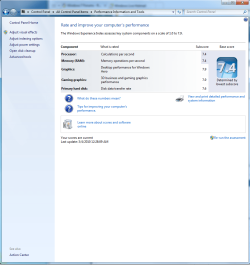
MY WEI-enabling AHCI

thobel

New member
Member
Local time
8:39 PM
Messages
52

Attachments

  • My WEI.png
    My WEI.png
    59.5 KB · Views: 97

My Computer

Computer Manufacturer/Model Number
Custom
OS
Windows 7 Ult
CPU
I7 980X
Motherboard
ASUS Rampage III
Memory
6GB Corsair Dominator DDR3 1600
Graphics Card(s)
GTX480 Tri Sli
Sound Card
Creative X-Fi Titanium
Monitor(s) Displays
30" Dell
Screen Resolution
2560x1600
Hard Drives
Intel X25m G2 160GBx3 Raid 0
PSU
Silverstone 1500
Case
Corsair 800D
Cooling
Liquid
Keyboard
Logitech G19
Mouse
Logitech G9x
Internet Speed
25MB/5MB
Other Info
Speakers: Bose Compantion 5
Water Cooling: 2 Loops 120.3 for Video Cards
140.1 for CPU

My Computer

Computer Manufacturer/Model Number
* BFK Customs *
OS
W 7 64-bit Ultimate
CPU
Intel Q9550 Yorkfield
Motherboard
ASUS P5Q Pro
Memory
8GB Dominator 8500C5D
Graphics Card(s)
ATI : XFX 5870
Sound Card
Realtek HD Audio 7-1
Monitor(s) Displays
1x 47" LCD HDMI & 3x 26" LCD HDMI
Screen Resolution
1920x1080P & 1920x1200
Hard Drives
1x 80GB Intel X25-M G2 SSD : 1x 500GB & 1x 640GB WD Caviar Black(s)
PSU
Corsair 620HX
Case
Cooler Master RC-690
Cooling
Tuniq Tower 120, 2x 140mm and 3x 120mm case fans
Keyboard
Microsoft 500
Mouse
Razer Diamondback 3G
Internet Speed
14 Mb/s
Other Info
1x Koutech 3Gb/s SATA HDD Hot Swap Rack

My Computer

Computer Manufacturer/Model Number
Custom
OS
Windows 7 Ult
CPU
I7 980X
Motherboard
ASUS Rampage III
Memory
6GB Corsair Dominator DDR3 1600
Graphics Card(s)
GTX480 Tri Sli
Sound Card
Creative X-Fi Titanium
Monitor(s) Displays
30" Dell
Screen Resolution
2560x1600
Hard Drives
Intel X25m G2 160GBx3 Raid 0
PSU
Silverstone 1500
Case
Corsair 800D
Cooling
Liquid
Keyboard
Logitech G19
Mouse
Logitech G9x
Internet Speed
25MB/5MB
Other Info
Speakers: Bose Compantion 5
Water Cooling: 2 Loops 120.3 for Video Cards
140.1 for CPU

My Computer

Computer Manufacturer/Model Number
* BFK Customs *
OS
W 7 64-bit Ultimate
CPU
Intel Q9550 Yorkfield
Motherboard
ASUS P5Q Pro
Memory
8GB Dominator 8500C5D
Graphics Card(s)
ATI : XFX 5870
Sound Card
Realtek HD Audio 7-1
Monitor(s) Displays
1x 47" LCD HDMI & 3x 26" LCD HDMI
Screen Resolution
1920x1080P & 1920x1200
Hard Drives
1x 80GB Intel X25-M G2 SSD : 1x 500GB & 1x 640GB WD Caviar Black(s)
PSU
Corsair 620HX
Case
Cooler Master RC-690
Cooling
Tuniq Tower 120, 2x 140mm and 3x 120mm case fans
Keyboard
Microsoft 500
Mouse
Razer Diamondback 3G
Internet Speed
14 Mb/s
Other Info
1x Koutech 3Gb/s SATA HDD Hot Swap Rack
Hello thobel, welcome to Seven Forums!


Do you have AHCI enabled, here's a good tutorial on that subject at the link below.

http://www.sevenforums.com/tutorials/61869-ahci-enable-windows-7-vista.html?ltr=A

I just followed the instructions to enable it. I did not see the drivers being installed as shown in the screen shots.


Did you get the "re-start" prompt, like in the snip in the tutorial?

No I did not. I did enable it in the bios raid controler. I'm not running raid but I turned on the controller and still dont see anything?
 

My Computer

Computer Manufacturer/Model Number
Custom
OS
Windows 7 Ult
CPU
I7 980X
Motherboard
ASUS Rampage III
Memory
6GB Corsair Dominator DDR3 1600
Graphics Card(s)
GTX480 Tri Sli
Sound Card
Creative X-Fi Titanium
Monitor(s) Displays
30" Dell
Screen Resolution
2560x1600
Hard Drives
Intel X25m G2 160GBx3 Raid 0
PSU
Silverstone 1500
Case
Corsair 800D
Cooling
Liquid
Keyboard
Logitech G19
Mouse
Logitech G9x
Internet Speed
25MB/5MB
Other Info
Speakers: Bose Compantion 5
Water Cooling: 2 Loops 120.3 for Video Cards
140.1 for CPU
If their anyway to test and see if AHCI is running?

A quick way to see if your drives are running in AHCI is if you have the 'Safely Remove Hardware and Eject Media' icon on the taskabr. If you do, right-click on that icon and your HDD's will show up as 'Ejectable Devices'
 

My Computer

Computer type
PC/Desktop
Computer Manufacturer/Model Number
Systems by SmartEyeball
OS
8 Pro x64
CPU
i7 3770K 4.6GHz
Motherboard
ASUS P8Z77 WS
Memory
16GB G.Skill Trident X 2666mhz
Graphics Card(s)
x2 EVGA 780 Ti Superclocked SLI
Sound Card
SB X-FI Surround 5.1 PRO USB / ATH-AD900 Headphones
Monitor(s) Displays
x3 Dell U2410 / 58" Samsung
Screen Resolution
5760*1200/ 1920*1200
Hard Drives
2x Intel 520 240GB (RAID 0) * 2x WD Caviar Blacks 2TB (RAID 0) * 2TB WD Caviar Black * Sony Optirac DVD
PSU
Silverstone Strider Evolution 1200W
Case
Thermaltake Level 10 GT Snow Edition
Cooling
Noctua NH-D14
Keyboard
Topre Realforce // Ducky Shine MX Black // Filco Ninja TKL
Mouse
Thermaltake Theron (Highly Recommended) + Razer Imperator
Antivirus
MSE
Browser
IE, FF, WaterFox
Other Info
GT Extreme V2 Sim Racing Cockpit + 40" LCD and K/B Mouse stand ▼
Fanatec CSR Elite Wheel + Clubsport V1 Pedals + CSR shifter/7G-H ▼Saitek X52 Pro ▼ TrackIR 5 Pro
Buttkicker v2 Seat Rumbler with Dedicated 5.1 and Sub Woofer attached to frame ▼
=
Bloody Big Grin
OK I do not have it showing on my task bar. I'm running a ASUS/Nvidia based mother board. I have raid enabled on the motherboard AHCI Enabled I have raid DISABLED on port 1 (where my hard drive is) the reg setting is changed and stuck. Any idea on what I may need to change?
 

My Computer

Computer Manufacturer/Model Number
Custom
OS
Windows 7 Ult
CPU
I7 980X
Motherboard
ASUS Rampage III
Memory
6GB Corsair Dominator DDR3 1600
Graphics Card(s)
GTX480 Tri Sli
Sound Card
Creative X-Fi Titanium
Monitor(s) Displays
30" Dell
Screen Resolution
2560x1600
Hard Drives
Intel X25m G2 160GBx3 Raid 0
PSU
Silverstone 1500
Case
Corsair 800D
Cooling
Liquid
Keyboard
Logitech G19
Mouse
Logitech G9x
Internet Speed
25MB/5MB
Other Info
Speakers: Bose Compantion 5
Water Cooling: 2 Loops 120.3 for Video Cards
140.1 for CPU
OK I do not have it showing on my task bar. I'm running a ASUS/Nvidia based mother board. I have raid enabled on the motherboard AHCI Enabled I have raid DISABLED on port 1 (where my hard drive is) the reg setting is changed and stuck. Any idea on what I may need to change?


Hello thobel.


Please start a new thread at the link below so we can get out of this thread about the Windows 7 WEI, ok.

Performance & Maintenance - Windows 7 Forums
 

My Computer

Computer Manufacturer/Model Number
* BFK Customs *
OS
W 7 64-bit Ultimate
CPU
Intel Q9550 Yorkfield
Motherboard
ASUS P5Q Pro
Memory
8GB Dominator 8500C5D
Graphics Card(s)
ATI : XFX 5870
Sound Card
Realtek HD Audio 7-1
Monitor(s) Displays
1x 47" LCD HDMI & 3x 26" LCD HDMI
Screen Resolution
1920x1080P & 1920x1200
Hard Drives
1x 80GB Intel X25-M G2 SSD : 1x 500GB & 1x 640GB WD Caviar Black(s)
PSU
Corsair 620HX
Case
Cooler Master RC-690
Cooling
Tuniq Tower 120, 2x 140mm and 3x 120mm case fans
Keyboard
Microsoft 500
Mouse
Razer Diamondback 3G
Internet Speed
14 Mb/s
Other Info
1x Koutech 3Gb/s SATA HDD Hot Swap Rack
OK I do not have it showing on my task bar. I'm running a ASUS/Nvidia based mother board. I have raid enabled on the motherboard AHCI Enabled I have raid DISABLED on port 1 (where my hard drive is) the reg setting is changed and stuck. Any idea on what I may need to change?


I have no RAID array, so don't have any RAID options enabled.

Depending on the layout, what is your SATA configured to?

For example mine is MAIN > Storage Configuration > configure SATA as = AHCI
 
Last edited:

My Computer

Computer type
PC/Desktop
Computer Manufacturer/Model Number
Systems by SmartEyeball
OS
8 Pro x64
CPU
i7 3770K 4.6GHz
Motherboard
ASUS P8Z77 WS
Memory
16GB G.Skill Trident X 2666mhz
Graphics Card(s)
x2 EVGA 780 Ti Superclocked SLI
Sound Card
SB X-FI Surround 5.1 PRO USB / ATH-AD900 Headphones
Monitor(s) Displays
x3 Dell U2410 / 58" Samsung
Screen Resolution
5760*1200/ 1920*1200
Hard Drives
2x Intel 520 240GB (RAID 0) * 2x WD Caviar Blacks 2TB (RAID 0) * 2TB WD Caviar Black * Sony Optirac DVD
PSU
Silverstone Strider Evolution 1200W
Case
Thermaltake Level 10 GT Snow Edition
Cooling
Noctua NH-D14
Keyboard
Topre Realforce // Ducky Shine MX Black // Filco Ninja TKL
Mouse
Thermaltake Theron (Highly Recommended) + Razer Imperator
Antivirus
MSE
Browser
IE, FF, WaterFox
Other Info
GT Extreme V2 Sim Racing Cockpit + 40" LCD and K/B Mouse stand ▼
Fanatec CSR Elite Wheel + Clubsport V1 Pedals + CSR shifter/7G-H ▼Saitek X52 Pro ▼ TrackIR 5 Pro
Buttkicker v2 Seat Rumbler with Dedicated 5.1 and Sub Woofer attached to frame ▼
=
Bloody Big Grin
Back
Top