

LuciferDreams
New member
- Local time
- 9:04 PM
- Messages
- 7
First, I need to thank the whole forum and admins for their great work in creating this very useful website. Really sorry to interrupt you, so I'll be really thankful for your response. I've tried searching for a solution for days while using my imagination to solve the problem with no luck.
* The problem is I'm most of the time using 2 out of 4 GB of RAM [50% ++] or more while my Laptop is being idle or doing simple tasks.
I Have 4 GB of Ram installed on my Toshiba Satellite A300 15A running 64bit Windows 7 Professional edition. This doesn't affect performance though, but I can recall using 30% Of my RAM in the past. [~3 Months ago]. It may not be a performance problem because I Defrag & Optimize, while trying to keep my Laptop's HDD Clean with no additional software. I've changed [reduced] many things from msconfig, windows futures so as to increase OS speed. This way my Laptop never lags. I never had problems with viruses tracking cookies etc.
When I open task manager it sais ~ Processes=69 and ~ Physical Memory=47%
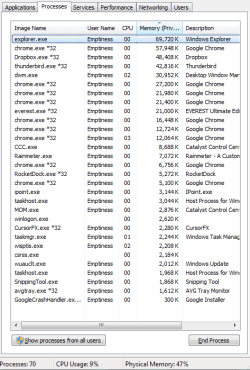
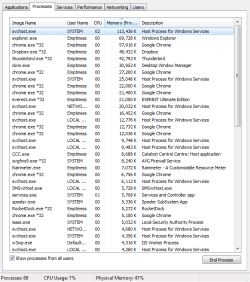
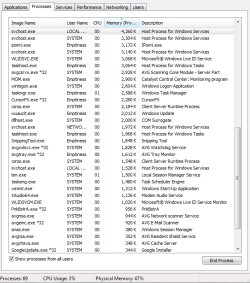
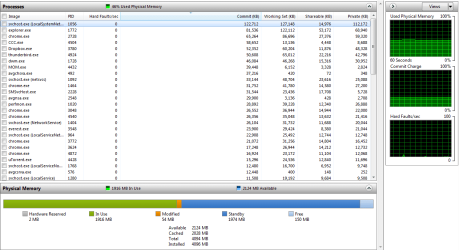
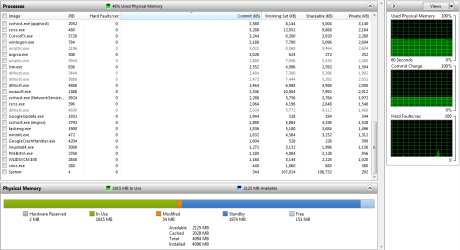
Keeping in mind windows "messes up" lot of times with "calculations" or doesn't show "real" numbers - I calculated all the processes to get a result from RAM usage. The result is more or less 700 MB of 4 GB. Task Manager shows 47% Physical Memory. The same story goes with the resource Monitor. 2 GB In use. You can see the screenshots below.
I Believe this is a problem because as time passes ram usage grows out of nowhere and I'm sure when OS uses more ram than it needs it becomes slower and slower while reading and writing in RAM Becomes more complicated.
My Laptop's Hardware:
* CPU - Intel Core 2 Duo T8100 [3 MB Cache, 2.10 GHz, 800MHz FSB]
* RAM - 2 x 2GB DDR2 667 MHz [Dual Channel]
* GPU - ATI Mobility Radeon HD3650 [512MB]
* HDD - Western Digital Scorpio Black 250 GB [7200 rpm]
* OS - Windows 7 x64 Professional
Thank you In advance for any possible help.
* The problem is I'm most of the time using 2 out of 4 GB of RAM [50% ++] or more while my Laptop is being idle or doing simple tasks.
I Have 4 GB of Ram installed on my Toshiba Satellite A300 15A running 64bit Windows 7 Professional edition. This doesn't affect performance though, but I can recall using 30% Of my RAM in the past. [~3 Months ago]. It may not be a performance problem because I Defrag & Optimize, while trying to keep my Laptop's HDD Clean with no additional software. I've changed [reduced] many things from msconfig, windows futures so as to increase OS speed. This way my Laptop never lags. I never had problems with viruses tracking cookies etc.
When I open task manager it sais ~ Processes=69 and ~ Physical Memory=47%
Keeping in mind windows "messes up" lot of times with "calculations" or doesn't show "real" numbers - I calculated all the processes to get a result from RAM usage. The result is more or less 700 MB of 4 GB. Task Manager shows 47% Physical Memory. The same story goes with the resource Monitor. 2 GB In use. You can see the screenshots below.
I Believe this is a problem because as time passes ram usage grows out of nowhere and I'm sure when OS uses more ram than it needs it becomes slower and slower while reading and writing in RAM Becomes more complicated.
My Laptop's Hardware:
* CPU - Intel Core 2 Duo T8100 [3 MB Cache, 2.10 GHz, 800MHz FSB]
* RAM - 2 x 2GB DDR2 667 MHz [Dual Channel]
* GPU - ATI Mobility Radeon HD3650 [512MB]
* HDD - Western Digital Scorpio Black 250 GB [7200 rpm]
* OS - Windows 7 x64 Professional
Thank you In advance for any possible help.
Attachments

My Computer
- OS
- The Best


