name object so user permission dialogue can find it

Windymiller

New member
Member
Local time
12:57 PM
Messages
91
Sorry if this is a stupid question but every time I try to change user permissions, the
object name is rejected with an error message. I assumed the dialogue simply wanted the
name of the file but it doesn`t seem to matter how I phrase it, the dialogue says it can`t find the object.

Can anyone help ? I have looked everywhere for an answer but the subject is never discussed.
 

My Computer My Computer

At a glance

Windows 7 Home Premium Upgrade designed for W...
Computer type
PC/Desktop
Computer Manufacturer/Model Number
Mesh
OS
Windows 7 Home Premium Upgrade designed for Windows Vista
Browser
Internet Explorer
Exactly where does it gives an error? And what error message it shows? What "object" are you trying to enter the name of?
 

My Computer My Computer

At a glance

Windows 7 Ultimate x64Intel Core i7-740QM8 GB DDR3NVIDIA GeForce 330GT
Computer type
Laptop
Computer Manufacturer/Model Number
Toshiba Sattelite A665-S6092
OS
Windows 7 Ultimate x64
CPU
Intel Core i7-740QM
Memory
8 GB DDR3
Graphics Card(s)
NVIDIA GeForce 330GT
Screen Resolution
1366x768
Hard Drives
Samsung 840 SSD 500GB
1TB USB3 external HD
Cooling
Coolermaster Notepal U3 notebook cooling pad
Internet Speed
3mbps ASDL
Antivirus
ClamWin 0.98.7
Browser
Opera 12.17 x86 (main), Firefox 38 (sec), IE11 (last resort)
I am trying to get into a second My Documents folder that is showing up under .....PC (name of my computer) in the
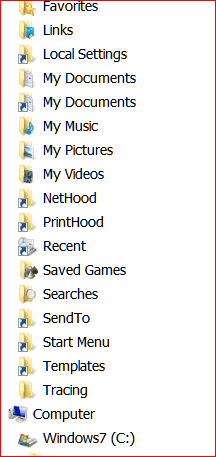
main directories folder ABOVE Computer i.e. in Libraries etc. not in Windows 7 or C Drive set. . When I try to open it to see what is in it before deleting it, I get the message Access is denied.* There is another My Documents folder which I can access. When I right click the folder and click on Properties and then Security, it shows that Everyone has permission to open it. I want to change it to Administrator as I am the Administrator on my PC. The menu dialogue asks me to put in object type and I put in Administrators. (I must admit it is not clear to me whether I should tick on group, or built in or users nor whether I should remove the ticks from the ones I have decided against - I`ve tried various combinations for this). The dialogue will not let me change the location, which is incorrect for this folder (it shows ....-PC i.e. with a hyphen, which is a folder that appears further down the directory under Computer/Windows 7/ C Drive/Users. When I enter an object name, i.e. My Documents, it says this object cannot be found. I`ve tried various ways of naming it to no avail.

*re Document can`t be accessed. The error message is C:/Users/M........./My Documents is not accessible. This seems to link or refer to 2 other possible entries, both under C:Users, one under M......-PC and one under Mum. I don`t know how the Mum file came about (it has Mum as user on user permissions) and I have been trying to get rid of it but I don`t want to delete the My Documents folder until I can see what is in it. I was previously advised to try UNLOCKER on the Mum folder/files but when I try it on this folder it says there is no handle for unlocking it !

Sorry this is a mess - I could really do with some help.

Thank you for your kindness in replying
 

My Computer My Computer

At a glance

Windows 7 Home Premium Upgrade designed for W...
Computer type
PC/Desktop
Computer Manufacturer/Model Number
Mesh
OS
Windows 7 Home Premium Upgrade designed for Windows Vista
Browser
Internet Explorer
Read kind message. In haste this morning but will do screen shots this afternoon.

Many thanks again.
 

My Computer My Computer

At a glance

Windows 7 Home Premium Upgrade designed for W...
Computer type
PC/Desktop
Computer Manufacturer/Model Number
Mesh
OS
Windows 7 Home Premium Upgrade designed for Windows Vista
Browser
Internet Explorer
I'm having trouble following the description of your problem.

There is a "My Documents" link that is only included for compatibility purposes for older software.
You can only see it if you have unchecked "Hide protected operating system files (Recommended)".
255484d1360979199-windows-7-refuses-allow-my-documents-redirection-user-folder-after-my-folders-relocated-.png


My Computer My Computer

At a glance

W7 Ultimate SP1, LM19.2 MATE, W10 Home 1703, ...AMD Phenom II x6 1100T, 3.3 GHz12GB DDR3 1333 G-Skill (4GB x 2), G-Skill (2G...NVIDIA GeForce GTX 660
Computer type
PC/Desktop
Computer Manufacturer/Model Number
n/a
OS
W7 Ultimate SP1, LM19.2 MATE, W10 Home 1703, W10 Pro 1703 VM, #All 64 bit
CPU
AMD Phenom II x6 1100T, 3.3 GHz
Motherboard
ASUS M4A88T-M/USB3 (AM3)
Memory
12GB DDR3 1333 G-Skill (4GB x 2), G-Skill (2GB x 2)
Graphics Card(s)
NVIDIA GeForce GTX 660
Sound Card
Realtek?
Monitor(s) Displays
Samsung S23B350
Screen Resolution
1920x1080
Hard Drives
WD Green 2TB (SATA), WD Green 3TB (SATA), WD Blue 4TB (SATA), WD Blue 6TB (SATA)
PSU
Cooler Master
Case
Antec GX300 Tower
Cooling
3x Antec TRICOOL 120mm Fans
Mouse
Wired Optical
Internet Speed
DSL
Antivirus
Avast
Browser
Pale Moon (64 bit)
Other Info
2018-12-27 Upgraded HDDs
2015-12-10 Upgraded case, graphics card, storage
2015-08-15 Upgraded motherboard & RAM
2015-07-15 Upgraded LM17.1 to LM17.2
Capture Directory 1.PNG

Capture Directory 2.PNG

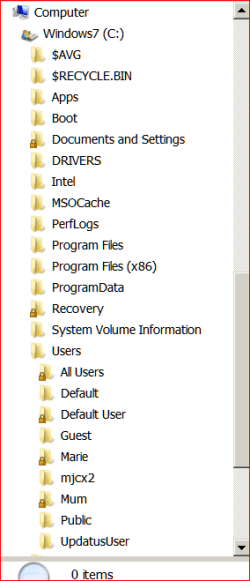
Here are overlapping shots of directory
 

My Computer My Computer

At a glance

Windows 7 Home Premium Upgrade designed for W...
Computer type
PC/Desktop
Computer Manufacturer/Model Number
Mesh
OS
Windows 7 Home Premium Upgrade designed for Windows Vista
Browser
Internet Explorer
Thanks lehnerus2000 for reply. Getting rid of making files visible doesn`t tell me what is in there and I am curious about
this. I bought a new computer last May and prior to that had transferred or copied quite a few files to my husband`s laptop so I could work on them. My old computer had really got into a mess. I transferred these to the new computer as part of generally importing files via a hard disk. My husband set the computer up for me. We bought ourselves one each fairly close together. He hasn`t had any trouble with his but mine has given me all sorts of headaches, mostly minor ones that don`t stop me using it. I made the files visible to try and see what was going on. A lot of my problems have been sorted out thanks to techguy but I still am getting this access denied to some files. Trouble is I can`t tell if it matters or not ! I thought it was probably due to the fact that I am useless at managing User Permissions. I have read all sorts of stuff on this on the web but am still very confused.
 

My Computer My Computer

At a glance

Windows 7 Home Premium Upgrade designed for W...
Computer type
PC/Desktop
Computer Manufacturer/Model Number
Mesh
OS
Windows 7 Home Premium Upgrade designed for Windows Vista
Browser
Internet Explorer
Different File Structure

XP used a different file structure to W7.

Windows XP:
C:\Documents and Settings\PJL\My Documents
W7:
C:\Users\PJL\Documents
You may have noticed that some programs create a folder in your documents folder.

The "My Documents" link is used by XP era programs to save files in the W7 Documents folder.

You shouldn't need to worry about it unless you have problems (e.g. files are going missing).
 

My Computer My Computer

At a glance

W7 Ultimate SP1, LM19.2 MATE, W10 Home 1703, ...AMD Phenom II x6 1100T, 3.3 GHz12GB DDR3 1333 G-Skill (4GB x 2), G-Skill (2G...NVIDIA GeForce GTX 660
Computer type
PC/Desktop
Computer Manufacturer/Model Number
n/a
OS
W7 Ultimate SP1, LM19.2 MATE, W10 Home 1703, W10 Pro 1703 VM, #All 64 bit
CPU
AMD Phenom II x6 1100T, 3.3 GHz
Motherboard
ASUS M4A88T-M/USB3 (AM3)
Memory
12GB DDR3 1333 G-Skill (4GB x 2), G-Skill (2GB x 2)
Graphics Card(s)
NVIDIA GeForce GTX 660
Sound Card
Realtek?
Monitor(s) Displays
Samsung S23B350
Screen Resolution
1920x1080
Hard Drives
WD Green 2TB (SATA), WD Green 3TB (SATA), WD Blue 4TB (SATA), WD Blue 6TB (SATA)
PSU
Cooler Master
Case
Antec GX300 Tower
Cooling
3x Antec TRICOOL 120mm Fans
Mouse
Wired Optical
Internet Speed
DSL
Antivirus
Avast
Browser
Pale Moon (64 bit)
Other Info
2018-12-27 Upgraded HDDs
2015-12-10 Upgraded case, graphics card, storage
2015-08-15 Upgraded motherboard & RAM
2015-07-15 Upgraded LM17.1 to LM17.2
Thanks again for reply. I have restored the default "Hide" some folders but the main Mum and Marie files are still there with their contents.

I tried again to unlock the Mum Folder and this time succeeded. I think I needed to click on the lock icon, not just on the file. I managed to open it and found an enormous number of files, many of them empty including some AppData files. . I have deleted all the empty ones. My husband suggested putting the others in a new folder and moving them out so I can delete the MUM file but when I moved a Windows Media file, from Mum to Marie, the folder name moved but the contents (pictures and music) disappeared. . Both folders are in Windows 7 C drive as you can see. There are quite a lof of Windows files in there, and some Microsoft files, which I hesitate to move or delete in case it affects the system.

Is that likely do you think ?
 

My Computer My Computer

At a glance

Windows 7 Home Premium Upgrade designed for W...
Computer type
PC/Desktop
Computer Manufacturer/Model Number
Mesh
OS
Windows 7 Home Premium Upgrade designed for Windows Vista
Browser
Internet Explorer
Moving files onto the root directory won't affect the system files. I've deleted several files which were saved to root directory, such as log files from programs.

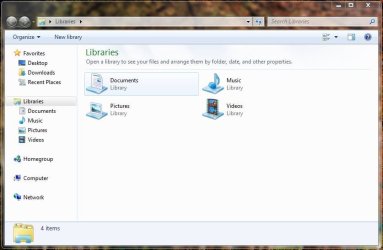
Windows 7 uses the concept of libraries, which Windows XP did not.

Lib.JPG

Untitled.jpg
 

My Computer My Computer

Computer type
Laptop
Delete User?

My husband suggested putting the others in a new folder and moving them out so I can delete the MUM file but when I moved a Windows Media file, from Mum to Marie, the folder name moved but the contents (pictures and music) disappeared. . Both folders are in Windows 7 C drive as you can see. There are quite a lof of Windows files in there, and some Microsoft files, which I hesitate to move or delete in case it affects the system.

Can you find the music and picture files (e.g. by using search or doing it yourself)?

You seem to be trying to delete/remove a user called "Mum".
There is a special procedure that you need to use to do this.

You should Copy (not Move) all of the files to a new folder first.

Then you should read these tutorials:
http://www.sevenforums.com/tutorials/181036-user-account-delete.html
http://www.sevenforums.com/tutorials/181426-user-account-enable-disable.html

Don't delete the "Mum" user until you locate the "missing" files (assuming you want to keep them).
 

My Computer My Computer

At a glance

W7 Ultimate SP1, LM19.2 MATE, W10 Home 1703, ...AMD Phenom II x6 1100T, 3.3 GHz12GB DDR3 1333 G-Skill (4GB x 2), G-Skill (2G...NVIDIA GeForce GTX 660
Computer type
PC/Desktop
Computer Manufacturer/Model Number
n/a
OS
W7 Ultimate SP1, LM19.2 MATE, W10 Home 1703, W10 Pro 1703 VM, #All 64 bit
CPU
AMD Phenom II x6 1100T, 3.3 GHz
Motherboard
ASUS M4A88T-M/USB3 (AM3)
Memory
12GB DDR3 1333 G-Skill (4GB x 2), G-Skill (2GB x 2)
Graphics Card(s)
NVIDIA GeForce GTX 660
Sound Card
Realtek?
Monitor(s) Displays
Samsung S23B350
Screen Resolution
1920x1080
Hard Drives
WD Green 2TB (SATA), WD Green 3TB (SATA), WD Blue 4TB (SATA), WD Blue 6TB (SATA)
PSU
Cooler Master
Case
Antec GX300 Tower
Cooling
3x Antec TRICOOL 120mm Fans
Mouse
Wired Optical
Internet Speed
DSL
Antivirus
Avast
Browser
Pale Moon (64 bit)
Other Info
2018-12-27 Upgraded HDDs
2015-12-10 Upgraded case, graphics card, storage
2015-08-15 Upgraded motherboard & RAM
2015-07-15 Upgraded LM17.1 to LM17.2
Thanks very much for advice. And links to tutorials. There is such a forest of them on the web that being directed to the most pertinent is a great help. Hope this will solve my problem.
 

My Computer My Computer

At a glance

Windows 7 Home Premium Upgrade designed for W...
Computer type
PC/Desktop
Computer Manufacturer/Model Number
Mesh
OS
Windows 7 Home Premium Upgrade designed for Windows Vista
Browser
Internet Explorer
Backup HDD Image

Thanks very much for advice. And links to tutorials. There is such a forest of them on the web that being directed to the most pertinent is a great help. Hope this will solve my problem.

I forgot to mention that you should create a backup HDD image before deleting users or editing the Registry. :o

Tutorials
http://www.sevenforums.com/tutorials/663-backup-complete-computer-create-image-backup.html
http://www.sevenforums.com/tutorials/73828-imaging-free-macrium.html

I prefer to use Macrium Reflect Free Edition.
 

My Computer My Computer

At a glance

W7 Ultimate SP1, LM19.2 MATE, W10 Home 1703, ...AMD Phenom II x6 1100T, 3.3 GHz12GB DDR3 1333 G-Skill (4GB x 2), G-Skill (2G...NVIDIA GeForce GTX 660
Computer type
PC/Desktop
Computer Manufacturer/Model Number
n/a
OS
W7 Ultimate SP1, LM19.2 MATE, W10 Home 1703, W10 Pro 1703 VM, #All 64 bit
CPU
AMD Phenom II x6 1100T, 3.3 GHz
Motherboard
ASUS M4A88T-M/USB3 (AM3)
Memory
12GB DDR3 1333 G-Skill (4GB x 2), G-Skill (2GB x 2)
Graphics Card(s)
NVIDIA GeForce GTX 660
Sound Card
Realtek?
Monitor(s) Displays
Samsung S23B350
Screen Resolution
1920x1080
Hard Drives
WD Green 2TB (SATA), WD Green 3TB (SATA), WD Blue 4TB (SATA), WD Blue 6TB (SATA)
PSU
Cooler Master
Case
Antec GX300 Tower
Cooling
3x Antec TRICOOL 120mm Fans
Mouse
Wired Optical
Internet Speed
DSL
Antivirus
Avast
Browser
Pale Moon (64 bit)
Other Info
2018-12-27 Upgraded HDDs
2015-12-10 Upgraded case, graphics card, storage
2015-08-15 Upgraded motherboard & RAM
2015-07-15 Upgraded LM17.1 to LM17.2
Thanks again. The trouble is that the Mum User does not appear on the Control Panel Users Account List and I can`t access Local Groups etc. on Windows 7 Home Premium which is what I have on my computer.
On the Security Dialogue on Properties for Mum, I have 2 unknown accounts with S numbers. One of these presumably is the Mum Account.

However as I have managed to unlock the folder, I will copy the contents and take an HD image as you advise, and then try deleting the folder and contents.
 

My Computer My Computer

At a glance

Windows 7 Home Premium Upgrade designed for W...
Computer type
PC/Desktop
Computer Manufacturer/Model Number
Mesh
OS
Windows 7 Home Premium Upgrade designed for Windows Vista
Browser
Internet Explorer
Add Snap-in

Thanks again. The trouble is that the Mum User does not appear on the Control Panel Users Account List and I can`t access Local Groups etc. on Windows 7 Home Premium which is what I have on my computer.
On the Security Dialogue on Properties for Mum, I have 2 unknown accounts with S numbers. One of these presumably is the Mum Account.

Have you tried using the "Author" option on "Computer Management"?

1 - Search for "Computer Management".
2 - Right click on the icon.
3 - Choose "Author".
193759d1326889419-mmc-windows-display-problem-computer-mangement-author.png
4 - Load the modules that you want using the "Add/Remove Snap-in ..." option (e.g. "Local Users and Groups").
193757d1326889201-mmc-windows-display-problem-computer-management-2.png
5 - Configure them (e.g. columns, width, etc.).
6 - Resize the main window (e.g. maximize).
7 - Choose "Save As" from the "File" menu and enter a name.
193758d1326889201-mmc-windows-display-problem-computer-management-3.png

8 - Create a shortcut to your new "Computer Management" console (for easy access).
9 - Pin it to your "Start Menu" or "Taskbar" (see the first picture above. I have pinned it to position 1).


The procedure is basically the same for "mmc.exe".
There is no "Author" option for "mmc.exe".
Simply run it and configure it the way you want and then choose "Save As" and name it.
 

My Computer My Computer

At a glance

W7 Ultimate SP1, LM19.2 MATE, W10 Home 1703, ...AMD Phenom II x6 1100T, 3.3 GHz12GB DDR3 1333 G-Skill (4GB x 2), G-Skill (2G...NVIDIA GeForce GTX 660
Computer type
PC/Desktop
Computer Manufacturer/Model Number
n/a
OS
W7 Ultimate SP1, LM19.2 MATE, W10 Home 1703, W10 Pro 1703 VM, #All 64 bit
CPU
AMD Phenom II x6 1100T, 3.3 GHz
Motherboard
ASUS M4A88T-M/USB3 (AM3)
Memory
12GB DDR3 1333 G-Skill (4GB x 2), G-Skill (2GB x 2)
Graphics Card(s)
NVIDIA GeForce GTX 660
Sound Card
Realtek?
Monitor(s) Displays
Samsung S23B350
Screen Resolution
1920x1080
Hard Drives
WD Green 2TB (SATA), WD Green 3TB (SATA), WD Blue 4TB (SATA), WD Blue 6TB (SATA)
PSU
Cooler Master
Case
Antec GX300 Tower
Cooling
3x Antec TRICOOL 120mm Fans
Mouse
Wired Optical
Internet Speed
DSL
Antivirus
Avast
Browser
Pale Moon (64 bit)
Other Info
2018-12-27 Upgraded HDDs
2015-12-10 Upgraded case, graphics card, storage
2015-08-15 Upgraded motherboard & RAM
2015-07-15 Upgraded LM17.1 to LM17.2
Thanks to all who have contributed. I have been frantically busy this week and had no time. My first task is to
clarify my backup procedures and this involves deciding which of my files really need backing up which will take some time. Once I am happy with my backup system, I will try the above suggestions. Hopefully get back before this thread dies !
 

My Computer My Computer

At a glance

Windows 7 Home Premium Upgrade designed for W...
Computer type
PC/Desktop
Computer Manufacturer/Model Number
Mesh
OS
Windows 7 Home Premium Upgrade designed for Windows Vista
Browser
Internet Explorer
Back
Top