Need advice with disk partitions; (should D: be NTFS?)

TDSS also came up clean.

Hopefully I'm clear of rootkits then! Now I just need to find out why I suddenly have a 4th bootrecord
 

My Computer My Computer

At a glance

windows 7 home premium
OS
windows 7 home premium
Everything that has worked best for Win7 install since before it was released is compiled in Clean Reinstall - Factory OEM Windows 7 so look it over and ask back any questions you have about the tools and methods which assure a perfect install.

That's great, thank you Greg.

I'll remember that in case I get another HP, though I'm a little wary of doing so as they seem to come with a lot of bloatware and the chasis is starting to fall apart after just 2 years :(

MID
 

My Computer My Computer

At a glance

windows 7 home premium
OS
windows 7 home premium
I'm going to go ahead and shut down for the night.

with any luck McAfee community will get back to me about the mystery 4th boot record soon. I'll keep y'all posted

Thanks again,
MID
 

My Computer My Computer

At a glance

windows 7 home premium
OS
windows 7 home premium
If you don't have boot problems then don't worry about it. If so or in doubt run Startup Repair.

Otherwise there's no evidence you have "four boot records" but there is evidence that you have something much worse: MucAfee and the HP Factory Preinstall, two of the worst things we see around here.

Whenever we have had a thread here with MucAfee it always turns out to be the problem.
 
If you don't have boot problems then don't worry about it. If so or in doubt run Startup Repair.
MucAfee and the HP Factory Preinstall, two of the worst things we see around here.
Whenever we have had a thread here with MucAfee it always turns out to be the problem.

Wow. I had no idea!

I'll think about this again in the morning. My parents are running McAfee too, though I persuaded them to get a Sony Vaio over another HP system.

If I have any further questions I'll let you know - you've been most helpful :D

'night!
MID
 

My Computer My Computer

At a glance

windows 7 home premium
OS
windows 7 home premium
HP makes good hardware, but any factory preinstall is an inferior Win7 install when compared to a Clean Reinstall - Factory OEM Windows 7 so why not have the best, instead of the worst.

HP also lards in more of the crapware than any other brand, although on more recent models they offer a Minimal Recovery when running HP System Recovery so it redeems them some.

Asus is even better hardware but their preinstalled software is so crappy it defeats the advantage. So again no one should put up with it on an OS they own, to install any way they want.
 
Ok so i've had this through from McAfee communities:

Moved this from Community Interface Help (ie problems with the site) to Home & Home Office / Virus and Spyware Protection / VirusScan.

Two things here : "Scanning Rootkit" and boot Records.

The wording of that Rootkit message is misleading. We've already had a go at McAfee about this. It means "Scanning for rootkits", not that it's found one. Don't panic. Eventually they'll get around to changing the wording. In the meantime a lot of people get alarmed needlessly.

As for boot records : it's checking the MBR. If it finds an extra record there you should investigate the reason. Run this program and it will tell you what it finds on the MBR - I've downloaded it and tested it. On mine it found only one record.

Download MBRCheck - MajorGeeks


Edit - alternatively there are many other MBR-checkers in the thread at MBR check tools. Use at your own risk, needless to say : I always download this sort of file to a safe place in Chrome, without running it, then upload the file to VirusTotal for checking.

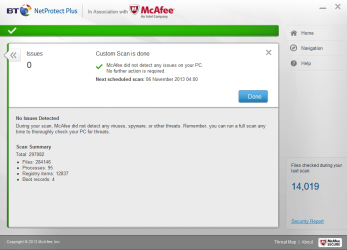
So apparently I should be concerned that It's reading 4 boot records.

It was suggested I download that program, but I wondered if any of you 7 wizards could tell me a way to check without all that?

Thanks,
MID
 

My Computer My Computer

At a glance

windows 7 home premium
OS
windows 7 home premium
Anybody?
 

My Computer My Computer

At a glance

windows 7 home premium
OS
windows 7 home premium
I think you lost all of us. There are no 4 boot records - just one. You are chasing a red herring.
 

My Computer My Computer

At a glance

Vista, Windows7, Mint Mate, Zorin, Windows 8from 1.6GHz Duo to i7
Computer Manufacturer/Model Number
HP, Dell, Gateway, Toshiba - 4 laptops and 2 desktops
OS
Vista, Windows7, Mint Mate, Zorin, Windows 8
CPU
from 1.6GHz Duo to i7
Monitor(s) Displays
2x HP w2207
Hard Drives
5x HDD, 7x SSD, 12x Externals
Keyboard
with trackball - no mices
Mouse
Trackball mice
Internet Speed
DSL 6000
I think you lost all of us. There are no 4 boot records - just one. You are chasing a red herring.

There are multiple boot records (each partition also has one). The question is what his scanner is reporting.
 

My Computer My Computer

At a glance

Windows
OS
Windows
I'll refer you back to this image.

Now according to a post I received from the McAfee community at:
Code:
https://community.mcafee.com/thread/62028

As for boot records : it's checking the MBR. If it finds an extra record there you should investigate the reason. Run this program and it will tell you what it finds on the MBR - I've downloaded it and tested it. On mine it found only one record.

http://www.majorgeeks.com/files/details/mbrcheck.html

According to this guy the boot records returned in this scan are of the MBR. [not sure if i believe this or not]

I didn't really want to be bothered downloading this thing I'd never heard of, so perhaps you clever folk can tell me if I can check my boot records without downloading things.

I just want to find out if I have the right number of boot records or not.
 

Attachments

  • mcafee results.png
    mcafee results.png
    46.8 KB · Views: 1

My Computer My Computer

At a glance

windows 7 home premium
OS
windows 7 home premium
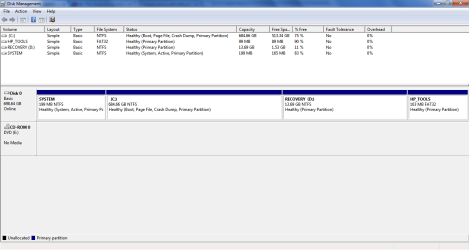
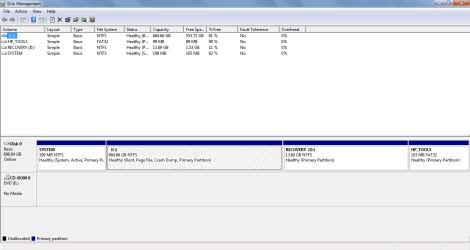
If you haven`t yet, you need to post a shot of disk management, not a result from McAfee.

McAfee is one of the worst programs out there, I used it for over 3 years and saw no positive reason for having it, but that`s just my opinion of it ;)
 

My Computer My Computer

At a glance

Windows 10 Pro x64Intel Core i7 6700KGSkill TridentZ RGB 16GB 3600 16-16-16-36EVGA GTX 980 Ti SC x2
Computer type
PC/Desktop
Computer Manufacturer/Model Number
Skylake Special #666
OS
Windows 10 Pro x64
CPU
Intel Core i7 6700K
Motherboard
Asus Sabertooth Z170 Mark 1
Memory
GSkill TridentZ RGB 16GB 3600 16-16-16-36
Graphics Card(s)
EVGA GTX 980 Ti SC x2
Sound Card
Realtek High Definition
Monitor(s) Displays
AOC G2460PG
Screen Resolution
1920 x 1080 144Hz
Hard Drives
Samsung 860 Pro 256GB, Seagate Barracuda 4TB x2
PSU
EVGA 1000 P2, EVGA White Custom Braided Cables
Case
Corsair Vengeance C70 Gunmetal Black
Cooling
Corsair H100i v2, Corsair ML120 x2, Thermal Grizzly Kryonaut
Keyboard
Logitech G910 Orion Spectrum
Mouse
Logitech G700s
Internet Speed
Verizon Fios Quantum Gateway 75/75
Antivirus
Windows Defender, Malwarebytes Free 3.8.3
Browser
Chrome
Other Info
Corsair SP120 x4, LG Blu-ray Drive, Durabrand HT-395 100 Watt Dolby Digital Amp, Corsair H2100 Wireless 7.1 Headset
Disk management shot as of today (top) - 4 'boot records'
Disk management shot as of 05/12/12 (bottom) - 3 'boot records'

Hope this helps
MID
 

Attachments

  • disk management 2.png
    disk management 2.png
    20.9 KB · Views: 3
  • disk management.png
    disk management.png
    19.4 KB · Views: 1

My Computer My Computer

At a glance

windows 7 home premium
OS
windows 7 home premium
Anybody please?

I feel like we've nearly made some progress with this stupid boot record reading.

MID
 

My Computer My Computer

At a glance

windows 7 home premium
OS
windows 7 home premium
There is obviously no difference.

I'm not sure why you'd be so concerned about something so inconsequential when you could instead be focusing your energy on getting a perfect Clean Reinstall - Factory OEM Windows 7 with our help since you're here and it's a speciality here.

The difference is that you would go from having the worst possible install of Win7 with worst possible AV, to the best possible install of Win7 with everything that works best based on our having helped here with tens of thousands of installs.
 
Hi Greg.

I'm not trying to be difficult here, I was just keen to find out what had changed in relation to boot records.
From the reply I got on the McAfee forums it didn't sound normal to have 4

As for why I haven't done the clean install; as I think I said I may well be getting a new laptop sometime soon. Also, I don't have any external hard drive available at the moment, although I'm hoping to buy one ASAP

I did just take a look at the linked clean install page however.

Just to clarify; I don't have any disks that came with my laptop or a windows 7 OS disk. I can still do a clean install if I get blank disks and follow the steps on your forum post?

Thanks,
MID
 

My Computer My Computer

At a glance

windows 7 home premium
OS
windows 7 home premium
The disk for your licensed version along with tool to burn to DVD is in Steps 1 and 2 of Clean Reinstall - Factory OEM Windows 7. Read over the tutorial to ask back any questions. Every step is compiled there to get and keep a perfect install, especially how to make sure you remember everything to back up, plus the tools, methods and tips that assure you get it perfect.

What's important with that mess is to delete all partitions during the booted Custom install when you get to the drive selection screen, using the Drive Options shown in Steps 7 and 8 of Clean Install Windows 7 which is the illustrated tutorial for the actual install.
 
Last edited:
Awesome!

I've just got a 500GB hard drive to back up my personal data, so I may end up doing this clean install after all!
I'll give you a shout when I get my hands on a blank disc

Thanks,
MID
 

My Computer My Computer

At a glance

windows 7 home premium
OS
windows 7 home premium
Back
Top