Need BIG help with updating BIOS

CHILL

New member
Local time
2:26 AM
Messages
6
Hiya doin' CHILL here, I need to know how to update my BIOS for my E-machine W3623 System. The BIOS is very outdated (7/29/2005) which I think maybe causing certain performance issues I have been having. I at least want to have the most recent BIOS running for the machine (for optimal performance) which I have already looked into (which is the Coconut Creek CR94510J[1].15A.1015 2009). I realize this update MUST be downloaded straight from the manufacturer ONLY or I could risk screwing myself over.

I downloaded the file from the E-machines support site. Problem is, when I try to run it I get the Intel Express Update Set-up screen which comes up and then it says "This program is unable to continue. Internal System Error: This is a programming or internal problem." After that I can't continue and the process automatically shuts down. So now I'm stuck and don't what know to do. Here is some more information about my system:

Operating System: Windows 7 Ultimate 64x
Intel Express Family Chipset 82945G
RAM: 2GB

Also another side question: Is this unit capable of more RAM than 2GB? Thanks in advance and I would GREATLY appreciate any help I can receive on this as I am lost. Let me know if you need anymore specific specs on the system.
 

My Computer My Computer

OS
Windows 7 Ultimate 64x
Welcome to SevenForums,

Performance issues aren't necessarily fixed up updating the BIOS. You are running a fairly low-spec PC so I wouldn't expect the performance to be outstanding. What sort of issues are you having? There may be easier way to fix this.

That is the correct BIOS update - how are you flashing the BIOS?

Unfortunately, your machine supports a maximum of 2GB only.

Regards,
Golden
 

My Computer My Computer

Computer type
PC/Desktop
Computer Manufacturer/Model Number
Golden Mk. I.4
OS
Windows 10 Pro x64 ; Xubuntu x64
CPU
Intel i7 860 @ 2.80 GHz O/C'ed to 4.0GHz
Motherboard
Gigabyte P55A-UD3R Rev.1. Award BIOS F13
Memory
16GB Corsair Vengance DDR3 @ 661 MHz Dual Channel (9-9-9-24)
Graphics Card(s)
EVGA NVidia GTX 560 1024MB
Sound Card
Realtek Integrated
Monitor(s) Displays
Dual Samsung SyncMaster 2494HS
Screen Resolution
1920*1080 and 1920*1080
Hard Drives
1*Samsung 840 EVO 120GB SSD;
1*OCZ Vertex 2 60GB SSD;
2*Samsung F3 SpinPoint 1TB in RAID0;
1*Samsung F1 SpinPoint 1TB;
2*Western Digital 1TB External USB 3.0
1*Western Digital 500GB External USB 3.0
1*Seagate 500GB External USB 2.0
PSU
Thermaltake ToughPower QFan 750W
Case
Thermaltake Element S VK60001W2Z
Cooling
Corsair H60 Water Cooling, 2*230mm and 2*80mm case fans
Keyboard
Logitech G110
Mouse
Logitech MX518
flashing your BIOS can be problematic--if you screw it up, you'll hose your motherboard.
I doubt your BIOS has anything to do with performance problems (more likely it's lack of RAM, a slow processor, and slow FSB--you might try updating your chipset and LAN drivers first

eMachines Support - Downloads & Support Documents - Desktop / W Series / W3623

2 GB is max ram for this machine

Gateway/eMachines doesn't offer any instructions for flashing the BIOS--there may be some useful info here:

Intel D945GCCRG1/ Gateway 4006181R Board - Pull :: LegendMicro.com

try googling Intel BIOS flash and Intel SPI flash device or you could you the last resort and actually read your manual
 

My Computer My Computer

Computer Manufacturer/Model Number
SALEON model 2.2b
OS
win7 ultimate 32bit
CPU
core2 Extreme QX6850-OCd to 3.15 GHz
Motherboard
ASUS P5G41-M LE
Memory
4 GB
Graphics Card(s)
NVidia 8600 GT
Monitor(s) Displays
23" acer
Hard Drives
one SATA 250GB partitioned equally in half
one SATA 160GB-internal storage
PSU
500W Thermaltake
Case
mini tower
Welcome to SevenForums,

Performance issues aren't necessarily fixed up updating the BIOS. You are running a fairly low-spec PC so I wouldn't expect the performance to be outstanding. What sort of issues are you having? There may be easier way to fix this.

To answer both you two, my main problem is two things. One I have slow internet, sometimes it can get quite bad (like it is now, which it shouldn't be because I'm using wireless and the speed is quite good yet that's not what I'm getting for some reason) and I can't watch anything online because it is choppy/laggy. The next thing is even when I'm not online it's difficult for me to view shows and movies in my favorite media players because incredible slow down choppiness. Granted I will admit when I upgraded to windows 7 these things got worse. But I soon realized that I'm running Windows 7 with a seriously outdated BIOS, so I figured that would be great in fixing some of these issues. My physical memory that I'm using also seems to randomly change and fluctuate back and forth even when I only have one thing going that should barely be taking up much memory. For instance right now it says my total physical memory is 1.99GB yet my available physical memory is like 648mb, yet I'm only running fire-fox right now, that just doesn't make sense.

That is the correct BIOS update - how are you flashing the BIOS?
I need to better understand this, exactly what does it mean to do that?

Unfortunately, your machine supports a maximum of 2GB only.
Yeah, crap I had hope. Ah well.

try googling Intel BIOS flash and Intel SPI flash device or you could you the last resort and actually read your manual

I will definitely look into that, as I need to know how I would update this BIOS. Also I have made sure that I have all my drivers up to date. So nothing is lacking in that area.
 
Last edited:

My Computer My Computer

OS
Windows 7 Ultimate 64x
Hi,

The choppiness you describe is a consequence of your internet connection, and not the BIOS, so I don't think that will help. Trying switching to a wired/ethernet connection to see if that helps.

Windows 7 requires a minimum of 1GB RAM, so I'm not surprised you are struggling in that department. You are probably better served by examining your startup items to see what can be reduced, and lessen the load on RAM. Have a look in Resource Monitor and see what is loaded and using your RAM.

http://www.sevenforums.com/tutorials/1401-startup-programs-change.html
http://www.sevenforums.com/tutorials/12523-resource-monitor.html

In summary, flashing your BIOS won't help the problems you describe.

Regards,
Golden
 

My Computer My Computer

Computer type
PC/Desktop
Computer Manufacturer/Model Number
Golden Mk. I.4
OS
Windows 10 Pro x64 ; Xubuntu x64
CPU
Intel i7 860 @ 2.80 GHz O/C'ed to 4.0GHz
Motherboard
Gigabyte P55A-UD3R Rev.1. Award BIOS F13
Memory
16GB Corsair Vengance DDR3 @ 661 MHz Dual Channel (9-9-9-24)
Graphics Card(s)
EVGA NVidia GTX 560 1024MB
Sound Card
Realtek Integrated
Monitor(s) Displays
Dual Samsung SyncMaster 2494HS
Screen Resolution
1920*1080 and 1920*1080
Hard Drives
1*Samsung 840 EVO 120GB SSD;
1*OCZ Vertex 2 60GB SSD;
2*Samsung F3 SpinPoint 1TB in RAID0;
1*Samsung F1 SpinPoint 1TB;
2*Western Digital 1TB External USB 3.0
1*Western Digital 500GB External USB 3.0
1*Seagate 500GB External USB 2.0
PSU
Thermaltake ToughPower QFan 750W
Case
Thermaltake Element S VK60001W2Z
Cooling
Corsair H60 Water Cooling, 2*230mm and 2*80mm case fans
Keyboard
Logitech G110
Mouse
Logitech MX518
Hi,

The choppiness you describe is a consequence of your internet connection, and not the BIOS, so I don't think that will help. Trying switching to a wired/ethernet connection to see if that helps.

Windows 7 requires a minimum of 1GB RAM, so I'm not surprised you are struggling in that department. You are probably better served by examining your startup items to see what can be reduced, and lessen the load on RAM. Have a look in Resource Monitor and see what is loaded and using your RAM.

http://www.sevenforums.com/tutorials/1401-startup-programs-change.html
http://www.sevenforums.com/tutorials/12523-resource-monitor.html

In summary, flashing your BIOS won't help the problems you describe.

Regards,
Golden

That's the thing though, it was doing it with the ethernet as well, I thought that was the problem which is why I switched to wireless. Same problem. I used to have no problem playing videos off my computer when I had XP, ever since I upgraded these problems started. I will look into what you are suggesting though.
 

My Computer My Computer

OS
Windows 7 Ultimate 64x
Windows 7 has a higher memory requirement than XP. You might also be better off installing 32 bit instead of the 64 bit you currently have.
 

My Computer My Computer

Computer type
PC/Desktop
Computer Manufacturer/Model Number
Golden Mk. I.4
OS
Windows 10 Pro x64 ; Xubuntu x64
CPU
Intel i7 860 @ 2.80 GHz O/C'ed to 4.0GHz
Motherboard
Gigabyte P55A-UD3R Rev.1. Award BIOS F13
Memory
16GB Corsair Vengance DDR3 @ 661 MHz Dual Channel (9-9-9-24)
Graphics Card(s)
EVGA NVidia GTX 560 1024MB
Sound Card
Realtek Integrated
Monitor(s) Displays
Dual Samsung SyncMaster 2494HS
Screen Resolution
1920*1080 and 1920*1080
Hard Drives
1*Samsung 840 EVO 120GB SSD;
1*OCZ Vertex 2 60GB SSD;
2*Samsung F3 SpinPoint 1TB in RAID0;
1*Samsung F1 SpinPoint 1TB;
2*Western Digital 1TB External USB 3.0
1*Western Digital 500GB External USB 3.0
1*Seagate 500GB External USB 2.0
PSU
Thermaltake ToughPower QFan 750W
Case
Thermaltake Element S VK60001W2Z
Cooling
Corsair H60 Water Cooling, 2*230mm and 2*80mm case fans
Keyboard
Logitech G110
Mouse
Logitech MX518
Would any Windows 7 updates help with these issues?

And is it really okay to be running a BIOS that's so old?
 

My Computer My Computer

OS
Windows 7 Ultimate 64x
I'm afraid not. The only reason to upgrade your BIOS is to take advantage of greater support for newer hardware. Your issue are not BIOS related.

Have you run Resource Monitor to examine how your RAM is used? have you tried removing items in Startup to lessen the load on your RAM?
 

My Computer My Computer

Computer type
PC/Desktop
Computer Manufacturer/Model Number
Golden Mk. I.4
OS
Windows 10 Pro x64 ; Xubuntu x64
CPU
Intel i7 860 @ 2.80 GHz O/C'ed to 4.0GHz
Motherboard
Gigabyte P55A-UD3R Rev.1. Award BIOS F13
Memory
16GB Corsair Vengance DDR3 @ 661 MHz Dual Channel (9-9-9-24)
Graphics Card(s)
EVGA NVidia GTX 560 1024MB
Sound Card
Realtek Integrated
Monitor(s) Displays
Dual Samsung SyncMaster 2494HS
Screen Resolution
1920*1080 and 1920*1080
Hard Drives
1*Samsung 840 EVO 120GB SSD;
1*OCZ Vertex 2 60GB SSD;
2*Samsung F3 SpinPoint 1TB in RAID0;
1*Samsung F1 SpinPoint 1TB;
2*Western Digital 1TB External USB 3.0
1*Western Digital 500GB External USB 3.0
1*Seagate 500GB External USB 2.0
PSU
Thermaltake ToughPower QFan 750W
Case
Thermaltake Element S VK60001W2Z
Cooling
Corsair H60 Water Cooling, 2*230mm and 2*80mm case fans
Keyboard
Logitech G110
Mouse
Logitech MX518
Yes I have done that and its still not running like it should be.
 

My Computer My Computer

OS
Windows 7 Ultimate 64x
Yes I have done that and its still not running like it should be.

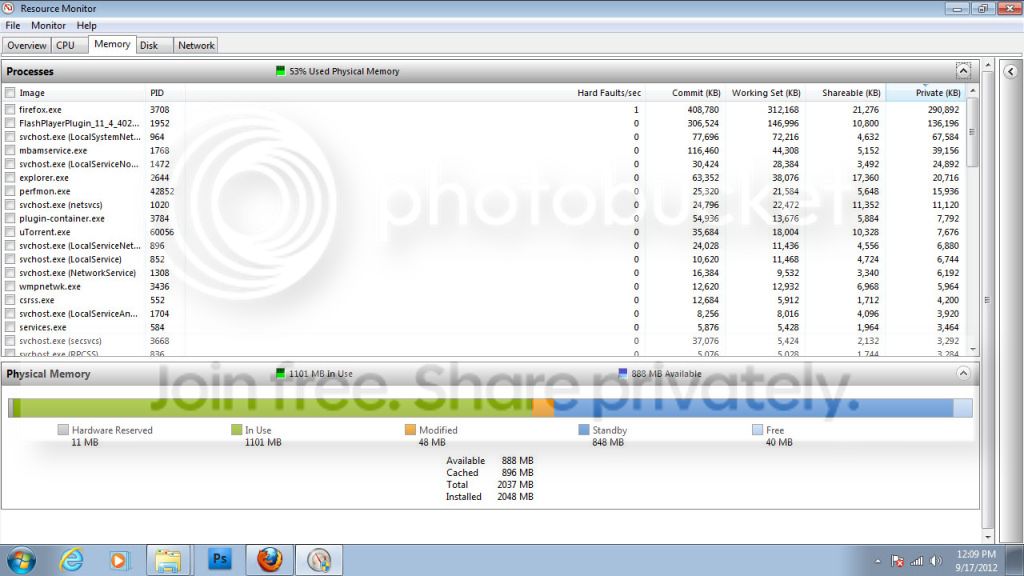
Exactly what did you do? Which items are in Startup? How about showing us some screen capture images of your Resource Monitor output?
 

My Computer My Computer

Computer type
PC/Desktop
Computer Manufacturer/Model Number
Golden Mk. I.4
OS
Windows 10 Pro x64 ; Xubuntu x64
CPU
Intel i7 860 @ 2.80 GHz O/C'ed to 4.0GHz
Motherboard
Gigabyte P55A-UD3R Rev.1. Award BIOS F13
Memory
16GB Corsair Vengance DDR3 @ 661 MHz Dual Channel (9-9-9-24)
Graphics Card(s)
EVGA NVidia GTX 560 1024MB
Sound Card
Realtek Integrated
Monitor(s) Displays
Dual Samsung SyncMaster 2494HS
Screen Resolution
1920*1080 and 1920*1080
Hard Drives
1*Samsung 840 EVO 120GB SSD;
1*OCZ Vertex 2 60GB SSD;
2*Samsung F3 SpinPoint 1TB in RAID0;
1*Samsung F1 SpinPoint 1TB;
2*Western Digital 1TB External USB 3.0
1*Western Digital 500GB External USB 3.0
1*Seagate 500GB External USB 2.0
PSU
Thermaltake ToughPower QFan 750W
Case
Thermaltake Element S VK60001W2Z
Cooling
Corsair H60 Water Cooling, 2*230mm and 2*80mm case fans
Keyboard
Logitech G110
Mouse
Logitech MX518
Here is the memory:

memory.jpg


Here is the rest of the memory with my start-up items shown in the bottom right hand corner:

memory2.jpg
 
Last edited:

My Computer My Computer

OS
Windows 7 Ultimate 64x
Back
Top