

- Local time
- 7:22 PM
- Messages
- 50,634
I was able to solve a 2 minute startup with the help of Cluberti's expert reading of the Boot Trace which pointed to heavily fragmented HD, especially free space. This was news since I defrag all installs with Auslogics with it reporting on this machine typical 2-3% fragmentation.
He suggested Defraggler to defrag HD including separate free space defrag. Sure enough it found 19% fragmentation on files, 33% on free space. A full minute was reduced from startup.
Excited about finding Defraggler (which is heavily recommended here) I am running it on my other machines and have run into a strange situation. One machine showed 56% file fragmentation, took an hour to complete file defrag, but even after completion still shows 56% fragmentation with a huge block of fragmented files shown way below the others on map shown here:
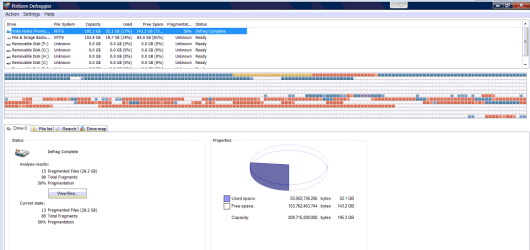
I thought it might be the second partition which stores Acronis image and file backup but that defragged in seconds reporting 0% frags. Free space reported just 23% but quickly defragged it.
When I double check with Auslogics it shows the block of files shown in red (fragmented) on Defraggler map to be grey (unmoveable) files.
Can anyone explain this?
I know that when System or MFT files block shrinking that Perfect Disk can offline Defrag those files. Perhaps that is what's needed here and will be my next stop unless there is a better explanation. The map does say they are still fragmented.
Thanks.
He suggested Defraggler to defrag HD including separate free space defrag. Sure enough it found 19% fragmentation on files, 33% on free space. A full minute was reduced from startup.
Excited about finding Defraggler (which is heavily recommended here) I am running it on my other machines and have run into a strange situation. One machine showed 56% file fragmentation, took an hour to complete file defrag, but even after completion still shows 56% fragmentation with a huge block of fragmented files shown way below the others on map shown here:
I thought it might be the second partition which stores Acronis image and file backup but that defragged in seconds reporting 0% frags. Free space reported just 23% but quickly defragged it.
When I double check with Auslogics it shows the block of files shown in red (fragmented) on Defraggler map to be grey (unmoveable) files.
Can anyone explain this?
I know that when System or MFT files block shrinking that Perfect Disk can offline Defrag those files. Perhaps that is what's needed here and will be my next stop unless there is a better explanation. The map does say they are still fragmented.
Thanks.

 .
.
