
Hello!
Well, I purchased an Acer Aspire One that has Windows 7 starter on it,
From all that I had read before I purchased it I didn't see any of the problems I'm having so I have no clue as what to do.
I have an administrator account on it, everything seems to be like it should. .
But I tried to download flashplayer into a file of a browser I use instead of enternet explorer (As enternet explorer has totaled some of my past computers. . )
but it said, I could not save the file there, as to ask Admin to do so.
. . .
Also another completely annoying factor, the mouse auto clicks on everything if held on a link past, say what. . 2 seconds? At the most? I can't find anywhere to change this.
I've gone through over and over, and still can't find the problem, I'm an admin on it. . Why won't it let me do admin stuff?
PLeaase help me, I've own many desktops in my life and now that I work, and travel alot I wanted just a simple little laptop and the acer one had simply sounded perfect from my research,
but It's annoying the snot outta me and won't let me do what I would think be completely normal things.
Please help
Thanks in advance!
~Tyz
Edit: No ones replyin, so If no can help me change this, I understand. . But if you can at least tell me if it's fixable or not would be helpful so I'd know to return it or not.
Well, I purchased an Acer Aspire One that has Windows 7 starter on it,
From all that I had read before I purchased it I didn't see any of the problems I'm having so I have no clue as what to do.
I have an administrator account on it, everything seems to be like it should. .
But I tried to download flashplayer into a file of a browser I use instead of enternet explorer (As enternet explorer has totaled some of my past computers. . )
but it said, I could not save the file there, as to ask Admin to do so.
. . .
Also another completely annoying factor, the mouse auto clicks on everything if held on a link past, say what. . 2 seconds? At the most? I can't find anywhere to change this.
I've gone through over and over, and still can't find the problem, I'm an admin on it. . Why won't it let me do admin stuff?
PLeaase help me, I've own many desktops in my life and now that I work, and travel alot I wanted just a simple little laptop and the acer one had simply sounded perfect from my research,
but It's annoying the snot outta me and won't let me do what I would think be completely normal things.
Please help
Thanks in advance!
~Tyz
Edit: No ones replyin, so If no can help me change this, I understand. . But if you can at least tell me if it's fixable or not would be helpful so I'd know to return it or not.
Last edited:
My Computer
- OS
- windows starter 7

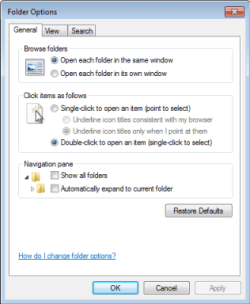

 (I thought that'd be default but yeah lol) and all the mouse and annoying click stuff. . .

