Need help for my mobile connection

saDdy

New member
Local time
12:02 PM
Messages
3
Hi. i'm currently running on window 7 home premium 64 bit. recently i purchased my new samsung mobile phone, while i was trying to install their pc studio, so that i could transfer my file to and fro from my pc to my phone using data cable, but while at the installation part, it prompt out that the installation is incomplete due to incompatible version of my window os. so how can i install the software? really in need of help. hope guys out there can guide me. thanks.
 

My Computer

OS
window 7 home premium 64 bit
I had the same problem so I installed it on another computer with win7 32.. I think this software is not compitable with 64 .
 

My Computer

Computer Manufacturer/Model Number
Mesh
OS
win7 ultimate 32 , 64 ,XP
CPU
3.40
Memory
4 GB
Graphics Card(s)
GeForce GTX 480
Sound Card
Realtek
Monitor(s) Displays
LG 28" LCD
Screen Resolution
1600X1024
Hard Drives
2X500GB HDD sata
Western Digital Usb 2TB
PSU
650w
Keyboard
Wireless Logitech
Mouse
Wireless Logitech
Internet Speed
50 MB
huh. den like tt i bought my com is a waste. i tt time bought a usb blue tooth adapter oso gone to waste aft buying win 7. sian.
 

My Computer

OS
window 7 home premium 64 bit
See these 2 methods.

1. Installed New Samsung PC Studio (Also had problems with USB drivers installation)
2. Connected my phone.
3. Opened Device Manager.
4. Clicked to Update Drivers of my S5600 (it was recognized as Samsung Modem Device).
5. Chosen to choose drivers that I want.
6. Then went to New Samsung PC Studio folder/USB Drivers/3/ and selected sscdbus.inf
7. Windows recognized drivers as x64 Compatible and I picked from the list Samsung USB Composite Device (or something like this)
8. Then after Installing refreshed the Device Manager and there appeared Unknown Device.
9. Manually updated drivers with New Samsung PC Studio folder/USB Driver/3/sscdsdm2.inf file. (In list appeared Samsung Modem Device);


1) Installed the PC Studio software
2) Installed USB drivers
3) Driver fails, etc . . .
4) Go to Control Panel -> System -> Device Manager
5) In the device manager there will be a device under the "Other devices" flyout, something like USB 1.0 . . .
6) Right click that device and click "Update driver software"
7) Select the button or radio button that allows you to bowse for the driver on your computer.
8) Browse to the following folder: "C:\Program Files (x86)\Samsung"
9) Be sure to select the option that searches subfolders.

Source: Samsung Mobile : Community
 

My Computer

Computer Manufacturer/Model Number
Too many to describe...
OS
Windows 7 x64 pro/ Windows 7 x86 Pro/ XP SP3 x86
Samsung

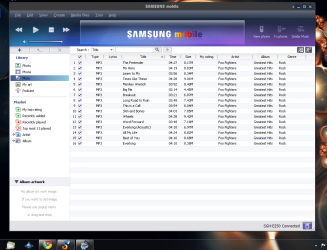
Download the 3. version,Install but DONT install any drivers!!!!!!!!!!! (click the X in the top right till program is installed) then open PC studio,Connect your phone and you should connect,it may tell you some features cannot be enabled but pc to phone does,i have done this myself
as you can see,it works, good luck
 

Attachments

  • Capture.PNG
    Capture.PNG
    85.5 KB · Views: 45

My Computer

Computer type
PC/Desktop
OS
Windows 7 X64 Bit
CPU
Intel(R) Core(TM)i7-4771 CPU @ 3.50GH
Motherboard
Asus Sabertooth Z87
Memory
Corsair 4x8 Vengeance (32GB)
Graphics Card(s)
NVIDIA GeForce GTX780
Monitor(s) Displays
LG
Screen Resolution
1920x1080
PSU
Corsair CX750
Case
Corsair 200 series
Cooling
H80i Liquid Cooler
Keyboard
Microsoft
Mouse
Microsoft
Internet Speed
good times-500-850 kbs bad times-50-100 kbs
Download the 3. version,Install but DONT install any drivers!!!!!!!!!!! (click the X in the top right till program is installed) then open PC studio,Connect your phone and you should connect,it may tell you some features cannot be enabled but pc to phone does,i have done this myself
as you can see,it works, good luck

sry, whr can i find de 3. version? cus when i purchase my samsung mobile, it come wid dis installation disc, inside de installation disc consist of de pc studio, de usb driver and de user guide.

btw, cud i ask whr can i get usb bluetooth adapter suitable for window 7? cus i find it tt when i connect my phone to my pc using data cable, it will charge up my phone, n i called samsung cust svc operator, they said the charging cant be deactivated. to me if batt not completely flat n u charge it, it will shorten de batt life span, so have to get a bluetooth adapter to transfer my file, but tt time i bought de ranger usb bluetooth adapter it cant support my window 7 os. so tt bluetooth had gone to waste, can ask whr can get one tt support window 7? thanks.
 

My Computer

OS
window 7 home premium 64 bit
Back
Top