
I'm trying to install the latest driver for my graphics/video card to try and solve an issue where my laptop freezes going into sleep mode. On the driver download page, I found drivers for the chipset and the VGA. In the device manager for windows, I found under the display adapters, Mobil Intel 4 Series Express Chipset family, but I can't find anything in the device manager for a VGA. Should I just install the chipset driver? Does that cover the video card? Here is the website with the drivers:
https://support.gateway.com/product/default.aspx?modelId=2384
In the readme file for that driver, it says it's for the Intel(R) 5 Series/3400 Series Chipset and to read the release notes to see if this driver will work with my chipset. I can't find the release notes to confirm whether this one will work.
I'd appreciate any help! Thanks very much.
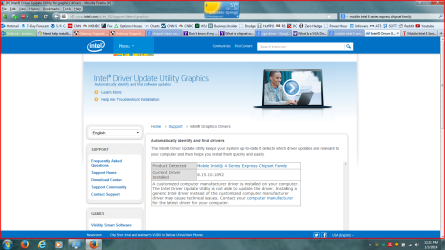
When I go to Intel's website and use their software updater to update the driver, this is what it says:
https://support.gateway.com/product/default.aspx?modelId=2384
In the readme file for that driver, it says it's for the Intel(R) 5 Series/3400 Series Chipset and to read the release notes to see if this driver will work with my chipset. I can't find the release notes to confirm whether this one will work.
I'd appreciate any help! Thanks very much.
When I go to Intel's website and use their software updater to update the driver, this is what it says:
Attachments
My Computer
- Computer type
- Laptop
- Computer Manufacturer/Model Number
- Gateway NV78
- OS
- Microsoft Windows 7 Home Premium 64-bit 7601 Multiprocessor Free Service Pack 1
- CPU
- Intel(R) Core(TM)2 Duo CPU T6600 @ 2.20GHz
- Motherboard
- Gateway NV78
- Memory
- 4.00 GB
- Graphics Card(s)
- (1) Mobile Intel(R) 4 Series Express Chipset Family (2) Mo
- Sound Card
- (1) High Definition Audio Device (2) High Definition Audio
- Screen Resolution
- 1600 x 900 x 32 bits (4294967296 colors) @ 59 Hz
- Hard Drives
- WDC WD5000LPVX-22V0TT0 ATA Device
- Antivirus
- Bitdefender Free
- Browser
- Firefox


