need help partitioning hard drive....

rome

New member
Local time
11:50 PM
Messages
14
Location
India
can someone pls help me out...my C drive there is 382 GB of free space from a total of 452 GB and i want to shrink it to 80 GB but when i do it from computer management as shown it only is allowing me to only shrink down to 216 GB not any lesser
 

My Computer

Computer Manufacturer/Model Number
HP G62-144 DX (Notebook)
OS
Windows 7 Home Premium 64-bit
CPU
Intel Core i3 M330 @ 2.13 GHz
Memory
4 GB DDR3 SDRAM
Monitor(s) Displays
15.6" HD LED
Screen Resolution
1366x768
Welcome to SF! rome

The main reason you are running into this problem is from trying to shrink the C primary you are booting into Windows from. In order to shrink the primary down past that point you will need to Diskpart or a 3rd drive partitioning program.

The thing to look at however is the total amount of used space being reported and deduct that from the total amount of drive space available before Windows or anything was installed. A 500gb drive should report some 465gb available. If your total installation of Windows, programs, and space reserved by Windows for the paging file and restore points comes in at 60gb or less you shouldn't see any problem.
 

My Computers

System One System Two

  • Computer type
    PC/Desktop
    Computer Manufacturer/Model Number
    Custom builds = 2
    OS
    W7 Ultimate x64/W10 Pro x64/W11 Pro Triple Boot - Main PC W7 Remote PC Micro ATX W7 Pro x64/W11 Pro
    CPU
    AMD Phenom II X4 975 Deneb 3.6ghz - 965 2nd remote pc
    Motherboard
    Gigabyte GA-790XTA-UD4-Gigabyte GA-880GM-D2H remote pc
    Memory
    Kingston Hyper X DDR3 1600 1.5v 16gb - Hyper X Fury 8gb 2nd
    Graphics Card(s)
    MSI HD Radeon 5750 1gb - MSI HD Radeon 6450 on mini tower
    Sound Card
    Creative Labs X-Fi Xtreme Audio P - Realtek onooard 2nd case
    Monitor(s) Displays
    ASUS VW199T-P 19" HP 2082a Main-HP 2082a 20" remote pc
    Screen Resolution
    Asus 1440x900 - HP 1600x900
    Hard Drives
    WD Black 1TB HD per OS W7, W10, and pending W11 presently on 500gb OS Drive - Pending Triple 1TB HDs for Spanned Storage/backup volume
    Single 2TB external USB enclosure, single 1TB System 7 Host/Boot drive, Pending 8TB external HD for system image b
    PSU
    Corsair 750TX - primary / Corsair CX600 - second
    Case
    Antec 900-2 - SSD compatible / NZXT Vulcan mini tower
    Cooling
    Zalman CNPS9900A
    Keyboard
    AZIO L70 Backlit Letters Gaming - ONN Cordless/USB
    Mouse
    MSI DS200 Programmable, Logitech Cordless
    Internet Speed
    30mbps upgrade - primary hard wired - mini tower usb WiFi
    Antivirus
    GFI VIPRE Internet Security 2014 on W7 2016 beta on W10,
    Browser
    Cyberfox, WaterFox 64bit FF variants, FireFox x64, Pale Moon
    Other Info
    Accomdata fan cooled usb 2.0 PIDE/Sata II, III external enclosure.
    Sambient usb/eSata PATA/Sata II, III external enclosure.
  • Computer type
    PC/Desktop
    System Manufacturer/Model Number
    CUSTOM ASSEMBLY
    OS
    W7 Pro x64/W11 Pro
    CPU
    AMD Deneb 3.6ghz - 965
    Motherboard
    Gigabyte GA-880GM-D2H remote pc
    Memory
    Kingston Hyper X Fury 8gb
    Graphics Card(s)
    MSI HD Radeon 6450 DVI Output
    Sound Card
    Realtek onooard Creative or Other separate PENDING
    Monitor(s) Displays
    VIZIO 32" LCD TV Separate LCD Pending
    Screen Resolution
    1600x1080
    Hard Drives
    WD 500GB OS Host/Boot WD Green 1TB Storage/Backup
    PSU
    Corsair 600W - THERMALTAKE 600W spare case
    Case
    NZXT Vulcan mini tower
    Cooling
    Twin 120mm Top Fans - 240mm Side Cover
    Keyboard
    ONN Cordless/USB Logitech Cordless
    Mouse
    ONN USB/Cordless - Logitech Cordless
    Internet Speed
    DSL 5G
    Browser
    MS Edge, FireFox, WaterFox x64, FireFox Nightly
    Other Info
    OS Testing-Remote Access to Main TeamViewer
Suggest using free Partition Wizard bootable CD to Resize your partition, create new one(s) and format Logical (for data) to avoid possible future boot conflicts.

Anytime you use a partition manager besides Disk Mgmt. to shrink your partition, there is risk of failure, however PW has never failed in hundreds of Resizing operations we have helped with here.

But be sure to back up your files first anyway, as they should always be.
 
Last edited:
can someone pls help me out...my C drive there is 382 GB of free space from a total of 452 GB and i want to shrink it to 80 GB but when i do it from computer management as shown it only is allowing me to only shrink down to 216 GB not any lesser

What is happening to you as that Win 7 has located some files at that 216 GB location which Win 7 thinks are needed (and they might well be).

When you first install Win 7 then the MFT (Master File table) gets located at a certain displacement from the start of the partition.

Now here are some tricks to help you reclaim some of that space.

1. Run a defragger.
2. Run the defragger again.
3. Now try to use the "Shrink volume" feature of DiskManagement.

To "shrink", right-click (in Disk Management display) the drive you want to shrink.

To run DiskManagement,
WIN key | type DISKMGMT.MSC | Enter key

The WIN key is the one with funny looking, wavy flag on it.

From the list of degraggers I'll include, then you will probably find DEFRAGGER from piriform to be the most straight-forward. This also free software.

If, after viewing the results of your endeavors, you still would like to shrink more, then let us know.

I've got a couple more tricks up the old sleeve which can help.
 

My Computer

Computer Manufacturer/Model Number
Toshiba Satellite S875D-S7239 laptop
OS
MS Windows 7 Ultimate SP1 64-bit
CPU
AMD A10-4600M
Motherboard
AMD Pumori (Socket FT1)
Memory
6.00 GB Dual-Channel DDR3 @ 798MHz (11-11-12-28)
Graphics Card(s)
AMD Radeon HD 7660G
Sound Card
High Definition Audio Device
Monitor(s) Displays
Generic PnP Monitor (1600x900@60Hz)
Screen Resolution
1600x900@60Hz
Hard Drives
SSD 119GB Corsair CSSD-V128GB2 ATA Device
Keyboard
Standard PS/2 Keyboard
Mouse
HP Wireless Optical Mobile Mouse Model FHA-3410
Internet Speed
What the local pub, local coffee shop offers.
Other Info
Optical Drive:MATSHITA BD-CMB UJ160B ATA Device


Also have an Asus ha1002xp netbook with Win 7 Ultimate installed.
can someone pls help me out...my C drive there is 382 GB of free space from a total of 452 GB and i want to shrink it to 80 GB but when i do it from computer management as shown it only is allowing me to only shrink down to 216 GB not any lesser

Uh OH! Just noticed that I left out the list of defraggers. Here it is:

Defraggers
Why won't some files defrag?
Defraggler
Auslogics Disk Defrag
Contig
UltraDefrag
PerfectDisk
MyDefrag
Power Defragmenter
O&O Degrag 10 Professional


I also goofed the defragger from Piriform and the defragger which I recommend for you is:
Defraggler
 

My Computer

Computer Manufacturer/Model Number
Toshiba Satellite S875D-S7239 laptop
OS
MS Windows 7 Ultimate SP1 64-bit
CPU
AMD A10-4600M
Motherboard
AMD Pumori (Socket FT1)
Memory
6.00 GB Dual-Channel DDR3 @ 798MHz (11-11-12-28)
Graphics Card(s)
AMD Radeon HD 7660G
Sound Card
High Definition Audio Device
Monitor(s) Displays
Generic PnP Monitor (1600x900@60Hz)
Screen Resolution
1600x900@60Hz
Hard Drives
SSD 119GB Corsair CSSD-V128GB2 ATA Device
Keyboard
Standard PS/2 Keyboard
Mouse
HP Wireless Optical Mobile Mouse Model FHA-3410
Internet Speed
What the local pub, local coffee shop offers.
Other Info
Optical Drive:MATSHITA BD-CMB UJ160B ATA Device


Also have an Asus ha1002xp netbook with Win 7 Ultimate installed.
thanx a lot all i will try the methods y'all have suggested will definitely get back to let y'all know what was the result.......
 

My Computer

Computer Manufacturer/Model Number
HP G62-144 DX (Notebook)
OS
Windows 7 Home Premium 64-bit
CPU
Intel Core i3 M330 @ 2.13 GHz
Memory
4 GB DDR3 SDRAM
Monitor(s) Displays
15.6" HD LED
Screen Resolution
1366x768
Uh OH! Just noticed that I left out the list of defraggers. Here it is:

Defraggers
Why won't some files defrag?
Defraggler
Auslogics Disk Defrag
Contig
UltraDefrag
PerfectDisk
MyDefrag
Power Defragmenter
O&O Degrag 10 Professional


I also goofed the defragger from Piriform and the defragger which I recommend for you is:
Defraggler
.
My favorite is Perfectdisk which does a good job of moving everything and shows a disk map so you can actually see what is preventing the partition from being shrunk. There is also a "boot time" defrag option that is necessary to move files normally locked when the Windows GUI is running. PerfectDisk is not free, but is available as fully functional trialware so it can be used to deal with the partition problem. Then you may feel you can't live without it and plunk down the $$$ :)
 

My Computer

Computer type
PC/Desktop
OS
Windows 7 x64
CPU
Intel Core2 Extreme Q6850 3.00GHz
Motherboard
EVGA 132-CK-NF79
Memory
8 GB
Graphics Card(s)
Radeon R7 260X
Sound Card
Xonar DS
Hard Drives
Hitachi Deskstar 1 tb
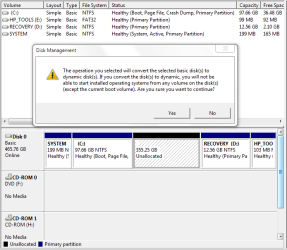
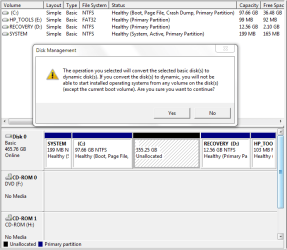
i defraged the disk and it worked perfectly....thanx for the idea.....now when i am trying to make a new drive with the unallocated space at the end of naming it etc. it gives me a message
"The operation you selected will convert disk to dynamic you will not be able to start installed operating systems from any volume on the disk (except current boot volume). are you sure you want to continue"

what i wanted to do was also install Win Xp and have a duel boot...how can i do that
 

My Computer

Computer Manufacturer/Model Number
HP G62-144 DX (Notebook)
OS
Windows 7 Home Premium 64-bit
CPU
Intel Core i3 M330 @ 2.13 GHz
Memory
4 GB DDR3 SDRAM
Monitor(s) Displays
15.6" HD LED
Screen Resolution
1366x768
rome,

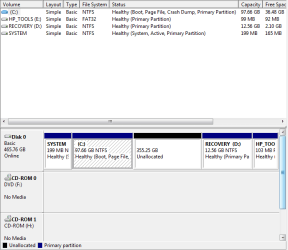
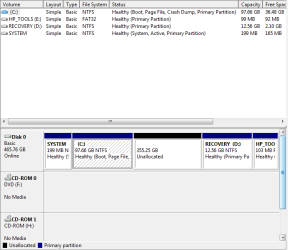
Would you make a snapshot of the Disk Management display and include the snapshot in your next post?

To run the Snipping Tool,
WIN key | type Snip | ENTER key

To run Disk Management,
WIN key | type DISKMGMT.MSC | ENTER key
 
Last edited:

My Computer

Computer Manufacturer/Model Number
Toshiba Satellite S875D-S7239 laptop
OS
MS Windows 7 Ultimate SP1 64-bit
CPU
AMD A10-4600M
Motherboard
AMD Pumori (Socket FT1)
Memory
6.00 GB Dual-Channel DDR3 @ 798MHz (11-11-12-28)
Graphics Card(s)
AMD Radeon HD 7660G
Sound Card
High Definition Audio Device
Monitor(s) Displays
Generic PnP Monitor (1600x900@60Hz)
Screen Resolution
1600x900@60Hz
Hard Drives
SSD 119GB Corsair CSSD-V128GB2 ATA Device
Keyboard
Standard PS/2 Keyboard
Mouse
HP Wireless Optical Mobile Mouse Model FHA-3410
Internet Speed
What the local pub, local coffee shop offers.
Other Info
Optical Drive:MATSHITA BD-CMB UJ160B ATA Device


Also have an Asus ha1002xp netbook with Win 7 Ultimate installed.
i defraged the disk and it worked perfectly....thanx for the idea.....now when i am trying to make a new drive with the unallocated space at the end of naming it etc. it gives me a message
"The operation you selected will convert disk to dynamic you will not be able to start installed operating systems from any volume on the disk (except current boot volume). are you sure you want to continue"

what i wanted to do was also install Win Xp and have a duel boot...how can i do that
.
Since you want to install a dual boot with XP don't create the partition in Windows 7. Leave it as unallocated space. There is another important issue though. Normally to create a dual boot you install the older operating system first. Since Windows 7 is already installed if you boot the XP CD and install XP I believe you will lose the ability to boot "7". Others with more dual boot experience will need to chime in here to clarify this.
 

My Computer

Computer type
PC/Desktop
OS
Windows 7 x64
CPU
Intel Core2 Extreme Q6850 3.00GHz
Motherboard
EVGA 132-CK-NF79
Memory
8 GB
Graphics Card(s)
Radeon R7 260X
Sound Card
Xonar DS
Hard Drives
Hitachi Deskstar 1 tb
If you've got the Windows 7 install CDs you can format your all drive, then install XP and then reinstall 7 as dual boot....long work if you really need to!

PS: I saw you're on notebook...you can create your proper W7 install CDs.
 

My Computer

Computer type
PC/Desktop
Computer Manufacturer/Model Number
Custom Build
OS
Windows 7 Professional SP1 - x64 [Non-UEFI Boot]
CPU
Ivy Bridge Core i5 3570K (Delidded)
Motherboard
Asus P8Z77-V LE PLUS
Memory
G.Skill "Ares" DDR3 PC3-12800 - 1600MHz (16Gb)
Graphics Card(s)
Asus Dual-RX480-O4G
Sound Card
Creative Sound Blaster Z w/5.1 sound system
Monitor(s) Displays
Asus IPS 23"
Screen Resolution
16/9
Hard Drives
Internal:
500Go Sata 6Gb/s (x2)
500Go Sata 3Gb/s (x2)
SSD 60Go Sata 6Gb/s
PSU
In Win C 900W Series 80+ Platinum
Case
Thermaltake Chaser A71
Cooling
Custom Water Cooling Loop
Keyboard
Cooler Master QuickFire XTi
Mouse
Razer Imperator 2012 (4G)
Antivirus
MSE
Browser
IE 11.0.xxx Rtm
Other Info
"Raid0" with Intel Smart Response Technology (HDD/SSD)
disk management 1.PNG

disk management 2.PNG

here are the screen shots.....
 

My Computer

Computer Manufacturer/Model Number
HP G62-144 DX (Notebook)
OS
Windows 7 Home Premium 64-bit
CPU
Intel Core i3 M330 @ 2.13 GHz
Memory
4 GB DDR3 SDRAM
Monitor(s) Displays
15.6" HD LED
Screen Resolution
1366x768
no i dont have the win 7 cd...can i use any win7 cd or does it have to be an OEM version...
i have 1 that i had downloaded of the net for my old laptop
 

My Computer

Computer Manufacturer/Model Number
HP G62-144 DX (Notebook)
OS
Windows 7 Home Premium 64-bit
CPU
Intel Core i3 M330 @ 2.13 GHz
Memory
4 GB DDR3 SDRAM
Monitor(s) Displays
15.6" HD LED
Screen Resolution
1366x768
no i dont have the win 7 cd...can i use any win7 cd or does it have to be an OEM version...
i have 1 that i had downloaded of the net for my old laptop

I don't think it should be an OEM Version...
Just use the key from your sticker at the back of your computer to reactivate W7...

Mind to create your own "Driver & Apps" CD First, after you burned an ISO file to Boot 7 on CD and before formating/partitionning your drive..
 

My Computer

Computer type
PC/Desktop
Computer Manufacturer/Model Number
Custom Build
OS
Windows 7 Professional SP1 - x64 [Non-UEFI Boot]
CPU
Ivy Bridge Core i5 3570K (Delidded)
Motherboard
Asus P8Z77-V LE PLUS
Memory
G.Skill "Ares" DDR3 PC3-12800 - 1600MHz (16Gb)
Graphics Card(s)
Asus Dual-RX480-O4G
Sound Card
Creative Sound Blaster Z w/5.1 sound system
Monitor(s) Displays
Asus IPS 23"
Screen Resolution
16/9
Hard Drives
Internal:
500Go Sata 6Gb/s (x2)
500Go Sata 3Gb/s (x2)
SSD 60Go Sata 6Gb/s
PSU
In Win C 900W Series 80+ Platinum
Case
Thermaltake Chaser A71
Cooling
Custom Water Cooling Loop
Keyboard
Cooler Master QuickFire XTi
Mouse
Razer Imperator 2012 (4G)
Antivirus
MSE
Browser
IE 11.0.xxx Rtm
Other Info
"Raid0" with Intel Smart Response Technology (HDD/SSD)
rome,

When you post that snip, then also let us know what you plan for partition sizes.

As has been indicated to you, if you really want a dual-boot system, then the best approach is to install XP first but this is not a necessity.

After we've got more info, then GregRocker will probably have more advise for you since he is knowledgeable in this area. Myself, I'm strongly opposed to dual-boot systems. Just cut the umbilical cord and live in a Win 7 world.
 

My Computer

Computer Manufacturer/Model Number
Toshiba Satellite S875D-S7239 laptop
OS
MS Windows 7 Ultimate SP1 64-bit
CPU
AMD A10-4600M
Motherboard
AMD Pumori (Socket FT1)
Memory
6.00 GB Dual-Channel DDR3 @ 798MHz (11-11-12-28)
Graphics Card(s)
AMD Radeon HD 7660G
Sound Card
High Definition Audio Device
Monitor(s) Displays
Generic PnP Monitor (1600x900@60Hz)
Screen Resolution
1600x900@60Hz
Hard Drives
SSD 119GB Corsair CSSD-V128GB2 ATA Device
Keyboard
Standard PS/2 Keyboard
Mouse
HP Wireless Optical Mobile Mouse Model FHA-3410
Internet Speed
What the local pub, local coffee shop offers.
Other Info
Optical Drive:MATSHITA BD-CMB UJ160B ATA Device


Also have an Asus ha1002xp netbook with Win 7 Ultimate installed.
here is the snap shots.....
disk management 1.PNG

disk management 2.PNG
 

My Computer

Computer Manufacturer/Model Number
HP G62-144 DX (Notebook)
OS
Windows 7 Home Premium 64-bit
CPU
Intel Core i3 M330 @ 2.13 GHz
Memory
4 GB DDR3 SDRAM
Monitor(s) Displays
15.6" HD LED
Screen Resolution
1366x768
Dual booting is fine as long you let the 2 OS on your system drive...uninstall a dual boot can left markers (bad sectors) on a drive forever or after a hard repairing.
 

My Computer

Computer type
PC/Desktop
Computer Manufacturer/Model Number
Custom Build
OS
Windows 7 Professional SP1 - x64 [Non-UEFI Boot]
CPU
Ivy Bridge Core i5 3570K (Delidded)
Motherboard
Asus P8Z77-V LE PLUS
Memory
G.Skill "Ares" DDR3 PC3-12800 - 1600MHz (16Gb)
Graphics Card(s)
Asus Dual-RX480-O4G
Sound Card
Creative Sound Blaster Z w/5.1 sound system
Monitor(s) Displays
Asus IPS 23"
Screen Resolution
16/9
Hard Drives
Internal:
500Go Sata 6Gb/s (x2)
500Go Sata 3Gb/s (x2)
SSD 60Go Sata 6Gb/s
PSU
In Win C 900W Series 80+ Platinum
Case
Thermaltake Chaser A71
Cooling
Custom Water Cooling Loop
Keyboard
Cooler Master QuickFire XTi
Mouse
Razer Imperator 2012 (4G)
Antivirus
MSE
Browser
IE 11.0.xxx Rtm
Other Info
"Raid0" with Intel Smart Response Technology (HDD/SSD)
rome,
Excellent.

Now as you have been informed from a knowledgeable source, you can install Win 7 first.

What size partition do you need for Win 7 and all the apps you will be installing and all of the music, videos, or whatever you want on that drive?

I'm not a big video collector myself but do have a small music collection and a small picture collection and numerous documents.

The drive I'm using in this laptop is 119 GB of which I'm presently only using 34 GB. As time goes on that will grow but I won't even come close to 100 GB. True is that you want a 10 % "buffer".
 

My Computer

Computer Manufacturer/Model Number
Toshiba Satellite S875D-S7239 laptop
OS
MS Windows 7 Ultimate SP1 64-bit
CPU
AMD A10-4600M
Motherboard
AMD Pumori (Socket FT1)
Memory
6.00 GB Dual-Channel DDR3 @ 798MHz (11-11-12-28)
Graphics Card(s)
AMD Radeon HD 7660G
Sound Card
High Definition Audio Device
Monitor(s) Displays
Generic PnP Monitor (1600x900@60Hz)
Screen Resolution
1600x900@60Hz
Hard Drives
SSD 119GB Corsair CSSD-V128GB2 ATA Device
Keyboard
Standard PS/2 Keyboard
Mouse
HP Wireless Optical Mobile Mouse Model FHA-3410
Internet Speed
What the local pub, local coffee shop offers.
Other Info
Optical Drive:MATSHITA BD-CMB UJ160B ATA Device


Also have an Asus ha1002xp netbook with Win 7 Ultimate installed.
rome,

When you post that snip, then also let us know what you plan for partition sizes.

As has been indicated to you, if you really want a dual-boot system, then the best approach is to install XP first but this is not a necessity.

After we've got more info, then GregRocker will probably have more advise for you since he is knowledgeable in this area. Myself, I'm strongly opposed to dual-boot systems. Just cut the umbilical cord and live in a Win 7 world.


i was planing to keep C drive for win 7 and couple of programs and downloads etc. i was contemplating if i should make a seprate drive for win xp of like 5-6GB...(is that sensible at all????) and keep the rest of it as a complete drive of like 350GB
 

My Computer

Computer Manufacturer/Model Number
HP G62-144 DX (Notebook)
OS
Windows 7 Home Premium 64-bit
CPU
Intel Core i3 M330 @ 2.13 GHz
Memory
4 GB DDR3 SDRAM
Monitor(s) Displays
15.6" HD LED
Screen Resolution
1366x768
Dual booting is fine as long you let the 2 OS on your system drive...uninstall a dual boot can left markers (bad sectors) on a drive forever or after a hard repairing.

is it possible to have more than 1 OS on the same drive?????? i thought that was not possible
 

My Computer

Computer Manufacturer/Model Number
HP G62-144 DX (Notebook)
OS
Windows 7 Home Premium 64-bit
CPU
Intel Core i3 M330 @ 2.13 GHz
Memory
4 GB DDR3 SDRAM
Monitor(s) Displays
15.6" HD LED
Screen Resolution
1366x768
Back
Top