That's ok - it will keep until you have the time.
Try downloading the instructions page and as many of the tools as you can until frustration sets in, then take a break. Keep download the tools until you have them all. Then you don't have to worry about the connection AND running the tool - you'll have everything you need.
For this exercise, I'm going to suggest that you skip updating the definitions because of your flaky connection. Many of the tools will prompt you with "Do you want to update the definitions" or something along those lines - just say no. It's not what I would normally suggest, but - you'll just have to run the scans with the definitions that come with the package.
I know you have other means to connect, so that might be your best bet if the connection issue persists and you have questions about the scans.
I've been thinking about the issue and the shotgun approach was only to double check your system (more like octo check).
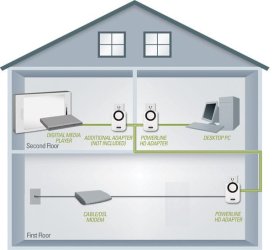
There are devices that give you fast cabled connection called Powerline adapters. The plug into your wall electrical outlets and run the signal over the house wires.
Since you're fairly far away from the router and going through walls and floors, that might be a good option for you instead of wireless.
Here's some on sale at Best Buy to give you an idea of the cost.
Any brand, except bargain basement brands, should work about the same. I picked TPL only so that the list was shorter, it wasn't a recommendation, although it is a fine brand. Do some homework, check reviews and see what ones fir your budget.
If you decide to go with a powerline adapter, I still think you should run the full guide.
Bill
.
Try downloading the instructions page and as many of the tools as you can until frustration sets in, then take a break. Keep download the tools until you have them all. Then you don't have to worry about the connection AND running the tool - you'll have everything you need.
For this exercise, I'm going to suggest that you skip updating the definitions because of your flaky connection. Many of the tools will prompt you with "Do you want to update the definitions" or something along those lines - just say no. It's not what I would normally suggest, but - you'll just have to run the scans with the definitions that come with the package.
I know you have other means to connect, so that might be your best bet if the connection issue persists and you have questions about the scans.
I've been thinking about the issue and the shotgun approach was only to double check your system (more like octo check).
There are devices that give you fast cabled connection called Powerline adapters. The plug into your wall electrical outlets and run the signal over the house wires.
Since you're fairly far away from the router and going through walls and floors, that might be a good option for you instead of wireless.
Here's some on sale at Best Buy to give you an idea of the cost.
Any brand, except bargain basement brands, should work about the same. I picked TPL only so that the list was shorter, it wasn't a recommendation, although it is a fine brand. Do some homework, check reviews and see what ones fir your budget.
If you decide to go with a powerline adapter, I still think you should run the full guide.
Bill
.
My Computer
At a glance
x64 (6.3.9600) Win8.1 Pro & soon dual boot x6...AMD A6-3420M APU with Radeon(tm) HD Graphics6.00 GBAMD Radeon(TM) HD 6520G
- Computer type
- Laptop
- Computer Manufacturer/Model Number
- HP Pavilion dv6-6c10us
- OS
- x64 (6.3.9600) Win8.1 Pro & soon dual boot x64 (6.1.7601) Win7_SP1 HomePrem
- CPU
- AMD A6-3420M APU with Radeon(tm) HD Graphics
- Motherboard
- Hewlett-Packard 1805
- Memory
- 6.00 GB
- Graphics Card(s)
- AMD Radeon(TM) HD 6520G
- Sound Card
- (1) AMD High Definition Audio Device (2) IDT High Definiti
- Monitor(s) Displays
- HP W2072a 20" LCD (1600 x 900) @ 60 Hz
- Screen Resolution
- 1366 x 768 x 32 bits (4294967296 colors) @ 60 Hz
- Hard Drives
- ST640LM0 00 HM641JI SATA Disk Device
- Keyboard
- Logitech k520 wireless KB
- Mouse
- Logitech m320 wireless mouse (bundled with KB)
- Internet Speed
- 15/5 | 54 MB Wireless 'n'
- Antivirus
- Realtime: Defender or Avast | On-demand: Malwarebytes, ESET
- Browser
- IE 11 on Win8, IE 10 on win 7
- Other Info
- Media: [Gimp, Audacity, VLC] || Comm: [WEmail 2012, Skype] || Productivity: [OpenOffice,| Textpad] || Utils: [Sysinternals, cCleaner, Speccy, Defraggler]