Need help with connectivity issues.

raaedk

New member
Local time
4:29 PM
Messages
6
Hello,

My connection keeps going out randomly and my computer is just having general bad connectivity. I know it is my computer because no other computers in the household are having this problem. I'm not really good with internet issues, but I've reset my router, restarted my computer, turned off firewall and antivirus. Those didn't work, and I did try using a ethernet cable but it didn't work any better. Thanks in advance, I left a ipconfig/all down here. If you need any more information just ask. :D

Windows IP Configuration

Host Name . . . . . . . . . . . . : (I removed this)
Primary Dns Suffix . . . . . . . :
Node Type . . . . . . . . . . . . : Hybrid
IP Routing Enabled. . . . . . . . : No
WINS Proxy Enabled. . . . . . . . : No

Wireless LAN adapter Wireless Network Connection 2:

Media State . . . . . . . . . . . : Media disconnected
Connection-specific DNS Suffix . :
Description . . . . . . . . . . . : Microsoft Virtual WiFi Miniport Adapter
Physical Address. . . . . . . . . : 44-6D-57-50-C8-2D
DHCP Enabled. . . . . . . . . . . : Yes
Autoconfiguration Enabled . . . . : Yes

Ethernet adapter Bluetooth Network Connection:

Media State . . . . . . . . . . . : Media disconnected
Connection-specific DNS Suffix . :
Description . . . . . . . . . . . : Bluetooth Device (Personal Area Network)
Physical Address. . . . . . . . . : 9C-B7-0D-9C-80-E4
DHCP Enabled. . . . . . . . . . . : Yes
Autoconfiguration Enabled . . . . : Yes

Wireless LAN adapter Wireless Network Connection:

Connection-specific DNS Suffix . :
Description . . . . . . . . . . . : Broadcom WLAN Adapter
Physical Address. . . . . . . . . : 44-6D-57-50-C8-2D
DHCP Enabled. . . . . . . . . . . : Yes
Autoconfiguration Enabled . . . . : Yes
Link-local IPv6 Address . . . . . : fe80::b056:1952:ebb3:1897%14(Preferred)
IPv4 Address. . . . . . . . . . . : 192.168.0.10(Preferred)
Subnet Mask . . . . . . . . . . . : 255.255.255.0
Lease Obtained. . . . . . . . . . : Sunday, October 07, 2012 1:07:19 PM
Lease Expires . . . . . . . . . . : Sunday, October 07, 2012 4:07:23 PM
Default Gateway . . . . . . . . . : 192.168.0.1
DHCP Server . . . . . . . . . . . : 192.168.0.1
DHCPv6 IAID . . . . . . . . . . . : 256142679
DHCPv6 Client DUID. . . . . . . . : 00-01-00-01-17-32-7F-AA-90-2B-34-26-8B-FA
DNS Servers . . . . . . . . . . . : 24.247.24.53
66.189.0.100
24.178.162.3
NetBIOS over Tcpip. . . . . . . . : Enabled

Ethernet adapter Local Area Connection:

Media State . . . . . . . . . . . : Media disconnected
Connection-specific DNS Suffix . :
Description . . . . . . . . . . . : Realtek PCIe GBE Family Controller
Physical Address. . . . . . . . . : 90-2B-34-26-8B-FA
DHCP Enabled. . . . . . . . . . . : Yes
Autoconfiguration Enabled . . . . : Yes

Tunnel adapter isatap.{FF700547-5989-4DE9-9EF2-58BE2D1135FC}:

Media State . . . . . . . . . . . : Media disconnected
Connection-specific DNS Suffix . :
Description . . . . . . . . . . . : Microsoft ISATAP Adapter
Physical Address. . . . . . . . . : 00-00-00-00-00-00-00-E0
DHCP Enabled. . . . . . . . . . . : No
Autoconfiguration Enabled . . . . : Yes

Tunnel adapter Local Area Connection* 12:

Connection-specific DNS Suffix . :
Description . . . . . . . . . . . : Microsoft Teredo Tunneling Adapter
Physical Address. . . . . . . . . : 00-00-00-00-00-00-00-E0
DHCP Enabled. . . . . . . . . . . : No
Autoconfiguration Enabled . . . . : Yes
IPv6 Address. . . . . . . . . . . : 2001:0:9d38:6ab8:3c90:3fbc:b8a5:6669(Preferred)
Link-local IPv6 Address . . . . . : fe80::3c90:3fbc:b8a5:6669%12(Preferred)
Default Gateway . . . . . . . . . : ::
NetBIOS over Tcpip. . . . . . . . : Disabled
 

My Computer

OS
Windows 7 Home Premium 64bit
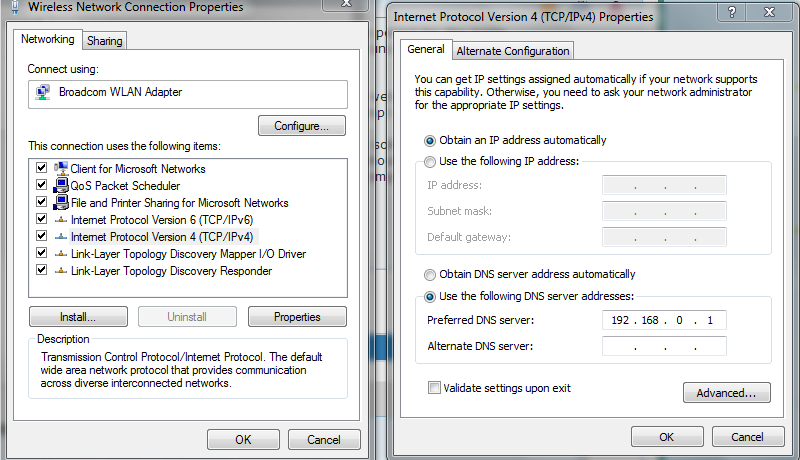
You have 3 dns servers set on the local side of the WLAN adapter. Try setting it to 192.168.0.1

Write those 3 DNS numbers down for future reference.. Goto your network connection right click it and go 'properties'.
Select Internet Protocol Version 4. Down the bottom of the properties box that comes up, put in only your router/default gateway as the primary DNS server.
 

My Computer

Computer Manufacturer/Model Number
Custom / Daily / In Progess
OS
Win 7 Ultimate x64
CPU
QuadCore Intel Nehalem Core i7-950, 3200 MHz
Motherboard
Gigabyte GA-X58A-UD3R Rev2.0
Memory
Patriot Sector 7 ViperII 2000Mhz Enhanced Low Lantency 3x4GB
Graphics Card(s)
Gigabyte GTX470
Sound Card
ICH10 / Realtek 8-ch
Monitor(s) Displays
Asus VE278Q 27" Widescreen LCD with LED AI backlight 1080p
Hard Drives
OCZ Vertex Agillity3
Seagate 500GB 7200rpm
PSU
Antex TruePower 750w
Case
Custom by me / Work in progress
Cooling
Corsair H80 / SilenX 38x120mm and 2x 25x80mm fans.......
One thing is your IP Lease Time is set to 3 hours. that is a very short time period for the lease. Usually they are set to 24 hours or longer. Could be every time the lease runs out the your connection to the net drops until the lease can be renewed.

When you say Bad Connectivity what exactly do you mean by that? Slow web browsing?
Have you run any PINGs to see what the times are? Open a Command Prompt and ping google.com.

Try connecting to another computer in your house, Network them, and do some file copies to and from that other computer. Depending on your wireless connection method, B, G or N you should get a file transfer rate of 1-2MBs, 6-10MBs or 20++MBs respectively. If you are getting those speeds from computer on your own LAN then it is something with the browser you are using.
 

My Computer

OS
7 x64
Thanks for the response Brad.

IyuRM.png


Once I did that, my connection stopped working at all and I got this error when visiting sites.

ptpmC.png
.

I changed it back to automatic.

And is there a way to change my IP lease time? Here is what I got when pinging google.
Microsoft Windows [Version 6.1.7601]
Copyright (c) 2009 Microsoft Corporation. All rights reserved.

C:\Users\Raaed>ping google.com

Pinging google.com [74.125.225.110] with 32 bytes of data:
Reply from 74.125.225.110: bytes=32 time=23ms TTL=54
Reply from 74.125.225.110: bytes=32 time=422ms TTL=54
Reply from 74.125.225.110: bytes=32 time=32ms TTL=54
Reply from 74.125.225.110: bytes=32 time=57ms TTL=54

Ping statistics for 74.125.225.110:
Packets: Sent = 4, Received = 4, Lost = 0 (0% loss),
Approximate round trip times in milli-seconds:
Minimum = 23ms, Maximum = 422ms, Average = 133ms

C:\Users\Raaed>

I have problems with Chrome and Firefox, and lag while playing games like League of Legends.
 

My Computer

OS
Windows 7 Home Premium 64bit
You have 3 dns servers set on the local side of the WLAN adapter. Try setting it to 192.168.0.1

Write those 3 DNS numbers down for future reference.. Goto your network connection right click it and go 'properties'.
Select Internet Protocol Version 4. Down the bottom of the properties box that comes up, put in only your router/default gateway as the primary DNS server.

Do NOT do that, Very Bad Idea!!!!

That puts extra work on the router and if the router is not setup to forward DNS lookup requests you will never get connected to any website. If the router was designed to also be the DNS lookup point and or server it would be configured that way by default.
 

My Computer

OS
7 x64
Im surprised that 'obtain dns automatically' was already selected and gave you those 3 DNS servers and not your default gateway. Makes me wonder how you're connected/router is setup. I would check the same IPV4 settings against one of the other working computers, and also have a look at the advanced tab.
 

My Computer

Computer Manufacturer/Model Number
Custom / Daily / In Progess
OS
Win 7 Ultimate x64
CPU
QuadCore Intel Nehalem Core i7-950, 3200 MHz
Motherboard
Gigabyte GA-X58A-UD3R Rev2.0
Memory
Patriot Sector 7 ViperII 2000Mhz Enhanced Low Lantency 3x4GB
Graphics Card(s)
Gigabyte GTX470
Sound Card
ICH10 / Realtek 8-ch
Monitor(s) Displays
Asus VE278Q 27" Widescreen LCD with LED AI backlight 1080p
Hard Drives
OCZ Vertex Agillity3
Seagate 500GB 7200rpm
PSU
Antex TruePower 750w
Case
Custom by me / Work in progress
Cooling
Corsair H80 / SilenX 38x120mm and 2x 25x80mm fans.......
Lease time is change on the router but if alll other computer are working OK that leaves out that as the cause of your computer connection problems. I suspect you have some nasties on your computer. A virus or trojan and Malware.

Download the Windows Defender Offline tool.

What is Windows Defender Offline?

Burn it to a CD and then boot the computer from that CD and see if it comes up with anything. You should also run Malwarebites.
 

My Computer

OS
7 x64
Im surprised that 'obtain dns automatically' was already selected and gave you those 3 DNS servers and not your default gateway. Makes me wonder how you're connected/router is setup. I would check the same IPV4 settings against one of the other working computers, and also have a look at the advanced tab.

It is totally normal for a router to pass down the REAL DNS server addresses the ISP hands out or from manually entered DNS server addresses in the router.

Windows IP Configuration

Host Name . . . . . . . . . . . . : i5
Primary Dns Suffix . . . . . . . :
Node Type . . . . . . . . . . . . : Hybrid
IP Routing Enabled. . . . . . . . : No
WINS Proxy Enabled. . . . . . . . : No

Ethernet adapter Local Area Connection 3:

Connection-specific DNS Suffix . :
Description . . . . . . . . . . . : Realtek PCIe GBE Family Controller
Physical Address. . . . . . . . . : BC-AE-C5-59-39-84
DHCP Enabled. . . . . . . . . . . : Yes
Autoconfiguration Enabled . . . . : Yes
Link-local IPv6 Address . . . . . : fe80::bd52:8905:6e42:806a%15(Preferred)
IPv4 Address. . . . . . . . . . . : 192.168.1.100(Preferred)
Subnet Mask . . . . . . . . . . . : 255.255.255.0
Lease Obtained. . . . . . . . . . : Saturday, October 06, 2012 7:55:00 PM
Lease Expires . . . . . . . . . . : Tuesday, October 09, 2012 7:55:00 PM
Default Gateway . . . . . . . . . : 192.168.1.1
DHCP Server . . . . . . . . . . . : 192.168.1.1
DHCPv6 IAID . . . . . . . . . . . : 331132613
DHCPv6 Client DUID. . . . . . . . : 00-01-00-01-14-A3-07-89-00-18-F3-2E-47-4E

DNS Servers . . . . . . . . . . . : 75.75.75.75
4.2.2.1
4.2.2.2
NetBIOS over Tcpip. . . . . . . . : Enabled
See the 75.75.75.75 address, that is assigned by my ISP.
The other 2 or ones I have manually entered into the router.

It is also faster to use REAL DNS server addresses, One less stop the lookup has to make to get you to the address you want.
 

My Computer

OS
7 x64
You have 3 dns servers set on the local side of the WLAN adapter. Try setting it to 192.168.0.1

Write those 3 DNS numbers down for future reference.. Goto your network connection right click it and go 'properties'.
Select Internet Protocol Version 4. Down the bottom of the properties box that comes up, put in only your router/default gateway as the primary DNS server.

Do NOT do that, Very Bad Idea!!!!

That puts extra work on the router and if the router is not setup to forward DNS lookup requests you will never get connected to any website. If the router was designed to also be the DNS lookup point and or server it would be configured that way by default.

Every router I've used to date is like that out of the box. On the pc it defaults to the router being the default gateway and primary dns server. On the WAN side of the router it gets its DNS info from the ISP automatically.
 

My Computer

Computer Manufacturer/Model Number
Custom / Daily / In Progess
OS
Win 7 Ultimate x64
CPU
QuadCore Intel Nehalem Core i7-950, 3200 MHz
Motherboard
Gigabyte GA-X58A-UD3R Rev2.0
Memory
Patriot Sector 7 ViperII 2000Mhz Enhanced Low Lantency 3x4GB
Graphics Card(s)
Gigabyte GTX470
Sound Card
ICH10 / Realtek 8-ch
Monitor(s) Displays
Asus VE278Q 27" Widescreen LCD with LED AI backlight 1080p
Hard Drives
OCZ Vertex Agillity3
Seagate 500GB 7200rpm
PSU
Antex TruePower 750w
Case
Custom by me / Work in progress
Cooling
Corsair H80 / SilenX 38x120mm and 2x 25x80mm fans.......
I have the full paid version of Malwarebytes, and I will start a scan now. So I should download Windows Defender, put it on a disc, and then boot from that disc on startup?
 
Last edited:

My Computer

OS
Windows 7 Home Premium 64bit
I have the full paid version of Malwarebytes , so I usually trust it but I will start a scan now. So I should download Windows Defender, put it on a disc, and then boot from that disc from startup?

Yes you should.
 

My Computer

OS
7 x64
Every router I've used to date is like that out of the box. On the pc it defaults to the router being the default gateway and primary dns server. On the WAN side of the router it gets its DNS info from the ISP automatically.

Every one that I have ever used always hands down the DNS server addresses obtained from the ISP or manually input into the router. That is with several Linksys models and my current Zyxel Zywall 5 that I have had for 8+ years. I can't check the NetGear I have as it is setup as just a wireless access point.
You really don't want the router to do the DNS lookups. With that type of setup the PC asks the router "Connect me to Google.com" the router then has to go out to the Real DNS servers and say "Give me the IP address for Google.com", Then it get a response from the Real DNS and then sends that back to the PC. Where if the computer is set to use the Real DNS it just asks that to forward that address to the browser and connect to it.
 

My Computer

OS
7 x64
Some malware called PlayBryte? Is it safe to remove the registry values for it?

Malwarebytes Anti-Malware (PRO) 1.65.0.1400
Malwarebytes : Free anti-malware download

Database version: v2012.10.07.04

Windows 7 Service Pack 1 x64 NTFS
Internet Explorer 9.0.8112.16421
Raaed :: RAAED-HP [administrator]

Protection: Disabled

10/7/2012 5:31:30 PM
mbam-log-2012-10-07 (17-37-01).txt

Scan type: Quick scan
Scan options enabled: Memory | Startup | Registry | File System | Heuristics/Extra | Heuristics/Shuriken | PUP | PUM
Scan options disabled: P2P
Objects scanned: 204961
Time elapsed: 2 minute(s), 42 second(s)

Memory Processes Detected: 0
(No malicious items detected)

Memory Modules Detected: 0
(No malicious items detected)

Registry Keys Detected: 5
HKCR\CLSID\{61e0ef7a-9bc0-45ea-9b2f-f3e9f02692bd} (PUP.PlayBryte) -> No action taken.
HKCU\SOFTWARE\Microsoft\Windows\CurrentVersion\Ext\Settings\{61E0EF7A-9BC0-45EA-9B2F-F3E9F02692BD} (PUP.PlayBryte) -> No action taken.
HKCU\SOFTWARE\Microsoft\Windows\CurrentVersion\Ext\Stats\{61E0EF7A-9BC0-45EA-9B2F-F3E9F02692BD} (PUP.PlayBryte) -> No action taken.
HKLM\SOFTWARE\Microsoft\Windows\CurrentVersion\Explorer\Browser Helper Objects\{61e0ef7a-9bc0-45ea-9b2f-f3e9f02692bd} (PUP.PlayBryte) -> No action taken.
HKLM\SOFTWARE\MICROSOFT\WINDOWS\CURRENTVERSION\UNINSTALL\PLAYBRYTE (PUP.PlayBryte) -> No action taken.

Registry Values Detected: 2
HKLM\SOFTWARE\Microsoft\Windows\CurrentVersion\Internet Settings\5.0\User Agent\Post Platform|playbrytetoolbar_Playbryte (PUP.PlayBryte) -> Data: -> No action taken.
HKLM\SOFTWARE\Microsoft\Windows\CurrentVersion\Uninstall\Playbryte|Publisher (PUP.PlayBryte) -> Data: Playbryte -> No action taken.

Registry Data Items Detected: 0
(No malicious items detected)

Folders Detected: 0
(No malicious items detected)

Files Detected: 0
(No malicious items detected)

(end)
 

My Computer

OS
Windows 7 Home Premium 64bit
Not sure but you should do a search of your drive for that PlayBrytetoolbar also.
 

My Computer

OS
7 x64
Well, after removing the PlayBryte, and switching to Google's Public DNS (I did that on my own), my internet seems to be working. There hasn't been any lag or shutoff for the last 8 hours. Thanks for the help. This is my updated ipconfig, although I'm not sure if it changed or not. I will set this topic as solved unless there is anything else wrong?

Microsoft Windows [Version 6.1.7601]
Copyright (c) 2009 Microsoft Corporation. All rights reserved.

C:\Windows\system32>ipconfig/all

Windows IP Configuration

Host Name . . . . . . . . . . . . : Raaed-HP
Primary Dns Suffix . . . . . . . :
Node Type . . . . . . . . . . . . : Hybrid
IP Routing Enabled. . . . . . . . : No
WINS Proxy Enabled. . . . . . . . : No

Wireless LAN adapter Wireless Network Connection 2:

Media State . . . . . . . . . . . : Media disconnected
Connection-specific DNS Suffix . :
Description . . . . . . . . . . . : Microsoft Virtual WiFi Miniport Adapter
Physical Address. . . . . . . . . : 44-6D-57-50-C8-2D
DHCP Enabled. . . . . . . . . . . : Yes
Autoconfiguration Enabled . . . . : Yes

Ethernet adapter Bluetooth Network Connection:

Media State . . . . . . . . . . . : Media disconnected
Connection-specific DNS Suffix . :
Description . . . . . . . . . . . : Bluetooth Device (Personal Area Network)
Physical Address. . . . . . . . . : 9C-B7-0D-9C-80-E4
DHCP Enabled. . . . . . . . . . . : Yes
Autoconfiguration Enabled . . . . : Yes

Wireless LAN adapter Wireless Network Connection:

Connection-specific DNS Suffix . :
Description . . . . . . . . . . . : Broadcom WLAN Adapter
Physical Address. . . . . . . . . : 44-6D-57-50-C8-2D
DHCP Enabled. . . . . . . . . . . : Yes
Autoconfiguration Enabled . . . . : Yes
Link-local IPv6 Address . . . . . : fe80::b056:1952:ebb3:1897%14(Preferred)
IPv4 Address. . . . . . . . . . . : 192.168.0.10(Preferred)
Subnet Mask . . . . . . . . . . . : 255.255.255.0
Lease Obtained. . . . . . . . . . : Sunday, October 07, 2012 5:11:02 PM
Lease Expires . . . . . . . . . . : Sunday, October 07, 2012 7:11:01 PM
Default Gateway . . . . . . . . . : 192.168.0.1
DHCP Server . . . . . . . . . . . : 192.168.0.1
DHCPv6 IAID . . . . . . . . . . . : 256142679
DHCPv6 Client DUID. . . . . . . . : 00-01-00-01-17-32-7F-AA-90-2B-34-26-8B-FA

DNS Servers . . . . . . . . . . . : 2001:4860:4860::8888
8.8.8.8
NetBIOS over Tcpip. . . . . . . . : Enabled

Ethernet adapter Local Area Connection:

Media State . . . . . . . . . . . : Media disconnected
Connection-specific DNS Suffix . :
Description . . . . . . . . . . . : Realtek PCIe GBE Family Controller
Physical Address. . . . . . . . . : 90-2B-34-26-8B-FA
DHCP Enabled. . . . . . . . . . . : Yes
Autoconfiguration Enabled . . . . : Yes

Tunnel adapter isatap.{FF700547-5989-4DE9-9EF2-58BE2D1135FC}:

Media State . . . . . . . . . . . : Media disconnected
Connection-specific DNS Suffix . :
Description . . . . . . . . . . . : Microsoft ISATAP Adapter
Physical Address. . . . . . . . . : 00-00-00-00-00-00-00-E0
DHCP Enabled. . . . . . . . . . . : No
Autoconfiguration Enabled . . . . : Yes

Tunnel adapter Local Area Connection* 12:

Connection-specific DNS Suffix . :
Description . . . . . . . . . . . : Microsoft Teredo Tunneling Adapter
Physical Address. . . . . . . . . : 00-00-00-00-00-00-00-E0
DHCP Enabled. . . . . . . . . . . : No
Autoconfiguration Enabled . . . . : Yes
IPv6 Address. . . . . . . . . . . : 2001:0:4137:9e76:1098:319d:b8a5:6669(Pref
erred)
Link-local IPv6 Address . . . . . : fe80::1098:319d:b8a5:6669%12(Preferred)
Default Gateway . . . . . . . . . : ::
NetBIOS over Tcpip. . . . . . . . : Disabled

C:\Windows\system32>
 

My Computer

OS
Windows 7 Home Premium 64bit
You have 3 dns servers set on the local side of the WLAN adapter. Try setting it to 192.168.0.1

Write those 3 DNS numbers down for future reference.. Goto your network connection right click it and go 'properties'.
Select Internet Protocol Version 4. Down the bottom of the properties box that comes up, put in only your router/default gateway as the primary DNS server.

Do NOT do that, Very Bad Idea!!!!

That puts extra work on the router and if the router is not setup to forward DNS lookup requests you will never get connected to any website. If the router was designed to also be the DNS lookup point and or server it would be configured that way by default.

Every router I've used to date is like that out of the box. On the pc it defaults to the router being the default gateway and primary dns server. On the WAN side of the router it gets its DNS info from the ISP automatically.

The router's I've set up are like this also, same with auto DNS to the ISP. I've never needed to type the default gateway in where it says DNS. Most routers will forward DNS requests as soon as you type in the DNS servers into the routers settings.

I've also never had a problem with the router being used as the DNS host, default gateway shows up as the DNS server in the ipconfig which only means the DNS is being handled by the router.
 

My Computer

Computer type
PC/Desktop
Computer Manufacturer/Model Number
Home built
OS
Windows 7 Ult, Windows 8.1 Pro,
CPU
Q9650-4.275GHz, E8600 4.5GHz, E6750-3.8GHz
Motherboard
Evga 780i FTW
Memory
G.Skill PC2 9600 1200Mhz 5 5 5 15 2T
Graphics Card(s)
GTX480
Sound Card
Asus Xonar D2
Monitor(s) Displays
HannsG
Screen Resolution
1680X1050
Hard Drives
GSkill Phoenix Pro 120GB SSD
PSU
ThermalTake Toughpower 1000Watt modular
Case
ThermalTake XaserV
Cooling
Xigmatek S1283
Keyboard
Logitech G15
Mouse
Logitech G9
Internet Speed
T1
My point is if the router is passing down the real DNS server addresses to all computer there is no reason to change it to have the router forward the DNS lookup and act as the DNS server in the computers network setup.
There is no point in doing this if the computer already has the Real DNS server addresses.
 

My Computer

OS
7 x64
I would think in the sense of security and availability, it would keep real world DNS traffic at the router and setting DNS servers manually on the PC is another point in the chain for fail as the ISP changes their infrastructure and your DNS entries become invalid. I can't choose a manual IP and use auto DNS in my pc's config.

No setting on the router gets changed for it to do this function automatically.
 

My Computer

Computer Manufacturer/Model Number
Custom / Daily / In Progess
OS
Win 7 Ultimate x64
CPU
QuadCore Intel Nehalem Core i7-950, 3200 MHz
Motherboard
Gigabyte GA-X58A-UD3R Rev2.0
Memory
Patriot Sector 7 ViperII 2000Mhz Enhanced Low Lantency 3x4GB
Graphics Card(s)
Gigabyte GTX470
Sound Card
ICH10 / Realtek 8-ch
Monitor(s) Displays
Asus VE278Q 27" Widescreen LCD with LED AI backlight 1080p
Hard Drives
OCZ Vertex Agillity3
Seagate 500GB 7200rpm
PSU
Antex TruePower 750w
Case
Custom by me / Work in progress
Cooling
Corsair H80 / SilenX 38x120mm and 2x 25x80mm fans.......
Back
Top