

BananaWaffle
New member
- Local time
- 1:10 AM
- Messages
- 2
I hope im posting this in the right forum, sorry if this doesnt belong here.
So i wanted to play some Ultra SF4 yesterday and i noticed that the sound form the game was gone. i can hear all the logos and intros but once im at the main menu, the sound is gone.
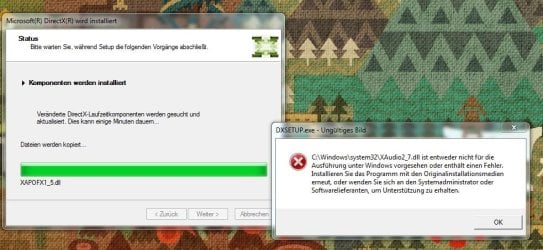
After a bit of research i think its a problem with Microsofts DirectX. more Specifically the component XAudio2_7.dll seems to be damaged or something and causing an error everytime i run the dx installer.
(I have attached a Screenshot, it is german, but it translates roughly to" XAudio2_7.dll is either damaged or not meant to run on Windows. try reinstalling bla bla bla" )
i have tried replacing the file, i have tried deleting it, making the installer download it again but nothng is working.
Everything i find online is just saying i should download the newest DirectX and try reinstalling it, wich just leads to the beforementioned Crash.
Thank you for your Help
EDIT:I have finally found the solution and fixed the issue
All the Error Messages were simply missleading.
Windows kept telling me that the file file XAudio2_7.dll was damaged, however the next file XAudio2_8.dll was simply missing for some reason. By sheer luck i discoverd there are supposed to be 8 files. after downloading the missing file and running the installer again i fixed the issue. The Ingame-sound in my Games (not only USF4, others were affected as well) is back
So i wanted to play some Ultra SF4 yesterday and i noticed that the sound form the game was gone. i can hear all the logos and intros but once im at the main menu, the sound is gone.
After a bit of research i think its a problem with Microsofts DirectX. more Specifically the component XAudio2_7.dll seems to be damaged or something and causing an error everytime i run the dx installer.
(I have attached a Screenshot, it is german, but it translates roughly to" XAudio2_7.dll is either damaged or not meant to run on Windows. try reinstalling bla bla bla" )
i have tried replacing the file, i have tried deleting it, making the installer download it again but nothng is working.
Everything i find online is just saying i should download the newest DirectX and try reinstalling it, wich just leads to the beforementioned Crash.
Thank you for your Help
EDIT:I have finally found the solution and fixed the issue
All the Error Messages were simply missleading.
Windows kept telling me that the file file XAudio2_7.dll was damaged, however the next file XAudio2_8.dll was simply missing for some reason. By sheer luck i discoverd there are supposed to be 8 files. after downloading the missing file and running the installer again i fixed the issue. The Ingame-sound in my Games (not only USF4, others were affected as well) is back
Attachments
Last edited:
My Computer
- Computer type
- PC/Desktop
- OS
- Windows 7 Ultimate x64


