
Need help with DNS server not responding

casshern

New member
Local time
12:00 AM
Messages
4
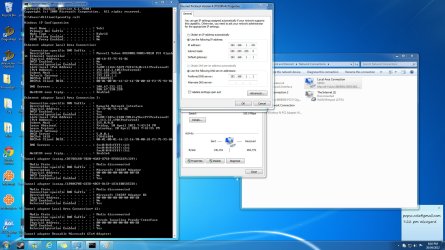
Hi, as of today, my internet connection doesnt work for two of my computers which are connected to the router by cable. When I go to troubleshoot, it tells me that the "DNS server is not responding". Can anyone help me fix this issue please?

Edit: added a screenie of the ipconfig as I figure you guys might find it useful
 

Attachments
  • Untitled.jpg
    Untitled.jpg
    496.3 KB · Views: 336

My Computer

OS
Windows 7 Ultimate x64
What router do you have? Have you tried rebooting it?
 

My Computer

OS
XP / Win7 x64 Pro
CPU
Intel Quad-Core Q9450 @ 3.2GHz
Motherboard
Asus P5-E
Memory
2x2GB GSkill DDR2
Graphics Card(s)
NVIDIA GeForce 8600 GTS (EVGA)
Monitor(s) Displays
Dell 2408WFP
Screen Resolution
1920x1200
You screen shots are unreadable (to me at least). Please do this:

Click on Start then Run or press Window key (next to left Ctrl key) +R and paste the following into the Run box, exactly as shown, including double quotes:

cmd /c "ipconfig /all > postme.txt & ping yahoo.com >> postme.txt & notepad postme.txt & del postme.txt"

and press ENTER.

A file will open in Notepad. Please copy and paste the contents here. Close the Notepad window and the file will be deleted and the Command Prompt window will also close.

If you don't have a Run selection off the Start menu, see here: Enable Run Command on Windows 7 or Vista Start Menu
 

My Computer

Computer type
PC/Desktop
Computer Manufacturer/Model Number
Lenovo IdeaCenter 450
OS
Windows 10 Pro X64
CPU
Intel Quad Core i7-4770 @ 3.4Ghz
Memory
16.0GB PC3-12800 DDR3 SDRAM 1600 MHz
Graphics Card(s)
Intel Integrated HD Graphics
Sound Card
Realtek HD Audio
Monitor(s) Displays
HP 22" LCD
Screen Resolution
1680 x 1050
Hard Drives
250GB Samsung EVO SATA-3 SSD
2TB Seagate ST2000DM001 SATA-2
1.5TB Seagate ST3150041AS SATA
Keyboard
Dell USB
Mouse
Lenovo USB
Internet Speed
Cable via Road Runner 3MB Upload, 30MB Download
Antivirus
Windows Defender, MBAM Pro, MBAE
Browser
Seamonkey
Other Info
UEFI/GPT
PLDS DVD-RW DH16AERSH
Hi, as of today, my internet connection doesnt work for two of my computers which are connected to the router by cable. When I go to troubleshoot, it tells me that the "DNS server is not responding". Can anyone help me fix this issue please?

Edit: added a screenie of the ipconfig as I figure you guys might find it useful

First thing I noticed is that the static IP you designated in IPv4 isn't the one showing up in the ipconfig, it should be the one you designated. If you are going to use static IP's you need to make sure that it's outside the routers DHCP address range.

Second thing is that the DNS server in IPv4 is pointing back to the router's default gateway rather than specifying a primary or secondary DNS server address. It might work better to type your actual DNS servers into the IPv4 properties.

I also noticed that a secondary wired connection appears to be active, it may help to disable the secondary connection.
 

My Computer

Computer type
PC/Desktop
Computer Manufacturer/Model Number
Home built
OS
Windows 7 Ult, Windows 8.1 Pro,
CPU
Q9650-4.275GHz, E8600 4.5GHz, E6750-3.8GHz
Motherboard
Evga 780i FTW
Memory
G.Skill PC2 9600 1200Mhz 5 5 5 15 2T
Graphics Card(s)
GTX480
Sound Card
Asus Xonar D2
Monitor(s) Displays
HannsG
Screen Resolution
1680X1050
Hard Drives
GSkill Phoenix Pro 120GB SSD
PSU
ThermalTake Toughpower 1000Watt modular
Case
ThermalTake XaserV
Cooling
Xigmatek S1283
Keyboard
Logitech G15
Mouse
Logitech G9
Internet Speed
T1
I have a Billion adsl router I believe, and yes I've tried several times restarting the router/shutting it off and turning the power off.
This whole thing started when the power suddenly went out the day before. Some how it miraculously started working again yesterday until my sister tripped the power and now it's stuffed again.

>chev65, I'm not really good with IT stuff, can you explain to me what IP i should put instead of the one I have?

My brother explained to me that the router is connected to another router with wifi which is then connected to my computer via LAN. So I think that explains why the DNS server in IPv4 is pointing back to the router's default gateway? I'm not really sure about this though :S.

Also, I notice that after the power failure, another connection was present (which is the one I'm connected to now on my laptop with wireless).
 

My Computer

OS
Windows 7 Ultimate x64
I have a Billion adsl router I believe, and yes I've tried several times restarting the router/shutting it off and turning the power off.
This whole thing started when the power suddenly went out the day before. Some how it miraculously started working again yesterday until my sister tripped the power and now it's stuffed again.

>chev65, I'm not really good with IT stuff, can you explain to me what IP i should put instead of the one I have?

My brother explained to me that the router is connected to another router with wifi which is then connected to my computer via LAN. So I think that explains why the DNS server in IPv4 is pointing back to the router's default gateway? I'm not really sure about this though :S.

Also, I notice that after the power failure, another connection was present (which is the one I'm connected to now on my laptop with wireless).

The part in bold can be a real problem.

Using two routers in a single network may or most likely may not be reliable at all, even if you think it's set up correctly it may or may not be completely reliable.

You would be far better off using a regular router plus a dedicated wireless access point or bridge rather than having two routers in a single network. Or you can use a dual router with both wired and wireless connections then add a switch if you need more wired LAN connections.

This probably explains why you have a static IP in IPv4 but the IP that shows up in your ipconfig/all is not the same as the one you assigned to it. It also explains the DNS problem and gives good reason for the power outage recovery problem.

If you can get the settings just right then it is possible to use two routers in a single network although it's not something I would do if I wanted a reliable network.

If you want a chance at getting the dual router set up correctly then the link below might help. :)

How to Connect Two Routers on a Home Network
 

My Computer

Computer type
PC/Desktop
Computer Manufacturer/Model Number
Home built
OS
Windows 7 Ult, Windows 8.1 Pro,
CPU
Q9650-4.275GHz, E8600 4.5GHz, E6750-3.8GHz
Motherboard
Evga 780i FTW
Memory
G.Skill PC2 9600 1200Mhz 5 5 5 15 2T
Graphics Card(s)
GTX480
Sound Card
Asus Xonar D2
Monitor(s) Displays
HannsG
Screen Resolution
1680X1050
Hard Drives
GSkill Phoenix Pro 120GB SSD
PSU
ThermalTake Toughpower 1000Watt modular
Case
ThermalTake XaserV
Cooling
Xigmatek S1283
Keyboard
Logitech G15
Mouse
Logitech G9
Internet Speed
T1
Thanks for the posted txt. After I looked at it I tried looking at your screen shots full screen and they were perfectly readable. :o

So there are two bridged routers then Ethernet to your computer.
Sounds like the setup between the two routes got hosed with the power outages.
Whoever set it up needs to set it up again. That would explain the ip mismatch CHev65 noticed.

This is a good article on how to do this: Configuring two wireless routers with one SSID (network name) at home for free roaming
 

My Computer

Computer type
PC/Desktop
Computer Manufacturer/Model Number
Lenovo IdeaCenter 450
OS
Windows 10 Pro X64
CPU
Intel Quad Core i7-4770 @ 3.4Ghz
Memory
16.0GB PC3-12800 DDR3 SDRAM 1600 MHz
Graphics Card(s)
Intel Integrated HD Graphics
Sound Card
Realtek HD Audio
Monitor(s) Displays
HP 22" LCD
Screen Resolution
1680 x 1050
Hard Drives
250GB Samsung EVO SATA-3 SSD
2TB Seagate ST2000DM001 SATA-2
1.5TB Seagate ST3150041AS SATA
Keyboard
Dell USB
Mouse
Lenovo USB
Internet Speed
Cable via Road Runner 3MB Upload, 30MB Download
Antivirus
Windows Defender, MBAM Pro, MBAE
Browser
Seamonkey
Other Info
UEFI/GPT
PLDS DVD-RW DH16AERSH
Okay, I'm so stupid. After hours of messing with the configs, I decided to try the benchmark thing that roadrunner suggested and it worked!!! Thanks to all <3
 

My Computer

OS
Windows 7 Ultimate x64
So you just changed the DNS, hmm easy enough, I'm wondering why the DNS server that once worked stopped working all the sudden, so many to choose from though.

I saw many more potential problems there and the dual router set up may cause problems down the line, just keep your fingers crossed. :)
 

My Computer

Computer type
PC/Desktop
Computer Manufacturer/Model Number
Home built
OS
Windows 7 Ult, Windows 8.1 Pro,
CPU
Q9650-4.275GHz, E8600 4.5GHz, E6750-3.8GHz
Motherboard
Evga 780i FTW
Memory
G.Skill PC2 9600 1200Mhz 5 5 5 15 2T
Graphics Card(s)
GTX480
Sound Card
Asus Xonar D2
Monitor(s) Displays
HannsG
Screen Resolution
1680X1050
Hard Drives
GSkill Phoenix Pro 120GB SSD
PSU
ThermalTake Toughpower 1000Watt modular
Case
ThermalTake XaserV
Cooling
Xigmatek S1283
Keyboard
Logitech G15
Mouse
Logitech G9
Internet Speed
T1
DNS Server not responding

To Casshern: what did you do after you ran the namebench program from Roadrunner?


Okay, I'm so stupid. After hours of messing with the configs, I decided to try the benchmark thing that roadrunner suggested and it worked!!! Thanks to all <3
 

My Computer

OS
Windows 7 home premium 32 bit
To Casshern: what did you do after you ran the namebench program from Roadrunner?


Okay, I'm so stupid. After hours of messing with the configs, I decided to try the benchmark thing that roadrunner suggested and it worked!!! Thanks to all <3

He simply choose the fastest and most reliable DNS servers that showed up on name bench. Google is a good choice at 8.8.8.8 and 8.8.4.4

You can type the DNS server into your IPv4 properties or type them into your routers settings for DNS servers.
 

My Computer

Computer type
PC/Desktop
Computer Manufacturer/Model Number
Home built
OS
Windows 7 Ult, Windows 8.1 Pro,
CPU
Q9650-4.275GHz, E8600 4.5GHz, E6750-3.8GHz
Motherboard
Evga 780i FTW
Memory
G.Skill PC2 9600 1200Mhz 5 5 5 15 2T
Graphics Card(s)
GTX480
Sound Card
Asus Xonar D2
Monitor(s) Displays
HannsG
Screen Resolution
1680X1050
Hard Drives
GSkill Phoenix Pro 120GB SSD
PSU
ThermalTake Toughpower 1000Watt modular
Case
ThermalTake XaserV
Cooling
Xigmatek S1283
Keyboard
Logitech G15
Mouse
Logitech G9
Internet Speed
T1
I need help with this too. Here is the notepad contents:

Windows IP Configuration
Host Name . . . . . . . . . . . . : Rita-PC
Primary Dns Suffix . . . . . . . :
Node Type . . . . . . . . . . . . : Hybrid
IP Routing Enabled. . . . . . . . : Yes
WINS Proxy Enabled. . . . . . . . : No
DNS Suffix Search List. . . . . . : domain.actdsltmp
Ethernet adapter Local Area Connection:
Connection-specific DNS Suffix . : domain.actdsltmp
Description . . . . . . . . . . . : Realtek PCIe FE Family Controller
Physical Address. . . . . . . . . : 00-25-64-03-3E-4B
DHCP Enabled. . . . . . . . . . . : Yes
Autoconfiguration Enabled . . . . : Yes
Link-local IPv6 Address . . . . . : fe80::41ce:90f7:29bd:5c1e%10(Preferred)
IPv4 Address. . . . . . . . . . . : 192.168.1.2(Preferred)
Subnet Mask . . . . . . . . . . . : 255.255.255.0
Lease Obtained. . . . . . . . . . : Tuesday, November 06, 2012 10:45:36 PM
Lease Expires . . . . . . . . . . : Tuesday, November 13, 2012 10:45:36 PM
Default Gateway . . . . . . . . . : 192.168.1.1
DHCP Server . . . . . . . . . . . : 192.168.1.1
DHCPv6 IAID . . . . . . . . . . . : 234890596
DHCPv6 Client DUID. . . . . . . . : 00-01-00-01-18-26-4D-92-00-25-64-03-3E-4B
DNS Servers . . . . . . . . . . . : 192.168.1.1
NetBIOS over Tcpip. . . . . . . . : Enabled
Tunnel adapter isatap.domain.actdsltmp:
Media State . . . . . . . . . . . : Media disconnected
Connection-specific DNS Suffix . : domain.actdsltmp
Description . . . . . . . . . . . : Microsoft ISATAP Adapter
Physical Address. . . . . . . . . : 00-00-00-00-00-00-00-E0
DHCP Enabled. . . . . . . . . . . : No
Autoconfiguration Enabled . . . . : Yes
Tunnel adapter Local Area Connection* 11:
Media State . . . . . . . . . . . : Media disconnected
Connection-specific DNS Suffix . :
Description . . . . . . . . . . . : Teredo Tunneling Pseudo-Interface
Physical Address. . . . . . . . . : 00-00-00-00-00-00-00-E0
DHCP Enabled. . . . . . . . . . . : No
Autoconfiguration Enabled . . . . : Yes
Ping request could not find host yahoo.com. Please check the name and try again.
 

My Computer

Computer Manufacturer/Model Number
Microsoft
OS
Win 7 Home Premium, 64-bit
CPU
Pentium Dual Core
You really should start your own thread so it doesn't get lost at the end of this one.

From what I can see, it looks like your DNS is not resolving names, like yahoo.com. If so, try the same thing. Download and run namebench and see what it tells you.
 

My Computer

Computer type
PC/Desktop
Computer Manufacturer/Model Number
Lenovo IdeaCenter 450
OS
Windows 10 Pro X64
CPU
Intel Quad Core i7-4770 @ 3.4Ghz
Memory
16.0GB PC3-12800 DDR3 SDRAM 1600 MHz
Graphics Card(s)
Intel Integrated HD Graphics
Sound Card
Realtek HD Audio
Monitor(s) Displays
HP 22" LCD
Screen Resolution
1680 x 1050
Hard Drives
250GB Samsung EVO SATA-3 SSD
2TB Seagate ST2000DM001 SATA-2
1.5TB Seagate ST3150041AS SATA
Keyboard
Dell USB
Mouse
Lenovo USB
Internet Speed
Cable via Road Runner 3MB Upload, 30MB Download
Antivirus
Windows Defender, MBAM Pro, MBAE
Browser
Seamonkey
Other Info
UEFI/GPT
PLDS DVD-RW DH16AERSH
Back
Top