
Need help with installing hard drive

mdrollins

New member
Local time
5:54 PM
Messages
13
First, I'm running Windows 7x64 Ultimate. I recently bought 2 Samsung 850 EVOs to setup in RAID0, and I bought a WB Black 4TB drive to increase my storage. After hooking everything up, I setup the RAID array, but then discovered my system used both SSDs and a portion of my WD Black drive to setup the RAID array. So, I removed the RAID and then rebuilt it using only the two SSDs.

I then proceeded to partition the WD Black drive using GPT, and when I go into Disk Management, it shows all my drives being partitioned and allocated, but I only have 3725.84GB free on the 4TB WD Black drive. When I view the properties of the disk, it shows 250GB being used but I can't find this anywhere. I've removed the partition, recreated the partition, I've removed the RAID arrays where Windows shows two separate drives, but I still can't find out what happened to the rest of my drive. Does anyone have any suggestions?
 

My Computer

Computer type
PC/Desktop
Computer Manufacturer/Model Number
Custom Build
OS
Windows 7 64 bit
CPU
Intel i7-5960X (Koolance i380 watercooled)
Motherboard
Asus X99 Deluxe
Memory
16GB Corsair Vengeance LPX 2800MHz DDR4
Graphics Card(s)
2-EVGA GeForce GTX 780 Tis Superclocked (EK watercooled) SLI
Sound Card
Built-in X99 sound
Monitor(s) Displays
Samsung U28D590D, HP ZR2740w IPS, HP 2311x
Screen Resolution
4K
Hard Drives
Samsung XP941 256GB M.2 PCIe SSD, 2-Samsung 850 EVO 500GB SSDs RAID0, 2-Samsung 840 Pro 256GB SSDs RAID0, WD Black 4TB, Seagate 2TB Hybrid, Hitachi 1TB
PSU
Corsair AX1200i
Case
Little Devil PC-V8
Cooling
Custom Water:480 & 360 rads, Koolance i380 CPU,EK GPU blocks
Keyboard
Corsair K70 RGB
Mouse
Corsair Sabre RGB
Internet Speed
150MBps
Antivirus
Bitdefender
Browser
Chrome, Edge, Firefox
Other Info
Blu-Ray Burner. DVDROM, Koolance DCB-FM01 Flowmeter, Bitspower in-line temperature gauge, custom RGB lighting, Koolance QD3 Nickel Finish Quick Disconnects, EK 6 Port Reservoir, EK-FC Dual Parallel SLI Waterblock, EK-XTOP D5 Alphacool Laing waterpump
A 4TB drive should have 3725GB free space. That is correct. Why does it show used space I don't know. Try removing the partition and re-initialize the drive as GPT.

Hard Drive Size Capacities Calculator
 

My Computer

Computer type
PC/Desktop
Computer Manufacturer/Model Number
Custom Build
OS
Windows 7 Ultimate x64 SP1
CPU
AMD Phenom 2 1090T
Motherboard
Gigabyte GA-890FXA-UD5
Memory
2x8GB Kingston HyperX Fury Black 1600Mhz Unganged
Graphics Card(s)
MSI GTX 970 Gaming 4G
Sound Card
Realtek On-Board HD 7.1 Audio / Logitech G35
Monitor(s) Displays
3xAcer GD245HQ
Screen Resolution
1920x1080
Hard Drives
Samsung 850 Pro 512GB SSD - OS /
WD Caviar Black SATA 3 - 1 TBx2 - Dynamic RAID 0 /
WD Caviar Green SATA 2 - 640GBx2 - Dynamic RAID 0 /
WD Caviar Green SATA 2 - 640GB - Internal Backup /
Seagate Barracude SATA 3 - 3TB - External Backup/ Sync
PSU
HighPower 1000W
Case
Cooler Master HAF 932
Cooling
Noctua NH-D14
Keyboard
Logitech G19
Mouse
Logitech G500
Internet Speed
100/4 Mbit Cable (100GB quota)
Antivirus
ZoneAlarm Extreme Security / MBAM Pro / MBAE Free / SAS Free
Browser
IE 11 - Firefox - Chrome
Other Info
Logitech F710/ G27/ G940/ Z5500 // TrackIR 5 // Nvidia 3D Surround Vision
Ok, found problem, need solution

A 4TB drive should have 3725GB free space. That is correct. Why does it show used space I don't know. Try removing the partition and re-initialize the drive as GPT.

Hard Drive Size Capacities Calculator

I downloaded a software program called MiniTool Partition Wizard, which was free. When I open the software, under my new WD Black 4TB drive, it shows a 128MB partition, which is entirely full. It's a GPT (Reserved Partition), and listed under File System, it says Other. The remaining portion of my drive shows a 3725.90GB GPT. The file system here is Unallocated. I've tried removing the partitions from each, I've wiped the drive by writing 0s to it, and I tried creating one larger partition, but for some reason I can't seem to get rid of this 128MB partition. Is there something I'm missing? Is this partition supposed to be there?
 

My Computer

Computer type
PC/Desktop
Computer Manufacturer/Model Number
Custom Build
OS
Windows 7 64 bit
CPU
Intel i7-5960X (Koolance i380 watercooled)
Motherboard
Asus X99 Deluxe
Memory
16GB Corsair Vengeance LPX 2800MHz DDR4
Graphics Card(s)
2-EVGA GeForce GTX 780 Tis Superclocked (EK watercooled) SLI
Sound Card
Built-in X99 sound
Monitor(s) Displays
Samsung U28D590D, HP ZR2740w IPS, HP 2311x
Screen Resolution
4K
Hard Drives
Samsung XP941 256GB M.2 PCIe SSD, 2-Samsung 850 EVO 500GB SSDs RAID0, 2-Samsung 840 Pro 256GB SSDs RAID0, WD Black 4TB, Seagate 2TB Hybrid, Hitachi 1TB
PSU
Corsair AX1200i
Case
Little Devil PC-V8
Cooling
Custom Water:480 & 360 rads, Koolance i380 CPU,EK GPU blocks
Keyboard
Corsair K70 RGB
Mouse
Corsair Sabre RGB
Internet Speed
150MBps
Antivirus
Bitdefender
Browser
Chrome, Edge, Firefox
Other Info
Blu-Ray Burner. DVDROM, Koolance DCB-FM01 Flowmeter, Bitspower in-line temperature gauge, custom RGB lighting, Koolance QD3 Nickel Finish Quick Disconnects, EK 6 Port Reservoir, EK-FC Dual Parallel SLI Waterblock, EK-XTOP D5 Alphacool Laing waterpump

My Computer

Computer type
PC/Desktop
Computer Manufacturer/Model Number
home built
OS
Multi-Boot W7_Pro_x64 W8.1_Pro_x64 W10_Pro_x64 +Linux_VMs +Chromium_VM
CPU
AMD Athlon II x4 620
Motherboard
Gigabyte GA-MA785G-UD3H
Memory
6GB GSkill DDR2 800
Graphics Card(s)
AMD 4670 GPU + AMD 4200 IGP
Sound Card
on board Realtek ALC889A
Monitor(s) Displays
RCA 40" LCD TV, Insignia 32" LCD TV, HP 15" LCD monitor
Screen Resolution
1680 x 1050
Hard Drives
OCZ Vertex 3 120GB,
Samsung F3 1TB (3),
Several others - WD, Seagate, Hitachi, ...
PSU
Corsair 500 W
Case
Rosewill mid tower
Cooling
CM 90mm rifle
Keyboard
Gyration wireless, Logitech wireless, Dell USB wired
Mouse
Gyration wireless, Logitech wireless, V7 USB wired
Internet Speed
Spectrum - 100Mbps D / 10Mbps U
Antivirus
Avast, MBAM3, EMET, WinPatrol
Browser
Pale Moon, Firefox, IE
Other Info
2 multi-boot PC's
Mainly HTPC/Office/Gen purpose (no gaming).
Trendnet USB KVM.
LG DVD burner/Blue Ray Player.
Tray system for removable SATA backup drives.

Not currently OCd, under-volted.
I use Hybrid sleep, rarely re-boot or shutdown.

Hauppauge HD-PVR, Avermedia PCIe TV Tuner, Hauppauge PCI TV Tuner.
The 128MB partition is normal, i asked about this here:
http://www.sevenforums.com/hardware...ition-wizard-show-gpt-reserved-partition.html

Are you sure where you see 250 GB used really isn't 250 MB ?

Well, what I figured out is that when I installed all 3 new drives (2 500GB SSDs in RAID0 and the 4TB WD Black Drive), I must not have noticed when setting up the RAID0 array with the 500GB drives, but the BIOS took 250GB of my WD Black Drive and added another drive to the RAID0 array I was replacing, which used 2 250GB drives. I feel dumb for not seeing that. I guess I was too excited about getting my drives installed and then transferring all my info from the old drives to the new drives.

One more question regarding the 4TB Black drive, does it matter how I format this drive to get the best performance out of it or do I just format it using the default sector settings?

I've already replaced my 2 250GB SSDs with the 2 500GB SSDs. Now I have more room to install my apps. I'm not quite sure what to do with the 250GB SSDs I replaced. I've heard some people caching their storage drives with an SSD, but from what I've read, anything over 60GB has no impact on performance. Besides, my 4TB drive is used for storing all my data files so I doubt it would be beneficial. I have all my applications installed on the 2 SSDs and my operating system installed on an M.2 PCIe SSD.
 

My Computer

Computer type
PC/Desktop
Computer Manufacturer/Model Number
Custom Build
OS
Windows 7 64 bit
CPU
Intel i7-5960X (Koolance i380 watercooled)
Motherboard
Asus X99 Deluxe
Memory
16GB Corsair Vengeance LPX 2800MHz DDR4
Graphics Card(s)
2-EVGA GeForce GTX 780 Tis Superclocked (EK watercooled) SLI
Sound Card
Built-in X99 sound
Monitor(s) Displays
Samsung U28D590D, HP ZR2740w IPS, HP 2311x
Screen Resolution
4K
Hard Drives
Samsung XP941 256GB M.2 PCIe SSD, 2-Samsung 850 EVO 500GB SSDs RAID0, 2-Samsung 840 Pro 256GB SSDs RAID0, WD Black 4TB, Seagate 2TB Hybrid, Hitachi 1TB
PSU
Corsair AX1200i
Case
Little Devil PC-V8
Cooling
Custom Water:480 & 360 rads, Koolance i380 CPU,EK GPU blocks
Keyboard
Corsair K70 RGB
Mouse
Corsair Sabre RGB
Internet Speed
150MBps
Antivirus
Bitdefender
Browser
Chrome, Edge, Firefox
Other Info
Blu-Ray Burner. DVDROM, Koolance DCB-FM01 Flowmeter, Bitspower in-line temperature gauge, custom RGB lighting, Koolance QD3 Nickel Finish Quick Disconnects, EK 6 Port Reservoir, EK-FC Dual Parallel SLI Waterblock, EK-XTOP D5 Alphacool Laing waterpump
As long as the 4 TB drive is initialized as GPT, I'd go with default formatting.

I can't recall ever reading that RAIDO served any purpose with 2 SSDs.
 

My Computer

Computer type
PC/Desktop
Computer Manufacturer/Model Number
Ignatz Special; 4 speed manual gearbox; factory air conditioning; one of one
OS
Windows 7 Home Premium SP1, 64-bit
CPU
Intel Skylake i5-6600K, not overclocked
Motherboard
AsRock Z170M Extreme 4, micro ATX
Memory
8 GB HyperX DDR4-2666 (2 x 4 GB)
Graphics Card(s)
none; graphics are integrated on CPU
Sound Card
onboard: Realtek ALC1150; external: USB Behringer UF0-202
Monitor(s) Displays
Dell S2340M 23 inch IPS
Screen Resolution
1600 x 900
Hard Drives
System: Crucial MX100 series SSD, 128 GB;
Data: Samsung Spinpoint 103SJ, 1 TB;
Backup: WD Caviar Green WD30EZRX-00D8PB0, 3 TB
PSU
Rosewill SilentNight 500 watt fanless, semi-modular
Case
Antec Solo II
Cooling
Noctua NH-U12S; Noctua F12 intake, Noctua S12A exhaust
Keyboard
Microsoft 200 6JH-00001 USB
Mouse
Dell or Microsoft optical wired; USB
Antivirus
Microsoft Security Essentials and Malwarebytes Premium
Browser
Pale Moon
Other Info
All fans PWM; speeds at idle: CPU circa 500 rpm; intake circa 600 rpm; exhaust circa 600 rpm; CPU temps 27 idle and 47 C load in a warm room (27 C/81 F) when running Intel Extreme Tuning Utility stress test.
Well, let me fill you in. Here are the specs of the drive listed on Samsung's website compared to my RAID0 setup:

SAMSUNG SSD 850 EVO 500GB VS MY 2 SAMSUNG SSD 850 EVO 500GB RAID0
SEQUENTIAL READ SPEED
Up to 540 MB/sec Sequential Read 815MB/sec
SEQUENTIAL WRITE SPEED
Up to 520 MB/sec Sequential Write 1448MB/sec
RANDOM READ SPEED
Random Read (4KB, QD1):
Up to 10,000 IOPS Random Read 62647 IOPS
RANDOM WRITE SPEED
Random Write (4KB, QD1):
Up to 40,000 IOPS Random Write 104368 IOPS

Now, instead of reading about something, I just ran the tests using Samsung Magician and am pulling the individual drive performance info from Samsung's website. My Samsung M.2 PCIe SSD runs faster than my two SSDs setup in RAID0. They're running off an Intel controller and I have the SSDs setup using Intel's Rapid Storage Technology. I have Write-cache buffer flushing disabled and Write Back Cache Mode enabled.
 

My Computer

Computer type
PC/Desktop
Computer Manufacturer/Model Number
Custom Build
OS
Windows 7 64 bit
CPU
Intel i7-5960X (Koolance i380 watercooled)
Motherboard
Asus X99 Deluxe
Memory
16GB Corsair Vengeance LPX 2800MHz DDR4
Graphics Card(s)
2-EVGA GeForce GTX 780 Tis Superclocked (EK watercooled) SLI
Sound Card
Built-in X99 sound
Monitor(s) Displays
Samsung U28D590D, HP ZR2740w IPS, HP 2311x
Screen Resolution
4K
Hard Drives
Samsung XP941 256GB M.2 PCIe SSD, 2-Samsung 850 EVO 500GB SSDs RAID0, 2-Samsung 840 Pro 256GB SSDs RAID0, WD Black 4TB, Seagate 2TB Hybrid, Hitachi 1TB
PSU
Corsair AX1200i
Case
Little Devil PC-V8
Cooling
Custom Water:480 & 360 rads, Koolance i380 CPU,EK GPU blocks
Keyboard
Corsair K70 RGB
Mouse
Corsair Sabre RGB
Internet Speed
150MBps
Antivirus
Bitdefender
Browser
Chrome, Edge, Firefox
Other Info
Blu-Ray Burner. DVDROM, Koolance DCB-FM01 Flowmeter, Bitspower in-line temperature gauge, custom RGB lighting, Koolance QD3 Nickel Finish Quick Disconnects, EK 6 Port Reservoir, EK-FC Dual Parallel SLI Waterblock, EK-XTOP D5 Alphacool Laing waterpump
My Samsung M.2 PCIe SSD runs faster than my two SSDs setup in RAID0.

If above is not a typo, that may be because you can lose some access time with RAID. Run AS SSD to see access times.
Intel should be fine but make sure the array is performing TRIM with trimcheck 0.7

Edit: Hmm, RAID is on another controller? Reading skills 5 minutes after you get up :)
 

My Computer

Computer type
PC/Desktop
Computer Manufacturer/Model Number
Custom Build
OS
Windows 7 Ultimate x64 SP1
CPU
AMD Phenom 2 1090T
Motherboard
Gigabyte GA-890FXA-UD5
Memory
2x8GB Kingston HyperX Fury Black 1600Mhz Unganged
Graphics Card(s)
MSI GTX 970 Gaming 4G
Sound Card
Realtek On-Board HD 7.1 Audio / Logitech G35
Monitor(s) Displays
3xAcer GD245HQ
Screen Resolution
1920x1080
Hard Drives
Samsung 850 Pro 512GB SSD - OS /
WD Caviar Black SATA 3 - 1 TBx2 - Dynamic RAID 0 /
WD Caviar Green SATA 2 - 640GBx2 - Dynamic RAID 0 /
WD Caviar Green SATA 2 - 640GB - Internal Backup /
Seagate Barracude SATA 3 - 3TB - External Backup/ Sync
PSU
HighPower 1000W
Case
Cooler Master HAF 932
Cooling
Noctua NH-D14
Keyboard
Logitech G19
Mouse
Logitech G500
Internet Speed
100/4 Mbit Cable (100GB quota)
Antivirus
ZoneAlarm Extreme Security / MBAM Pro / MBAE Free / SAS Free
Browser
IE 11 - Firefox - Chrome
Other Info
Logitech F710/ G27/ G940/ Z5500 // TrackIR 5 // Nvidia 3D Surround Vision
Hi all!

Just to sum up for the HDD, mdrollins, if you have really fixed your RAID array, there is nothing to worry about with the 4 TB HDD.

A 4TB drive if correctly recognized by the system would show up as ~3725 GB, because of the system-manufacturer differences in the capacity understanding.

You can partition that drive however you want (in the allowed parameters) if it is initialized in GPT. Format in NTFS and create the partitions you need. If you'd like to have a drive over 2.2 TB in capacity as an OS drive, you'd also need to have UEFI BIOS.

Cheers! :)

CK_WD
 

My Computer

Computer type
PC/Desktop
OS
Windows 7 Home Premium x64
No, it's not a typo, but the formatting of the speeds are off since before I clicked post message, the speed of my RAID0 drives where further under the title. I ran the speed test just before posting. I'll take a look at trimcheck. I didn't know that application even existed, but I'm glad you mentioned it.

Thanks a lot for the help getting my 4TB WD Black drive up and running. This is the largest drive I have, so I guess I'm just not used to seeing such a large amount of space unusable, but it's all relative to the size of the drive. The drives I've been using to store my data are from previous builds, but the drives still worked so I just kept using them. I ran across the UEFI GPT boot drive fiasco whenever I installed my Samsung XP941 M.2 PCIe SSD to use as my boot drive and hold my operating system. I install all of my applications on my SSDs, and the 4TB drive will be used to store all of my data, which includes my Windows download directory, desktop, my documents, my pictures, my videos, etc.

Everything is setup and working fine now. The drives are formatted, and I've migrated all the data from the old drives to the new drives. I'm glad forums like this exist. I'll download Trimcheck and the other speed test software you mentioned. One bad thing about running my SSDs in RAID0 is the Samsung Magician software doesn’t recognize the SSDs like it would if they weren't setup in RAID0. The only functionality of the software I can use is the performance check. It doesn't recognize my XP941 drive either, but that's because of how it had to be setup in order to use it as my boot drive, and because it's an OEM drive.
 

My Computer

Computer type
PC/Desktop
Computer Manufacturer/Model Number
Custom Build
OS
Windows 7 64 bit
CPU
Intel i7-5960X (Koolance i380 watercooled)
Motherboard
Asus X99 Deluxe
Memory
16GB Corsair Vengeance LPX 2800MHz DDR4
Graphics Card(s)
2-EVGA GeForce GTX 780 Tis Superclocked (EK watercooled) SLI
Sound Card
Built-in X99 sound
Monitor(s) Displays
Samsung U28D590D, HP ZR2740w IPS, HP 2311x
Screen Resolution
4K
Hard Drives
Samsung XP941 256GB M.2 PCIe SSD, 2-Samsung 850 EVO 500GB SSDs RAID0, 2-Samsung 840 Pro 256GB SSDs RAID0, WD Black 4TB, Seagate 2TB Hybrid, Hitachi 1TB
PSU
Corsair AX1200i
Case
Little Devil PC-V8
Cooling
Custom Water:480 & 360 rads, Koolance i380 CPU,EK GPU blocks
Keyboard
Corsair K70 RGB
Mouse
Corsair Sabre RGB
Internet Speed
150MBps
Antivirus
Bitdefender
Browser
Chrome, Edge, Firefox
Other Info
Blu-Ray Burner. DVDROM, Koolance DCB-FM01 Flowmeter, Bitspower in-line temperature gauge, custom RGB lighting, Koolance QD3 Nickel Finish Quick Disconnects, EK 6 Port Reservoir, EK-FC Dual Parallel SLI Waterblock, EK-XTOP D5 Alphacool Laing waterpump

My Computer

Computer type
PC/Desktop
Computer Manufacturer/Model Number
Custom Build
OS
Windows 7 Ultimate x64 SP1
CPU
AMD Phenom 2 1090T
Motherboard
Gigabyte GA-890FXA-UD5
Memory
2x8GB Kingston HyperX Fury Black 1600Mhz Unganged
Graphics Card(s)
MSI GTX 970 Gaming 4G
Sound Card
Realtek On-Board HD 7.1 Audio / Logitech G35
Monitor(s) Displays
3xAcer GD245HQ
Screen Resolution
1920x1080
Hard Drives
Samsung 850 Pro 512GB SSD - OS /
WD Caviar Black SATA 3 - 1 TBx2 - Dynamic RAID 0 /
WD Caviar Green SATA 2 - 640GBx2 - Dynamic RAID 0 /
WD Caviar Green SATA 2 - 640GB - Internal Backup /
Seagate Barracude SATA 3 - 3TB - External Backup/ Sync
PSU
HighPower 1000W
Case
Cooler Master HAF 932
Cooling
Noctua NH-D14
Keyboard
Logitech G19
Mouse
Logitech G500
Internet Speed
100/4 Mbit Cable (100GB quota)
Antivirus
ZoneAlarm Extreme Security / MBAM Pro / MBAE Free / SAS Free
Browser
IE 11 - Firefox - Chrome
Other Info
Logitech F710/ G27/ G940/ Z5500 // TrackIR 5 // Nvidia 3D Surround Vision
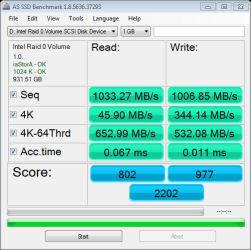
Sorry, been busy with other things. First, I checked and both of my SSD RAID0 setups are running TRIM. As far as running AS SSD to produce a benchmark score for my Samsung 850 RAID0 drives, here it is. I've never used this benchmark before so I don't really have anything to compare it to.
 

Attachments

  • 850RAID0.png
    850RAID0.png
    13.4 KB · Views: 7

My Computer

Computer type
PC/Desktop
Computer Manufacturer/Model Number
Custom Build
OS
Windows 7 64 bit
CPU
Intel i7-5960X (Koolance i380 watercooled)
Motherboard
Asus X99 Deluxe
Memory
16GB Corsair Vengeance LPX 2800MHz DDR4
Graphics Card(s)
2-EVGA GeForce GTX 780 Tis Superclocked (EK watercooled) SLI
Sound Card
Built-in X99 sound
Monitor(s) Displays
Samsung U28D590D, HP ZR2740w IPS, HP 2311x
Screen Resolution
4K
Hard Drives
Samsung XP941 256GB M.2 PCIe SSD, 2-Samsung 850 EVO 500GB SSDs RAID0, 2-Samsung 840 Pro 256GB SSDs RAID0, WD Black 4TB, Seagate 2TB Hybrid, Hitachi 1TB
PSU
Corsair AX1200i
Case
Little Devil PC-V8
Cooling
Custom Water:480 & 360 rads, Koolance i380 CPU,EK GPU blocks
Keyboard
Corsair K70 RGB
Mouse
Corsair Sabre RGB
Internet Speed
150MBps
Antivirus
Bitdefender
Browser
Chrome, Edge, Firefox
Other Info
Blu-Ray Burner. DVDROM, Koolance DCB-FM01 Flowmeter, Bitspower in-line temperature gauge, custom RGB lighting, Koolance QD3 Nickel Finish Quick Disconnects, EK 6 Port Reservoir, EK-FC Dual Parallel SLI Waterblock, EK-XTOP D5 Alphacool Laing waterpump
Back
Top