Need help with OC settings

morrowmedia

New member
Local time
2:04 PM
Messages
51
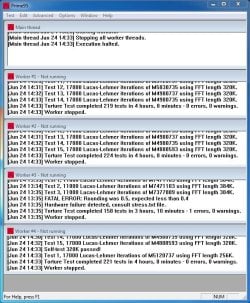
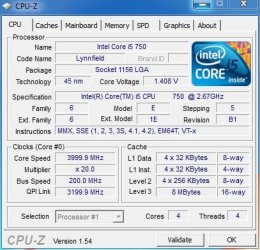
I was able to run @ 4.0GHz for 3 hours as the attached picture suggest. I am not sure what else I can change around to keep the same core from failing out. Please let me know if there is any incite someone can provide me to guide me during this process.

Thank you very much,

Zach
 

Attachments
  • Capture.JPG
    Capture.JPG
    121.4 KB · Views: 17
  • Capture2.JPG
    Capture2.JPG
    45.2 KB · Views: 9

My Computer

OS
Windows 7 Ultimate
CPU
Intel Core i5 750 (Quad Core)
Motherboard
Gigabyte P55A-UD3
Memory
4GB DDR3 1600
Graphics Card(s)
XFX ATI Radeon HD5770
Sound Card
On board
Monitor(s) Displays
2
Screen Resolution
1280x1024
Hard Drives
1tb Hitachi Sata
PSU
Thermaltake 750W
Case
Corsair 800D
Cooling
Corsair H50
Keyboard
Logitech Wireless
Mouse
Logitech WIreless
Internet Speed
Cable Internet
Intel® Core™ i5 Processor I5-750 - SLBLC

I thnk you are hitting the volatge range for the chip, so be careful on pressing it. I know you got that error previous to upping the voltage, but I wouldn't press it.

Here is another good description of OCing the i5-750 : Feature - Overclocking Intel's Core i5 750 | bit-tech.net

If you increase your voltage your gonna start seeing increased temps. If you are on a stock cooler HSF then I would not go higher and as the article above states, 1.45-150 is needed to get more at 200mhz base clock.

Another concern is the error on the worker #3
The third core in your screenshot Worker #3 had the same issue in your last thread. I think there is a way to disable cores for testing, but haven't done it. I think this is in the BIOS. you might have a CPU that unfortunately is hitting a wall on that 3rd core. none of the other ones are showing errors right?
 

My Computer

Computer type
Laptop
Computer Manufacturer/Model Number
ASUS G60-RBBX05
OS
Win7 Home Premium 64x
CPU
Intel Core 2 Duo P7450 / 2.13 GHz (2.29 with Extreme Turbo)
Memory
4 GB PC-6400 Hyundai (2X2) at 800Mhz
Graphics Card(s)
NVIDIA GeForce GTX 260M 1GB DDR3 VRAM
Monitor(s) Displays
16" LED Backlit
Screen Resolution
1366 x 768 on laptop 1600x1050 max res on 22" external mon
Hard Drives
OCZ Agility 3 60GB SSD / 320 GB - Serial ATA-150 - 7200 rpm
PSU
6-cell Lithium ion { lasts 1.5 hours }
Case
ASUS G60 Laptop
Keyboard
Chicklet type back-lit (white light) keyboard
Mouse
Logitech G9 Laser Mouse 3200dpi and 1000 reports per minute
Internet Speed
Comcast 8.60mb/s up - 3.11mb/s down
Antivirus
MSE
Browser
Firefox
Other Info
General mid-budget gaming Comp. Low batterylife - High FrameRates - currently overheating problems :(

2nd Rig: Case: Rosewill BLACKHAWK Gaming ATX Mid Tower Computer Case

Mobo: GIGABYTE GA-990FXA-UD3
CPU: AMD FX-6200 Zambezi 3.8GHz (4.1GHz Turbo)
Heatsink: COOLER MASTER V8 CPU Cooler
RAM: Patriot Viper 3 8GB (2 x 4GB) 240-Pin DDR3 SDRAM 1866 (PC3 15000)
GPU: SAPPHIRE Radeon HD 6850 1GB 2
That is correct, none of the other cores are showing errors. Just that one. I am using a corsair H50 with 2 fans for push/pull air flow in a Corsair 800D case. So I have plenty of air flow and the cores are reaching a max of 74c and the core that failed after 3 hrs reaches only 70c max. So it cant be a temp issue...I was just wondering if there was any other setting i might be over looking in the bios that would help me obtain the 4ghz speed I desire. If not its no big deal..3.8GHz is plenty fast...4.0GHz is just for my own selfish desire. :-)

Zach
 

My Computer

OS
Windows 7 Ultimate
CPU
Intel Core i5 750 (Quad Core)
Motherboard
Gigabyte P55A-UD3
Memory
4GB DDR3 1600
Graphics Card(s)
XFX ATI Radeon HD5770
Sound Card
On board
Monitor(s) Displays
2
Screen Resolution
1280x1024
Hard Drives
1tb Hitachi Sata
PSU
Thermaltake 750W
Case
Corsair 800D
Cooling
Corsair H50
Keyboard
Logitech Wireless
Mouse
Logitech WIreless
Internet Speed
Cable Internet
Well as your avatar says "Play Hard" Just at least wear a cup....

Note: I meant wear a cup metaphorically. (I know this isnt a metaphor but whatever.)
 

My Computer

Computer type
Laptop
Computer Manufacturer/Model Number
ASUS G60-RBBX05
OS
Win7 Home Premium 64x
CPU
Intel Core 2 Duo P7450 / 2.13 GHz (2.29 with Extreme Turbo)
Memory
4 GB PC-6400 Hyundai (2X2) at 800Mhz
Graphics Card(s)
NVIDIA GeForce GTX 260M 1GB DDR3 VRAM
Monitor(s) Displays
16" LED Backlit
Screen Resolution
1366 x 768 on laptop 1600x1050 max res on 22" external mon
Hard Drives
OCZ Agility 3 60GB SSD / 320 GB - Serial ATA-150 - 7200 rpm
PSU
6-cell Lithium ion { lasts 1.5 hours }
Case
ASUS G60 Laptop
Keyboard
Chicklet type back-lit (white light) keyboard
Mouse
Logitech G9 Laser Mouse 3200dpi and 1000 reports per minute
Internet Speed
Comcast 8.60mb/s up - 3.11mb/s down
Antivirus
MSE
Browser
Firefox
Other Info
General mid-budget gaming Comp. Low batterylife - High FrameRates - currently overheating problems :(

2nd Rig: Case: Rosewill BLACKHAWK Gaming ATX Mid Tower Computer Case

Mobo: GIGABYTE GA-990FXA-UD3
CPU: AMD FX-6200 Zambezi 3.8GHz (4.1GHz Turbo)
Heatsink: COOLER MASTER V8 CPU Cooler
RAM: Patriot Viper 3 8GB (2 x 4GB) 240-Pin DDR3 SDRAM 1866 (PC3 15000)
GPU: SAPPHIRE Radeon HD 6850 1GB 2
... the cores are reaching a max of 74c and the core that failed after 3 hrs reaches only 70c max. So it cant be a temp issue...
It just might be. 72C is max.

It's possible you just got an unfriendly chip? However, 3.8GHz isn't half bad.
 

My Computer

OS
7 Ultimate x64
CPU
i5-2500k
Motherboard
Asus P8P67 Pro
Memory
8GB G.Skill Ripjaws X F3-12800CL7D-8GBXH 1866MHz 8-9-8-24
Graphics Card(s)
EVGA GTX 570 SC
Sound Card
X-Fi Titanium Fatality
Monitor(s) Displays
Samsung S27A550H 27" LED
Screen Resolution
1920x1080
Hard Drives
OCZ Vertex 3 120GB.
1TB Samsung F3.
2TB Samsung F4.
PSU
PC Power & Cooling Silencer 760
Case
Lian Li Lancool K62
Cooling
Thermalright Venomous X Black/Scythe S-Flex/Shin-Etsu X23
Keyboard
MS Natural Elite 4000 Ergonomic
Mouse
Logitech G500
Internet Speed
6MB/768
Other Info
Logitech Z-5500 505 watts.
D-Link DGL-4500.
Tripp-Lite Smart Pro 1500.
Yea, I'm going to stick with 3.8 for now. If money was no option, what chip/mobo should I get if I want to run a fast setup?
 

My Computer

OS
Windows 7 Ultimate
CPU
Intel Core i5 750 (Quad Core)
Motherboard
Gigabyte P55A-UD3
Memory
4GB DDR3 1600
Graphics Card(s)
XFX ATI Radeon HD5770
Sound Card
On board
Monitor(s) Displays
2
Screen Resolution
1280x1024
Hard Drives
1tb Hitachi Sata
PSU
Thermaltake 750W
Case
Corsair 800D
Cooling
Corsair H50
Keyboard
Logitech Wireless
Mouse
Logitech WIreless
Internet Speed
Cable Internet
If money is no option look into a SSD for your OS!
 

My Computer

Computer type
Laptop
Computer Manufacturer/Model Number
ASUS G60-RBBX05
OS
Win7 Home Premium 64x
CPU
Intel Core 2 Duo P7450 / 2.13 GHz (2.29 with Extreme Turbo)
Memory
4 GB PC-6400 Hyundai (2X2) at 800Mhz
Graphics Card(s)
NVIDIA GeForce GTX 260M 1GB DDR3 VRAM
Monitor(s) Displays
16" LED Backlit
Screen Resolution
1366 x 768 on laptop 1600x1050 max res on 22" external mon
Hard Drives
OCZ Agility 3 60GB SSD / 320 GB - Serial ATA-150 - 7200 rpm
PSU
6-cell Lithium ion { lasts 1.5 hours }
Case
ASUS G60 Laptop
Keyboard
Chicklet type back-lit (white light) keyboard
Mouse
Logitech G9 Laser Mouse 3200dpi and 1000 reports per minute
Internet Speed
Comcast 8.60mb/s up - 3.11mb/s down
Antivirus
MSE
Browser
Firefox
Other Info
General mid-budget gaming Comp. Low batterylife - High FrameRates - currently overheating problems :(

2nd Rig: Case: Rosewill BLACKHAWK Gaming ATX Mid Tower Computer Case

Mobo: GIGABYTE GA-990FXA-UD3
CPU: AMD FX-6200 Zambezi 3.8GHz (4.1GHz Turbo)
Heatsink: COOLER MASTER V8 CPU Cooler
RAM: Patriot Viper 3 8GB (2 x 4GB) 240-Pin DDR3 SDRAM 1866 (PC3 15000)
GPU: SAPPHIRE Radeon HD 6850 1GB 2
1.4 volts is on the top end of safe voltage ranges. If you can, take it down.

Your failed test is because it is not stable that high. It has to come down.

~Lordbob
 

My Computer

Computer Manufacturer/Model Number
Hera
OS
Windows 7 Ultimate x64, Mint 9
CPU
Intel i5-2500k
Motherboard
ASUS P8P67 Pro
Memory
2x 4Gb Corsair VENGEANCE DDR3-1600
Graphics Card(s)
NVidia GeForce N260GTX Twin Frozr
Sound Card
Realtek HD OnBoard Audio
Monitor(s) Displays
ASUS 24" Monitor
Screen Resolution
1920x1080
Hard Drives
G.SKILL Phoenix Series 60GB SATA II MLC Internal Solid State Drive (SSD)
SAMSUNG Spinpoint F3R 1TB 7200 RPM 32MB Cache SATA II
PSU
Cooler Master Real Power Pro 750W
Case
Cooler Master Haf 932
Cooling
Fans
Keyboard
Razer Tarantula
Mouse
Razer Lachesis
Internet Speed
not fast enough
1.4 volts is on the top end of safe voltage ranges. If you can, take it down.

Your failed test is because it is not stable that high. It has to come down.

~Lordbob

It was failing after 5 minutes prior to me bumping up the volts. I feel like there may be a setting somewhere I could change...but I'll just be content with a 3.8GHz overclock for now. :-)

Zach
 

My Computer

OS
Windows 7 Ultimate
CPU
Intel Core i5 750 (Quad Core)
Motherboard
Gigabyte P55A-UD3
Memory
4GB DDR3 1600
Graphics Card(s)
XFX ATI Radeon HD5770
Sound Card
On board
Monitor(s) Displays
2
Screen Resolution
1280x1024
Hard Drives
1tb Hitachi Sata
PSU
Thermaltake 750W
Case
Corsair 800D
Cooling
Corsair H50
Keyboard
Logitech Wireless
Mouse
Logitech WIreless
Internet Speed
Cable Internet
You can try taking off all OC and run Primetest to see if that third core still fails.

If that third core fails under normal conditions, then its not the OC causing the issue and you might be able to return the chip.
 

My Computer

Computer type
Laptop
Computer Manufacturer/Model Number
ASUS G60-RBBX05
OS
Win7 Home Premium 64x
CPU
Intel Core 2 Duo P7450 / 2.13 GHz (2.29 with Extreme Turbo)
Memory
4 GB PC-6400 Hyundai (2X2) at 800Mhz
Graphics Card(s)
NVIDIA GeForce GTX 260M 1GB DDR3 VRAM
Monitor(s) Displays
16" LED Backlit
Screen Resolution
1366 x 768 on laptop 1600x1050 max res on 22" external mon
Hard Drives
OCZ Agility 3 60GB SSD / 320 GB - Serial ATA-150 - 7200 rpm
PSU
6-cell Lithium ion { lasts 1.5 hours }
Case
ASUS G60 Laptop
Keyboard
Chicklet type back-lit (white light) keyboard
Mouse
Logitech G9 Laser Mouse 3200dpi and 1000 reports per minute
Internet Speed
Comcast 8.60mb/s up - 3.11mb/s down
Antivirus
MSE
Browser
Firefox
Other Info
General mid-budget gaming Comp. Low batterylife - High FrameRates - currently overheating problems :(

2nd Rig: Case: Rosewill BLACKHAWK Gaming ATX Mid Tower Computer Case

Mobo: GIGABYTE GA-990FXA-UD3
CPU: AMD FX-6200 Zambezi 3.8GHz (4.1GHz Turbo)
Heatsink: COOLER MASTER V8 CPU Cooler
RAM: Patriot Viper 3 8GB (2 x 4GB) 240-Pin DDR3 SDRAM 1866 (PC3 15000)
GPU: SAPPHIRE Radeon HD 6850 1GB 2
Yep, if it fails @ stock speeds, or after being re-seated etc - it could simply be just a dud chip.
 

My Computer

Computer type
PC/Desktop
Computer Manufacturer/Model Number
Systems by SmartEyeball
OS
8 Pro x64
CPU
i7 3770K 4.6GHz
Motherboard
ASUS P8Z77 WS
Memory
16GB G.Skill Trident X 2666mhz
Graphics Card(s)
x2 EVGA 780 Ti Superclocked SLI
Sound Card
SB X-FI Surround 5.1 PRO USB / ATH-AD900 Headphones
Monitor(s) Displays
x3 Dell U2410 / 58" Samsung
Screen Resolution
5760*1200/ 1920*1200
Hard Drives
2x Intel 520 240GB (RAID 0) * 2x WD Caviar Blacks 2TB (RAID 0) * 2TB WD Caviar Black * Sony Optirac DVD
PSU
Silverstone Strider Evolution 1200W
Case
Thermaltake Level 10 GT Snow Edition
Cooling
Noctua NH-D14
Keyboard
Topre Realforce // Ducky Shine MX Black // Filco Ninja TKL
Mouse
Thermaltake Theron (Highly Recommended) + Razer Imperator
Antivirus
MSE
Browser
IE, FF, WaterFox
Other Info
GT Extreme V2 Sim Racing Cockpit + 40" LCD and K/B Mouse stand ▼
Fanatec CSR Elite Wheel + Clubsport V1 Pedals + CSR shifter/7G-H ▼Saitek X52 Pro ▼ TrackIR 5 Pro
Buttkicker v2 Seat Rumbler with Dedicated 5.1 and Sub Woofer attached to frame ▼
=
Bloody Big Grin
If you want to get past that 384K test you should run the custom test in prime blend which will allow you to run just the 384K test that you are failing rather then running it over 4 hours to get to that point again. Failing the 384K test usually relates to a low Vcore or CPUvtt. After that your other cores were failing the 320K test which is one of the hardest tests to pass in Prime Blend. There isn't much of a reason to run Prime blend past 10 hours because the entire test repeats itself at that point.
 

My Computer

Computer type
PC/Desktop
Computer Manufacturer/Model Number
Home built
OS
Windows 7 Ult, Windows 8.1 Pro,
CPU
Q9650-4.275GHz, E8600 4.5GHz, E6750-3.8GHz
Motherboard
Evga 780i FTW
Memory
G.Skill PC2 9600 1200Mhz 5 5 5 15 2T
Graphics Card(s)
GTX480
Sound Card
Asus Xonar D2
Monitor(s) Displays
HannsG
Screen Resolution
1680X1050
Hard Drives
GSkill Phoenix Pro 120GB SSD
PSU
ThermalTake Toughpower 1000Watt modular
Case
ThermalTake XaserV
Cooling
Xigmatek S1283
Keyboard
Logitech G15
Mouse
Logitech G9
Internet Speed
T1
If you want to get past that 384K test you should run the custom test in prime blend which will allow you to run just the 384K test that you are failing rather then running it over 4 hours to get to that point again. Failing the 384K test usually relates to a low Vcore or CPUvtt. After that your other cores were failing the 320K test which is one of the hardest tests to pass in Prime Blend. There isn't much of a reason to run Prime blend past 10 hours because the entire test repeats itself at that point.

That's just it Chev...I run it at 3.8GHz OC and it test fine, its when I go up to 4.0GHz that it fails, and the max temp only goes up a couple degrees (68c @ 3.8GHz and 70c @ 4.0GHz) I'm using the Corsair H50 with push/pull and I have the Corsair 800D case so the inside stays relatively cool. I brought my vcore up to the thresh hold to get the 4.0GHz to run longer than 2 minutes, what should i change the CPUvtt to?

Zach
 

My Computer

OS
Windows 7 Ultimate
CPU
Intel Core i5 750 (Quad Core)
Motherboard
Gigabyte P55A-UD3
Memory
4GB DDR3 1600
Graphics Card(s)
XFX ATI Radeon HD5770
Sound Card
On board
Monitor(s) Displays
2
Screen Resolution
1280x1024
Hard Drives
1tb Hitachi Sata
PSU
Thermaltake 750W
Case
Corsair 800D
Cooling
Corsair H50
Keyboard
Logitech Wireless
Mouse
Logitech WIreless
Internet Speed
Cable Internet
you mean its 1.4 in the bios? whats the voltage under load in windows?

whats your fsb at?

70 degrees is pushing it intel states the max safe operating temp as 72.2 :p

I really struggled to get my friends i5 past 3.8 , i gave up in the end
 

My Computer

Computer type
PC/Desktop
Computer Manufacturer/Model Number
Custom
OS
Win 10 Home Premium 64 Bit
CPU
I7 5930K @ 4.5
Motherboard
Asus X99 s
Memory
16GB Kingston Hyper X Fury DDR4
Graphics Card(s)
EVGA 980ti SC + ACX 2.0
Sound Card
Onboard
Monitor(s) Displays
ROG Swift PG278Q
Screen Resolution
2560x1440
Hard Drives
Kingston Hyper X 250gb SSD
Samsung 2TB mechanical
PSU
Corsair RM 850
Case
NZXT H440 Red
Cooling
Corsair H100i GTX
Keyboard
Razer Reclusa
Mouse
Logitech G5 Gamer
Internet Speed
34mb
Antivirus
Eset Smart Security
Browser
Firefox
If you want to get past that 384K test you should run the custom test in prime blend which will allow you to run just the 384K test that you are failing rather then running it over 4 hours to get to that point again. Failing the 384K test usually relates to a low Vcore or CPUvtt. After that your other cores were failing the 320K test which is one of the hardest tests to pass in Prime Blend. There isn't much of a reason to run Prime blend past 10 hours because the entire test repeats itself at that point.

That's just it Chev...I run it at 3.8GHz OC and it test fine, its when I go up to 4.0GHz that it fails, and the max temp only goes up a couple degrees (68c @ 3.8GHz and 70c @ 4.0GHz) I'm using the Corsair H50 with push/pull and I have the Corsair 800D case so the inside stays relatively cool. I brought my vcore up to the thresh hold to get the 4.0GHz to run longer than 2 minutes, what should i change the CPUvtt to?

Zach

At a certain point you will need to increase CPUvtt but you should not raise it more than .5 above DIMM voltage. There are other important voltages that may need adjustments also like QPI-PLL Vcore, ICH Vcore, IOH Vcore, and a few others are important. You should probably use the overclocking guide in the link below if you want to go further with your overclock. Second link is for memory speed.

How to Overclock the I7 (Ported)

Memory Frequency Guide
 

My Computer

Computer type
PC/Desktop
Computer Manufacturer/Model Number
Home built
OS
Windows 7 Ult, Windows 8.1 Pro,
CPU
Q9650-4.275GHz, E8600 4.5GHz, E6750-3.8GHz
Motherboard
Evga 780i FTW
Memory
G.Skill PC2 9600 1200Mhz 5 5 5 15 2T
Graphics Card(s)
GTX480
Sound Card
Asus Xonar D2
Monitor(s) Displays
HannsG
Screen Resolution
1680X1050
Hard Drives
GSkill Phoenix Pro 120GB SSD
PSU
ThermalTake Toughpower 1000Watt modular
Case
ThermalTake XaserV
Cooling
Xigmatek S1283
Keyboard
Logitech G15
Mouse
Logitech G9
Internet Speed
T1
I'm debating just going with an i7 1366 setup and taking this mobo/cpu out and using it at home for a media center. Seems the i7's like OC a bit more than the i5, plus I like the thought of HT. the system runs great at 3.8 so I am going to keep it there for now..its only 200MHz difference and i'm running raid0, so i'm going to stop being selfish and just chill. Thank you all so much for your help. I love this forum and the supporters on it!

Zach
 

My Computer

OS
Windows 7 Ultimate
CPU
Intel Core i5 750 (Quad Core)
Motherboard
Gigabyte P55A-UD3
Memory
4GB DDR3 1600
Graphics Card(s)
XFX ATI Radeon HD5770
Sound Card
On board
Monitor(s) Displays
2
Screen Resolution
1280x1024
Hard Drives
1tb Hitachi Sata
PSU
Thermaltake 750W
Case
Corsair 800D
Cooling
Corsair H50
Keyboard
Logitech Wireless
Mouse
Logitech WIreless
Internet Speed
Cable Internet
4 GHz is a bit extreme for that chip.. if you got it to work for 4 hours, you're doing better than most. If you have enough to buy a faster CPU, I would take the advice given earlier in this thread and get an SSD instead. Doesn't matter what the numbers say, the HDD is ALWAYS a bottleneck in your system.
 
Back
Top