
Need my system sounds back!

kimouette

New member
Local time
4:19 AM
Messages
40
Under Windows XP a very loud sound system used to be played everytime my battery level reached 10% or less.

Now that I have Windows 7, I can use the control panel and select sounds to create an alarm, but everytime the sound is muted or not loud enough, I cant hear the alarm!

How can I get that "independant from the computer's volume" sound system back??
 

My Computer

Computer Manufacturer/Model Number
Lenovo 3000 N200 (0769)
OS
Windows 7 Ultimate 32-bit SP1
CPU
Intel(R) Pentium(R) Dual CPU T2370 @ 1.73GHz
Motherboard
Lenovo IEL10
Memory
4096 MBytes (2X2 Gb)
Graphics Card(s)
Generic PnP Monitor on Mobile Intel 965 Express Chipset Fami
Sound Card
High Definition Audio Device
Monitor(s) Displays
Generic PnP Monitor on Mobile Intel 965 Express Chipset Fami
Screen Resolution
1280x800 pixels
Hard Drives
Internal : Western Digital Mobile/WD Scorpio®, 7200 RPM with 16 MB cache, Capacity : 488GB
Under Windows XP a very loud sound system used to be played everytime my battery level reached 10% or less.

Now that I have Windows 7, I can use the control panel and select sounds to create an alarm, but everytime the sound is muted or not loud enough, I cant hear the alarm!

How can I get that "independant from the computer's volume" sound system back??

Hi Kim and welcome

We could be more useful if you gave us some computer info, ie, make, model, and sound card.

You can go into device manager by typing device manager in search and go to the sound tab. Is your device listed? does it have a yellow triangle on it? are there any other "unknown" devices with yellow on them?

Let us know

Ken J++
 

My Computer

Computer Manufacturer/Model Number
HP Pavillion dv-7 1005 Tx
OS
Win 8 Release candidate 8400
CPU
[email protected]
Memory
4 gigs
Graphics Card(s)
Nvidia 9600M
Sound Card
HD built-in
Monitor(s) Displays
17" Wxga
Screen Resolution
1440x900
Cooling
none
Internet Speed
45Mb down 5Mb up
I have a Lenovo n200 T2370
Intel Pentium Dual Core 1.73 Ghz
4Go RAM
32 bits system
Windows 7 RC (french) Integral edition, version 7100

Sometimes I use an external sound card. It's an M-Audio Firewire 410, that I plug in the mini-firewire input of my computer. I play electronic drums on my computer, so when that external sound card is connected, it becomes the ONLY device that I care about!! So I would like to avoid adding or activating some other general sound parameters...if possible!!

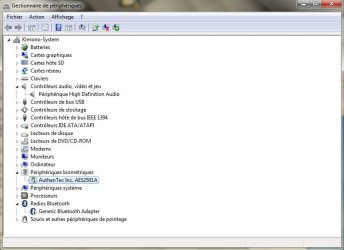
You can go into device manager by typing device manager in search and go to the sound tab. Is your device listed?
When you say the "sound tab" are you talking about the "Audio control, video and games" tab??

Sorry I have to translate from french, it might not be the exact term.
But otherwise there are no "yellow arrows"

I have attached a printscreen...

Whatever suggestion you are about to make, please keep in mind that I only want that "independant from the computer's volume low battery alarm" back! I dont want to add some audio drivers of mess up my current setting!

Thanks a lot for your help!!
 

Attachments

  • device-manager.jpg
    device-manager.jpg
    40.6 KB · Views: 30

My Computer

Computer Manufacturer/Model Number
Lenovo 3000 N200 (0769)
OS
Windows 7 Ultimate 32-bit SP1
CPU
Intel(R) Pentium(R) Dual CPU T2370 @ 1.73GHz
Motherboard
Lenovo IEL10
Memory
4096 MBytes (2X2 Gb)
Graphics Card(s)
Generic PnP Monitor on Mobile Intel 965 Express Chipset Fami
Sound Card
High Definition Audio Device
Monitor(s) Displays
Generic PnP Monitor on Mobile Intel 965 Express Chipset Fami
Screen Resolution
1280x800 pixels
Hard Drives
Internal : Western Digital Mobile/WD Scorpio®, 7200 RPM with 16 MB cache, Capacity : 488GB
Anyone can help?
 

My Computer

Computer Manufacturer/Model Number
Lenovo 3000 N200 (0769)
OS
Windows 7 Ultimate 32-bit SP1
CPU
Intel(R) Pentium(R) Dual CPU T2370 @ 1.73GHz
Motherboard
Lenovo IEL10
Memory
4096 MBytes (2X2 Gb)
Graphics Card(s)
Generic PnP Monitor on Mobile Intel 965 Express Chipset Fami
Sound Card
High Definition Audio Device
Monitor(s) Displays
Generic PnP Monitor on Mobile Intel 965 Express Chipset Fami
Screen Resolution
1280x800 pixels
Hard Drives
Internal : Western Digital Mobile/WD Scorpio®, 7200 RPM with 16 MB cache, Capacity : 488GB
Back
Top