
Need to change folder details

sam49

New member
Member
VIP
Local time
12:55 AM
Messages
140
Hi can I ask a little advice please I am using Windows 7 professional 64 bit and I have a little problem I Have quite a lot of Audio books and when I open a folder that a book is in I would like it to show different details at the top of the folder.

I don’t need to alter the all the folders on the computer just the ones with the audio books in I have attached a screenshot as you can see the usual details are ticked and are displayed in the folder details.

But some of the details I would like to display like Author and Comments I have to click on the word (more) then I have scroll down a list to tick the ones I would like displayed.

So is there a way I can move some of these details to the top of the list please

Regards
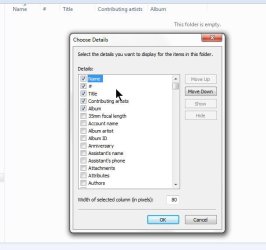
ScreenShot020.jpg

PS I have tried the move up and down buttons but next time I need the change the details they are all back to normal.
 
Last edited:

My Computer

Computer Manufacturer/Model Number
Custom Made
OS
Windows 7 Professional 64 Bit
CPU
Intel Core I7 920 @ 2.6 GHz
Motherboard
Asus P6T SE
Memory
12 Meg Triple Channel DDR3
Graphics Card(s)
Nvidia Gforce GTX 260
Sound Card
On Board
Monitor(s) Displays
DGM
Hard Drives
500 gig Sata
PSU
Not sure
Case
Thermalite
Cooling
Standard cooling
Keyboard
Usb
Mouse
Usb
Internet Speed
7meg
Try the Move Up Button. :)

It will be grayed out until you select an item that can be moved up.
 

My Computer

Computer Manufacturer/Model Number
HP Media Center
OS
Windows 7 32 bit
CPU
AMD 5200+ dual core
Memory
2 GB
Graphics Card(s)
NVidia GeForce 6150SE 128 MB
Monitor(s) Displays
CRT
Screen Resolution
1280x1024
Hard Drives
500 GB Sata internal :

SIIG USB 3.0 docking stations w/WD Caviar Black 6 Gb/s drives
Keyboard
PS/2
Mouse
PS/2 Wheel Mouse
Other Info
SIIG USB 3.0 PCIexpress card.
Not sure how well this will work, but after you set one folder up the way you want, go to menu / tools / folder options. On the second tab click "apply to all folders". Hopefully it will affect the folders you want, and not the ones you don't.
 

My Computer

Computer type
PC/Desktop
Computer Manufacturer/Model Number
dell precision t3400 tower
OS
Linux Lite 3.2 x64; Windows 7, 8.1
CPU
Core2Duo 2.4
Memory
6GB ddr2
Graphics Card(s)
nVidia
Hard Drives
120gb SSD, 1TB HD, 2TB HD; sata II
Internet Speed
12/2
Browser
Vivaldi, Slimjet (Chromium) x64
Hi Paul1149

Not sure how well this will work, but after you set one folder up the way you want, go to menu / tools / folder options. On the second tab click "apply to all folders". Hopefully it will affect the folders you want, and not the ones you don't.

This seems to have worked just not sure if it will change all my folders but after a quick check it seems not my other folders seem ok.
 

My Computer

Computer Manufacturer/Model Number
Custom Made
OS
Windows 7 Professional 64 Bit
CPU
Intel Core I7 920 @ 2.6 GHz
Motherboard
Asus P6T SE
Memory
12 Meg Triple Channel DDR3
Graphics Card(s)
Nvidia Gforce GTX 260
Sound Card
On Board
Monitor(s) Displays
DGM
Hard Drives
500 gig Sata
PSU
Not sure
Case
Thermalite
Cooling
Standard cooling
Keyboard
Usb
Mouse
Usb
Internet Speed
7meg
Hi MilesAhead

I did try the move up button but it does not remember the position in the list

Try the Move Up Button. :)

It will be grayed out until you select an item that can be moved up.
 

My Computer

Computer Manufacturer/Model Number
Custom Made
OS
Windows 7 Professional 64 Bit
CPU
Intel Core I7 920 @ 2.6 GHz
Motherboard
Asus P6T SE
Memory
12 Meg Triple Channel DDR3
Graphics Card(s)
Nvidia Gforce GTX 260
Sound Card
On Board
Monitor(s) Displays
DGM
Hard Drives
500 gig Sata
PSU
Not sure
Case
Thermalite
Cooling
Standard cooling
Keyboard
Usb
Mouse
Usb
Internet Speed
7meg
Yeah. That kind of stuff is why people have favorite 3rd party file managers. Thing is Explorer has the advantage of always being in ram. But there are some good free file managers out there. It's not 64 bit but FreeCommander is still quite serviceable. Also Q-Dir is interesting. It seems to update almost daily and act a bit flighty for my use. But some people are enthusiastic about it. I like the concept of 4 panes.
 

My Computer

Computer Manufacturer/Model Number
HP Media Center
OS
Windows 7 32 bit
CPU
AMD 5200+ dual core
Memory
2 GB
Graphics Card(s)
NVidia GeForce 6150SE 128 MB
Monitor(s) Displays
CRT
Screen Resolution
1280x1024
Hard Drives
500 GB Sata internal :

SIIG USB 3.0 docking stations w/WD Caviar Black 6 Gb/s drives
Keyboard
PS/2
Mouse
PS/2 Wheel Mouse
Other Info
SIIG USB 3.0 PCIexpress card.
Thanks guys I will have a look at some file manager program
 

My Computer

Computer Manufacturer/Model Number
Custom Made
OS
Windows 7 Professional 64 Bit
CPU
Intel Core I7 920 @ 2.6 GHz
Motherboard
Asus P6T SE
Memory
12 Meg Triple Channel DDR3
Graphics Card(s)
Nvidia Gforce GTX 260
Sound Card
On Board
Monitor(s) Displays
DGM
Hard Drives
500 gig Sata
PSU
Not sure
Case
Thermalite
Cooling
Standard cooling
Keyboard
Usb
Mouse
Usb
Internet Speed
7meg
Back
Top