
I got 3 Dell tower computers free from my church when the towers were swapped out for new laptops. I am one of the church's audio/video tech's. The towers were used to send the videos and slideds to the overhead projector.
The OS on the towers is Win 7 32bit. I was told to wipe any church data off the hard drives. I know the easy way is to wipe the partition clean and reinstall Win 7. But I would have to reinstall with my Win 7 cd. the 2 towers that I am selling I am trying to save the OS. Rather then install my Win 7.
1st I went to the user account in the control pannel and changed the name there.
2. I left click on the start icon > right click my computer icon > scrolled down the menu to properties.
3. Then under "computer name domain, and workgroup settings" I hit the button "change settings"
4. Clicked on the button that renames the computer. Then typed in my name in the computer description box.
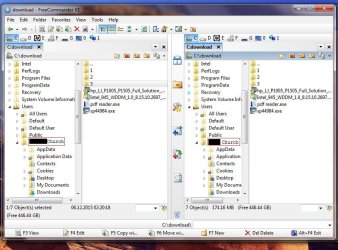
But I still have the church's name in navigation panel under "users > xxxx church-pc. See screen capture picture bellow. The part in the screen has a red box around it is what I am talking about. How do I fix this? 1. of the 3 dell towers I am keeping. The other 2 will be sold at a swap meet that I am going to soon.
Steve
The OS on the towers is Win 7 32bit. I was told to wipe any church data off the hard drives. I know the easy way is to wipe the partition clean and reinstall Win 7. But I would have to reinstall with my Win 7 cd. the 2 towers that I am selling I am trying to save the OS. Rather then install my Win 7.
1st I went to the user account in the control pannel and changed the name there.
2. I left click on the start icon > right click my computer icon > scrolled down the menu to properties.
3. Then under "computer name domain, and workgroup settings" I hit the button "change settings"
4. Clicked on the button that renames the computer. Then typed in my name in the computer description box.
But I still have the church's name in navigation panel under "users > xxxx church-pc. See screen capture picture bellow. The part in the screen has a red box around it is what I am talking about. How do I fix this? 1. of the 3 dell towers I am keeping. The other 2 will be sold at a swap meet that I am going to soon.
Steve
Attachments
My Computer
- Computer type
- Laptop
- Computer Manufacturer/Model Number
- Dell Inspiron 3541
- OS
- windows 7 home 32 bit, I just changed back from 64 to 32bit
- CPU
- amc a6-6310, radon r4 graphics 1800mhz with 4 cores
- Memory
- 6.8gb
- Graphics Card(s)
- not sure off hand
- Sound Card
- not shure off hand
- Monitor(s) Displays
- built in lcd
- Screen Resolution
- 1366 x 768
- Hard Drives
- 1 500gb sata internal HDD and 1 250 gb's sata HDD in a USB external USB case.
- Keyboard
- Wifi with attached wifi mouse
- Internet Speed
- don't know
- Antivirus
- Zone Alarm
- Browser
- Firefox
- Other Info
- The gateway laptop model MD2614U died because a voltage regulator on the motherboard went poof. The Gateway laptop has been scraped.


